
1. Setup and Assembly
This section provides instructions for the proper assembly and initial setup of your FEELIN Computer Desk. Please ensure all components are present before beginning assembly.
1.1 Unpacking and Component Check
Carefully unpack all items from the packaging. Lay them out on a clean, soft surface to prevent scratches. Verify that all parts listed in the included hardware pack are present. If any parts are missing or damaged, do not proceed with assembly and contact customer support.
Included Components:
- Desk tabletop (1)
- Desk legs/supports (as per design)
- Assembly hardware (screws, bolts, Allen wrench, etc.)
1.2 Assembly Instructions
- Identify the tabletop and the leg components.
- Attach the leg components to the designated points on the underside of the tabletop using the provided hardware. Ensure all screws are finger-tightened initially.
- Once all legs are in place, carefully tighten all screws with the provided Allen wrench. Do not overtighten to avoid damaging the wood.
- With assistance, carefully flip the assembled desk upright.
- Ensure the desk is stable and level. Adjust any leveling feet if present.
Safety Note: Always assemble the desk on a flat, stable surface. It is recommended to have two people for assembly to prevent injury or damage to the product.

Image 1: The FEELIN Computer Desk fully assembled, showcasing its modern design and sturdy construction. This image illustrates the final appearance after successful setup.
2. Operating and Usage
The FEELIN Computer Desk is designed for versatile use in various home and office environments. Its spacious design accommodates a range of activities.
2.1 Intended Use
This desk is suitable for use as a computer desk, study desk, home office desk, gaming desk, or a general workbench. Its robust construction supports typical office equipment and personal items.
2.2 Workspace Optimization
The generous desktop dimensions provide ample space for a computer monitor, laptop, keyboard, mouse, and other accessories. Organize your workspace to enhance productivity and comfort.
- Position your monitor at eye level to reduce neck strain.
- Ensure your keyboard and mouse are at a comfortable height to support proper wrist posture.
- Utilize the spacious surface for documents, books, or decorative items without cluttering your primary work area.

Image 2: The desk in use with a laptop and a small plant, demonstrating its functionality as a personal workspace. The image highlights the ample surface area for daily tasks.
3. Care and Maintenance
Proper care will ensure the longevity and appearance of your FEELIN Computer Desk, which is constructed from solid wood.
3.1 Cleaning Instructions
- For daily cleaning, wipe the surface with a soft, dry cloth.
- For spills or smudges, use a slightly damp cloth with mild soap. Immediately dry the surface with a clean, soft cloth to prevent water damage.
- Avoid using abrasive cleaners, harsh chemicals, or solvents, as these can damage the wood finish.
3.2 Wood Care
- Protect the desk surface from direct sunlight and extreme temperature changes, which can cause fading or warping.
- Use coasters under drinks and placemats under hot items to prevent rings and heat damage.
- Periodically check and tighten all assembly hardware to maintain stability.
4. Troubleshooting
This section addresses common issues you might encounter with your FEELIN Computer Desk.
4.1 Desk Wobbles
- Cause: Loose assembly hardware or uneven floor.
- Solution:
- Check all screws and bolts and tighten them securely with the provided Allen wrench.
- If the floor is uneven, adjust any leveling feet on the desk legs. If no leveling feet are present, place a small, stable shim under the shortest leg.
4.2 Surface Scratches or Dents
- Cause: Sharp objects, heavy impact, or abrasive contact.
- Solution:
- For minor scratches, wood repair kits or furniture polish designed for solid wood may help.
- Prevent future damage by using desk pads, mouse pads, and avoiding dragging objects across the surface.
5. Product Specifications
| Attribute | Detail |
|---|---|
| Brand | FEELIN |
| Model | Computer Desk |
| Dimensions (L x W x H) | 140 cm x 70 cm x 75 cm (55.1 x 27.6 x 29.5 inches) |
| Material | Solid Wood |
| Color | One Color (typically black as shown in images) |
| Assembly Required | Yes |
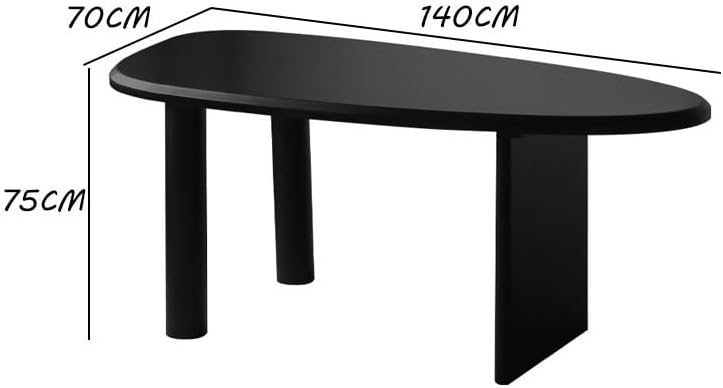
Image 3: Dimensional diagram of the FEELIN Computer Desk, indicating a length of 140cm, a width of 70cm, and a height of 75cm. This provides precise measurements for planning your space.
6. Warranty and Customer Support
For warranty information or customer support regarding your FEELIN Computer Desk, please refer to the purchase documentation or contact the seller directly.
Contact Information:
- Refer to your purchase receipt or the seller's contact details on the platform where the product was acquired.
- For general inquiries, visit the FEELIN brand page or website (if available).
Please retain your proof of purchase for any warranty claims.