Introduction
This manual provides instructions for the ALLIMITY replacement remote control, designed for use with various Saba TV models. This remote offers full functionality without the need for programming or complex setup. Simply insert batteries and begin use.
Compatible TV Models include:
- LED32TC2200E(I), LED40TC2600E(I)
- LHD24CX(V.2), LHD28CX23(V.2), LHD32CX23, LHD40C26, LHD46CX
- S2814R, S2816R, S3214R, S3215R
- L32F2A3EB, LC24HA3, LC32C22IT, LC32HA3, LD22BCS105
- LD22CH12, LD32CHS2300ES, S3225R, S4014R, SA32S40
- LED28TC2300E, LD40CHS2000ES, LED28AHD2060E(T)
- LED28TC2200E (V.2), LED32AHC2200E, LED32AHC2200E(T)
- AS3215R, LE22PV15WH, L24CE2A3EB, LED32AHD2000E(T)
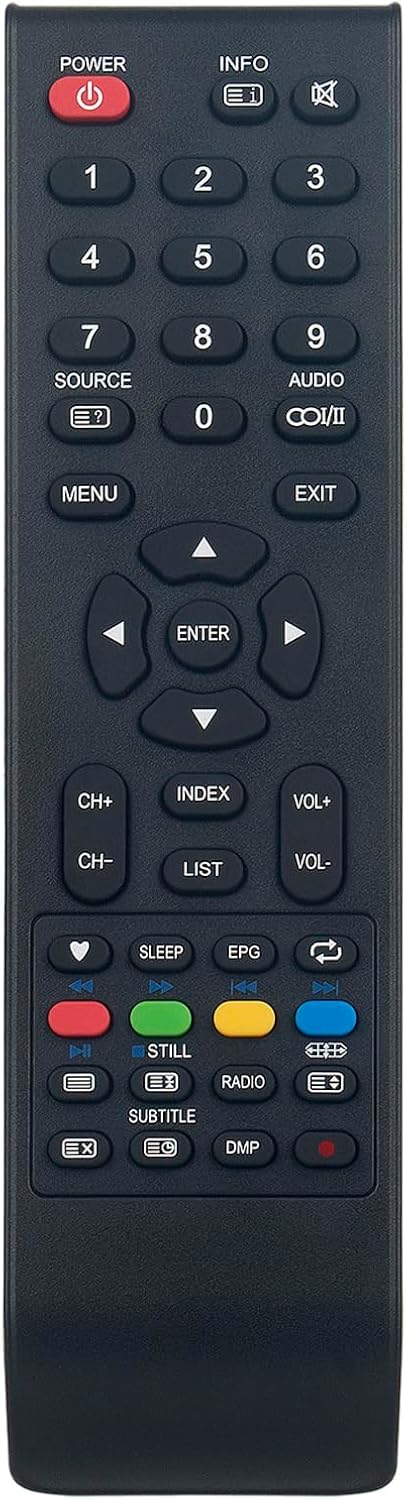
Figure 1: Front view of the ALLIMITY Replacement Remote Control.
Setup
1. Battery Installation
The remote control requires two AAA batteries (not included). Follow these steps to install them:
- Locate the battery compartment cover on the back of the remote control.
- Slide the cover downwards or press the latch to open it.
- Insert two AAA batteries, ensuring the positive (+) and negative (-) terminals align correctly with the markings inside the compartment.
- Replace the battery compartment cover by sliding it back into place until it clicks securely.
Note: Always replace both batteries at the same time with new ones. Do not mix old and new batteries, or different types of batteries.
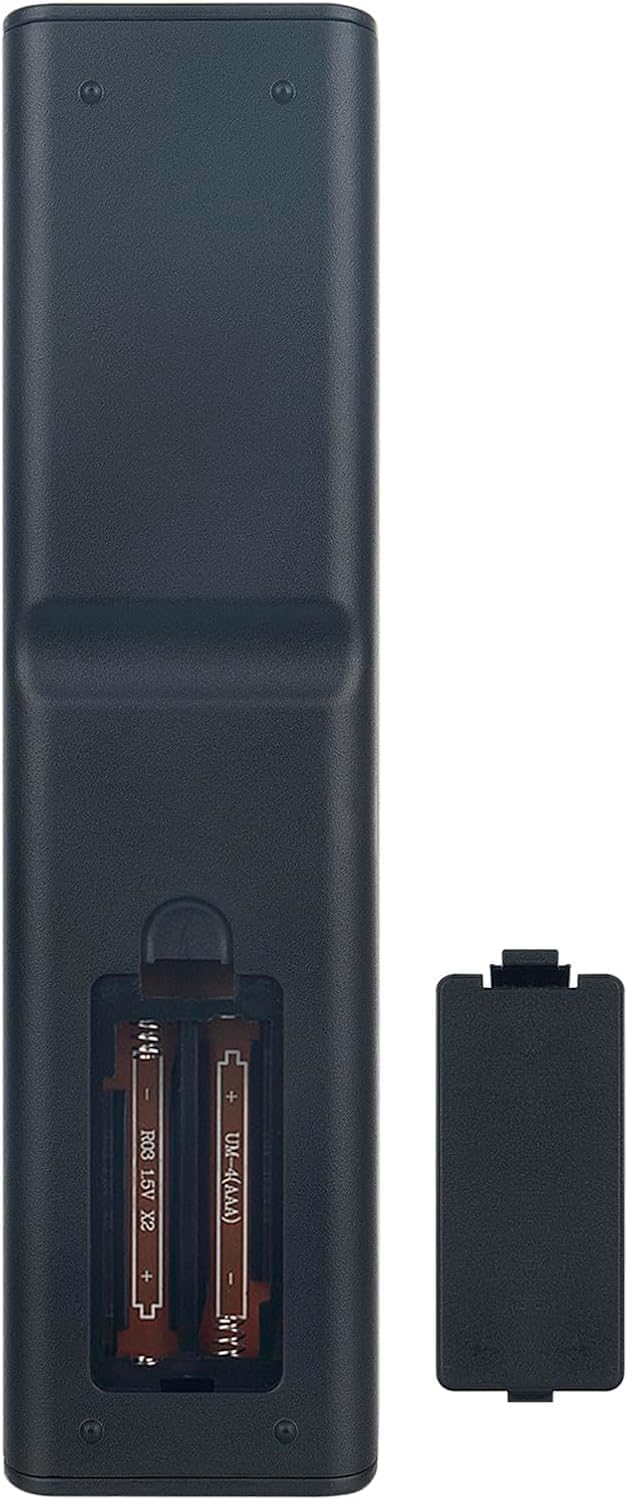
Figure 2: Battery compartment on the back of the remote control.
Operating Instructions
This remote control is designed to replicate the functions of your original Saba TV remote. Point the remote directly at your TV's infrared sensor for optimal performance.
Key Button Functions:
- POWER (⏻): Turns the TV On or Off.
- INFO: Displays information about the current program or input.
- Number Buttons (0-9): Directly select TV channels or input numerical values.
- SOURCE: Cycles through available input sources (HDMI, AV, etc.).
- MENU: Accesses the TV's main menu.
- Navigation Buttons (▲ ▼ ◄ ►): Navigate through menus and options.
- ENTER: Confirms selections in menus.
- EXIT: Exits the current menu or screen.
- VOL+ / VOL-: Adjusts the volume up or down.
- CH+ / CH-: Changes the channel up or down.
- MUTE: Mutes or unmutes the TV sound.
- EPG: Accesses the Electronic Program Guide.
- SLEEP: Sets the sleep timer.
- Color Buttons (Red, Green, Yellow, Blue): Functionality varies depending on the TV model and current menu/application.
- Playback Controls (◀◀, ▶▶, ■, ▶||): Control media playback (e.g., with a connected DVD player or USB media).
Maintenance
Proper care will extend the life of your remote control.
- Cleaning: Use a soft, dry cloth to wipe the surface of the remote. Do not use liquid cleaners or abrasive materials.
- Storage: Store the remote in a cool, dry place away from direct sunlight and extreme temperatures.
- Battery Replacement: If the remote is not used for an extended period, remove the batteries to prevent leakage.
- Avoid Drops: Handle the remote with care to prevent damage from accidental drops.
Troubleshooting
| Problem | Possible Cause | Solution |
|---|---|---|
| Remote not responding | Dead or incorrectly inserted batteries. Obstruction between remote and TV. Remote out of range. | Replace batteries, ensuring correct polarity. Remove any objects blocking the signal path. Move closer to the TV. |
| Specific buttons not working | Button stuck or damaged. Remote not fully compatible with a specific TV function. | Check if the button is physically stuck. Ensure your TV model is fully compatible with all remote functions. |
| Intermittent response | Low battery power. Interference from other devices. | Replace batteries. Minimize interference from other electronic devices. |
Specifications
- Brand: ALLIMITY
- Model: MME-LHD40C26-NP
- Dimensions: 17 x 5 x 1 cm (6.7 x 2 x 0.4 inches)
- Weight: 59 g (2.1 oz)
- Connector Type: Infrared
- Maximum Range: 10 meters (33 feet)
- Number of Buttons: 25
- Batteries Required: 2 x AAA (not included)
- Special Features: Ergonomic design
- Compatible Devices: Saba TVs, DVD/Blu-Ray players, Projectors, Set-top boxes, Game consoles, Stereo systems, Home cinema systems (compatibility may vary by specific function)
Warranty and Support
This product comes with a standard manufacturer's warranty. For specific warranty details, please refer to the documentation provided at the time of purchase or contact your retailer.
For technical support or further assistance, please contact the ALLIMITY customer service or the vendor from whom you purchased this remote control.


