
Introduction
Thank you for choosing the Raddy N75 Wi-Fi Weather Station. This device provides real-time indoor and outdoor temperature and humidity, weather forecasts, and other essential meteorological data directly to its 7.5-inch LCD display and a dedicated mobile application. This manual will guide you through the setup, operation, and maintenance of your weather station to ensure optimal performance.
What's in the Box
Please check the contents of your package:
- Main Weather Station Unit
- Wireless Outdoor Sensor
- Power Adapter for Main Unit
- User Manual
Product Overview
The Raddy N75 Wi-Fi Weather Station features a large 7.5-inch color LCD display for clear visibility of all weather parameters. It connects to your home Wi-Fi network (2.4 GHz only) to provide accurate network time and access to real-time weather data via the Tuya app.

Image: The Raddy N75 main display unit and the compact wireless outdoor sensor. The main unit features a large color screen displaying various weather parameters.
Key Features:
- 7.5-inch Color LCD Display: Shows indoor/outdoor temperature and humidity, 12-24 hour weather forecast, moon phases, frost alert, and barometric pressure.
- Wi-Fi Connectivity: Connects to the Tuya app for real-time data monitoring and historical data analysis (up to one year). Supports 2.4 GHz Wi-Fi networks only.
- Accurate Network Time: Automatically synchronizes time via the internet.
- Adjustable Backlight: Four levels of brightness adjustment for optimal viewing in any lighting condition.
- Flexible Placement: Can be wall-mounted or placed on a tabletop.
- USB Charging Port: Built-in 5V/1A USB output for charging external devices.
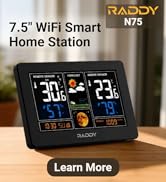
Image: Close-up of the Raddy N75 display, highlighting temperature, humidity, and weather forecast icons. The display is clear and easy to read.
Setup Guide
1. Powering On the Main Unit
- Connect the provided power adapter to the main weather station unit and plug it into a power outlet.
- The display will light up, and the unit will begin its initial setup.
- Note: While the main unit can operate on batteries (2x AA, not included) for backup, the display will only be continuously lit when powered by the adapter. Wi-Fi connectivity requires adapter power.
2. Installing the Outdoor Sensor
- Open the battery compartment on the back of the wireless outdoor sensor.
- Insert 2x AA batteries (not included), ensuring correct polarity.
- Close the battery compartment securely.
- Place the outdoor sensor in a shaded, dry location away from direct sunlight and precipitation for accurate readings. Ensure it is within range of the main unit (typically up to 100 meters in open air, less with obstructions).
3. Wi-Fi Connection and App Pairing
The Raddy N75 connects to the Tuya Smart app for advanced features and remote monitoring.
- Download the Tuya Smart App: Search for "Tuya Smart" in the Apple App Store (iOS) or Google Play Store (Android) and install it on your smartphone.
- Register/Log In: Open the app and create a new account or log in if you already have one.
- Add Device:
- On the main unit, press and hold the Wi-Fi button (refer to your unit's specific button layout) until the Wi-Fi icon starts flashing rapidly.
- In the Tuya Smart app, tap the "+" icon in the top right corner to add a device.
- Select "Small Home Appliance" -> "Weather Station" or use the auto-scan feature.
- Follow the on-screen instructions in the app to connect the weather station to your 2.4 GHz Wi-Fi network. Enter your Wi-Fi password when prompted.
- Once connected, the Wi-Fi icon on the weather station display will become solid, and the network time will synchronize automatically.

Image: A smartphone screen showing the Tuya app interface, displaying real-time weather data and historical trends from the Raddy N75 weather station.
Operating Instructions
Display Information
The 7.5-inch LCD display provides a comprehensive overview of current and forecasted weather conditions:
- Indoor Temperature & Humidity: Current readings from the main unit.
- Outdoor Temperature & Humidity: Current readings from the wireless outdoor sensor.
- Weather Forecast: Icons representing 12-24 hour weather predictions (sunny, partly cloudy, cloudy, rainy, heavy rainy, snowy).
- Moon Phase: Displays the current phase of the moon.
- Frost Alert: An icon will appear when the outdoor temperature is between -1°C (30°F) and 3°C (37°F).
- Barometric Pressure: Current atmospheric pressure readings.
- Network Time & Date: Automatically updated via Wi-Fi.

Image: A visual guide illustrating the six weather forecast icons (sunny to snowy) and the twelve distinct moon phases displayed on the Raddy N75 weather station.
Adjusting Settings
The main unit features buttons on the side for various adjustments:
- Backlight Adjustment: Press the "LIGHT" button to cycle through four brightness levels (100%, 80%, 60%, 0%).
- Temperature Unit: Press the "°C/°F" button to switch between Celsius and Fahrenheit.
- Time Format: Press the "12/24H" button to switch between 12-hour and 24-hour time formats.
- Manual Time/Date Setting: If Wi-Fi is not connected, you can manually set the time and date using the "SET" button and arrow keys (refer to the full manual for specific steps).

Image: A composite image demonstrating the four adjustable backlight levels of the Raddy N75 weather station display, from 100% brightness to 0% (off).
USB Charging Port
The main unit includes a built-in USB charging port (5V/1A output) on the side, allowing you to conveniently charge small electronic devices.

Image: The Raddy N75 weather station placed on a bedside table, with a smartphone connected and charging via the station's integrated USB port.
App Integration (Tuya Smart)
The Tuya Smart app enhances the functionality of your Raddy N75 Weather Station:
- Real-time Monitoring: View current indoor and outdoor temperature, humidity, and other data directly on your smartphone from anywhere.
- Historical Data: Access daily, weekly, monthly, and yearly trends for temperature, humidity, and barometric pressure. This data is stored for up to one year.
- Alerts: Set custom alerts for temperature or humidity thresholds.
- Remote Control: Adjust certain settings of the weather station remotely via the app.
Ensure your weather station remains connected to a stable 2.4 GHz Wi-Fi network for continuous app functionality.
Maintenance
- Cleaning: Wipe the display and unit surfaces with a soft, dry cloth. Avoid abrasive cleaners or solvents.
- Outdoor Sensor Batteries: Replace the AA batteries in the outdoor sensor annually or when the low battery indicator appears on the main unit.
- Placement: Periodically check the outdoor sensor's placement to ensure it remains protected from direct elements and maintains good signal strength with the main unit.
- Firmware Updates: Check the Tuya Smart app periodically for any available firmware updates for your weather station to ensure optimal performance and new features.
Troubleshooting
| Problem | Possible Cause | Solution |
|---|---|---|
| No display on main unit | Power adapter not connected or faulty; batteries depleted (if running on backup). | Ensure power adapter is securely connected and plugged in. Replace backup batteries if used. |
| Outdoor sensor not connecting/displaying data | Sensor batteries depleted; sensor out of range; interference. | Replace sensor batteries. Move sensor closer to the main unit. Avoid placing near large metal objects or strong electromagnetic sources. Re-pair the sensor if necessary (refer to the full manual for pairing steps). |
| Wi-Fi connection fails or disconnects | Incorrect Wi-Fi password; 5 GHz Wi-Fi network used; weak signal; main unit not powered by adapter. | Ensure correct password. Confirm your router is broadcasting a 2.4 GHz network. Move the weather station closer to the router. Ensure the main unit is powered by the adapter, not just batteries. Restart the weather station and router. |
| App not showing real-time data | Weather station not connected to Wi-Fi; app not refreshed; internet connectivity issues. | Check Wi-Fi connection on the weather station. Refresh the app. Verify your smartphone has internet access. |
Specifications
| Feature | Detail |
|---|---|
| Model | N75 |
| Display Type | 7.5-inch Color LCD |
| Connectivity Technology | Wi-Fi (2.4 GHz only) |
| Temperature Accuracy | ±0.5 °C |
| Power Source (Main Unit) | Power Adapter (included), 2x AA Batteries (backup, not included) |
| Power Source (Outdoor Sensor) | 2x AA Batteries (not included) |
| Special Features | Large Display, Adjustable Brightness, Wireless Sensor, Network Time, Frost Alert, USB Charging Port |
| Material | Plastic |
| Main Unit Dimensions | Approx. 20.5 cm x 12.8 cm (8.1" x 5") |
| Outdoor Sensor Dimensions | Approx. 9.5 cm x 4.8 cm (3.7" x 1.9") |

Image: A detailed view of the Raddy N75 main unit, outdoor sensor, and power adapter, with key dimensions indicated for each component.
Warranty and Support
The Raddy N75 Wi-Fi Weather Station comes with a standard manufacturer's warranty. Please refer to the warranty card included in your package or contact Raddy customer support for specific details regarding warranty coverage and claims.
For technical assistance, troubleshooting, or further inquiries, please visit the official Raddy website or contact their customer service department. Contact information can typically be found in the included documentation or on the manufacturer's website.


