
1. Important Safety Information
Before operating the WALKINGPAD R1 Pro-front Handrail Treadmill, please read and understand all safety instructions. Failure to follow these instructions may result in injury or damage to the product.
- Ensure the treadmill is placed on a flat, stable surface.
- Maintain a clear space of at least 2 meters (6.5 feet) behind the treadmill and 0.5 meters (1.6 feet) on each side.
- Keep children and pets away from the treadmill during operation.
- Always wear appropriate athletic footwear.
- Do not use the treadmill if you feel dizzy, unwell, or experience pain. Consult a physician.
- Unplug the treadmill from the power source when not in use or before cleaning and maintenance.
- The maximum user weight capacity is 240 lbs (108 kg).
2. Product Overview
The WALKINGPAD R1 Pro-front Handrail is a versatile 2-in-1 fitness device designed for both walking and running. Its foldable design allows for easy storage, making it suitable for home use.
Key Features:
- 2-in-1 Functionality: Operates as a walking pad (armrest down) or a treadmill (armrest up).
- Integrated LED Display: Provides real-time exercise data including calories burned, distance, speed, steps, and time.
- Quiet Operation: Equipped with a brushless motor for reduced noise during workouts.
- Comfortable Running Belt: Features an 8-layer high-quality running belt for enhanced comfort and shock absorption.
- Durable Construction: Built with a one-piece aluminum alloy frame.
- Multiple Control Options: Can be controlled via remote, the KS Fit App, or foot control (in auto mode).

Image: The WALKINGPAD R1 Pro-front Handrail in both running and under-desk walking configurations.

Image: Detailed view of the treadmill's internal structure, highlighting the shock-absorbing running belt, aluminum alloy frame, and enhanced motor for quiet operation.
3. Setup
The WALKINGPAD R1 Pro-front Handrail requires no installation. It features a one-piece folding design for immediate use.
Unfolding the Treadmill:
- Place the folded treadmill on a flat surface.
- Gently lift the rear section of the treadmill until it locks into place.
- Raise the front handrail to its upright position and secure it.
- Connect the power cord to the treadmill and a suitable power outlet.
Folding for Storage:
- Ensure the treadmill is powered off and unplugged.
- Lower the front handrail.
- Unlock the rear section and fold the treadmill in half.
- Utilize the integrated wheels for easy movement and store upright in a suitable location.
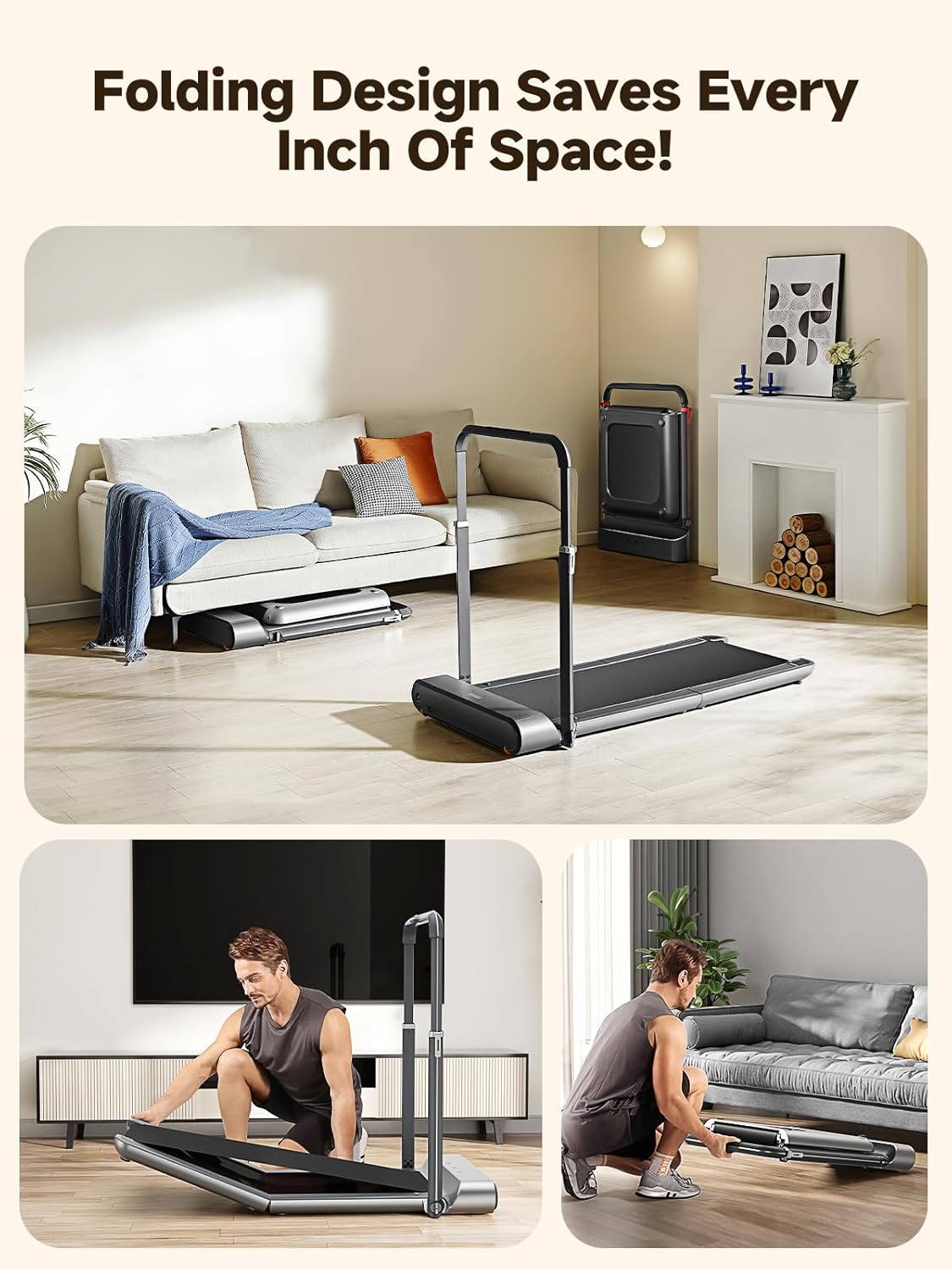
Image: Visual guide for folding and unfolding the treadmill, showcasing its space-saving design.

Image: Step-by-step visual instructions for setting up and storing the treadmill.
4. Operating Instructions
The WALKINGPAD R1 Pro-front Handrail offers two primary modes of operation and multiple control methods.
Operating Modes:
- Walking Mode: When the armrest is down, the treadmill functions as a walking pad with a speed range of 0.5-3.7 MPH. Ideal for walking while working or light exercise.
- Running Mode: When the armrest is up, it functions as a treadmill with a speed range of 0.5-6.2 MPH, suitable for faster walking or running.

Image: Comparison of Walking Mode and Running Mode, showing the armrest positions and corresponding speed ranges.
Control Methods:
- Remote Control: Use the included remote to start/stop the treadmill and adjust speed. The speed interval is 0.5 mph.
- KS Fit App: Download the KS Fit App to your smartphone for comprehensive control and tracking of your workout data.
- Foot Control (Auto Mode): In auto mode, the treadmill can be controlled by foot pressure. Walking towards the front of the belt increases speed, while walking towards the rear decreases it.

Image: Illustration of foot control functionality on the treadmill.

Image: Overview of the remote control, integrated display, and mobile app for treadmill operation.
5. Maintenance
Regular maintenance ensures the longevity and optimal performance of your WALKINGPAD R1 Pro-front Handrail Treadmill.
Cleaning:
- Wipe down the treadmill surface with a damp cloth after each use.
- Avoid using abrasive cleaners or solvents.
- Ensure no moisture enters the motor housing or electrical components.
Running Belt Adjustment and Lubrication:
- Periodically check the running belt for proper tension and alignment. Refer to the detailed instructions in the full user manual for specific adjustment procedures.
- Lubricate the running belt as recommended in the full user manual to reduce friction and wear. Use only approved treadmill lubricant.
6. Troubleshooting
If you encounter issues with your treadmill, refer to the following common troubleshooting steps:
- Treadmill not powering on: Check if the power cord is securely plugged into both the treadmill and the wall outlet. Ensure the power switch is in the 'ON' position.
- Belt slipping or uneven: The running belt may require adjustment or lubrication. Follow the maintenance instructions or consult the full user manual.
- Unusual noises: Stop using the treadmill immediately. Check for any foreign objects under the belt or contact customer support.
- Remote control not working: Replace the remote control battery. Ensure there are no obstructions between the remote and the treadmill's receiver.
For more detailed troubleshooting, please consult the comprehensive user manual or contact WALKINGPAD customer support.
7. Specifications
Detailed technical specifications for the WALKINGPAD R1 Pro-front Handrail Treadmill.
| Feature | Specification |
|---|---|
| Model Number | TRR1F Pro |
| Product Dimensions (Unfolded) | 146 x 72 x 90 cm (57.5 x 28 x 35.5 inches) |
| Packed Size (Folded) | 97.8 x 71.1 x 15.2 cm (38.5 x 28 x 6 inches) |
| Item Weight | 32.7 kg (72 lbs) |
| Maximum User Capacity | 240 lbs |
| Walking Mode Speed Range | 0.5 - 3.7 MPH |
| Running Mode Speed Range | 0.5 - 6.2 MPH |
| Horsepower | 2 HP |
| Display Type | LED |
| Frame Material | Aluminum |
| Power Source | Corded Electric |
| Included Components | Lanyard, Power Cord, Remote Control, User Manual, Wrench |

Image: Dimensional specifications of the treadmill.
8. Warranty and Support
For information regarding product warranty, returns, or technical support, please refer to the warranty card included with your purchase or visit the official WALKINGPAD website. Keep your purchase receipt as proof of purchase for any warranty claims.
Manufacturer: WALKINGPAD
Place of Business: nansihuanxilu188haoshibaqu25haolou,1zhi15ceng101nei4ceng410hao,beijingshi,fengtai,china


