1. Introduction
This manual provides detailed instructions for the installation, usage, and maintenance of the ITMBET EB-BS901ABY 4600mAh replacement battery. This battery is specifically designed for the Samsung Galaxy S22 5G, compatible with models SM-S901 and SM-S901U. Please read this manual thoroughly before proceeding with installation or use to ensure proper function and safety.
2. Product Overview
The ITMBET EB-BS901ABY replacement battery kit includes the 4600mAh battery and a professional tool repair kit to assist with installation. The battery is designed to restore your phone's battery life to optimal performance.

Image 2.1: Contents of the ITMBET EB-BS901ABY replacement battery kit, including the battery and various repair tools.
Key Features:
- High Capacity: 4600mAh 3.85V battery for extended usage.
- Compatibility: Specifically for Samsung Galaxy S22 5G (SM-S901, SM-S901U).
- Safety Certifications: CE, UL, and ROHS certified for enhanced safety.
- Integrated Protection: Features protection against overcharging, overheating, and over-discharging.
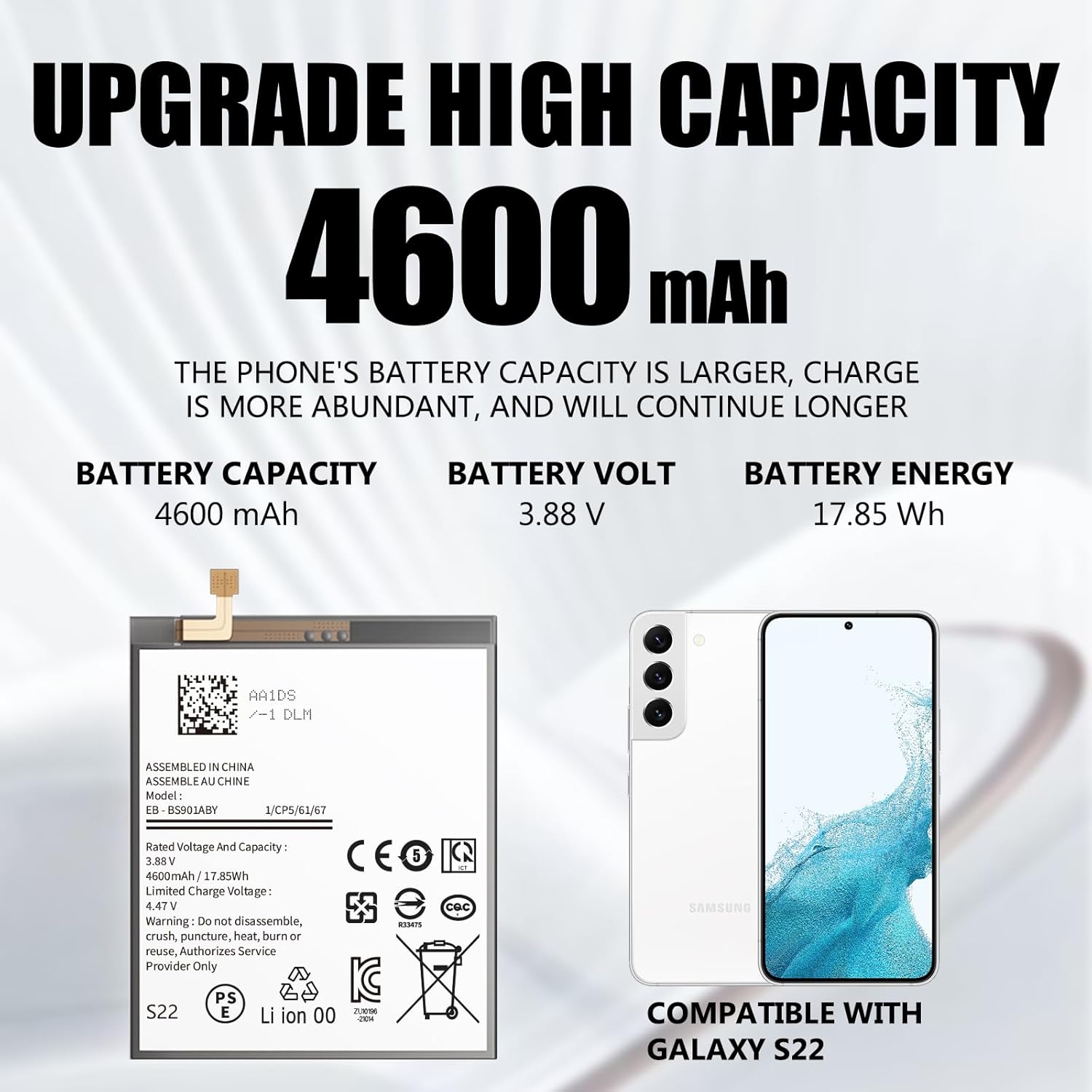
Image 2.2: Detailed specifications of the battery, highlighting its 4600mAh capacity, 3.88V voltage, and 17.85Wh energy.

Image 2.3: Information on the battery's new cycle status and environmental compliance, indicating over 800 charging cycles.

Image 2.4: Visual representation of the battery's integrated safety protections, including temperature, circuit, overcurrent, and overvoltage protection.
3. Safety Information
Please observe the following safety guidelines to prevent damage to the battery, your device, or personal injury:
- Do not disassemble, crush, puncture, heat, or burn the battery.
- Avoid exposing the battery to extreme temperatures (above 60°C or below 0°C).
- Keep the battery away from water or other liquids.
- If the battery appears damaged, swollen, or leaks, discontinue use immediately and dispose of it properly.
- Only use the provided tools or appropriate repair tools for installation.
- Ensure proper disposal of the old battery in accordance with local regulations.
The ITMBET EB-BS901ABY battery is certified by CE, UL, and ROHS, indicating compliance with safety and environmental standards.
4. Installation Guide
Replacing a phone battery requires careful attention and precision. If you are not confident in performing this repair, it is recommended to seek professional assistance. Refer to online video tutorials specific to your Samsung Galaxy S22 5G model for visual guidance.
Required Tools (Included):
- Small screwdrivers
- Prying tools (plastic spudger, guitar pick-style opener)
- Adhesive strips
Installation Steps:
- Step 1: Prepare the Phone
Turn off your phone completely. Use a hairdryer or heat gun to gently heat the edges of the phone's back cover. This softens the internal adhesive, making it easier to remove. Carefully insert the blue prying tool (or similar thin tool) into the gap around the phone case to begin separating the back cover. Proceed slowly and with caution to avoid damaging internal components or the back cover itself.

Image 4.1: Illustration of carefully opening the phone's back cover using a prying tool after heating the adhesive.
- Step 2: Disconnect and Remove Old Battery
Once the back cover is removed, locate the FPC (Flexible Printed Circuit) cable connecting the battery to the motherboard. Carefully disconnect this cable. Then, use the blue prying tool to gently pry the old battery from its compartment. The battery is typically secured with adhesive, so apply steady, gentle force. Ensure the old battery is discharged as much as possible before removal to minimize risk.
Image 4.2: Depiction of disconnecting the FPC cable and carefully prying out the old battery from the phone's internal chassis.
- Step 3: Install New Battery
Clean any remaining adhesive from the battery compartment. Apply new adhesive strips (if provided) to secure the new ITMBET battery in place. Connect the FPC cable of the new battery to the motherboard, ensuring it is seated correctly.
- Step 4: Reassemble the Phone
Carefully reattach the back cover, ensuring all clips and adhesive align properly. Apply gentle pressure around the edges to secure it. Power on your phone to test the new battery and ensure all functions are working correctly.
5. Operating Instructions
To achieve optimal performance and longevity from your new ITMBET battery, follow these recommendations:
- Initial Charging: For the first three uses, fully deplete the battery before charging it to 100%.
- Optimal Performance: Full performance and longevity are typically achieved after 3 to 5 complete charge and discharge cycles.
- Charger Usage: Always use your original phone charger and cable for recharging.
- Regular Use: The battery is designed to support daily phone activities such as calling, messaging, browsing, and media consumption.

Image 5.1: Examples of typical daily phone usage, illustrating the battery's capability to support various activities throughout the day.
6. Maintenance
Proper maintenance can extend the life of your battery:
- Avoid leaving your phone in direct sunlight or extremely hot environments (e.g., inside a car on a hot day).
- Do not expose the battery to very cold temperatures.
- If storing the phone for an extended period, charge the battery to about 50% before storage.
- Avoid constantly draining the battery to 0% or charging it to 100% if possible, as this can reduce overall lifespan.
7. Troubleshooting
If you encounter issues with your new battery, consider the following:
- Battery Not Charging: Ensure the FPC cable is securely connected. Try a different original charger and cable.
- Rapid Discharge: Verify that the battery is fully seated and connected. Perform the 3-5 charge/discharge cycles as recommended. Check for background apps consuming excessive power.
- Phone Not Powering On: Double-check all internal connections. Ensure the battery has some charge.
- Physical Damage: If the battery or phone was damaged during installation, discontinue use and seek professional repair.
For persistent issues or defects, please refer to the Warranty and Support section.
8. Specifications
| Feature | Specification |
|---|---|
| Brand | ITMBET |
| Model Number | EB-BS901ABY |
| Battery Capacity | 4600 Milliamp Hours (mAh) |
| Rated Voltage | 3.85V |
| Limited Charge Voltage | 4.47V |
| Energy | 17.85 Wh |
| Battery Cell Composition | Li-ion (Lithium-ion) |
| Compatibility | Samsung Galaxy S22 5G (SM-S901, SM-S901U) |
| Certifications | CE, UL, ROHS |
9. Warranty and Support
Your satisfaction is important to ITMBET. If you experience any defects or quality issues with your battery, please contact ITMBET customer support. We guarantee a response within 24 hours and offer a full refund within 30 days of purchase for qualifying issues.
For support, please refer to the contact information provided with your purchase or visit the official ITMBET support website.


