
1. Introduction
This manual provides essential instructions for the setup, operation, and maintenance of your iStorage diskAshur DT3 8TB Secure Encrypted Desktop Hard Drive. Please read this manual thoroughly before using the device to ensure proper functionality and data security.
What's in the Box
- 1 x iStorage diskAshur DT3 Secure Encrypted Desktop Hard Drive
- USB Type C & A cables
- Universal Mains Adapter
- Quick Start Guide and Product Disclaimer
2. Setup
2.1 Connecting the Device
To begin using your diskAshur DT3, follow these steps:
- Connect the supplied AC adapter to the DC 12V port on the back of the drive and then to a mains power outlet.
- Insert the supplied USB cable into the USB 3.0 port on the back of the drive and connect the other end to your computer or laptop.
- Turn the power switch on the back of the drive to the 'ON' position. The red LED on the keypad will illuminate.

Image: Rear view of the iStorage diskAshur DT3, highlighting the USB 3.0 port, DC 12V power input, and the ON/OFF switch. This illustrates where to connect the power adapter and USB cable.
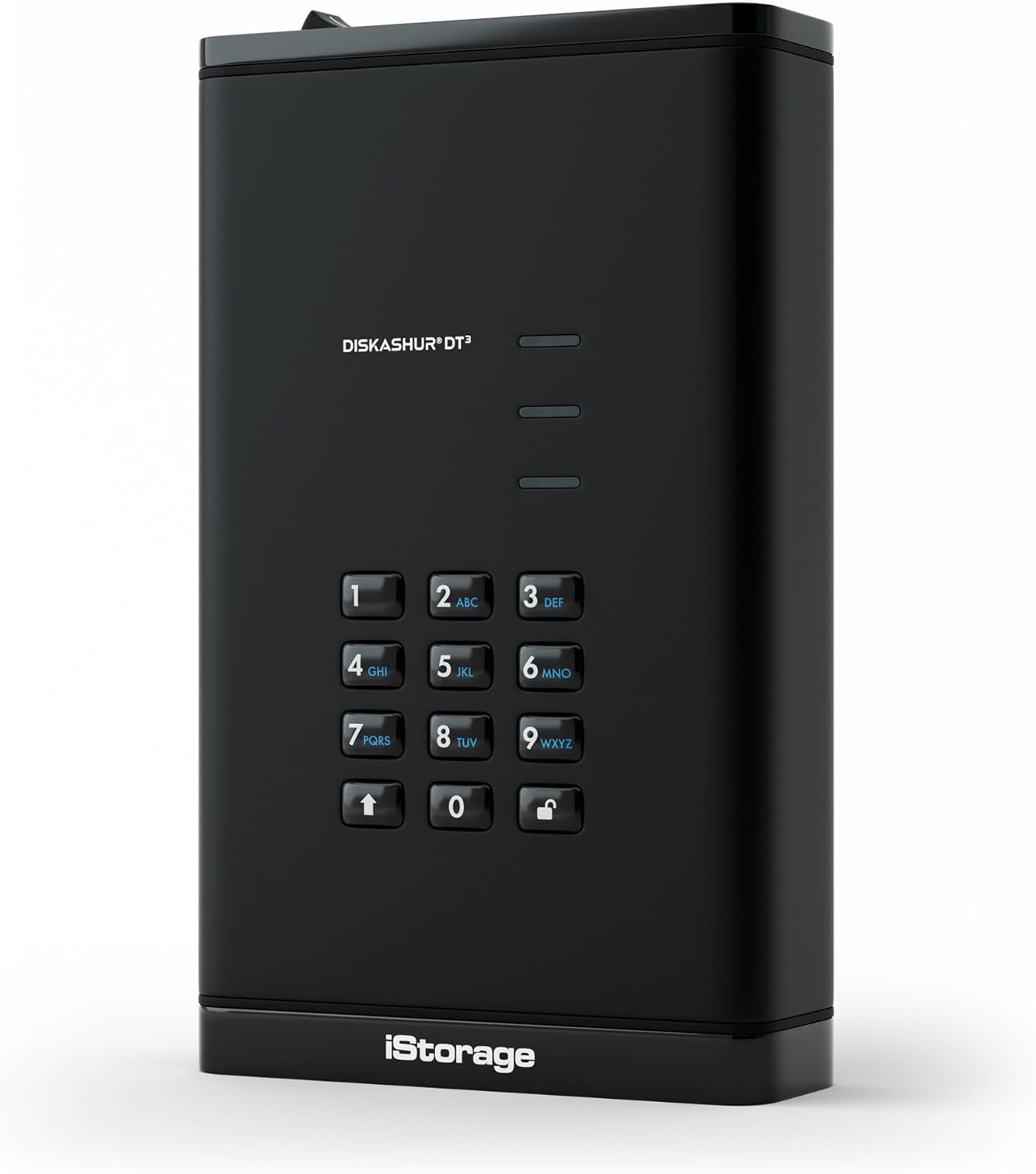
Image: Front view of the iStorage diskAshur DT3, displaying the alphanumeric keypad and LED indicators. This shows the primary interface for PIN entry.
2.2 Initial Unlock
To unlock your diskAshur DT3 for the first time or after it has been locked:
- Ensure the red LED is illuminated.
- Enter your 8-64 digit User PIN on the keypad.
- Press the UNLOCK button (key with a padlock icon).
Upon successful PIN entry, the green and blue LEDs will blink, and then the middle LED will turn solid green, indicating the drive is unlocked and ready for use.
Video: This video demonstrates the process of unlocking and encrypting data using a diskAshur drive. While the video specifically mentions DT2, the steps for unlocking and data transfer are applicable to the diskAshur DT3.
3. Operating the Device
3.1 Storing Data
Once the drive is unlocked and connected to your computer, it will appear as a removable drive. You can store files by:
- Copying and pasting files into the drive's folder.
- Dragging and dropping files directly into the drive's folder.
All data transferred to the diskAshur DT3 is encrypted in real-time using AES-XTS 256-bit hardware encryption.
3.2 Locking the Device
To secure your data and disconnect the drive:
- Safely eject the drive from your operating system (e.g., 'Safely Remove Hardware' on Windows, 'Eject' on macOS).
- Once ejected, the drive will automatically lock, and the red LED will illuminate.
- Turn the power switch on the back of the drive to the 'OFF' position.
The drive is now securely locked and can be safely disconnected and transported.
3.3 Security Features
- PIN Authentication: Access requires an 8-64 digit PIN. Without the correct PIN, data remains inaccessible.
- Hardware Encryption: All data is encrypted in real-time using AES-XTS 256-bit hardware encryption.
- FIPS 140-3 Level 3 Certified: The diskAshur DT3 is certified to FIPS 140-3 Level 3 (pending), ensuring high-level security compliance.
- Auto-Lock: The drive features an auto-lock function that can be configured to automatically lock after a predetermined period of inactivity.
- Wear-Resistant Keypad: The alphanumeric keypad is designed to prevent key usage from being easily identified, protecting against potential brute-force attacks.
- OS and Platform Independent: Works with any device that has a USB port, including Windows, macOS, iPadOS, Linux, Chrome, Android, and various embedded systems.
Video: An introductory video showcasing the iStorage diskAshur3 range, highlighting its key features and security aspects relevant to the DT3 model.
4. Maintenance
To ensure the longevity and optimal performance of your diskAshur DT3:
- Keep the device clean and free from dust. Use a soft, dry cloth for cleaning.
- Avoid exposing the device to extreme temperatures or humidity.
- Do not attempt to open or disassemble the device, as this will void the warranty and may compromise its security features.
- Always safely eject the drive before disconnecting it from your computer to prevent data corruption.
5. Troubleshooting
If you encounter issues with your diskAshur DT3, consider the following:
- Drive not recognized: Ensure all cables (power and USB) are securely connected and the drive's power switch is ON. Try connecting to a different USB port or computer.
- Incorrect PIN entry: If the User PIN is entered incorrectly 10 consecutive times, the User PIN will be deleted. Data will remain on the device but only accessible with the Admin PIN. If the Admin PIN is entered incorrectly 10 consecutive times, all data is lost forever, and the device will need to be reconfigured.
- Slow transfer speeds: Ensure you are using a USB 3.0 compatible port on your computer for optimal speeds (up to 290MB/s Read, 284MB/s Write).
- LED indicators: Refer to the quick start guide for a detailed explanation of LED behaviors (red, green, blue) which indicate drive status (locked, unlocked, activity).
6. Specifications
| Feature | Detail |
|---|---|
| Digital Storage Capacity | 8 TB |
| Hard Drive Type | Mechanical Hard Disk |
| Hard Drive Interface | USB 3.0 |
| Connectivity Technology | USB |
| Hardware Platform | Linux, Mac, PC |
| Item Model Number | IS-DT3-256-8000-F |
| Item Weight | 2.05 pounds |
| Product Dimensions | 7.3 x 4.41 x 1.71 inches |
| Color | Black |
| Hard Drive Rotational Speed | 7200 RPM |
| Power Source | AC |
| Special Features | Backward Compatible, Dust Resistant, Hardware Encryption, Portable, Waterproof |
| Compatible Devices | Desktop, Gaming Console, Laptop, Smartphone, Tablet |
7. Warranty and Support
For warranty information and technical support, please refer to the documentation included with your product or visit the official iStorage website. Keep your purchase receipt for warranty claims.


