
Introduction and Safety Warnings
This EIELEDIY DIY Drone Soldering Kit is designed for electronics enthusiasts aged 14 and up. It offers a hands-on experience in assembling and soldering a functional quadcopter. The assembly process requires basic knowledge of electronic circuits, manual dexterity, and patience.
Important Safety Note:
- Assembly and soldering are estimated to take approximately 2 hours.
- Essential tools required include a soldering iron, solder wire, and a screwdriver (not included in the kit).
- This project has a relatively high difficulty level. It is not recommended for individuals who are careless or lack problem-solving skills. Patience and the ability to identify and resolve issues are crucial for successful completion.
- Always ensure proper ventilation when soldering and wear appropriate safety gear, such as safety glasses.
- The drone contains a Lithium-ion battery. Handle with care and follow all battery safety guidelines.
This kit also serves as an excellent STEM educational tool, helping users understand the basic operating principles of drones through practical assembly and soldering.
Setup and Assembly Instructions
Follow these steps carefully to assemble your EIELEDIY DIY Drone Kit. Most components are pre-assembled, simplifying the soldering process.
1. Kit Contents and Required Tools
Before starting, verify all components are present and gather the necessary tools.
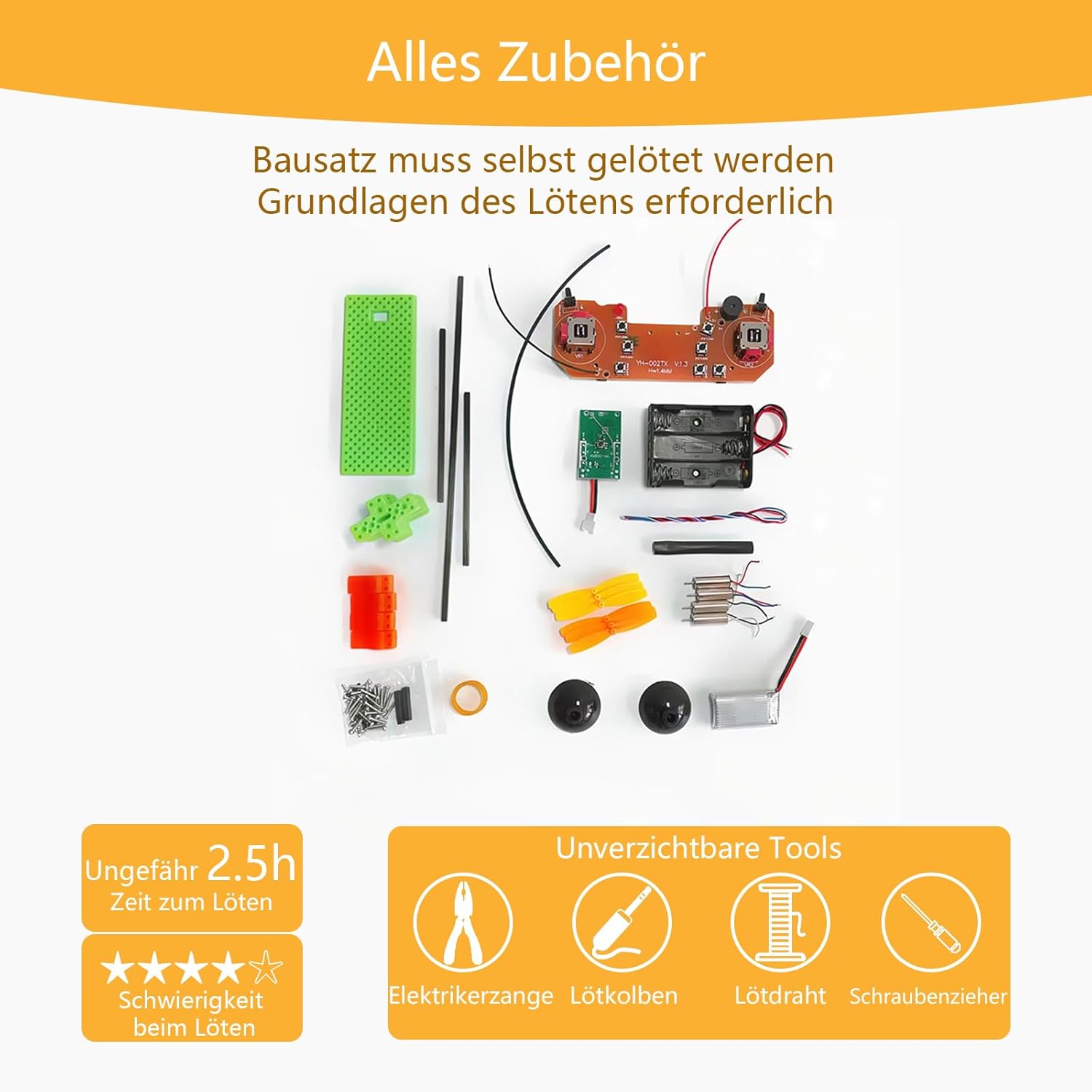
Image Description: This image displays all components included in the DIY drone kit, along with essential tools required for assembly: electrician's pliers, soldering iron, solder wire, and screwdriver. It indicates an approximate soldering time of 2.5 hours and highlights the high difficulty level for soldering.
2. Component Assembly and Soldering
The kit features pre-assembled components, requiring only simple soldering steps. Refer to the diagrams for correct connections.

Image Description: This image illustrates the pre-assembled components of the drone kit, indicating that most parts are pre-soldered, requiring only simple soldering. It also shows a diagram for wire board battery cable side connection and carbon rod measurements (10cm).
- Connect the Battery Board: Solder the battery board to the main control board. Ensure correct polarity.
- Attach Motors: Solder the motor wires to the designated points on the main control board. Pay attention to the motor rotation direction for each arm.
- Install Carbon Rods: Insert the 10cm carbon rods into the drone frame, ensuring they are securely fastened.
- Mount Propellers: Attach the propellers to the motor shafts. Ensure the correct propeller type (CW/CCW) is used for each motor. A set of spare propellers is included to replace any damaged ones during flight or assembly.
- Secure the Shell: Assemble the drone's shell around the internal components.
Operating Instructions
Your EIELEDIY drone is equipped with multiple flight functions for an engaging experience. The remote control requires its own batteries (not included).
Remote Control Overview
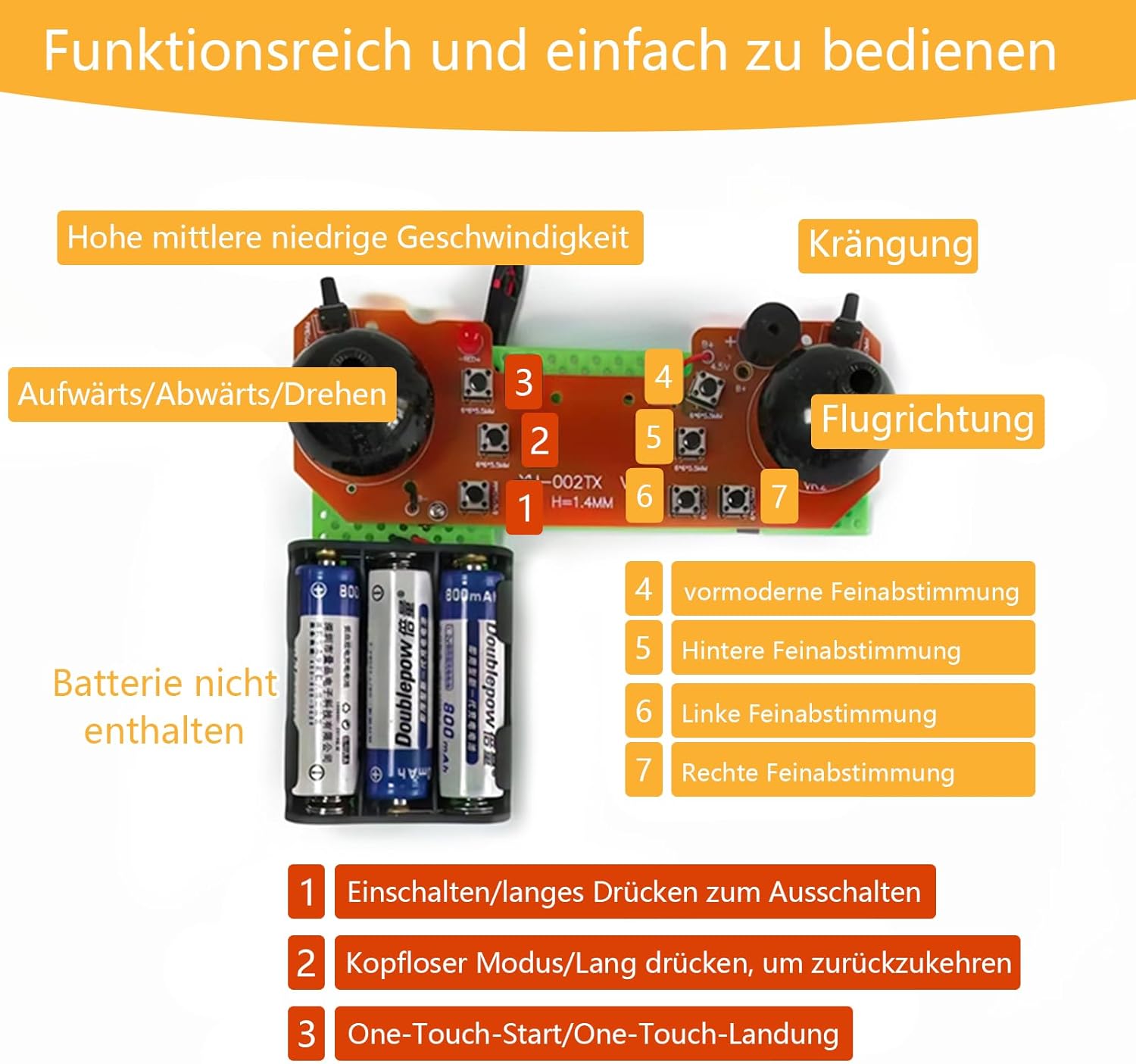
Image Description: This image details the remote control's layout and functions. It shows controls for high, medium, low speed, banking, ascend/descend/rotate, and flight direction. Key functions are numbered: 1. Power On/Long press for Off, 2. Headless Mode/Long press to return, 3. One-Touch Start/Land, 4. Forward Fine-tuning, 5. Backward Fine-tuning, 6. Left Fine-tuning, 7. Right Fine-tuning. Note: Batteries for the remote are not included.
Flight Functions
- Power On/Off (1): Press briefly to power on. Long press to power off.
- Headless Mode (2): Press briefly to activate Headless Mode. Long press to exit. In Headless Mode, the drone's orientation is relative to the pilot, regardless of its actual front.
- One-Touch Start/Land (3): Press to initiate automatic takeoff or landing.
- Speed Adjustment: Toggle between high, medium, and low speeds to suit your flying skill level and environment.
- 360° Rotation: Execute impressive 360-degree flips for enhanced flying fun.
- Fine-tuning (4, 5, 6, 7): Use the fine-tuning buttons to adjust the drone's stability and drift in forward, backward, left, and right directions.
Operating the drone requires practice to master. Start in a clear, open area and gradually increase complexity as you gain experience.
Maintenance
Regular maintenance ensures the longevity and optimal performance of your drone.
- Propeller Inspection: Regularly check propellers for damage (cracks, bends). Replace any damaged propellers immediately using the included spare set to maintain flight stability.
- Battery Care: Charge the Lithium-ion battery using the provided Micro-USB cable connected to a USB-A port. Do not overcharge or completely drain the battery. Store the battery in a cool, dry place.
- Cleaning: Keep the drone free from dust and debris. Use a soft, dry cloth to clean the body and components. Avoid using liquids.
- Motor Check: Ensure motors spin freely and are not obstructed by hair or small particles.
- Connection Integrity: Periodically check soldered connections for any signs of loosening or corrosion. Re-solder if necessary.
Troubleshooting
Encountering issues is part of the learning process with a DIY kit. Here are some common problems and solutions:
- Drone does not power on:
- Check battery charge level.
- Ensure battery is correctly connected to the main board.
- Verify all power-related solder joints are secure.
- Drone does not take off or flies erratically:
- Ensure propellers are installed correctly (CW/CCW on the right motors).
- Check for any damaged propellers and replace them.
- Calibrate the drone before flight (refer to remote control instructions for calibration steps, typically involving stick movements).
- Verify all motor connections are secure and motors spin freely.
- Use the fine-tuning buttons on the remote to correct any drift.
- Remote control does not connect to drone:
- Ensure both the drone and remote control are powered on.
- Check remote control batteries.
- Follow the pairing procedure (usually power on drone, then remote, move left stick up then down).
- Short flight time:
- Ensure the battery is fully charged.
- Battery degradation can occur over time; consider replacing if flight time significantly decreases.
If you encounter persistent issues, carefully re-examine your assembly and soldering. EIELEDIY offers comprehensive technical support for this product.
Specifications
Detailed specifications for the EIELEDIY DIY Drone Kit (Model EU-D04F6-A).

Image Description: This image provides the dimensions of the assembled drone and its remote control. The drone measures approximately 15.2 cm x 15.2 cm, with propeller arms extending 5.5 cm from the center.
| Feature | Detail |
|---|---|
| Model Number | EU-D04F6-A |
| Brand | EIELEDIY |
| Product Dimensions (L x W x H) | 15 x 15 x 3 cm (assembled drone) |
| Product Weight | 180 grams |
| Recommended Age | 14 years and up (Manufacturer recommends 18 months and up, but given soldering and difficulty, 14+ is more appropriate for assembly) |
| Educational Value | STEM, Design Skills, Practical Skills, Electronic Technology Knowledge |
| Assembly Required | Yes |
| Battery Type (Included) | Lithium-ion (1 Lithium-polymer battery included) |
| Main Material | Acrylic |
| Number of Players | 1 player |
Warranty and Support
EIELEDIY is committed to providing a quality product and support for your DIY drone kit.
- Technical Support: For any assembly, operation, or troubleshooting questions, please contact EIELEDIY customer support.
- Warranty Information: Specific warranty details are not provided in the product description. Please refer to the retailer's return policy or contact EIELEDIY directly for warranty claims.