
KU XIU X40Q
KU XIU X40Q 3-in-1 Wireless Charging Station User Manual
Model: X40Q
Introduction
The KU XIU X40Q is a Qi2 Certified 15W Magnetic Foldable 3-in-1 Wireless Charging Station designed for Apple devices. This compact and versatile charger allows you to simultaneously charge your iPhone, Apple Watch, and AirPods, making it an ideal solution for both home and travel use. Its advanced aluminum alloy construction ensures efficient heat dissipation and durability.
What's in the Box

Image: The KU XIU X40Q charging station unfolded, alongside the 45W PD fast charging adapter, and a USB-C to USB-C cable.
Please verify that all items listed below are included in your package:
- 1 x KU XIU X40Q 3-in-1 Foldable Wireless Charger
- 1 x 45W PD Fast Charging Adapter
- 1 x Travel Storage Bag
- 1 x USB-C to USB-C Cable
- 1 x User Manual (this document)
Setup Guide
- Unpack the Charger: Carefully remove the KU XIU X40Q charging station and all accessories from the packaging.
- Unfold the Charger: Gently unfold the charging station to its desired upright position. The magnetic charging pad for the iPhone should be at the top, the Apple Watch charger arm extended, and the AirPods charging pad at the base.
- Connect Power: Insert one end of the provided USB-C to USB-C cable into the USB-C port on the back of the charging station.
- Connect to Power Adapter: Insert the other end of the USB-C cable into the provided 45W PD Fast Charging Adapter.
- Plug into Wall Outlet: Plug the 45W PD Fast Charging Adapter into a standard wall power outlet. For optimal performance, ensure the outlet is functional and provides stable power.
- Indicator Light: The charging station may display a brief indicator light upon successful power connection, signifying it is ready for use.
Image: The KU XIU X40Q charging station connected to its power adapter and cable, ready for device placement.
Operating Instructions
The KU XIU X40Q allows for simultaneous wireless charging of your iPhone, Apple Watch, and AirPods. Follow these steps for effective charging:
- Charging Your iPhone:
- Ensure your iPhone is MagSafe compatible (iPhone 12 series or newer).
- Place your iPhone onto the magnetic charging pad at the top of the station. The strong magnets will align your device automatically for optimal charging.
- You can position your iPhone in either portrait or landscape mode for comfortable viewing while charging.
- Charging Your Apple Watch:
- Extend the Apple Watch charging arm.
- Place your Apple Watch onto the dedicated charging module on the arm. Ensure it snaps into place magnetically.
- Charging Your AirPods:
- Place your AirPods (with wireless charging case) onto the charging pad located at the base of the station.
- Ensure the AirPods case is centered on the charging area for proper connection.
- Charging Confirmation: Your devices will indicate charging status (e.g., battery icon, charging sound) once properly placed on their respective charging areas.

Image: The KU XIU X40Q charging station demonstrating flexible charging angles, including iPhone in portrait and landscape modes.

Image: The KU XIU X40Q charging station actively charging an iPhone, Apple Watch, and AirPods simultaneously on a bedside table.
Key Features
- Qi2 Certified 15W Ultra-Fast Charging: Delivers up to 15W wireless charging for compatible iPhones, significantly faster than standard 7.5W chargers. Provides 5W simultaneous fast charging for AirPods and Apple Watch.
- Magnetic Alignment (MagSafe Compatible): Built-in high-quality magnets ensure precise alignment and secure attachment for your iPhone, optimizing charging efficiency.
- 3-in-1 Simultaneous Charging: Efficiently charges your iPhone, Apple Watch, and AirPods all at once from a single power source.
- Ultra-Compact Foldable Design: Designed for portability, the charger folds down to a compact size (approximately 2.68 x 2.68 x 1.07 inches) and weighs only 210g (7.4oz), making it ideal for travel.
- Adjustable Charging Angle: Supports both landscape and portrait orientations for your iPhone, allowing for comfortable viewing during charging.
- Premium Aluminum Alloy Construction: Enhances heat dissipation for safe and stable charging, while providing a durable and aesthetically pleasing finish.
- Included 45W PD Adapter: Comes with a powerful 45W Power Delivery adapter to ensure fast and stable wireless charging performance.

Image: A graphic illustrating the KU XIU X40Q's 2X faster charging speed compared to a traditional 7.5W charger, showing an iPhone charging on the stand.

Image: Close-up views of the KU XIU X40Q highlighting its aluminum alloy construction and dedicated charging areas for iPhone, Apple Watch, and AirPods.
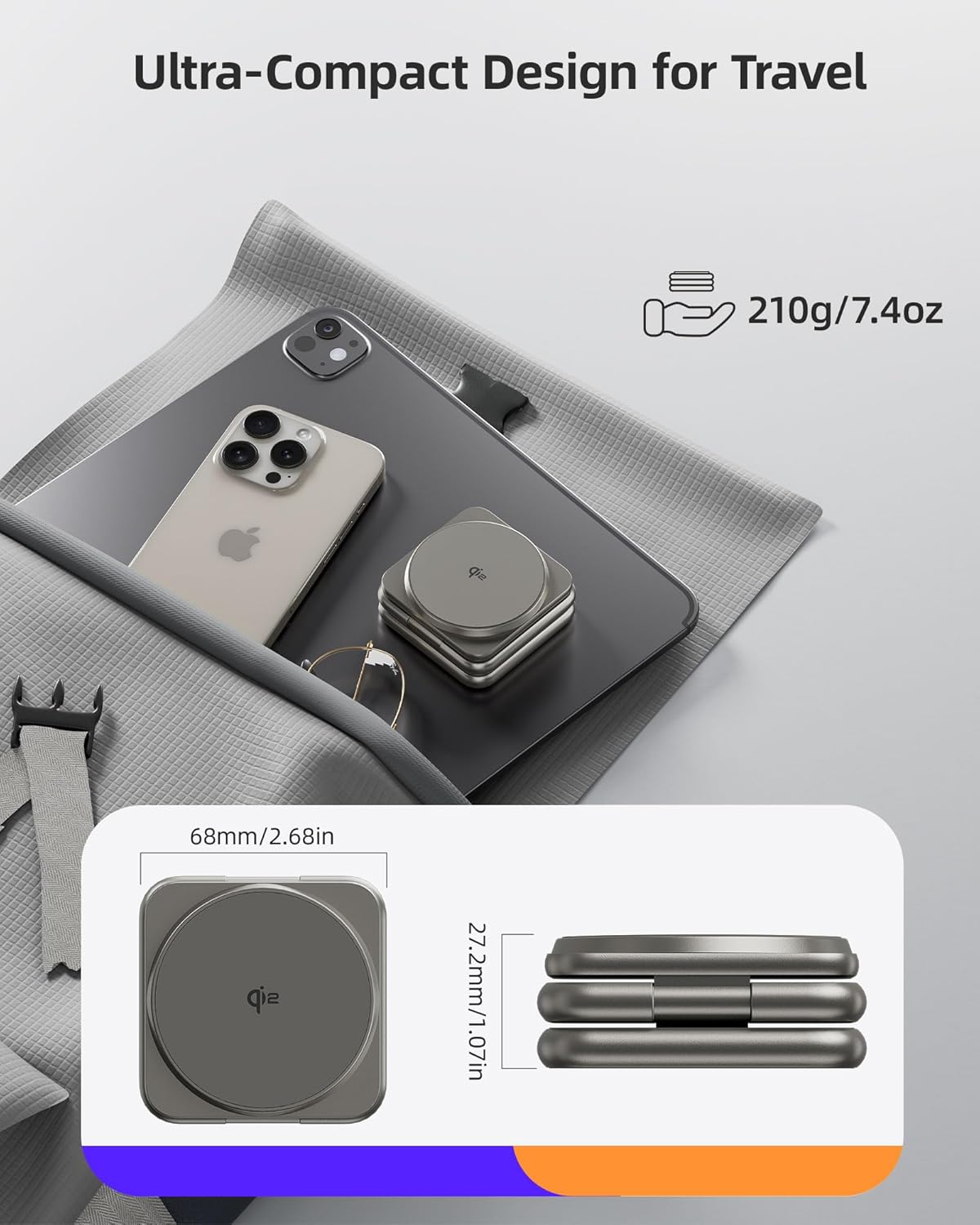
Image: The KU XIU X40Q folded, demonstrating its ultra-compact size and portability, shown next to an iPhone and iPad for scale.
Compatibility
The KU XIU X40Q 3-in-1 Wireless Charging Station is compatible with a wide range of Apple devices:
- iPhones: iPhone 16 series, iPhone 15 series, iPhone 14 series, iPhone 13 series, iPhone 12 series (MagSafe compatible models).
- Apple Watch: Apple Watch Ultra/Ultra 2, Series 9/8/7/6/5/4/3/2/SE.
- AirPods: AirPods 4 with Active Noise Cancellation, AirPods 3, AirPods 2 (with wireless charging case), AirPods Pro, AirPods Pro 2.

Image: A visual chart detailing the compatibility of the KU XIU X40Q with various iPhone, Apple Watch, and AirPods models.
Specifications
| Feature | Detail |
|---|---|
| Model Number | X40Q |
| Charging Standard | Qi2 Certified |
| iPhone Wireless Output | Up to 15W |
| Apple Watch Wireless Output | 5W |
| AirPods Wireless Output | 5W |
| Input Voltage | 12 Volts |
| Input Amperage | 3 Amps |
| Dimensions (Folded) | 2.68 x 2.68 x 1.07 inches (68 x 68 x 27.2 mm) |
| Weight | 210g (7.4oz) |
| Material | Aluminum Alloy |
| Connectivity | Wireless (USB Type-C input) |
| Included Adapter | 45W PD Fast Charging Adapter |
Maintenance and Care
To ensure the longevity and optimal performance of your KU XIU X40Q charging station, please follow these maintenance guidelines:
- Cleaning: Disconnect the charger from the power source before cleaning. Use a soft, dry, lint-free cloth to wipe the surfaces. Do not use abrasive cleaners, solvents, or aerosol sprays, as these may damage the finish or internal components.
- Storage: When not in use, especially during travel, fold the charger into its compact form and store it in the provided travel storage bag to protect it from dust and scratches.
- Avoid Liquids: Keep the charging station away from water and other liquids. In case of accidental spills, immediately disconnect power and allow it to dry completely before re-use.
- Temperature: Operate and store the charger within normal room temperatures. Avoid extreme heat or cold, which can affect performance and lifespan.
- Handle with Care: While constructed from durable aluminum alloy, avoid dropping the device or subjecting it to strong impacts.
Troubleshooting
If you encounter issues with your KU XIU X40Q charging station, please refer to the following common problems and solutions:
| Problem | Possible Solution |
|---|---|
| Device is not charging. |
|
| Slow charging speed. |
|
| Indicator light is off or blinking. |
|
| Charger or device feels warm during charging. |
|
Warranty and Support
The KU XIU X40Q 3-in-1 Wireless Charging Station is protected by registered US design and invention patents (Patent Numbers USD1030658S and US11936224B1).
For warranty information, technical support, or any inquiries regarding your KU XIU X40Q product, please contact KU XIU customer service through the following channels:
- Manufacturer: Shenzhen Kuxiu Communication Co., Ltd
- Amazon Store: Visit the KU XIU Store on Amazon for product information and support options.
- Refer to the contact information provided on the product packaging or the official KU XIU website for direct customer service details.
Please retain your purchase receipt as proof of purchase for warranty claims.
Related documentsX40Q


Ask a question about this manual
Ask about setup, troubleshooting, compatibility, parts, safety, or missing instructions. Manuals+ will review the question and use this page’s manual context to help answer it.