
HOTSWEAT ellipse
HOTSWEAT Vibration Plate Exercise Machine User Manual
Model: ellipse | Brand: HOTSWEAT
Introduction
This user manual provides essential information for the safe and effective operation of your HOTSWEAT Vibration Plate Exercise Machine. This full-body power plate is designed to assist with lymphatic drainage, fat burning, muscle building, and overall physical well-being through vibration technology. Please read this manual thoroughly before initial use and retain it for future reference.
Safety Information
To ensure safe operation and prevent injury, please observe the following precautions:
- Consult a physician before starting any new exercise program, especially if you have pre-existing medical conditions.
- Do not use the machine if you are pregnant, have a pacemaker, or suffer from severe osteoporosis, epilepsy, or acute thrombosis.
- Ensure the machine is placed on a stable, level surface. The four non-slip suction cups on the bottom are designed for stability and to reduce noise.
- Keep children and pets away from the machine during operation.
- Do not exceed the maximum weight recommendation of 330 pounds.
- Always ensure the power cord is securely plugged in and not damaged.
- Unplug the machine when not in use or before cleaning.
- Do not attempt to disassemble or repair the machine yourself. Contact customer support for assistance.
- Use the machine only for its intended purpose as described in this manual.
Package Contents
Verify that all items are present in the package:
- HOTSWEAT Vibration Plate Exercise Machine
- Remote Control Unit
- Power Cord
- Instruction Book (this manual)
- Resistance Bands (if included with your model)

Product Overview
Familiarize yourself with the key components of your vibration plate:
- Vibration Platform: The main surface where you stand or sit. Features an anti-slip pedal surface for safety.
- Control Panel: Integrated into the platform with a High-Definition LCD Display. Shows speed, time, and program information.
- Remote Control: Allows for convenient adjustment of settings during your workout.
- Power Switch: Located on the side of the unit.
- Power Cord Port: For connecting the power cord.
- Rubber Suction Feet: Four feet on the bottom for stability and noise reduction.
- Silent Motor: Provides quiet operation.
- Safety Buckle: (If applicable, though not explicitly detailed for this model, it's a common feature).


Setup
- Unpack: Carefully remove the vibration plate and all accessories from the packaging.
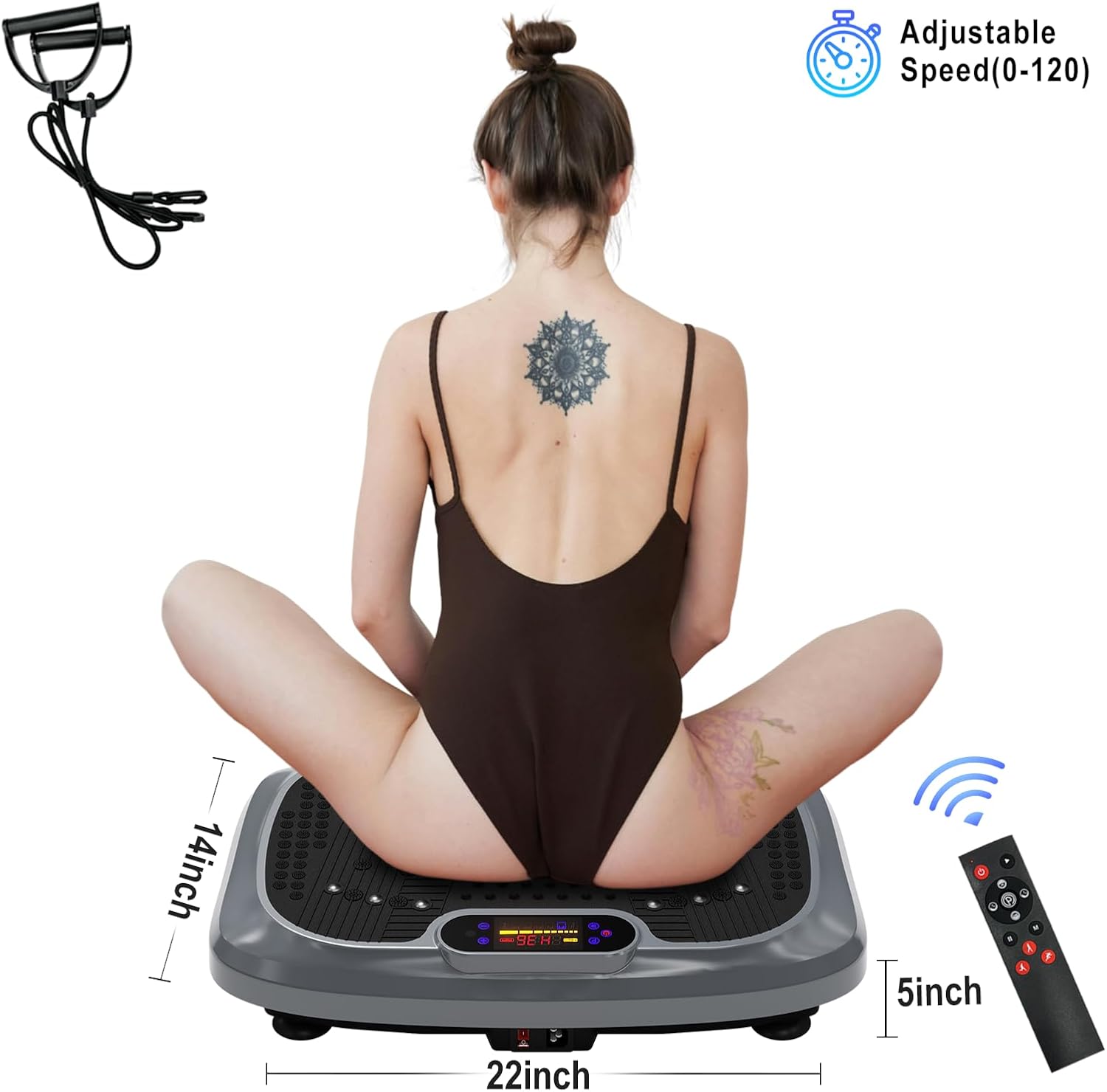
- Placement: Choose a flat, stable, and non-slip surface for the machine. Ensure there is enough clear space around the unit for safe exercise. The machine is compact and handy, measuring approximately 22 inches (L) x 14 inches (W) x 5 inches (H), making it suitable for home or office use and easy to store under a bed, couch, or coffee table.
- Power Connection: Insert the power cord into the power port on the machine and then plug the other end into a standard electrical outlet.
- Initial Check: Before turning on, ensure no foreign objects are on or under the platform.

Video: Demonstrates the setup and basic usage of the HOTSWEAT Vibration Plate, including plugging it in and stepping onto the platform.
Operating Instructions
Powering On/Off
- To turn on the machine, press the Power Switch located on the side of the unit. The LCD display will illuminate.
- To turn off, press the Power Switch again or use the 'Stop' button on the remote control.
Using the Control Panel and Remote
The machine can be operated using either the integrated control panel or the remote control.
- Start/Stop: Press to begin or pause the vibration.
- Speed Adjustment: Use 'Speed+' and 'Speed-' to increase or decrease the vibration intensity. There are 5 resistance levels and adjustable speed from 0-120.
- Time Adjustment: Use 'Time+' and 'Time-' to set your desired workout duration.
- Program Selection:
- Manual Program: Allows you to manually control speed and time.
- Program Autorun Mode: Select from 5 preset modes (Running Strong, Jogging Comfortable, Walking Relax, Jogging Comfortable, Running Strong) for varied intensity training. Use the 'Program Auto' button on the control panel or the corresponding shortcut keys on the remote.

Exercise Guide
The HOTSWEAT Vibration Plate offers a full-body workout, contributing to fat burning, muscle building, improved circulation, and bone density. Just 20 minutes on the vibration machine can be equivalent to various other exercises.

Here are some common positions and their benefits:
- Standing Position: Stand with feet shoulder-width apart, knees slightly bent. This position targets overall body muscle activation, burns calories, increases circulation, and improves bone density.
- Squat Position: Perform squats while standing on the platform. This enhances leg and glute strength and toning.
- Push-up Position: Place hands on the platform and perform push-ups. This targets chest, shoulders, and triceps.
- Plank Position: Place forearms on the platform and hold a plank. Excellent for core strengthening.
- Sitting Position: Sit on the platform with legs extended. Can be used for gentle vibration and relaxation, or for specific leg exercises.
- Using Resistance Bands: Attach the included resistance bands to the machine (if applicable) and perform exercises like bicep curls, lateral raises, or rows while standing on the platform. This helps tone and shape buttocks and abs.


Remember to maintain proper posture and engage your core during all exercises. Start with shorter durations and lower intensities, gradually increasing as your body adapts.
Maintenance
Regular maintenance ensures the longevity and optimal performance of your vibration plate:
- Cleaning: Wipe the machine with a soft, damp cloth after each use. Do not use abrasive cleaners or solvents. Ensure the machine is unplugged before cleaning.
- Storage: Store the machine in a cool, dry place away from direct sunlight and moisture. Its compact size allows for easy storage.
- Inspection: Periodically check the power cord for any signs of damage. Ensure the rubber suction feet are clean and intact for maximum stability.
Troubleshooting
| Problem | Possible Cause | Solution |
|---|---|---|
| Machine does not power on. | Power cord not properly connected; Power switch off; No power from outlet. | Ensure power cord is securely plugged into both the machine and the wall outlet. Check if the power switch is in the 'ON' position. Test the outlet with another device. |
| Vibration is weak or inconsistent. | Incorrect speed setting; Overload (exceeding weight limit); Machine not on a flat surface. | Increase the speed setting. Ensure user weight is within the 330 lbs limit. Place the machine on a completely flat and stable surface. |
| Remote control not working. | Dead batteries; Obstruction between remote and machine sensor. | Replace the batteries in the remote control. Ensure there is a clear line of sight between the remote and the machine's sensor. |
| Excessive noise during operation. | Machine not stable; Foreign object under the machine. | Ensure all four rubber suction feet are firmly on the ground. Check for and remove any objects beneath the machine. |
If you encounter any issues not listed here or if the problem persists, please contact HOTSWEAT customer support.
Specifications
| Feature | Detail |
|---|---|
| Brand | HOTSWEAT |
| Model Name | ellipse |
| Controls Type | Remote |
| Display Type | LCD |
| Number of Resistance Levels | 5 |
| Operation Mode | Automatic |
| Power Source | Corded Electric |
| Item Weight | 7 Kilograms |
| Color | GREY |
| Material | Acrylonitrile Butadiene Styrene (ABS) |
| Maximum Weight Recommendation | 330 Pounds |
| Suggested Users | unisex-adult |
Warranty and Support
Warranty Description: Any problem with the product or missing parts will be solved within 24 hours.
For product support, inquiries, or to report any issues, please contact HOTSWEAT customer service through the retailer's platform or visit the official HOTSWEAT store for contact information.
Official HOTSWEAT Store: HOTSWEAT Store on Amazon
Ask a question about this manual
Ask about setup, troubleshooting, compatibility, parts, safety, or missing instructions. Manuals+ will review the question and use this page’s manual context to help answer it.