
Important Safety Information
WARNING: Read this user manual thoroughly before operation. Failure to follow instructions may result in serious injury or equipment damage.
RISK OF ELECTRICAL SHOCK: Always wait at least 10 minutes after removing power before servicing the unit to allow capacitors to discharge.

Image: Front view of two AHD12 VFDs, highlighting the control panel and safety warning.
1. Product Overview
The MDWXDOFP AHD12 series Variable Frequency Drive (VFD) is an economical inverter designed for controlling the speed of 3-phase AC motors. It converts fixed-frequency, fixed-voltage AC power into variable-frequency, variable-voltage AC power, enabling precise motor speed regulation and energy savings.
Key Features:
- Input Voltage: 380V 3-Phase
- Output Voltage: 380V 3-Phase
- Economical and reliable design
- Integrated control panel for easy operation
- Suitable for various industrial applications requiring motor speed control

Image: Front and side view of the AHD12 VFD, illustrating its compact form factor.
2. Setup and Installation
2.1 Mounting
Mount the VFD vertically on a flat, non-flammable surface in an environment free from excessive dust, moisture, corrosive gases, and direct sunlight. Ensure adequate ventilation space around the unit (at least 10 cm on all sides) for proper heat dissipation.
2.2 Wiring
All wiring must be performed by qualified personnel in accordance with local and national electrical codes. Ensure power is disconnected before making any connections.
- Power Input (R, S, T): Connect the 380V 3-phase AC power supply to the R, S, T terminals.
- Motor Output (U, V, W): Connect the 3-phase motor to the U, V, W terminals.
- Grounding (PE): Connect the ground terminal (PE) to a reliable earth ground.
- Control Terminals: Refer to the detailed wiring diagram in the full manual for control signal connections (e.g., start/stop, speed reference, fault output).

Image: Side view of the AHD12 VFD with the terminal block exposed, indicating connection points for power input, motor output, and control signals.

Image: Rear view of the AHD12 VFD, illustrating the cooling fins and potential additional connection points.
3. Operating Instructions
3.1 Control Panel Overview
The VFD features an intuitive control panel with a digital display and various buttons for operation and parameter setting.
- RUN/STOP/RESET: Buttons for starting, stopping, and resetting the VFD.
- PRG (Program): Enters/exits parameter setting mode.
- MF (Multi-Function): Used for various functions depending on the mode.
- Up/Down Arrows: Navigate through parameters or adjust values.
- ENTER: Confirms selections or parameter changes.
- Potentiometer Knob: Typically used for analog speed reference adjustment.
3.2 Basic Operation
- Power On: Apply 380V 3-phase power to the VFD. The display will illuminate.
- Start Motor: Press the RUN button. The motor will accelerate to the set frequency.
- Adjust Speed: Use the potentiometer knob or the Up/Down arrow buttons (depending on parameter settings) to adjust the output frequency and motor speed.
- Stop Motor: Press the STOP/RESET button. The motor will decelerate and stop.
3.3 Parameter Settings
The AHD12 VFD has numerous parameters to customize its operation. Refer to the complete user manual for a detailed list and explanation of all parameters. Common parameters include:
- P0.01: Maximum Output Frequency
- P0.02: Base Frequency
- P0.03: Acceleration Time
- P0.04: Deceleration Time
- P0.05: Motor Rated Current
To enter parameter setting mode, press the PRG button. Use the Up/Down arrows to navigate parameters and ENTER to select and confirm values.
4. Maintenance
Regular maintenance ensures optimal performance and extends the lifespan of your VFD.
- Cleaning: Periodically clean the VFD's exterior and ventilation grilles to prevent dust accumulation, which can hinder cooling. Use a soft, dry cloth. Do not use liquid cleaners.
- Inspection: Regularly inspect wiring connections for tightness and signs of damage. Check for any unusual noises or odors during operation.
- Environmental Conditions: Ensure the operating environment remains within the specified temperature and humidity ranges.
- Fan Check: Verify that the cooling fan operates freely and is not obstructed.
Always disconnect power and wait 10 minutes before performing any maintenance or inspection.
5. Troubleshooting
This section covers common issues and their potential solutions. For complex problems, contact technical support.
| Problem | Possible Cause | Solution |
|---|---|---|
| VFD does not power on | No input power; Blown fuse | Check power supply; Replace fuse |
| Motor does not run | Incorrect wiring; Motor parameters not set; Emergency stop active | Verify wiring; Set motor parameters (P0.05); Check emergency stop circuit |
| Overcurrent fault (OC) | Motor overload; Short circuit; Rapid acceleration | Reduce load; Check motor/cables; Increase acceleration time (P0.03) |
| Overvoltage fault (OV) | High input voltage; Rapid deceleration | Check input voltage; Increase deceleration time (P0.04) |
6. Specifications
The MDWXDOFP AHD12 series offers various power ratings. Below are the general specifications for 380V 3-phase input models.
| Model | Power (KW) | Output Current (A) |
|---|---|---|
| D12-T3-0R7G | 0.75 | 3 |
| D12-T3-1R5G | 1.5 | 4 |
| D12-T3-2R2G | 2.2 | 5 |
Input Voltage: 380V 3-Phase
Output Voltage: 380V 3-Phase
Item Weight: Approximately 50 Grams (for 1.5KW model)
Manufacturer: MDWXDOFP
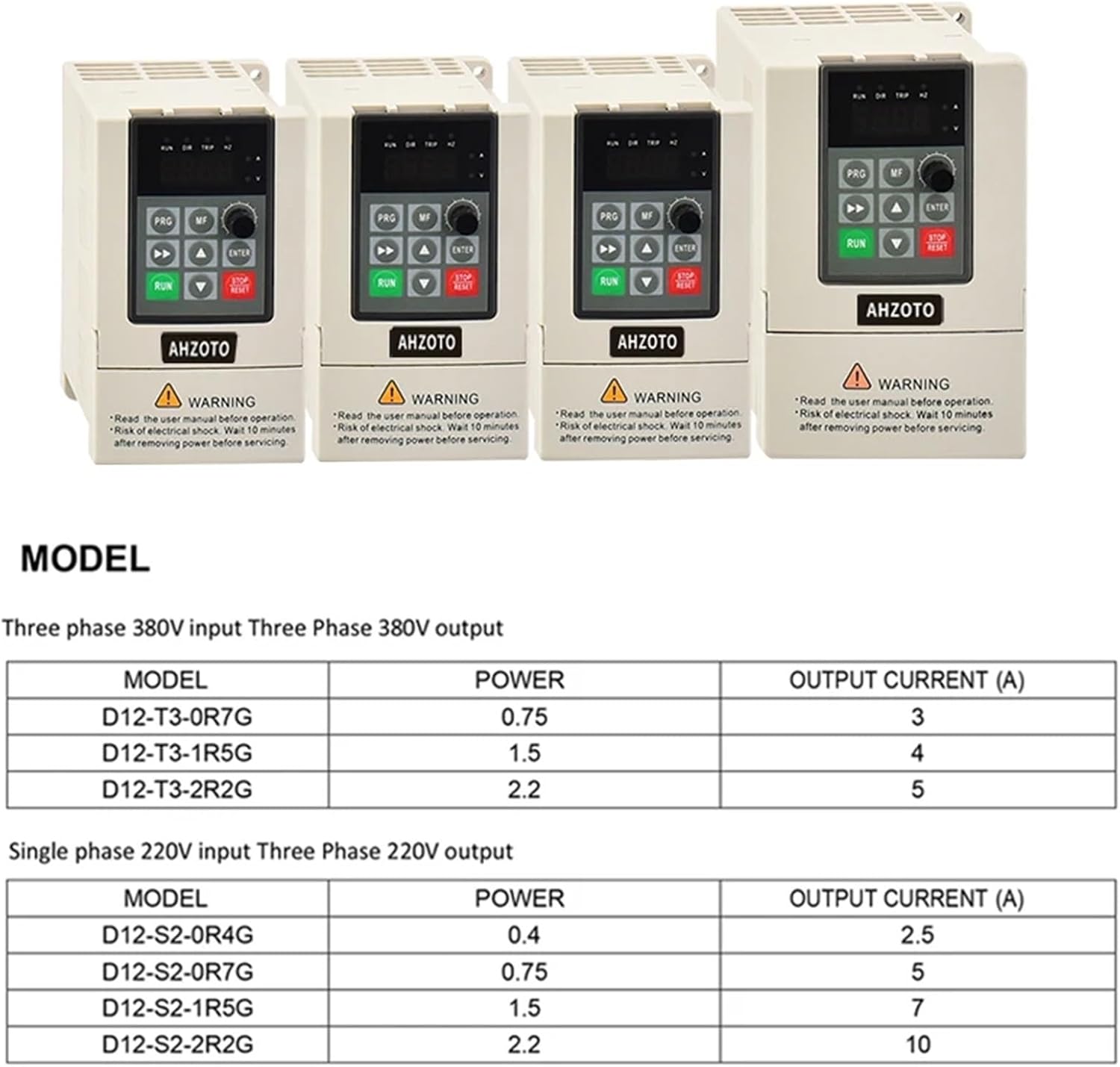
Image: Model specification table for AHD12 series, including power and output current ratings.
7. Warranty and Support
This product comes with a standard manufacturer's warranty. For warranty details, technical support, or service inquiries, please refer to the contact information provided with your purchase or visit the official MDWXDOFP website.