
1. Introduction
Thank you for choosing the Enzemit G10 Bluetooth Smart Sunglasses. These innovative sunglasses integrate audio functionality with eye protection, offering a unique blend of technology and style. Designed for comfort and convenience, the G10 allows you to enjoy music, make calls, and access voice assistance without the need for additional earphones, all while protecting your eyes from harmful UV rays and blue light.
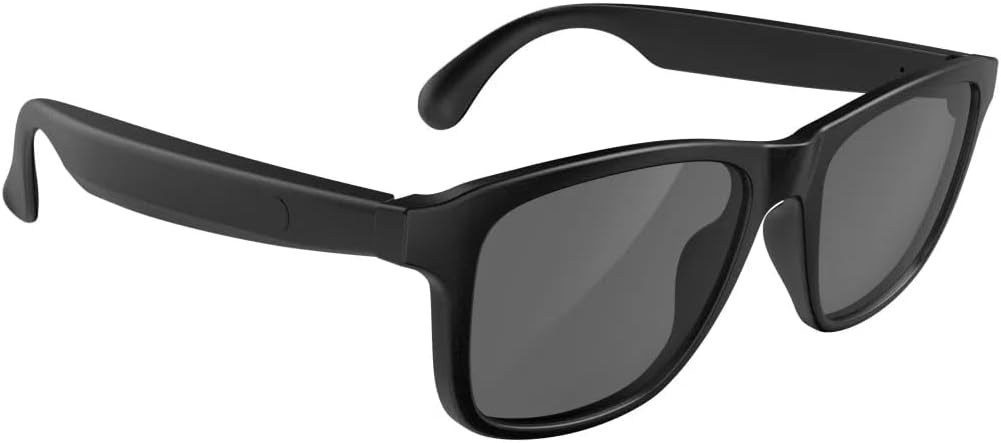
A pair of black Enzemit G10 Bluetooth Smart Sunglasses, showcasing their sleek design.
2. Product Overview
The Enzemit G10 Smart Sunglasses are engineered with several key features to enhance your daily experience:
- Integrated Sound and Vision: Enjoy audio directly from the sunglasses, eliminating the need for separate headphones.
- Premium UV400 Polarized Lenses: Provides full protection against ultraviolet rays, ensuring clear vision and eye comfort outdoors.
- Blue Light Blocking: Lenses are designed to reduce blue light exposure, preventing eye fatigue.
- Long-Lasting Battery: A built-in 160mAh lithium-ion battery offers extended usage times.
- Advanced Bluetooth 5.3 Technology: Ensures stable, fast, and compatible wireless connections.
- Built-in Microphone & Smart Voice Assistant: Supports hands-free calls and voice commands (e.g., Siri).

An infographic showcasing key features: immersive stereo speakers, advanced Bluetooth 5.3 technology, and extended battery life.

This image emphasizes the directional speaker technology in the Enzemit G10 Smart Sunglasses, illustrating how sound is directed towards the ear.

A visual representation of the open-ear design of the Enzemit G10 Smart Sunglasses, allowing users to hear their surroundings while enjoying audio.
3. Package Contents
Please verify that all items are present in your package:
- 1 x Enzemit G10 Smart Glasses
- 1 x Charging Cable
- 1 x Glasses Cleaning Cloth
- 1 x Glasses Box
4. Setup
4.1 Charging the Sunglasses
Before initial use, fully charge your Enzemit G10 Smart Sunglasses. Use the provided magnetic charging cable.
- Connect the magnetic end of the charging cable to the charging port on the sunglasses' temple.
- Connect the USB end of the cable to a standard USB power adapter (not included) or a computer's USB port.
- The indicator light will show charging status (refer to LED indicator section for details, if available).
- A full charge typically takes 1.5 to 2 hours.

The image shows the Enzemit G10 Smart Sunglasses being charged via its magnetic charging port, with a close-up of the magnetic connector.

This graphic illustrates the battery performance of the Enzemit G10 Smart Sunglasses, detailing 4 hours of music play, 5 hours of call time, 1.5 hours for recharging, and 100 hours of standby time.
4.2 Bluetooth Pairing
To connect your sunglasses to a smartphone or other Bluetooth-enabled device:
- Ensure the sunglasses are charged and powered off.
- Press and hold the power button (or designated touch area) for approximately 5 seconds until the indicator light flashes, indicating pairing mode.
- On your smartphone, navigate to Bluetooth settings and turn Bluetooth on.
- Search for available devices and select "G10" from the list.
- Once connected, the indicator light on the sunglasses will change (e.g., solid blue or slow flash).

An illustration depicting the Enzemit G10 Smart Sunglasses wirelessly connecting to a smartphone, symbolizing Bluetooth pairing.
5. Operating Instructions
The Enzemit G10 Smart Sunglasses feature intuitive touch controls located on the temples. Refer to the diagram below for specific functions:

This image displays the touch control functions on the Enzemit G10 Smart Sunglasses, including power, voice assistant, play/pause, and call management.

A close-up image showing a finger interacting with the touch control area on the temple of the Enzemit G10 Smart Sunglasses.
5.1 Power On/Off
- Power On: Tap the touch control area for 2 seconds.
- Power Off: Tap the touch control area for 5 seconds.
5.2 Music Playback
- Play/Pause: One tap on the touch control area.
5.3 Call Management
- Answer Call: Tap on the right temple.
- End Call: One tap on the touch control area.
- Reject Call: Tap on the left temple.
5.4 Voice Assistant
- Activate Voice Assistant (e.g., Siri): Tap the touch control area for 2 seconds.
6. Maintenance
To ensure the longevity and optimal performance of your Enzemit G10 Smart Sunglasses, follow these maintenance guidelines:
- Cleaning Lenses: Use the provided glasses cleaning cloth to gently wipe the lenses. Avoid using abrasive materials or harsh chemicals that could scratch or damage the lens coating.
- Cleaning Frame: Wipe the frame with a soft, damp cloth. Do not submerge the sunglasses in water.
- Storage: When not in use, store the sunglasses in the provided glasses box to protect them from dust, scratches, and impacts.
- Avoid Extreme Temperatures: Do not expose the sunglasses to extreme heat or cold, as this can damage the battery and electronic components.
- Water Resistance: The sunglasses may have a degree of water resistance (e.g., IPX4 for splash resistance), but they are not designed for swimming or submersion. Avoid direct contact with excessive water.
7. Troubleshooting
If you encounter issues with your Enzemit G10 Smart Sunglasses, refer to the following common solutions:
| Problem | Possible Cause | Solution |
|---|---|---|
| Sunglasses do not power on. | Low battery. | Charge the sunglasses fully using the provided cable. |
| Cannot pair with Bluetooth device. | Sunglasses not in pairing mode; Bluetooth off on device; device too far. | Ensure sunglasses are in pairing mode (flashing indicator). Turn Bluetooth on your device. Keep devices within 10 meters. |
| No sound or low volume. | Volume too low on sunglasses or connected device; connection issue. | Adjust volume on both sunglasses and connected device. Reconnect Bluetooth. |
| Voice assistant not responding. | Incorrect activation gesture; device not connected. | Ensure you are tapping for 2 seconds. Verify Bluetooth connection. |
If the problem persists after trying these solutions, please contact customer support.
8. Specifications
Detailed technical specifications for the Enzemit G10 Smart Sunglasses:
- Model Name: G10 Smart glasses
- Brand: Enzemit
- Item Model Number: G10
- Connectivity Technology: Bluetooth
- Wireless Communication Standard: Bluetooth 5.3
- Battery: 2 Lithium Ion batteries (included)
- Battery Capacity: 160mAh (approximate)
- Charging Time: 1.5 - 2 hours
- Music Playtime: Up to 4 hours
- Call Time: Up to 5 hours
- Standby Time: Up to 100 hours
- Item Weight: 3.52 ounces
- Special Features: Lightweight, Music Player, Phone Call, Voice Call
- Manufacturer: Shenzhen Gonbes Technology Co.,Ltd

A diagram from a top-down perspective, labeling key components such as dual directional speakers, magnetic charging port, microphone, and changeable front frame.

A technical drawing providing the dimensions of the Enzemit G10 Smart Sunglasses, including frame width, lens height, and temple length.
9. Warranty and Support
9.1 Warranty Information
The Enzemit G10 Smart Sunglasses come with a limited manufacturer's warranty. Please refer to the product packaging or the official Enzemit website for specific warranty terms and conditions. This warranty typically covers defects in materials and workmanship under normal use.
9.2 Customer Support
For technical assistance, troubleshooting, or warranty claims, please contact Enzemit customer support through the retailer where the product was purchased or visit the official Enzemit website for contact information.