
aicoco StreamCam OnAir
Aicoco StreamCam OnAir 4K Wireless Live Streaming Camera User Manual
Model: StreamCam OnAir (ASIN: B0DB1R3JDG)
1. Introduction
This manual provides detailed instructions for the setup, operation, and maintenance of your Aicoco StreamCam OnAir 4K Wireless Live Streaming Camera. Designed for professional live streaming and content creation, this compact and portable camera offers high-quality 4K video recording, extended battery life, and robust environmental resistance. Please read this manual thoroughly before using the device to ensure optimal performance and longevity.
2. Product Overview
2.1 Key Features
- Professional Live Streaming: Dedicated camera for live streaming and content creation, compact and portable.
- 180° Rotating Lens: Allows for easy switching between front-facing and first-person shooting perspectives.
- Extended Battery Life: 3500 mAh battery provides up to 270 minutes of continuous recording (720P mode).
- Hot-Swappable Batteries: Unique backup power system supports battery replacement during live streams without interruption.
- 4K30 fps Video Recording: Supports high-resolution video capture with a powerful image sensor for clear and vivid live streams.
- Dual-Mic Stereo Audio: Built-in dual microphone array for omnidirectional sound reception and clear audio, even in noisy environments.
- 3.5mm Audio Input: Supports external audio input for enhanced sound quality.
- IPx4 Rain-Resistant: Suitable for both outdoor and indoor use, offering protection against rain.
- Heat-Resistant: Designed to handle high external temperatures with a built-in cooling system, operating from -20°C to 75°C (-4°F to 167°F).
- Easy Operation: Remote control via Aicoco live APP and wireless connection to PC for multi-device streaming.
- 1/4" Screw Interface: Compatible with various accessories like brackets, selfie sticks, and external microphones.
2.2 Camera Components

Figure 2.2.1: Front view of the Aicoco StreamCam OnAir camera, showing the main lens, display screen, and control buttons.
- 1. Lens: 180° rotatable lens for versatile shooting angles.
- 2. Display Screen: Touchscreen interface for settings and preview.
- 3. Power Button: Located on the front, below the screen.
- 4. Record Button: Located on the front, below the screen.
- 5. Battery Compartment: Located on the side for hot-swappable battery.
- 6. SD Card Slot: Located within the battery compartment.
- 7. 1/4" Thread Adapter: For mounting on tripods and other accessories (located on the bottom).
- 8. 3.5mm Audio Jack: For external microphone input.
- 9. USB-C Port: For charging and data transfer.
- 10. Dual Microphones: Built-in for stereo audio capture.
3. Setup
3.1 Charging the Battery
The Aicoco StreamCam OnAir comes with a 3500 mAh Lithium Polymer battery. For optimal performance, fully charge the battery before first use.
- Locate the USB-C port on the camera.
- Connect the provided 1.8m USB-C cable to the camera and a 5V adapter or power bank.
- The charging indicator light will show the charging status. A full charge can provide up to 270 minutes of continuous recording (in 720P mode).

Figure 3.1.1: The camera's battery compartment, illustrating the hot-swappable battery feature for continuous operation.
3.2 Inserting the SD Card
A universal camera SD card is required for video recording. Ensure the camera is powered off before inserting or removing the SD card.
- Open the battery compartment.
- Locate the SD card slot inside the compartment.
- Gently insert the Micro SD card into the slot until it clicks into place.
- Close the battery compartment securely.
3.3 Initial Power-On
To power on the camera, press and hold the Power Button located below the screen. The camera will boot up in approximately 20 seconds, displaying the live view on the touchscreen.
4. Operation
4.1 Basic Controls and Touchscreen Navigation
The camera features a sensitive touchscreen for intuitive control. Swipe gestures allow access to various settings and modes.
- Power On/Off: Press and hold the Power Button.
- Start/Stop Recording: Tap the Record Button.
- Access Settings: Swipe down on the touchscreen to reveal camera settings and connection options.
- View Library: Swipe left on the touchscreen to access recorded videos and photos.
- Return to Live View: Swipe right from the library or settings screen.
4.2 Video Recording and Resolution
The Aicoco StreamCam OnAir supports 4K30 fps and 1080P60 fps video recording. Adjust resolution and frame rate via the video settings menu on the touchscreen.
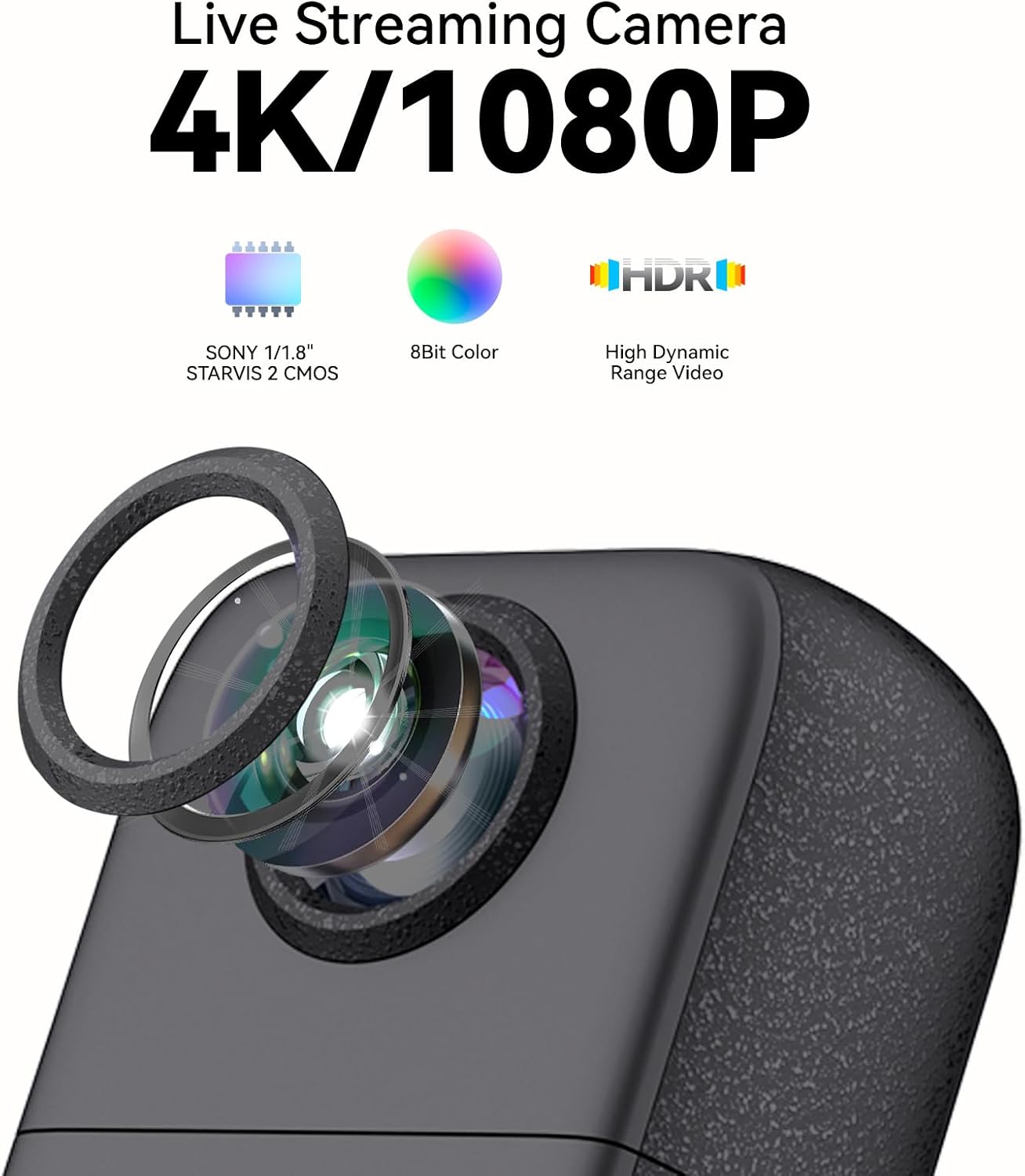
Figure 4.2.1: Illustrates the camera's 4K/1080P recording capabilities, SONY 1/1.8" STARVIS 2 CMOS sensor, 8Bit Color, and HDR video support.
4.3 180° Rotating Lens
The camera's lens can be manually rotated 180 degrees, allowing for flexible shooting perspectives, including first-person view and selfie/vlog mode.

Figure 4.3.1: Demonstrates the 180° rotatable lens, ideal for various streaming scenarios from fishing to music performances.
4.4 External Audio Input
For enhanced audio quality, connect an external microphone via the 3.5mm audio jack. The built-in dual microphones provide clear stereo sound for general use.

Figure 4.4.1: Shows the camera connected to an external sound card and microphone via the 3.5mm jack for high-definition audio input.
4.5 Connectivity Options (Webcam & Wireless Streaming)
The camera can function as a plug-and-play USB webcam or connect wirelessly to a PC for multi-device streaming.
- USB Camera: Connect directly to your PC via USB-C. No capture card is required.
- Wireless Connection: Use the Aicoco wireless camera assistant (PC side) to connect multiple devices wirelessly.
- Live Streaming App: Use the Aicoco live APP on your mobile phone to remotely control the camera and start broadcasting.

Figure 4.5.1: Depicts the camera's versatility as a USB camera (no capture card needed) and a 4K ultra-clear anti-shake webcam for live streaming.
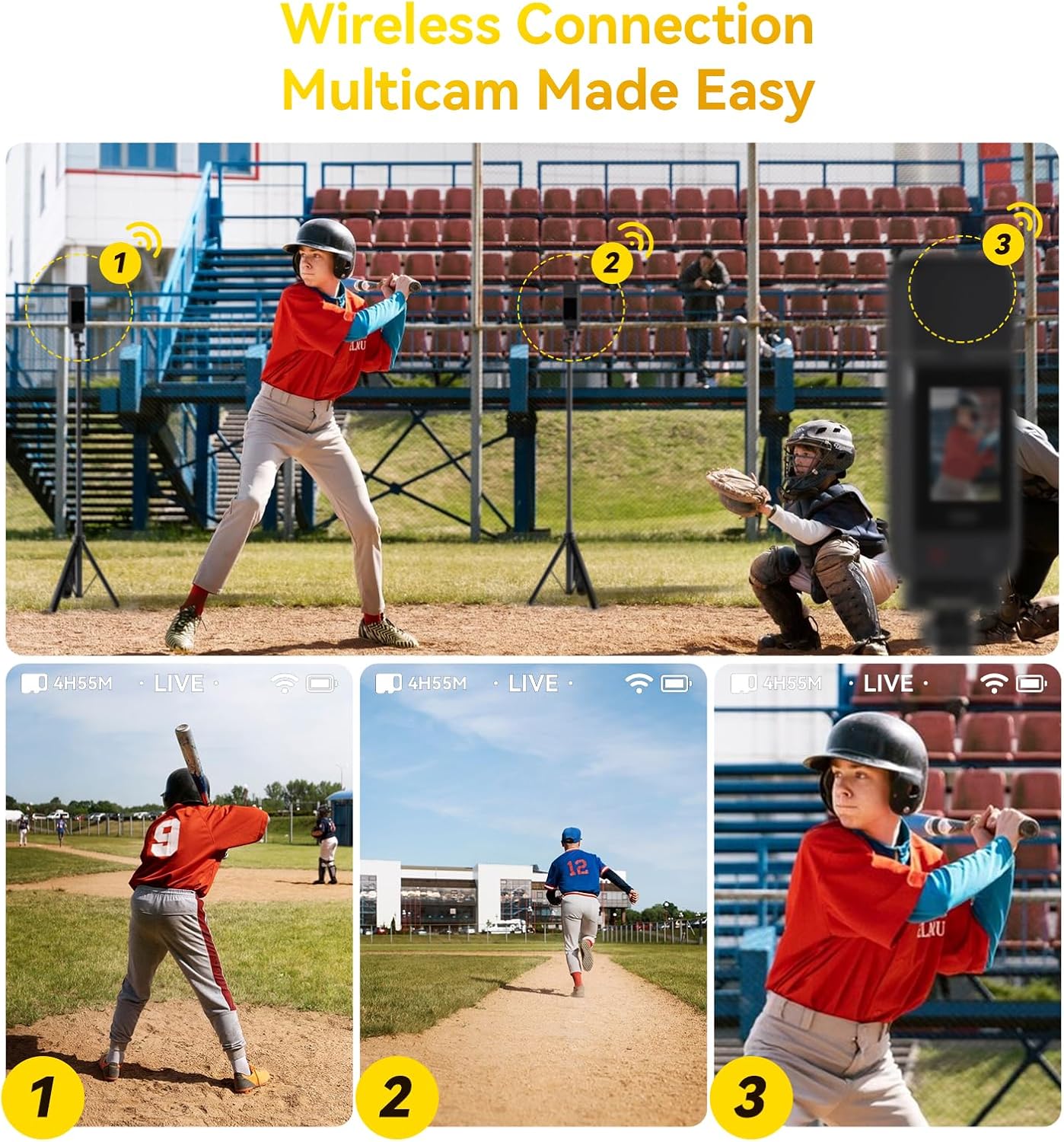
Figure 4.5.2: Illustrates the ease of wireless multicam connection, allowing multiple cameras to be used for a single live stream.
5. Maintenance
5.1 Cleaning the Camera
- Use a soft, dry cloth to clean the camera body.
- For the lens, use a specialized lens cleaning cloth and solution to avoid scratches.
- Do not use harsh chemicals or abrasive materials.
5.2 Environmental Considerations
The camera is designed for durability in various conditions.
- Temperature: Operates effectively from -20°C to 75°C (-4°F to 167°F).
- Water Resistance: IPx4 rain-resistant, meaning it can withstand splashing water from any direction. Do not submerge the camera in water.
- Overheating Prevention: Features a built-in high-speed micro-fan airflow channel and cooling system to prevent overheating during extended use.

Figure 5.2.1: The camera's robust design, highlighting its heat resistance up to 167°F (75°C) and IPx4 rain-proof rating, making it suitable for outdoor environments.
5.3 Storage
When not in use, store the camera in a cool, dry place, away from direct sunlight and extreme temperatures. Use the provided storage bag for protection.
6. Troubleshooting
| Problem | Possible Cause | Solution |
|---|---|---|
| Camera does not power on. | Low or no battery charge. | Charge the battery fully. Ensure the battery is correctly inserted. |
| Recording stops unexpectedly. | SD card full or corrupted; low battery. | Check SD card storage, format if necessary. Charge or replace battery. |
| Poor video quality. | Incorrect resolution settings; dirty lens. | Adjust video settings to 4K30fps. Clean the camera lens. |
| Cannot connect to mobile app/PC. | Incorrect Wi-Fi settings; app not updated. | Ensure correct Wi-Fi network is selected. Update Aicoco live APP/PC assistant. Restart camera and device. |
| Camera feels hot during use. | Normal operation, especially during 4K recording. | The camera has a built-in cooling system. If it becomes excessively hot, power off and allow it to cool down. |
7. Specifications
| Feature | Detail |
|---|---|
| Brand | aicoco |
| Model Name | StreamCam OnAir |
| Item Weight | 10.6 ounces |
| Package Dimensions | 5.51 x 2.17 x 1.38 inches |
| Batteries | 1 Lithium Polymer battery (included) |
| Color | BLACK |
| Special Features | 4K Wireless Live, HDR, High and low temperature resistant, Hot-swappable battery, SONY STARVIS 2 CMOS |
| Photo Sensor Technology | CMOS |
| Video Capture Resolution | 4K |
| Maximum Focal Length | 24 |
| Flash Memory Type | Micro SD |
| Video Capture Format | MP4 |
| Supported Audio Format | AAC, MP3 |
| Screen Size | 2.4 Inches |
| Connectivity Technology | USB |
| Operating Temperature Range | -20°C to 75°C (-4°F to 167°F) |
| Water Resistance Rating | IPx4 (Rain-Proof) |
8. What's in the Box
- Aicoco Live Broadcast Camera x1
- 1.8m USB-C Cable x1
- 1/4 inch Screw Adapter x1
- Cold Shoe Adapter x1
- Storage Bag x1
- Lithium Polymer Battery x1
9. Warranty and Support
Your Aicoco StreamCam OnAir camera is covered by a manufacturer's warranty. For specific warranty terms and conditions, please refer to the warranty card included in your product packaging or visit the official Aicoco website.
For technical support, troubleshooting assistance, or any inquiries regarding your product, please contact Aicoco customer service through their official channels. Keep your purchase receipt as proof of purchase for warranty claims.
Ask a question about this manual
Ask about setup, troubleshooting, compatibility, parts, safety, or missing instructions. Manuals+ will review the question and use this page’s manual context to help answer it.