
1. Introduction
Thank you for choosing the GOOLOO GE1200 & A3 Portable Jump Starter with Air Compressor. This device is designed to provide reliable jump-starting for vehicles, inflate tires, and serve as a portable power bank and LED flashlight. Please read this manual thoroughly before use to ensure safe and optimal performance.
2. Safety Information
WARNING: Improper use may result in injury or damage to the device or vehicle. Always follow these safety guidelines.
- Do not immerse the device in water.
- Do not operate the device in explosive atmospheres, such as in the presence of flammable liquids, gases, or dust.
- Keep the device away from children.
- Do not jump start a frozen battery.
- Ensure proper polarity connection (red clamp to positive, black clamp to negative) to avoid sparks or damage.
- Do not connect the positive and negative clamps together.
- If the battery clamps touch each other, sparks may occur.
- Do not use the jump starter if the cables or clamps are damaged.
- Disconnect the clamps from the vehicle battery within 30 seconds after the vehicle starts.
- Do not over-inflate tires. Always check the manufacturer's recommended tire pressure.
- Store the device in a cool, dry place when not in use.
3. Product Overview
The GOOLOO GE1200 & A3 combines multiple functions into a compact unit. Familiarize yourself with its components.

Image: The GOOLOO GE1200 (left) and A3 (right) portable jump starters, showcasing their design and included jumper cables and air hose.
Key Components:
- Jump Start Port
- Smart Jumper Cables (Red for Positive, Black for Negative)
- Air Compressor Hose with Nozzles
- Digital Display (for A3 model, showing battery level, pressure)
- USB Output Ports (for power bank function)
- USB-C Input/Output Port
- DC Output Port
- LED Flashlight
- Power Button
- Mode/Unit Button (for A3 air compressor)
4. Charging the Device
Before first use, fully charge the GOOLOO jump starter. It is recommended to recharge the device every 3-6 months to maintain battery health, even when not in use.
Charging Steps:
- Connect the provided USB-C charging cable to the device's USB-C input port.
- Connect the other end of the cable to a USB wall adapter (not included) or a powered USB port.
- The battery indicator lights or digital display will show the charging progress.
- Charging is complete when all indicator lights are solid or the display shows 100%. A full charge typically takes 3-4 hours.
5. Operating the Jump Starter
This device is designed to jump start 12V vehicles. The GE1200 supports up to 8.0L gas and 6.0L diesel engines, while the A3 supports up to 9.0L gas and 6.5L diesel engines.

Image: The GOOLOO A3 jump starter connected to a car battery, illustrating its use for jump-starting various vehicle types.
Jump Starting Steps:
- Ensure the jump starter is sufficiently charged.
- Connect the smart jumper cable's blue plug into the jump start port on the device.
- Attach the red (positive) clamp to the positive (+) terminal of the vehicle's battery.
- Attach the black (negative) clamp to the negative (-) terminal of the vehicle's battery.
- Check the indicator light on the smart jumper cable. A solid green light indicates a safe connection. If it's red or flashing, check connections and battery voltage.
- If the vehicle battery is extremely low, press the "BOOST" button on the smart cable (if available) for 3 seconds until the green light is solid.
- Start the vehicle.
- Once the vehicle starts, immediately remove the clamps from the vehicle battery (black first, then red) within 30 seconds.
- Disconnect the smart jumper cable from the jump starter.

Image: Visual representation of the GOOLOO jump starter's safety features, including protection against over-charge, over-current, short-circuit, reverse-polarity, low-temp, high-temp, spark-proof, over-voltage, over-load, and reverse-charge.
6. Operating the Air Compressor (A3 Model)
The A3 model includes a 150PSI air compressor for inflating tires and other inflatables.
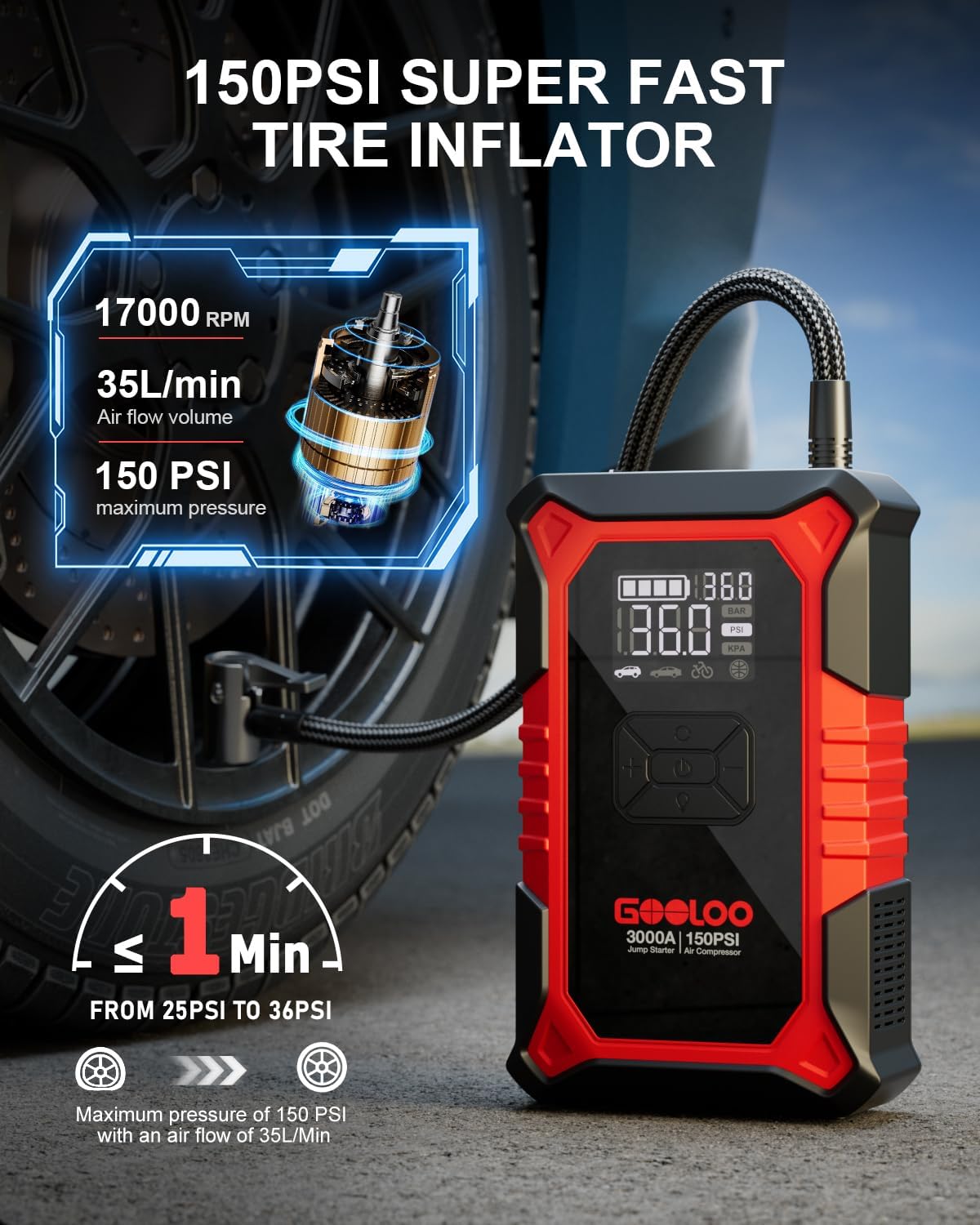
Image: The GOOLOO A3 jump starter actively inflating a car tire, displaying its digital pressure gauge and highlighting its 150PSI maximum pressure and 35L/min airflow.
Tire Inflation Steps:
- Connect the air hose to the air output port on the device.
- Screw the air hose nozzle onto the tire valve stem.
- Turn on the device. The digital display will show the current tire pressure.
- Use the '+' and '-' buttons to set the desired pressure. The A3 offers 5 inflation modes (SUV, Car, Bike, Ball, Customizable) and supports unit switching (BAR/PSI/KPA).
- Press the inflation button to start the compressor.
- The compressor will automatically shut off once the preset pressure is reached.
- Unscrew the air hose nozzle from the tire valve and disconnect the hose from the device.

Image: The GOOLOO A3 jump starter on a pedestal, surrounded by a car, motorcycle, bicycle, and ball, illustrating its capacity to inflate various items on a single charge.
7. Power Bank Functionality
The GOOLOO jump starter can also charge your electronic devices.

Image: The GOOLOO jump starter (Elite series) simultaneously charging a smartphone and a tablet via its dual USB output ports, demonstrating its quick charging capabilities.
Charging Devices:
- Connect your device's USB charging cable to one of the jump starter's USB output ports (Output1: 5V/2.4A, Output2: 5V/9V/12V, USB-C IN/OUT: 5V/3A).
- The jump starter will automatically begin charging your device.
- Disconnect your device once charging is complete.
8. LED Flashlight Functionality
The built-in LED flashlight provides illumination for various situations.
Using the Flashlight:
- Press and hold the power button for 3 seconds to turn on the LED flashlight.
- Press the power button again to cycle through modes: Solid light, SOS signal, Strobe light.
- Press and hold the power button again to turn off the flashlight.
9. Maintenance and Storage
Proper maintenance ensures the longevity and performance of your GOOLOO jump starter.

Image: The GOOLOO jump starter shown in both a hot desert environment (140°F) and a snowy landscape (-4°F), illustrating its ability to function in extreme temperatures.
- Cleaning: Use a dry, soft cloth to wipe the device. Do not use harsh chemicals or abrasive materials.
- Storage: Store the device in a cool, dry place between -4°F to 140°F (-20°C to 60°C). Avoid direct sunlight and high humidity.
- Battery Care: Recharge the device every 3-6 months, even if not used, to prevent deep discharge and prolong battery life.
- Cable Care: Inspect jumper cables and air hose for any damage before each use.
10. Troubleshooting
If you encounter issues, refer to the following common problems and solutions:
| Problem | Possible Cause | Solution |
|---|---|---|
| Vehicle does not start. | Low charge on jump starter; incorrect cable connection; vehicle battery completely dead. | Ensure jump starter is fully charged. Check cable connections for correct polarity. Use the BOOST function if the vehicle battery is very low. |
| Smart cable indicator is red/flashing. | Reverse polarity; short circuit; over-temperature. | Disconnect and re-connect clamps correctly. Ensure clamps are not touching. Allow device to cool down if overheated. |
| Air compressor not inflating. | Hose not securely connected; incorrect pressure setting; low battery. | Check hose connection to valve and device. Verify desired pressure is set. Recharge the jump starter. |
| Device not charging. | Faulty cable or adapter; charging port issue. | Try a different USB-C cable and wall adapter. Contact support if issue persists. |
If these solutions do not resolve the issue, please contact GOOLOO customer support.
11. Specifications
| Feature | Specification |
|---|---|
| Peak Current (GE1200) | 2000A |
| Peak Current (A3) | 3000A |
| Engine Compatibility (GE1200) | Up to 8.0L Gas / 6.0L Diesel |
| Engine Compatibility (A3) | Up to 9.0L Gas / 6.5L Diesel |
| Air Compressor Pressure (A3) | 150 PSI Max |
| Air Flow (A3) | 35L/Min |
| Operating Temperature | -4°F to 140°F (-20°C to 60°C) |
| USB Output 1 | 5V/2.4A |
| USB Output 2 | 5V/9V/12V |
| USB-C Input/Output | 5V/3A |
| DC Output | 15V/10A |
12. Warranty and Support
GOOLOO products come with a standard warranty. For detailed warranty information, product support, or to report any issues, please visit the official GOOLOO website or contact their customer service directly. Keep your purchase receipt as proof of purchase.
For further assistance, please refer to the contact information provided with your product packaging or on the GOOLOO official website.