
HARDELL A41-HDETJP37-1-1
HARDELL Mini Rotary Tool 3.7V USB Cordless Rechargeable
Model: A41-HDETJP37-1-1
1. Safety Instructions
Please read and understand all safety warnings and instructions before operating this tool. Failure to follow the warnings and instructions may result in electric shock, fire, and/or serious injury.
- Always wear appropriate personal protective equipment, such as safety glasses, when operating the rotary tool.
- Keep your work area clean and well-lit. Cluttered or dark areas invite accidents.
- Do not operate power tools in explosive atmospheres, such as in the presence of flammable liquids, gases, or dust.
- Keep children and bystanders away while operating a power tool. Distractions can cause you to lose control.
- Avoid accidental starting. Ensure the switch is in the off-position before connecting to a battery pack, picking up or carrying the tool.
- Do not overreach. Keep proper footing and balance at all times. This enables better control of the power tool in unexpected situations.
- Disconnect the battery pack from the power tool before making any adjustments, changing accessories, or storing power tools.
- Use the power tool, accessories, and tool bits in accordance with these instructions, taking into account the working conditions and the work to be performed.
- Do not expose power tools to rain or wet conditions. Water entering a power tool will increase the risk of electric shock.
2. Product Overview
The HARDELL Mini Rotary Tool is a versatile, cordless, and rechargeable pen-type tool designed for various precision tasks. Its compact and ergonomic design ensures comfortable handling and ease of use for detailed work.
Key Features:
- Cordless USB Rechargeable: Offers freedom of movement without power cords.
- High Rotation Speed: Up to 37000 RPM for efficient material removal.
- Stable Operation: Maintains stability even at high speeds.
- Large Capacity Battery: Provides extended working time.
- One-Touch Switch: Simple and convenient power control.
- Compact & Lightweight: Ergonomic pen-type design for comfortable grip and portability.
- Quiet Operation: Designed for minimal noise during use.
Package Contents:
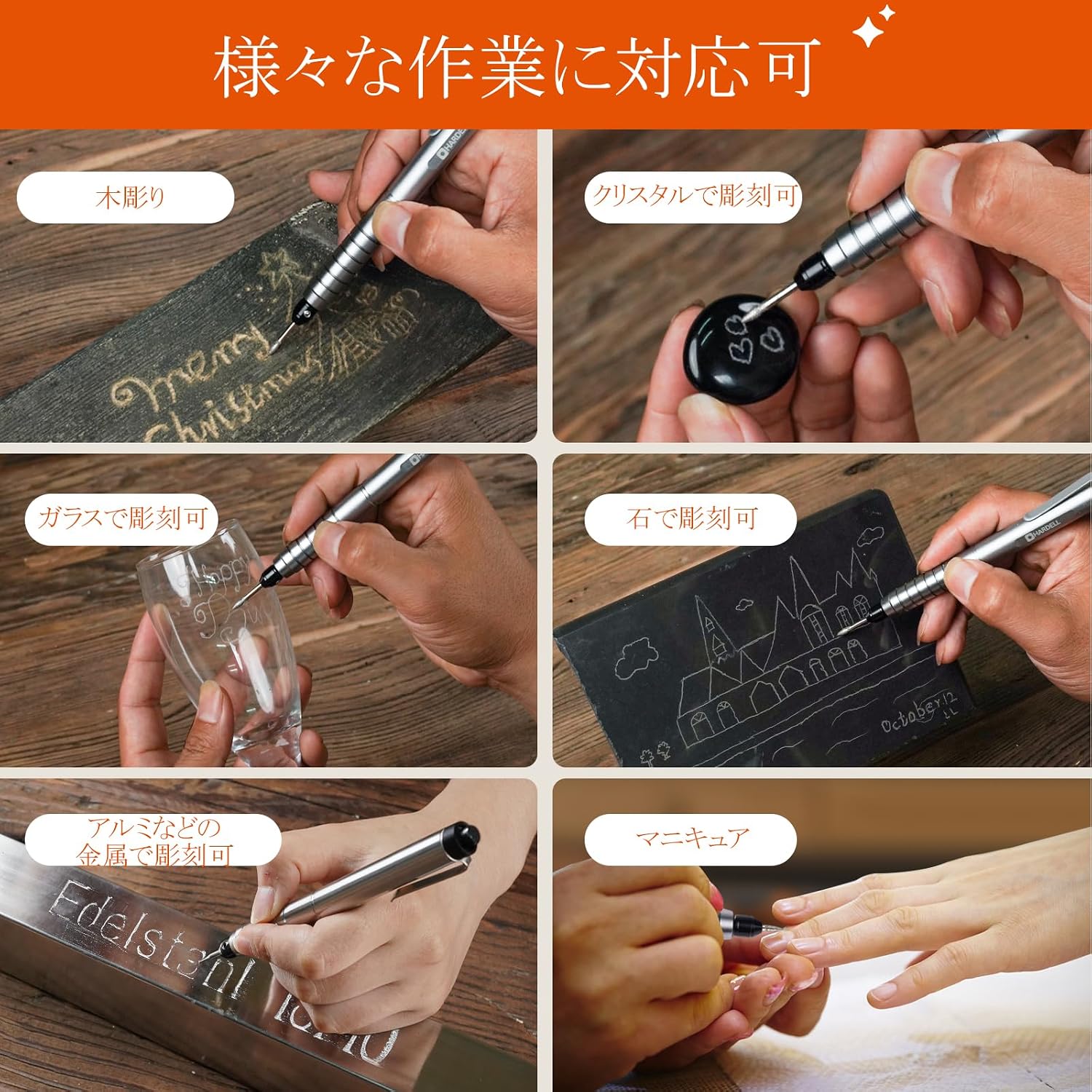
Image displaying the HARDELL Mini Rotary Tool kit, including the tool, various diamond bits, hex wrench, screws, battery, battery charger, and instruction manual.
- Mini Rotary Tool Body x1
- Diamond Bits x6
- Hex Wrench x1
- Screws x2
- Instruction Manual x1
- Battery x1
- Battery Charger x1
3. Setup
3.1 Attaching Accessories (Bits):

Three-step image demonstrating how to attach accessories: 1. Loosen the chuck screw with a hex wrench. 2. Insert the appropriate bit. 3. Tighten the screw with the hex wrench.
- Using the provided hex wrench, loosen the chuck screw at the tip of the rotary tool.
- Insert the desired accessory bit into the chuck. Ensure the bit is fully seated.
- Tighten the chuck screw firmly with the hex wrench to secure the bit. Do not overtighten.
3.2 Battery Installation and Charging:

Three-step image demonstrating battery installation and charging: 1. Twist the tool body to remove the battery. 2. Insert the battery into the charger, observing polarity. 3. Ensure the battery is correctly placed for charging.
- To access the battery compartment, gently twist the rotary tool body to separate the sections.
- Remove the battery and insert it into the provided battery charger. Pay close attention to the positive (+) and negative (-) polarity markings on both the battery and the charger.
- Connect the USB cable from the charger to a suitable USB power source (e.g., wall adapter, computer USB port). The charger's indicator light will show charging status.
- Once fully charged, disconnect the charger and reinsert the battery into the rotary tool, ensuring correct polarity, then reassemble the tool body.
4. Operating Instructions
4.1 Power On/Off:

Image showing a hand operating the one-touch switch on the HARDELL Mini Rotary Tool for easy power control.
The HARDELL Mini Rotary Tool features a convenient one-touch switch. Press the power button once to turn the tool on. Press it again to turn the tool off.
4.2 Speed Adjustment:
This tool offers 5-speed settings, allowing you to adjust the rotation speed according to the material and task. Refer to the tool's controls for specific speed selection. Start with a lower speed for delicate work and gradually increase for more aggressive material removal.
4.3 General Usage Tips:

Image showing the HARDELL Mini Rotary Tool being used for various tasks: wood carving, crystal engraving, glass engraving, metal engraving, and manicure.
- Always test the tool on a scrap piece of material before working on your final project.
- Apply light and consistent pressure. Excessive force can damage the tool, the bit, or the workpiece, and may lead to overheating.
- Allow the tool to do the work. The high rotation speed is designed for efficient material removal with minimal pressure.
- For prolonged use, take short breaks to allow the tool to cool down and prevent overheating.
- Ensure the workpiece is securely clamped or held to prevent movement during operation.
5. Maintenance
Regular maintenance ensures the longevity and optimal performance of your HARDELL Mini Rotary Tool.
- Cleaning: After each use, disconnect the battery and use a soft, dry cloth to wipe down the tool body. Use a small brush or compressed air to clear any dust or debris from the chuck and ventilation openings. Do not use harsh chemicals or abrasive cleaners.
- Bit Care: Inspect bits regularly for wear or damage. Replace dull or damaged bits to ensure efficient and safe operation. Clean bits after use to remove accumulated material.
- Battery Care: Store the battery in a cool, dry place away from direct sunlight and extreme temperatures. Do not store fully discharged batteries for extended periods.
- Storage: Store the rotary tool and its accessories in a clean, dry place, out of reach of children.
6. Troubleshooting
If you encounter issues with your HARDELL Mini Rotary Tool, refer to the following common problems and solutions:
| Problem | Possible Cause | Solution |
|---|---|---|
| Tool does not turn on. | Battery is discharged or incorrectly installed. | Charge the battery fully. Ensure the battery is inserted with correct polarity. |
| Tool stops rotating during use. | Excessive pressure applied; battery low; bit jammed. | Reduce pressure. Recharge battery. Check for obstructions and clear if necessary. |
| Tool overheats. | Continuous heavy use; blocked ventilation. | Allow the tool to cool down. Take breaks during prolonged use. Ensure ventilation openings are clear of debris. |
| Bit wobbles or is not secure. | Chuck screw loose; incorrect bit size. | Tighten the chuck screw firmly. Ensure the bit is compatible with the chuck size. |
| Reduced performance/power. | Battery low; worn out bit. | Recharge the battery. Replace the bit if it is dull or damaged. |
7. Specifications

Close-up image of the rotary tool's internal mechanism, highlighting its 37000 RPM rotation speed, stable operation, and large capacity battery.
- Brand: HARDELL
- Model Number: A41-HDETJP37-1-1
- Power Source: Battery-powered
- Battery Voltage: 3.7V
- Max Rotation Speed: 37000 RPM
- Speed Settings: 5-speed adjustable
- Charging Type: USB Rechargeable
- Color: Silver
- Unit Count: 1
- Included Components: Mini Rotary Tool, Diamond Bits, Hex Wrench, Screws, Battery, Battery Charger, Instruction Manual
8. Warranty and Support
For warranty information, technical support, or any inquiries regarding your HARDELL Mini Rotary Tool, please refer to the contact details provided in the included instruction manual or visit the official HARDELL website. Keep your purchase receipt as proof of purchase for warranty claims.
Related documentsA41-HDETJP37-1-1


Ask a question about this manual
Ask about setup, troubleshooting, compatibility, parts, safety, or missing instructions. Manuals+ will review the question and use this page’s manual context to help answer it.