
Introduction
This manual provides essential instructions for the safe and efficient operation of your Jocca 2313 Cordless Handheld Vacuum Cleaner. Please read it thoroughly before initial use and retain it for future reference. This appliance is designed for household cleaning tasks, offering convenience and portability.
Safety Instructions
To reduce the risk of fire, electric shock, or injury, always follow basic safety precautions when using electrical appliances.
- Read all instructions carefully before operating the vacuum cleaner.
- Do not use outdoors or on wet surfaces. This vacuum is intended for indoor use.
- Do not allow the vacuum cleaner to be used as a toy. Close attention is necessary when used by or near children.
- Use only as described in this manual. Use only manufacturer's recommended attachments.
- Do not handle the charger or vacuum cleaner with wet hands.
- Do not vacuum flammable or combustible liquids, such as gasoline, or use in areas where they may be present.
- Do not vacuum anything that is burning or smoking, such as cigarettes, matches, or hot ashes.
- Keep hair, loose clothing, fingers, and all parts of the body away from openings and moving parts.
- Turn off all controls before unplugging.
- Use only the charging cable provided by the manufacturer.
- Do not use with a damaged charging cable or plug. If the appliance is not working as it should, has been dropped, damaged, left outdoors, or dropped into water, return it to a service center.
Package Contents
Carefully unpack your new Jocca 2313 Cordless Handheld Vacuum Cleaner and ensure all items are present and in good condition. If any items are missing or damaged, please contact customer support.
- Jocca 2313 Handheld Vacuum Cleaner Unit
- Extendable Tube
- Brush Nozzle
- Flat Nozzle
- Long Flat Nozzle
- Charging Cable (USB)

Image: The packaging box for the Jocca 2313 Handheld Vacuum Cleaner, showing the product and brand information.
Product Overview
Familiarize yourself with the components of your Jocca 2313 Cordless Handheld Vacuum Cleaner.
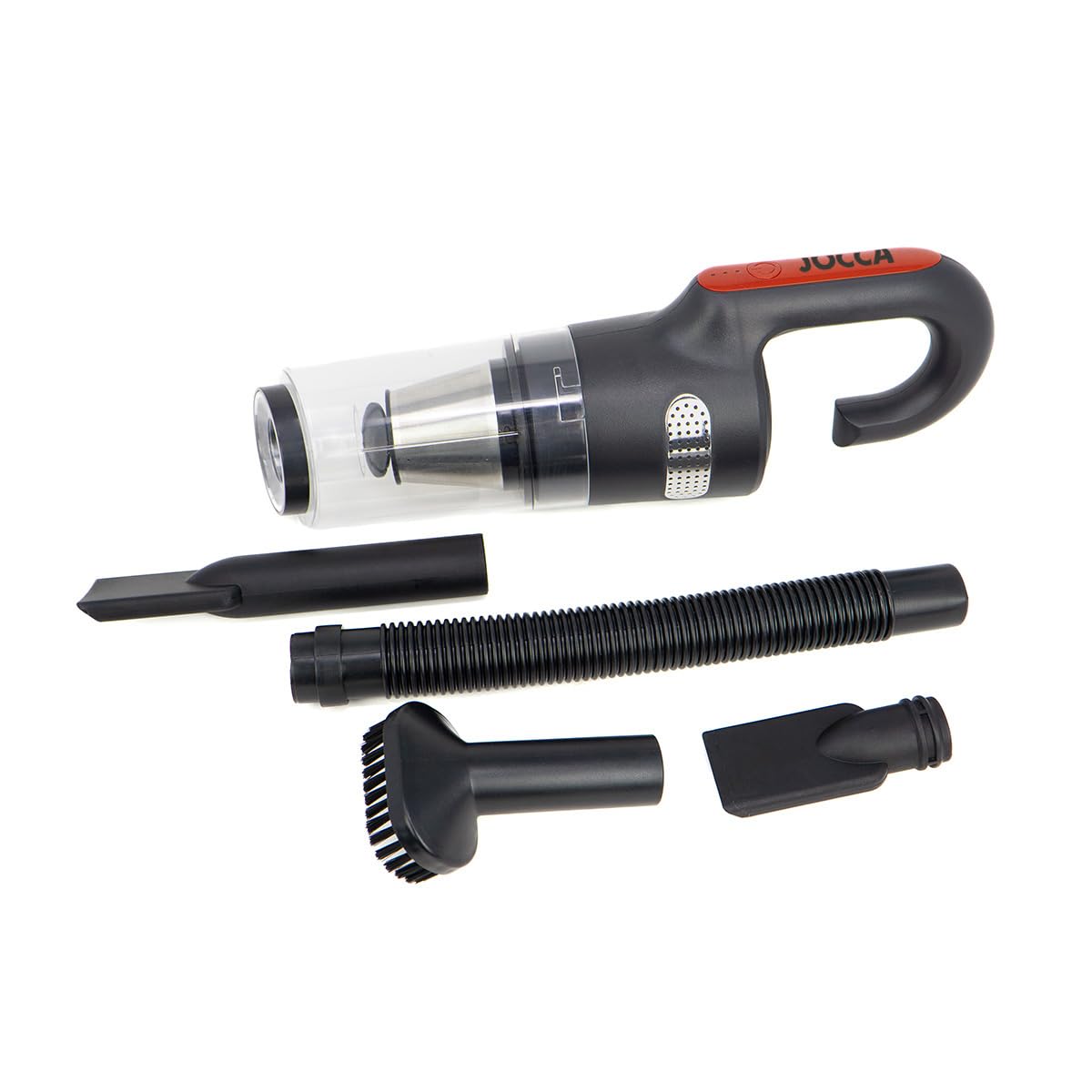
Image: The main unit of the Jocca 2313 Handheld Vacuum Cleaner, showing the handle, dustbin, and filter assembly.
- Handle: Ergonomically designed for comfortable grip and portability.
- Power Button: Located on the handle for easy access to turn the unit on/off and adjust suction modes.
- Dustbin: Transparent, removable, and washable 0.5 L capacity for collecting debris.
- Filter Assembly: Contains a washable HEPA filter and a stainless steel filter for efficient dust separation.
- Charging Port: Located on the unit for connecting the USB charging cable.
- Suction Port: Where attachments are connected for vacuuming.
Setup
Follow these steps to prepare your vacuum cleaner for use.
- Unpack: Remove the vacuum cleaner and all accessories from the packaging. Dispose of packaging materials responsibly.
- Charge Battery: Before first use, fully charge the vacuum cleaner. Refer to the 'Charging' section for detailed instructions.
- Attach Nozzle: Select the appropriate nozzle for your cleaning task. You can attach the brush nozzle, flat nozzle, or long flat nozzle directly to the vacuum's suction port. For extended reach, connect the extendable tube first, then attach the desired nozzle to the tube.

Image: The vacuum cleaner with the brush nozzle attached, suitable for upholstery and general surfaces.

Image: The vacuum cleaner with the flat nozzle attached, ideal for narrow gaps and edges.
Charging
Ensure your vacuum cleaner is fully charged for optimal performance.
- Locate the charging port on the vacuum cleaner unit.
- Connect the provided USB charging cable to the vacuum's charging port.
- Plug the other end of the USB cable into a suitable USB power adapter (not included) or a powered USB port.
- The LED indicator lights on the handle will illuminate to show the charging status.
- A full charge typically takes approximately 2 hours. Once fully charged, the indicator lights may change or turn off.
- The vacuum provides up to 20 minutes of continuous use on a full charge.

Image: Top view of the vacuum cleaner, highlighting the power button and LED indicator lights that show battery status during charging and operation.
Operating Instructions
Operating your Jocca 2313 Handheld Vacuum Cleaner is straightforward.
- Power On/Off: Press the power button located on the handle to turn the vacuum cleaner on. Press it again to turn it off.
- Adjust Suction Mode: The vacuum features two power levels: a weaker mode for light cleaning and a stronger mode for more demanding tasks. Press the power button repeatedly to cycle through the modes.
- Vacuuming: Guide the selected nozzle over the area to be cleaned. The vacuum is capable of picking up both dry debris and small liquid spills.
- Wet Vacuuming: When vacuuming liquids, ensure the dustbin is not overfilled. Empty the dustbin immediately after vacuuming liquids to prevent damage and maintain hygiene.

Image: The vacuum cleaner effectively cleaning a liquid spill on a hard surface.

Image: The vacuum cleaner picking up dry debris from a floor.
Maintenance and Cleaning
Regular maintenance ensures optimal performance and extends the lifespan of your vacuum cleaner.
- Emptying the Dustbin: When the dustbin is full (0.5 L capacity) or suction power decreases, detach the dustbin from the main unit. Empty the collected debris into a waste bin.
- Cleaning Filters: The vacuum features a dual-filter system: a washable HEPA filter and a stainless steel filter. Remove both filters from the dustbin. Rinse them under running water until clean. Do not use detergents.
- Drying Filters: Allow both filters to air dry completely for at least 24 hours before reinserting them into the dustbin. Do not use a dryer or direct heat.
- Reassembly: Once the filters are completely dry, place the stainless steel filter back into the dustbin, followed by the HEPA filter. Reattach the dustbin to the main vacuum unit, ensuring it clicks securely into place.
- Exterior Cleaning: Wipe the exterior of the vacuum cleaner with a soft, damp cloth. Do not use abrasive cleaners or solvents.

Image: The vacuum cleaner's transparent dustbin, clearly showing the internal filter assembly which needs regular cleaning.
Troubleshooting
If you encounter any issues with your vacuum cleaner, refer to the following common problems and solutions.
| Problem | Possible Cause | Solution |
|---|---|---|
| Vacuum does not turn on. | Battery is depleted. | Charge the vacuum cleaner fully. |
| Charging cable not properly connected. | Ensure the charging cable is securely connected to both the vacuum and the power source. | |
| Reduced suction power. | Dustbin is full. | Empty the dustbin. |
| Filters are dirty or clogged. | Clean and thoroughly dry the HEPA and stainless steel filters. | |
| Nozzle or tube is blocked. | Remove any blockages from the nozzles, extendable tube, or suction port. | |
| Short battery run time. | Battery not fully charged. | Ensure the vacuum is charged for the recommended duration (approx. 2 hours). |
| Battery degradation over time. | Battery capacity may naturally decrease with extended use. |
Specifications
Key technical specifications for the Jocca 2313 Cordless Handheld Vacuum Cleaner.
- Brand: Jocca
- Model Number: 2313
- Suction Power: 7500 Pa
- Battery: 8.4V Lithium-ion
- Run Time: Up to 20 minutes
- Dustbin Capacity: 0.5 L
- Filter Type: HEPA, Stainless Steel
- Dimensions (L x W x H): 14 x 11 x 36 cm
- Special Features: Cordless, Wet & Dry capability, Portable
- Power Source: Battery Powered
Warranty and Support
For warranty information, product registration, or technical support, please refer to the documentation included with your purchase or visit the official Jocca website. Keep your proof of purchase for any warranty claims.