
1. Introduction
The Soundcore Select 4 Go is a compact and portable Bluetooth speaker designed for on-the-go audio. It features a powerful 5W speaker, a passive radiator for enhanced bass, and IP67 dust and water resistance, making it suitable for various environments, including outdoor use. With up to 20 hours of playback time, you can enjoy your favorite music for extended periods. This manual provides instructions for setting up, operating, and maintaining your speaker.
2. Package Contents
Ensure all items are present in your package. If any items are missing or damaged, please contact customer support.
- Soundcore Select 4 Go Speaker
- USB-A to USB-C Cable
- Quick Start Guide
- Safety Manual

Image: Package contents of the Soundcore Select 4 Go speaker.
3. Product Overview
The Soundcore Select 4 Go features a compact design with intuitive controls and robust audio components.
3.1. Components
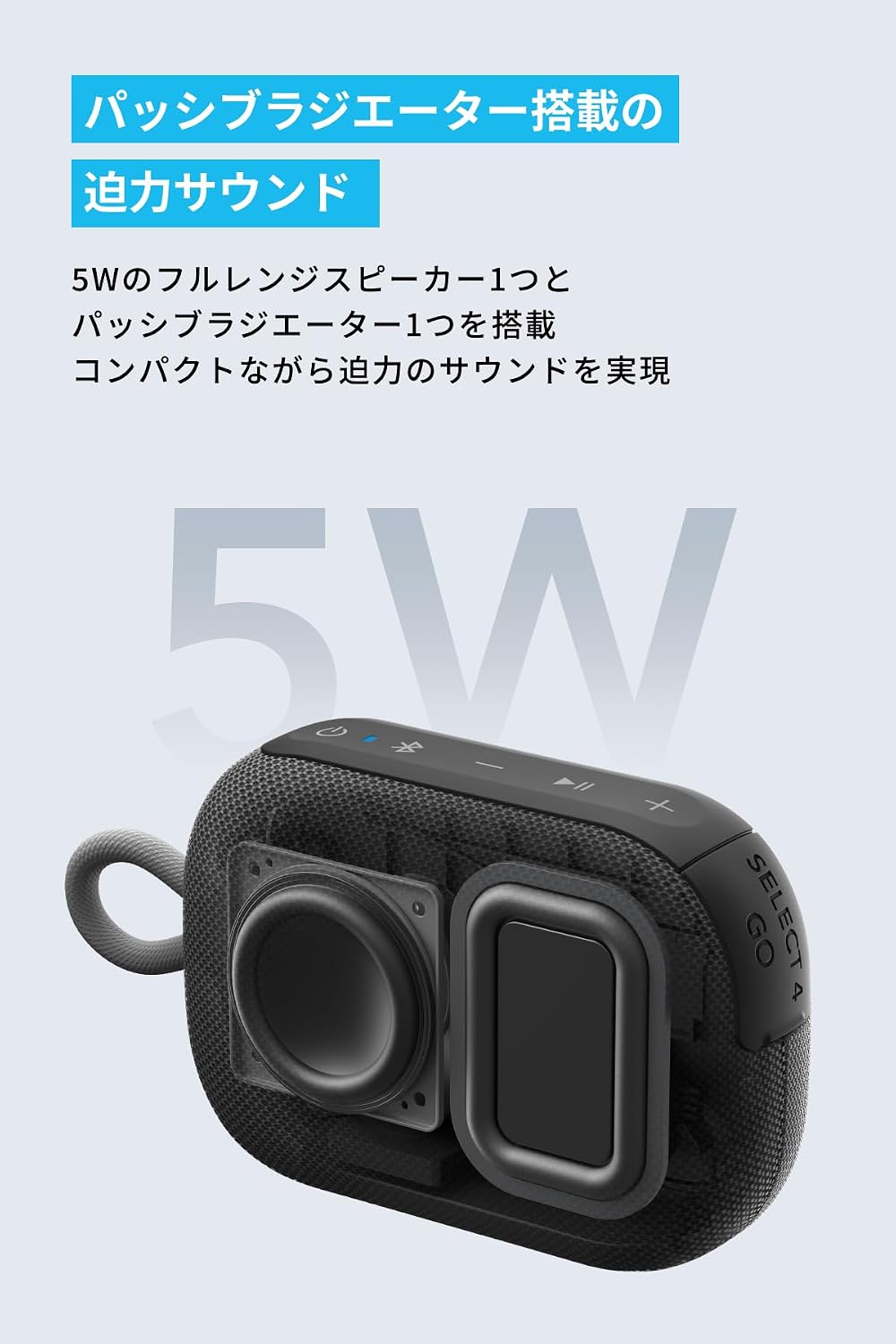
Image: Internal view highlighting the 5W full-range speaker and passive radiator.
The speaker is equipped with a 5W full-range speaker and a passive radiator to deliver powerful and clear audio despite its compact size.
3.2. Controls and Indicators
The speaker features several buttons for control and LED indicators for status.
- Power Button: Press and hold to power on/off.
- Bluetooth Button: Press to enter Bluetooth pairing mode.
- Volume Down (-): Decrease volume.
- Multi-function Button (Play/Pause): Play/pause music, answer/end calls. Double press for next track, triple press for previous track.
- Volume Up (+): Increase volume.
- LED Indicators: Show power, charging, and Bluetooth status.
4. Setup
4.1. Charging the Speaker
Before first use, fully charge the speaker. Use the provided USB-A to USB-C cable to connect the speaker to a 5V USB power adapter (not included).
- The LED indicator will show charging status.
- A full charge typically takes approximately 3 hours.
4.2. Power On/Off
- To power on, press and hold the Power button for 2 seconds.
- To power off, press and hold the Power button for 2 seconds.
4.3. Bluetooth Pairing
- Power on the Soundcore Select 4 Go. The Bluetooth indicator will flash blue, indicating it is in pairing mode.
- On your Bluetooth-enabled device, go to the Bluetooth settings and search for 'Soundcore Select 4 Go'.
- Select 'Soundcore Select 4 Go' to connect. Once connected, the Bluetooth indicator will turn solid blue.
The speaker will automatically attempt to reconnect to the last paired device when powered on.
5. Operating
5.1. Music Playback
- Press the Multi-function button once to play or pause music.
- Double press the Multi-function button for the next track.
- Triple press the Multi-function button for the previous track.
5.2. Volume Control
- Press the '+' button to increase volume.
- Press the '-' button to decrease volume.
5.3. Wireless Stereo Pairing (TWS)
You can pair two Soundcore Select 4 Go speakers together for a more immersive stereo sound experience.
- Ensure both Soundcore Select 4 Go speakers are powered on and not connected to any other Bluetooth device.
- On one speaker (this will be the primary speaker), press and hold the Bluetooth button for 2 seconds until you hear a tone. The Bluetooth indicator will flash white.
- On the second speaker, press the Bluetooth button once. It will automatically search for the primary speaker.
- Once successfully paired, both speakers will emit a tone, and the Bluetooth indicator on the primary speaker will flash blue, while the secondary speaker's indicator will turn solid white.
- Connect your Bluetooth device to the primary speaker ('Soundcore Select 4 Go').

Image: Two Soundcore Select 4 Go speakers demonstrating wireless stereo pairing.
Note: For products with a serial number where the 7th digit is 'C' or later, or if the firmware version in the Soundcore app starts with '3.', simultaneous pairing with older models may not be possible. If you encounter pairing issues, please contact customer support.
6. Maintenance
6.1. Cleaning
- Wipe the speaker with a soft, damp cloth.
- Do not use any corrosive cleaners or chemicals.
- Thanks to its IP67 rating, the speaker can be rinsed with water if it gets dirty with sand or mud. Ensure the charging port cover is securely closed before rinsing.

Image: Speaker submerged in shallow water with dirt, showcasing IP67 durability.
6.2. Storage
- Store the speaker in a cool, dry place away from direct sunlight and extreme temperatures.
- Avoid storing the speaker with a completely depleted battery for extended periods. Charge it periodically to maintain battery health.
7. Troubleshooting
| Problem | Solution |
|---|---|
| Speaker does not power on. | Ensure the speaker is charged. Connect it to a power source and try again. |
| Cannot pair with Bluetooth device. | Ensure the speaker is in pairing mode (flashing blue LED). Turn off Bluetooth on other devices to avoid interference. Try restarting both the speaker and your device. |
| No sound or low volume. | Check the volume levels on both the speaker and your connected device. Ensure the speaker is not muted. |
| Sound quality is poor. | Move the speaker closer to your Bluetooth device. Avoid obstacles between the speaker and device. Ensure there is no interference from other wireless devices. |
| Cannot perform TWS pairing. | Ensure both speakers are Soundcore Select 4 Go models and are not connected to any other device. Refer to the note in Section 5.3 regarding serial numbers and firmware versions. |
8. Specifications
| Feature | Detail |
|---|---|
| Brand | Soundcore |
| Model Number | AMZ-A31X1 |
| Connectivity Technology | Bluetooth |
| Output Power | 5W |
| Battery Life | Up to 20 hours |
| Waterproof Rating | IP67 (Dustproof and Waterproof) |
| UPC | 194644205386 |
9. Warranty and Support
9.1. Warranty Information
Soundcore provides an 18-month warranty from the date of purchase. This warranty covers defects in materials and workmanship. If you register your product with Anker, the warranty period is automatically extended to 24 months.
9.2. Customer Support
For any questions regarding the product or delivery, please contact our customer support team. Our Japanese customer support is available to assist you.
You can find contact information on the official Soundcore website or through your purchase platform.
10. Safety Information
- Do not expose the speaker to extreme temperatures or direct sunlight for prolonged periods.
- Do not disassemble or modify the speaker. This will void the warranty.
- Use only original or certified cables for charging.
- Keep the speaker away from children and pets.
- Ensure the charging port cover is securely closed when using the speaker near water to maintain its IP67 rating.


