
1. Introduction
Thank you for choosing the JINSHANGZI Zordai OD3 Military Outdoor Smartwatch. This device is designed for durability and functionality, offering a range of features for fitness tracking, communication, and daily convenience. Please read this manual carefully to ensure proper use and optimal performance of your smartwatch.
The Zordai OD3 features military-grade hardness, 3ATM IP68 waterproofing, Bluetooth 5.0 connectivity, over 100 sport modes, 24-hour health monitoring, and a vibrant 2.1-inch HD display with a long-lasting 380 mAh battery.
2. Setup
2.1. Charging the Smartwatch
Before first use, fully charge your Zordai OD3 smartwatch. Connect the magnetic charging cable to the charging contacts on the back of the watch and plug the USB end into a standard USB power adapter (not included).
A full charge typically takes approximately 2 hours. The watch has a 380 mAh battery, providing 5-7 days of daily use and up to 20 days of standby time.
2.2. Downloading the ZORDAI App
To unlock the full potential of your smartwatch, download the companion application. Search for "ZORDAI" in your smartphone's app store (Google Play Store for Android or Apple App Store for iOS) and install it.
The app supports Android 4.4 and above, and iOS 10.0 and above.
2.3. Pairing with Your Smartphone
- Ensure Bluetooth is enabled on your smartphone.
- Open the ZORDAI app on your smartphone.
- Follow the in-app instructions to add a new device. The app will search for your Zordai OD3 smartwatch.
- Select your smartwatch from the list of discovered devices. Confirm the pairing request on both your phone and the watch if prompted.
- Once paired, the app will synchronize data with your watch, and you can customize settings.
3. Operating Instructions
3.1. Basic Navigation
The Zordai OD3 features a 2.1-inch IPS full-view color screen with 360x360 resolution. Navigate the interface using touch gestures:
- Swipe Up/Down: Scroll through menus and notifications.
- Swipe Left/Right: Access quick widgets or different watch faces.
- Tap: Select an item or confirm an action.
- Press Side Button: Return to the home screen or power on/off.
3.2. Bluetooth Calling
After pairing your smartwatch with your phone via Bluetooth 5.0, you can make and receive calls directly from your wrist. Ensure the Bluetooth call function is enabled in the ZORDAI app.
3.3. AI Voice Assistant
The built-in AI Voice Assistant allows you to control your watch and perform tasks using voice commands. Activate the voice assistant by clicking the watch voice function after connecting to your phone. You can ask for weather updates, set timers, or initiate calls.

Image: The smartwatch screen showing the AI voice assistant interface, ready to receive commands such as playing music, making calls, setting timers, or checking the weather.
3.4. Sport Modes
The Zordai OD3 offers over 100 sport modes, including walking, running, climbing, cycling, and basketball. To start a workout:
- Navigate to the Sport Modes menu on your watch.
- Select your desired activity.
- The watch will begin tracking your activity, including steps, distance, calories burned, and heart rate.

Image: The smartwatch displaying various sport mode icons and a user wearing the watch during physical activity, with real-time exercise data visible on the screen.
3.5. Health Monitoring
The smartwatch continuously monitors your health metrics:
- Heart Rate: The built-in Zhangheng BD1662_I2C heart rate sensor provides continuous heart rate monitoring. View your real-time heart rate on the watch or in the ZORDAI app for historical data.
- Blood Pressure: The watch can estimate blood pressure. For accurate medical readings, consult a professional medical device.
- Sleep Monitoring: The watch tracks your sleep patterns, including deep sleep, light sleep, and awake times. Review your sleep data in the ZORDAI app to understand your sleep quality.
- Breathing Training: Access guided breathing exercises to help manage stress and improve relaxation.
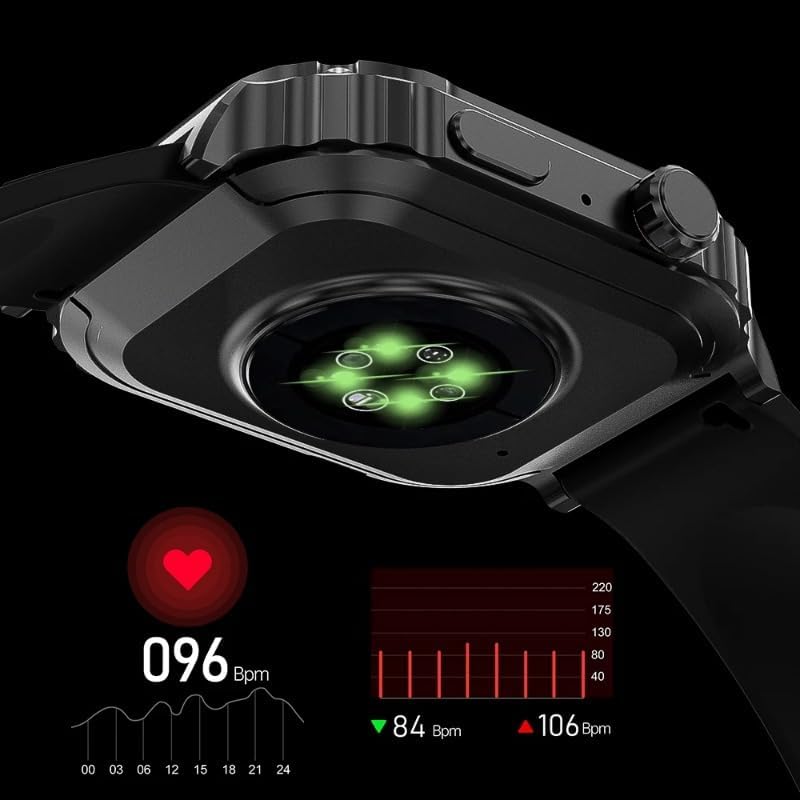
Image: A close-up view of the smartwatch's rear, highlighting the green LED sensors used for heart rate monitoring, with a digital display showing '096 Bpm' and a corresponding heart rate graph.
3.6. Other Features
- Watch Face Customization: Choose from over 500 dial options or create custom watch faces.
- Notifications: Receive call and message notifications directly on your wrist.
- Remote Music Control: Control music playback on your smartphone.
- Remote Camera: Use your watch as a remote shutter for your phone's camera.
- Weather Display: Get real-time weather updates.
- Find Phone: Locate your connected smartphone.
- Password Protection: Secure your watch with a password.
- Calculator: A basic calculator for quick computations.
- Split-Screen Display & Quick Widgets: Access frequently used functions quickly.
- Alipay & My QR Code: For convenient payments and sharing.
- GPS Tracking & NFC: Utilize these features for navigation and contactless interactions (availability may depend on region and specific watch model configuration).
4. Maintenance
4.1. Water Resistance
The Zordai OD3 has an impressive 3ATM IP68 waterproof rating, meaning it can withstand water immersion up to 30 meters. This makes it suitable for swimming and daily water exposure. However, avoid hot water, steam, or prolonged exposure to high-pressure water jets, as these can compromise the seals.

Image: The smartwatch being splashed with water, illustrating its IP68 swimming-grade waterproof capability, suitable for use in swimming pools.
4.2. Cleaning
Regularly clean your smartwatch and strap to prevent skin irritation and maintain its appearance. Use a soft, damp cloth to wipe the screen and body. For the silicone strap, you can use mild soap and water. Ensure the watch is completely dry before charging.
4.3. Battery Care
- Avoid fully discharging the battery frequently.
- Do not expose the watch to extreme temperatures (hot or cold) for extended periods, as this can degrade battery life.
- Use only the provided charging cable.
5. Troubleshooting
- Watch not turning on: Ensure the watch is fully charged. Connect it to the charger for at least 30 minutes.
- Cannot pair with phone:
- Ensure Bluetooth is enabled on your phone and the watch.
- Make sure the watch is within range of your phone.
- Restart both your phone and the watch.
- Try unpairing and re-pairing through the ZORDAI app.
- Inaccurate health data: Ensure the watch is worn snugly on your wrist, not too tight or too loose. Clean the sensors regularly.
- Notifications not appearing: Check app permissions on your phone to ensure the ZORDAI app has access to notifications. Also, verify notification settings within the ZORDAI app.
- Screen unresponsive: Try restarting the watch by pressing and holding the side button. If the issue persists, ensure the screen is clean and dry.
6. Specifications
| Feature | Specification |
|---|---|
| Brand | JINSHANGZI |
| Model | Zordai OD3 |
| Chip | 8762 |
| Flash Memory Size | 128 MB |
| Android OS Compatibility | Android 4.4 and above |
| iOS Compatibility | iOS 10.0 and above |
| Heart Rate Sensor | Zhangheng BD1662_I2C |
| Bluetooth | Dual Bluetooth 5.0 |
| Waterproof Level | IP68 (3ATM) |
| Craftsmanship | Stainless Steel + IML |
| Screen Size | 2.1 inches |
| Screen Resolution | 360 x 360 |
| Screen Type | IPS Full View Color Screen |
| Screen Material | Glass (OGS) |
| Strap Length | 260 mm |
| Strap Material | Silicone Gel |
| Battery Capacity | 380 mAh |
| Typical Usage Battery Life | 5-7 days |
| Standby Time | Up to 20 days |
7. Warranty and Support
The JINSHANGZI Zordai OD3 Military Outdoor Smartwatch comes with a standard manufacturer's warranty. Please refer to the product packaging or the official JINSHANGZI website for specific warranty terms and conditions.
For technical support, troubleshooting assistance, or warranty claims, please contact JINSHANGZI customer service through the contact information provided with your purchase or on their official website.