
1. Introduction
This manual provides essential instructions for the installation, operation, and maintenance of your MAVRIK replacement porcelain socket. This component is designed for use with VULCAN equipment, specifically as a direct replacement for VULCAN part number LH0001 and P1005A. Adhering to these guidelines will ensure proper function and longevity of the part.
2. Product Overview
The MAVRIK porcelain socket is a high-quality replacement part engineered to meet or exceed the original specifications of VULCAN P1005A. It is suitable for commercial kitchen environments and ensures reliable electrical connection for compatible VULCAN equipment.
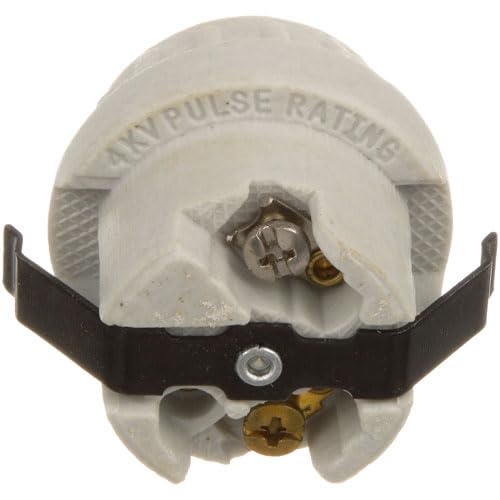
Figure 1: MAVRIK Replacement Porcelain Socket. This image displays the porcelain socket from a top-down perspective, showing the ceramic body, metal mounting brackets, and screw terminals for electrical connections. The text "4KV PULSE RATING" is visible on the ceramic surface.
3. Installation Instructions
Safety Precaution: Before beginning any installation, ensure that the equipment's power supply is completely disconnected and locked out to prevent accidental startup. Failure to do so may result in serious injury or electrical shock.
- Identify the Original Part: Locate the existing porcelain socket within your VULCAN equipment that requires replacement. Confirm it matches the form factor of the MAVRIK replacement part.
- Disconnect Wiring: Carefully disconnect all electrical wiring from the old socket. Note the position and connection points of each wire for correct re-installation. It is recommended to take a photograph before disconnecting.
- Remove Old Socket: Unscrew or unclip the old socket from its mounting position.
- Install New Socket: Position the MAVRIK replacement porcelain socket in the same location as the old one. Secure it using the existing mounting hardware or appropriate fasteners.
- Connect Wiring: Reconnect the electrical wires to the new socket's terminals, ensuring each wire is securely fastened to its correct terminal. Double-check all connections for tightness.
- Verify Installation: Once installed, visually inspect the socket and wiring to ensure everything is correctly seated and no wires are loose or exposed.
- Restore Power: After confirming the installation is complete and safe, restore power to the equipment.
If you are unsure about any step, consult a qualified technician.
4. Operating Instructions
As a passive electrical component, the porcelain socket does not require specific operational steps beyond proper installation. Once correctly installed and connected to the power supply, it facilitates the intended electrical function within the VULCAN equipment. Ensure that the equipment it is installed in is operated according to its own manufacturer's guidelines.
5. Maintenance
The MAVRIK porcelain socket is designed for durability and requires minimal maintenance. However, periodic inspection is recommended to ensure continued safe and efficient operation:
- Visual Inspection: Regularly check the socket for any signs of physical damage, cracks in the porcelain, discoloration, or loose connections.
- Cleanliness: Keep the area around the socket clean and free from grease, dust, or debris, which can accumulate and potentially affect performance or safety.
- Connection Integrity: Periodically verify that all wire connections to the socket terminals remain tight and secure.
If any damage or loose connections are observed, disconnect power immediately and replace the socket or tighten connections as necessary.
6. Troubleshooting
If the equipment connected to the MAVRIK porcelain socket is not functioning as expected, consider the following troubleshooting steps:
- No Power:
- Ensure the main power supply to the equipment is active.
- Check all electrical connections to the socket for tightness and proper contact.
- Inspect the wiring for any breaks or damage.
- Intermittent Operation:
- Loose connections are a common cause of intermittent power. Re-tighten all terminal screws.
- Inspect the socket for any signs of arcing or overheating, which may indicate a faulty component.
- Visible Damage:
- If the porcelain body is cracked or chipped, or if terminals are corroded or bent, the socket must be replaced immediately.
Always disconnect power before performing any inspection or repair. If the issue persists, consult a qualified service technician.
7. Specifications
| Part Number (MAVRIK) | Replacement for Vulcan LH0001 / P1005A |
| Compatibility | VULCAN Equipment (Commercial Kitchen) |
| Material | Porcelain (Ceramic) |
| ASIN | B0D9XYJ5FL |
| Manufacturer | MAVRIK (Replacement for VULCAN) |
| Date First Available | July 23, 2024 |
8. Warranty and Support
For information regarding warranty coverage or technical support for your MAVRIK replacement part, please refer to the official MAVRIK website or contact their customer service directly. Ensure you have your purchase details and the product's ASIN (B0D9XYJ5FL) available when contacting support.
MAVRIK Store Link: Visit the Mavrik Store on Amazon