
1. Introduction
This manual provides essential instructions for the safe and efficient use of your Onerbl AC-DC Adapter, Model ASW0551-24020002A. This power supply is designed to convert alternating current (AC) from a wall outlet into direct current (DC) required by compatible devices, such as Linak HOMELINE or DESKLINE systems used for adjustable beds and office desks. Please read this manual thoroughly before installation and operation.
2. Safety Information
To ensure safe operation and prevent damage, observe the following precautions:
- Do not expose the adapter to water, moisture, or high humidity.
- Do not disassemble, modify, or attempt to repair the adapter. Refer all servicing to qualified personnel.
- Ensure the adapter is used within its specified voltage and current ratings.
- Avoid placing the adapter in poorly ventilated areas or near heat sources.
- Unplug the adapter from the power outlet when not in use for extended periods.
- This adapter features built-in over voltage and over heat protection for enhanced safety.
3. Package Contents
Verify that your package contains the following item:
- 1 x Onerbl AC-DC Adapter (Model: ASW0551-24020002A)
4. Product Overview
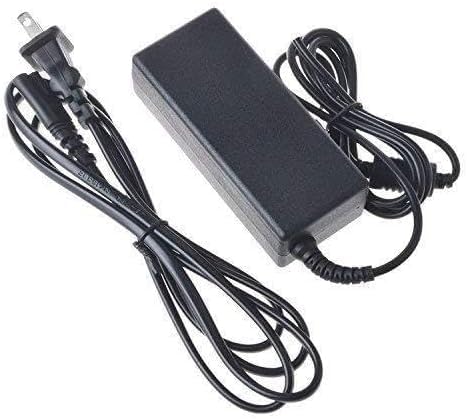
Figure 1: Onerbl AC-DC Adapter. This image shows the compact design of the power adapter, typically featuring a power input port and a DC output connector.
The Onerbl AC-DC Adapter is a reliable power supply unit designed for specific Linak systems. It is compatible with Linak Model No: ASW0551-24020002A, Item No: SMPS002-0001, and LP Part No: 13600039, 13600098. This adapter is suitable for powering various HOMELINE or DESKLINE applications, including adjustable beds and basic office desks.
5. Setup Instructions
- Verify Compatibility: Before connecting, ensure that your device (e.g., adjustable bed, office desk) requires a 24V DC power supply and is compatible with the adapter's connector type. Refer to your device's manual for power requirements.
- Connect to Device: Insert the DC output connector of the Onerbl adapter firmly into the power input port of your Linak system or compatible device.
- Connect to Power Outlet: Plug the AC input cable of the adapter into a standard electrical wall outlet (100-240V AC, 50/60Hz).
- Secure Connections: Ensure all connections are secure to prevent accidental disconnections.
6. Operating Instructions
Once the adapter is correctly set up, your device should be ready for operation.
- With the adapter connected to both the device and a power outlet, the device should receive power.
- Operate your device according to its specific user manual.
- The adapter continuously converts AC power to DC power as long as it is plugged into an active outlet and connected to the device.
7. Maintenance
Proper maintenance ensures the longevity and reliable performance of your adapter:
- Cleaning: Disconnect the adapter from all power sources before cleaning. Use a soft, dry cloth to wipe the exterior. Do not use liquid cleaners or aerosols.
- Storage: Store the adapter in a cool, dry place away from direct sunlight and extreme temperatures.
- Inspection: Periodically inspect the adapter and its cables for any signs of damage, such as frayed wires or cracked casing. If damage is found, discontinue use and replace the adapter.
8. Troubleshooting
If you encounter issues with your Onerbl AC-DC Adapter, refer to the following troubleshooting steps:
| Problem | Possible Cause | Solution |
|---|---|---|
| Device not receiving power. | Adapter not properly connected to device or power outlet. Power outlet is not active. Incompatible device. |
Ensure both ends of the adapter are securely plugged in. Test the power outlet with another device. Verify device compatibility with the adapter's specifications. |
| Adapter feels excessively hot. | Poor ventilation. Overload or short circuit in the connected device. |
Ensure the adapter is in a well-ventilated area. Disconnect the adapter immediately. Check the connected device for faults. |
| Intermittent power to device. | Loose connection. Damaged cable or adapter. |
Check all connections for tightness. Inspect cables and adapter for visible damage. Replace if damaged. |
9. Specifications
| Feature | Detail |
|---|---|
| Model Number | ASW0551-24020002A |
| Input Voltage | 100-240V AC, 50/60Hz |
| Output Voltage | 24V DC |
| Compatible Linak Models | ASW0551-24020002A, SMPS002-0001, 13600039, 13600098 |
| Manufacturer | Shenzhen Waweis Technology Co., Ltd |
| Safety Features | Over Voltage Protection, Over Heat Protection |
10. Warranty and Support
Onerbl products are manufactured to high standards and undergo testing to ensure great working condition. For specific warranty information, please refer to the terms provided at the time of purchase or contact your retailer. For technical support or inquiries, please reach out to the seller or manufacturer directly.