
1. Introduction
This manual provides essential information for the safe and efficient use of your Candy Rapidò CI 3E7L0W2 integrated dishwasher. Please read these instructions carefully before installation, operation, or maintenance. Keep this manual for future reference.
The Candy Rapidò CI 3E7L0W2 dishwasher is designed for modern households, offering a 13 place setting capacity, 5 customizable programs, and Wi-Fi connectivity for remote control via the hOn app. It features a quiet operation at 47 dB, delayed start options, and indicators for salt and cycle completion.
2. Setup and Installation
2.1 Unpacking
Carefully remove all packaging materials. Inspect the dishwasher for any signs of damage during transit. Report any damage to your retailer immediately.
2.2 Positioning and Dimensions
The Candy Rapidò CI 3E7L0W2 is an integrated dishwasher designed to fit into standard kitchen cabinetry. Ensure the installation area meets the required dimensions for proper fit and ventilation.
- Height: Adjustable between 81.8 cm and 90 cm
- Width: 59.7 cm
- Depth: 55.5 cm
- Weight: Approximately 32 kg
Refer to the technical diagram for precise measurements and installation clearances.
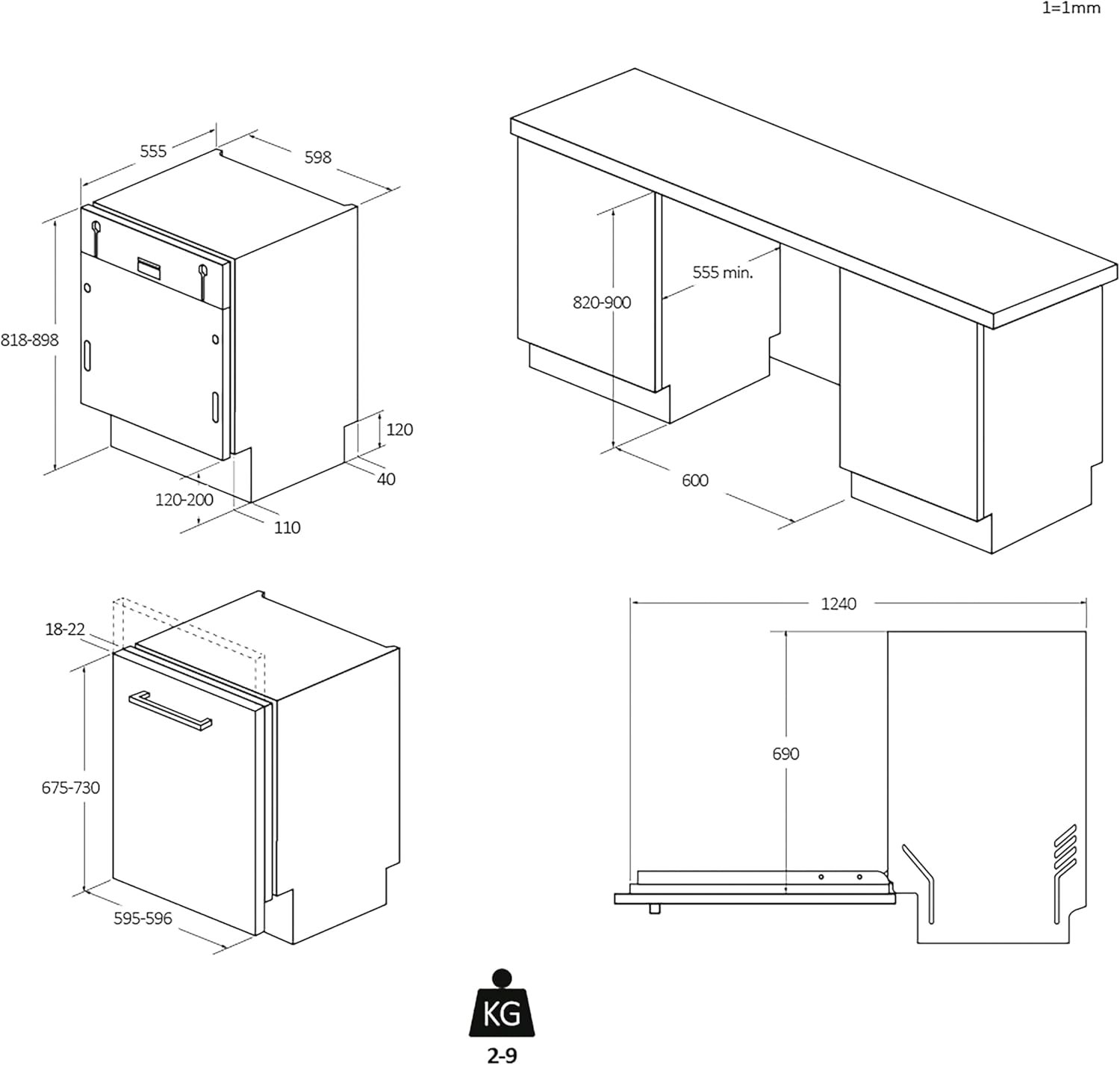
The dishwasher is designed for built-in installation. Ensure adequate space for water inlet, drain hoses, and electrical connections. The adjustable height feature allows for seamless integration with various countertop heights.

2.3 Electrical and Water Connections
Ensure the dishwasher is connected to a grounded electrical outlet (230 Volts). Water inlet and drain hoses must be securely connected according to local plumbing codes. Consult a qualified technician for installation if you are unsure.
3. Operating Instructions
3.1 Control Panel Overview
The dishwasher features a digital control panel for easy program selection and monitoring.

3.2 Loading the Dishwasher
Proper loading ensures optimal cleaning results. The dishwasher accommodates 13 place settings.
- Place larger items in the lower basket.
- Place glasses, cups, and smaller items in the upper basket.
- Ensure items do not block the spray arms.
- Use the cutlery basket for forks, knives, and spoons.

3.3 Program Selection
The dishwasher offers 5 wash programs to suit various needs:
- Normal: For daily soiled dishes.
- Intensive: For heavily soiled pots and pans.
- Quick: For lightly soiled dishes requiring a fast wash.
- Delicate: For fragile items like glassware.
- Economic (Eco): For energy-efficient washing of normally soiled dishes.
Select the desired program using the control panel. The estimated cycle duration for the Eco program is 3 hours and 54 minutes.
3.4 Special Features
- Wi-Fi Connectivity: Connect your dishwasher to the hOn app on your smartphone to control cycles remotely, monitor status, and access additional features.
- Delayed Start: Program the wash cycle to start after 3, 6, or 9 hours, allowing you to take advantage of off-peak electricity rates or have dishes ready at a convenient time.
- Salt Indicator: An indicator light will illuminate when the salt reservoir needs refilling, ensuring optimal water softening.
- End Cycle Indicator: The dishwasher provides an indication when the wash cycle is complete.
- Quiet Operation: With a noise level of only 47 dB, the dishwasher operates quietly, suitable for open-plan living spaces or night-time use.
4. Maintenance
Regular maintenance ensures the longevity and efficiency of your dishwasher.
4.1 Cleaning Filters
The dishwasher filters should be cleaned regularly to prevent blockages and ensure effective washing. Refer to the detailed instructions in the full product manual for filter removal and cleaning procedures.
4.2 Refilling Salt and Rinse Aid
Monitor the salt and rinse aid indicators on the control panel. Refill the salt reservoir with dishwasher salt and the rinse aid dispenser with rinse aid as needed. These are crucial for preventing water spots and ensuring proper drying.
4.3 Exterior and Interior Cleaning
Wipe the exterior of the dishwasher with a soft, damp cloth. For the interior, periodically run a dishwasher cleaning cycle with a specialized cleaner to remove grease and limescale buildup.
5. Troubleshooting
If you encounter issues with your dishwasher, consult the following common troubleshooting tips before contacting service.
- Dishwasher not starting: Check if the power cord is securely plugged in, the door is fully closed, and the water supply is turned on.
- Dishes not clean: Ensure dishes are loaded correctly, spray arms are not blocked, filters are clean, and sufficient detergent is used. Check water hardness settings and salt levels.
- Water not draining: Check the drain hose for kinks or blockages, and ensure the drain filter is clean.
- Unusual noises: Verify that dishes are not interfering with spray arms or other internal components.
For persistent problems, refer to the comprehensive troubleshooting guide in the full product manual or contact customer support.
6. Specifications
Detailed technical specifications for the Candy Rapidò CI 3E7L0W2 dishwasher.
| Specification | Value |
|---|---|
| Model Name | CI 3E7L0W2 |
| Internal Model Number | 1950079 |
| Brand | Candy |
| Installation Type | Built-in (Integrated) |
| Dimensions (P x L x H) | 55.5 cm x 59.7 cm x 81.8-90 cm (adjustable height) |
| Weight | 32 kg |
| Capacity | 13 Place Settings |
| Number of Programs | 5 (Normal, Intensive, Quick, Delicate, Economic) |
| Noise Level | 47 dB |
| Energy Efficiency Class | E |
| Energy Consumption (per 100 cycles) | 93 kWh |
| Water Consumption (per cycle) | 10.9 Liters |
| Voltage | 230 Volts |
| Special Features | Wi-Fi + Bluetooth Connectivity, End Cycle Indicator, Salt Indicator, Inverter Motor |
| ASIN | B0D9WK76B5 |
| First Available | 22 July 2024 |

For more detailed product information, visit the official EPREL database: https://eprel.ec.europa.eu/qr/1950079
7. Warranty and Support
7.1 Warranty Information
This product is covered by the manufacturer's warranty. For specific details regarding warranty terms and conditions, please refer to the documentation provided with your purchase or contact Candy customer service. Standard return policies apply for products purchased through retailers.
7.2 Customer Support
For technical assistance, spare parts, or service requests, please contact Candy customer support. You can find contact information on the official Candy website or in the warranty documentation.
Manufacturer: Candy
Website: corporate.haier-europe.com
Phone: +3903920861


