
Introduction
Thank you for choosing the Catnapper Warner Power Headrest with Lumbar Power Lift Lay Flat Recliner. This manual provides essential information for the safe assembly, operation, and maintenance of your new recliner. Please read all instructions carefully before use and retain this manual for future reference.
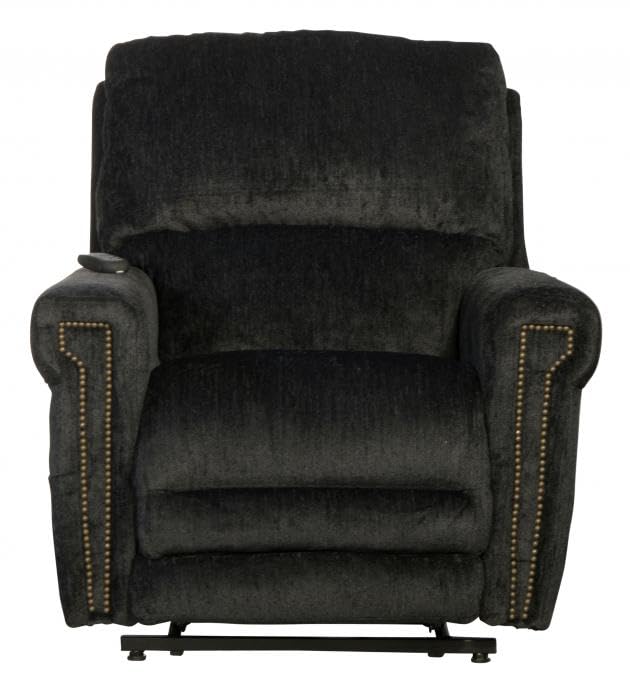
Figure 1: Catnapper Warner Power Recliner in its standard upright position.
Important Safety Information
Please read and understand all safety warnings before operating this recliner. Failure to follow these instructions may result in injury or damage to the product.
- Always use the power and recline features with caution.
- Keep fingers, pets, and other body parts away from moving parts, especially during recline, lift, and headrest adjustments.
- Ensure the area around the recliner is clear of obstructions before operating any power functions.
- Unplug the chair from the power outlet when not in use or before cleaning and maintenance.
- Do not allow children to play on or operate the recliner unsupervised.
- Do not sit on the footrest when it is extended.
- Follow the manufacturer's instructions for proper use and maintenance to ensure longevity and safe operation.
- Proposition 65 Warning: This product contains chemicals known to the State of California to cause cancer and birth defects or other reproductive harm. For more information, visit www.P65Warnings.ca.gov.
Setup and Assembly
Your Catnapper Warner recliner typically arrives in two main sections: the backrest and the base. Follow these steps for assembly:
- Unpack Components: Carefully remove all parts from the packaging. Ensure all components are present: recliner base, backrest, power cord, and remote control.
- Attach Backrest: Align the metal receivers on the backrest with the posts on the recliner base. Slide the backrest down firmly until it locks into place. You should hear a click.
- Connect Power: Locate the power cord and connect it to the power input on the recliner's mechanism, usually found at the back or underneath the chair. Plug the other end into a standard wall outlet.
- Cable Management: Ensure all cables are securely routed and not pinched by moving parts.

Figure 2: Rear view of the recliner, illustrating the general area for power cord connection.
Operating Instructions
Your Catnapper Warner recliner features a dual motor system for independent control of recline, headrest, and lumbar support, along with a power lift function.
Remote Control Functions
The recliner is operated via a wired remote control, typically located in a side pocket or attached to the chair. Familiarize yourself with the buttons:
- Recline/Incline Buttons: Control the main recline angle of the chair and the extension/retraction of the footrest. Press and hold to adjust to your desired position.
- Headrest Buttons: Adjust the angle of the power headrest independently.
- Lumbar Buttons: Control the power lumbar support for personalized comfort in your lower back.
- Lift Assist Buttons: Engage the power lift mechanism to gently raise the chair, assisting you in standing up.
Using the Recline and Ottoman
To recline, press and hold the appropriate button on the remote. The footrest will extend first, followed by the backrest reclining. Release the button when you reach your desired position. To return to the upright position, press the opposite button.

Figure 3: Recliner with the extended ottoman for leg support.

Figure 4: Side view demonstrating the recliner in a fully reclined, lay-flat position with the extended ottoman.
Adjusting Headrest and Lumbar
Use the dedicated headrest and lumbar buttons on the remote to fine-tune your comfort. These can be adjusted independently of the main recline function.
Using the Power Lift Function
For assistance in standing, press and hold the lift assist button. The chair will gently tilt forward and upward, helping you to a standing position. To return to a seated position, press the opposite button.

Figure 5: Recliner in the elevated lift-assist position.

Figure 6: Side view illustrating the recliner's lift mechanism in action.
Care and Maintenance
Proper care will extend the life and appearance of your recliner.
- Cleaning Fabric: For the luxurious thick chenille fabric, vacuum regularly to remove dust and loose particles. For spills, blot immediately with a clean, dry cloth. For stubborn stains, consult a professional upholstery cleaner or use a mild fabric cleaner designed for chenille, testing on an inconspicuous area first.
- Mechanism Care: The power mechanism is designed for long-term use and typically requires minimal maintenance. Avoid spilling liquids near the motor or electrical components.
- Power Cord: Periodically inspect the power cord for any damage. If damaged, discontinue use and contact customer support for a replacement.
- General Care: Avoid placing the recliner in direct sunlight to prevent fading. Keep sharp objects away from the fabric.
Troubleshooting
If you encounter issues with your recliner, refer to the following common problems and solutions:
| Problem | Possible Cause | Solution |
|---|---|---|
| Recliner does not operate. | No power, loose connection, remote issue. |
|
| Footrest or backrest moves slowly or intermittently. | Low power, obstruction, motor strain. |
|
| Noise during operation. | Loose components, mechanism friction. |
|
Product Specifications
| Feature | Detail |
|---|---|
| Brand | Catnapper |
| Model Name | Warner |
| Item Model Number | 764862172453 |
| Color | Slate |
| Product Dimensions | 41"D x 38"W x 43"H |
| Item Weight | 151 Pounds |
| Material | Chenille Fabric |
| Back Style | Coil Comfort |
| Special Features | Power Headrest, Power Lumbar, Power Lift, Lay Flat Recline, Dual Motor Design, Extended Ottoman, Decorative Nailhead Trim, Comfort Coil Seating with Comfor-Gel |
| Reclining Position Count | 3 (various positions possible with dual motor) |
| Recommended Uses | Relaxing |
| Indoor/Outdoor Usage | Indoor |
| UPC | 720368872018 |
Warranty and Support
For specific warranty details regarding your Catnapper Warner recliner, please refer to the warranty card included with your purchase or visit the official Catnapper website. If you require technical assistance, replacement parts, or have questions not covered in this manual, please contact Catnapper customer service.
Manufacturer: Catnapper
Website: www.catnapper.com (Note: This is a placeholder URL, please verify the actual manufacturer website for support.)