
ShellHome SP-001
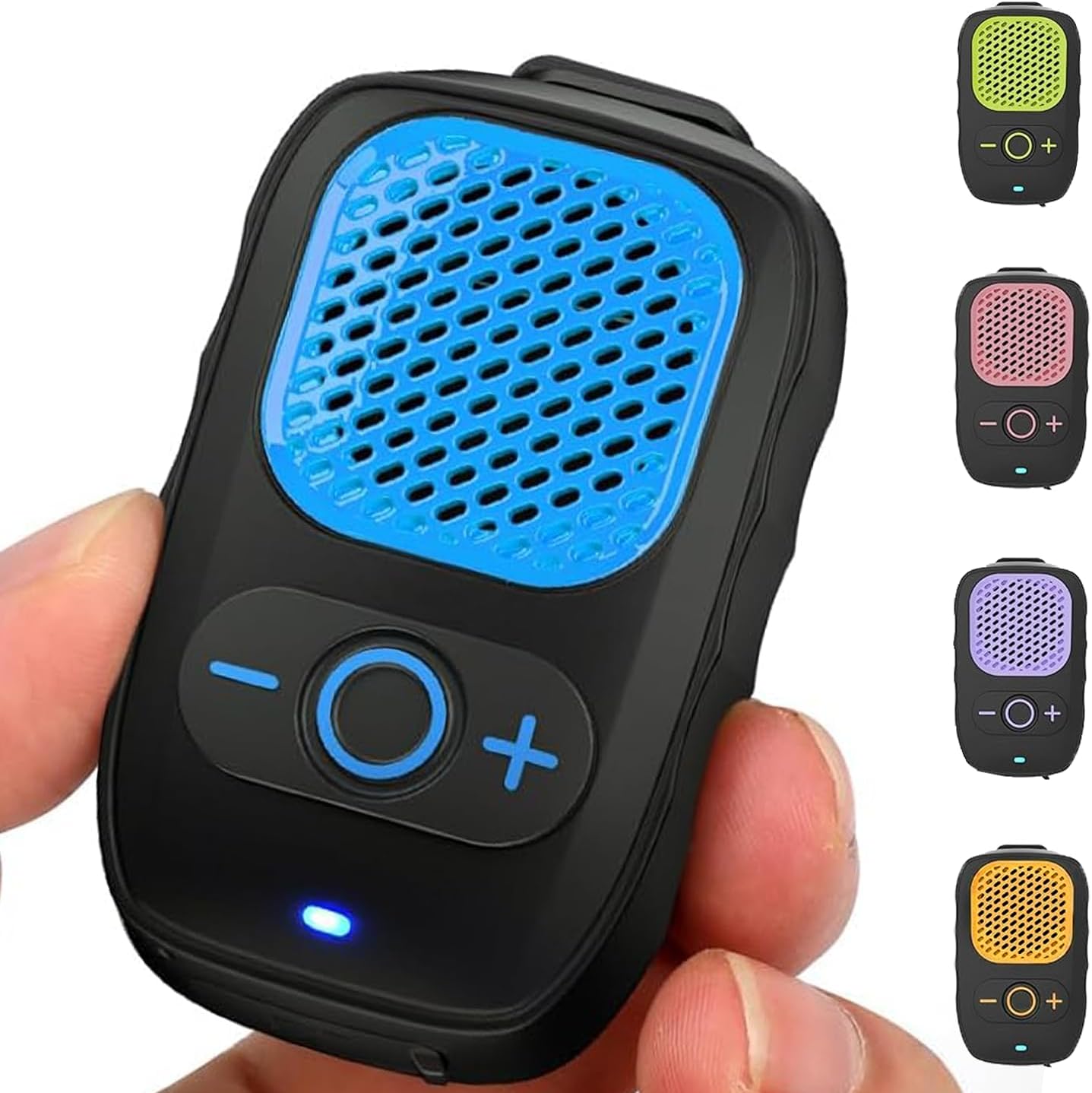
ShellHome Wearable Bluetooth Speaker
Model: SP-001
Instruction Manual
Introduction
Thank you for choosing the ShellHome Wearable Bluetooth Speaker. This compact and versatile speaker is designed for hands-free audio, offering powerful sound and convenient call management. Its lightweight, clip-on design and water-resistant features make it ideal for various activities, from job sites to outdoor adventures. Please read this manual carefully to ensure proper use and optimal performance of your new speaker.
What's in the Box
- Wireless Speaker
- Carrying Bag
- User Manual
- Charging Cable (USB-A to USB-C)

Product Features
- Hands-Free Convenience: Easy-open clip and detachable magnet for secure attachment to clothing or surfaces.
- Extended Playtime: Up to 30 hours of continuous playback on a single charge.
- Ultra-Lightweight: Weighs under 2 oz for comfortable all-day wear.
- High-Quality Sound: Delivers powerful audio in a compact form factor.
- Glove-Friendly Controls: Large multi-function buttons for easy operation.
- Durable & Water-Resistant: IPX6-rated for dust and water resistance, suitable for outdoor use.
- Built-in Microphone: For hands-free calls with ENC Noise Cancelling.
- Stable Bluetooth 5.4: Ensures faster pairing, wider connection range, and enhanced signal stability.


Setup
1. Charging the Speaker
Before first use, fully charge your speaker. Use the provided USB-A to USB-C charging cable. Connect the USB-C end to the speaker's charging port and the USB-A end to a compatible USB power source (e.g., computer, wall adapter).

2. Bluetooth Pairing
- Ensure the speaker is charged and powered off.
- Press and hold the multi-function button (center button) for a few seconds until the LED indicator flashes blue, indicating pairing mode.
- On your device (smartphone, tablet, laptop), enable Bluetooth and search for available devices.
- Select "SP-001" from the list of devices.
- Once connected, the LED indicator will turn solid blue.

3. Wearing and Placement
The speaker features a robust clip and can be attached to various items:
- Clothing: Clip onto your shirt collar, pocket, or belt.
- Bags: Use the integrated clip or the included carabiner to attach to backpacks or carrying bags.
- Surfaces: The non-magnetic design allows for placement on any flat surface.


Operating Instructions
1. Power On/Off
- Power On: Press and hold the multi-function button (center button) until the LED indicator lights up.
- Power Off: Press and hold the multi-function button until the LED indicator turns off.
2. Volume Control
- Increase Volume: Press the "+" button.
- Decrease Volume: Press the "-" button.

3. Music Playback
- Play/Pause: Short press the multi-function button.
- Next Track: Long press the "+" button.
- Previous Track: Long press the "-" button.
4. Call Management
- Answer/End Call: Short press the multi-function button.
- Reject Call: Long press the multi-function button.
- Activate Voice Assistant: Double press the multi-function button.

Maintenance
- Cleaning: Wipe the speaker with a soft, damp cloth. Do not use harsh chemicals or abrasive cleaners.
- Water Exposure: While IPX6 rated, avoid prolonged submersion in water. Ensure the charging port cover is securely closed when exposed to water.
- Storage: Store the speaker in a cool, dry place, away from extreme temperatures and direct sunlight. Use the provided carrying bag for protection when not in use.

Troubleshooting
| Problem | Solution |
|---|---|
| Speaker does not power on. | Ensure the speaker is fully charged. Press and hold the multi-function button for a longer duration. |
| Cannot pair with device. | Ensure the speaker is in pairing mode (flashing blue LED). Turn off and on Bluetooth on your device. Move closer to the speaker. Forget previous pairings on your device and try again. |
| No sound or low volume. | Increase volume on both the speaker and your connected device. Ensure the speaker is properly paired. Check if the audio source is playing. |
| Poor call quality. | Ensure you are within Bluetooth range. Reduce background noise. Check network signal on your phone. |
Specifications
| Feature | Detail |
|---|---|
| Model Name | SP-001 |
| Connectivity Technology | Bluetooth 5.4 |
| Battery Life | 30 Hours |
| Water Resistance Level | IPX6 (Water Resistant) |
| Item Weight | 2 Ounces |
| Product Dimensions | 1.6"D x 1"W x 2.8"H |
| Speaker Maximum Output Power | 3 Watts |
| Included Components | Wireless Speaker, User Manual, Charging Cable, Carrying Bag |
Official Product Video
Warranty and Support
ShellHome products are designed for durability and performance. For specific warranty information and customer support, please refer to the contact details provided on the product packaging or visit the official ShellHome website. Keep your purchase receipt for warranty claims.
Ask a question about this manual
Ask about setup, troubleshooting, compatibility, parts, safety, or missing instructions. Manuals+ will review the question and use this page’s manual context to help answer it.