
1. Introduction
This manual provides detailed instructions for the safe and correct installation of the AGJPXFR 12 PCS LED Backlight Strip set. This product is designed as a replacement part for specific Samsung TV models, ensuring proper illumination for your television display. Please read all instructions carefully before beginning the installation process.
Important Compatibility Note: Many TV models use various different sets of LED strips. It is crucial to match the strips provided in this package to the original strips inside your TV before installation. If you are uncertain about compatibility, it is recommended to consult a professional or contact the seller with a photo of your TV's internal components.
2. Safety Information
Always prioritize safety when working with electronic devices. Improper handling can lead to electric shock, damage to the TV, or personal injury.
- Disconnect Power: Always unplug the TV from the power outlet before opening the back panel or performing any installation.
- Static Electricity: Discharge any static electricity from your body by touching a grounded metal object before handling electronic components. Consider using an anti-static wrist strap.
- Handle with Care: LED strips are delicate. Avoid bending them excessively or applying undue pressure.
- Professional Assistance: If you are not comfortable with electronic repairs or TV disassembly, seek assistance from a qualified technician.
3. Setup and Installation
This section outlines the general steps for replacing the LED backlight strips. Specific TV disassembly procedures may vary by model. Refer to your TV's service manual for detailed disassembly instructions if needed.
- Preparation:
- Ensure the TV is unplugged and placed on a clean, soft, and stable surface to prevent screen damage.
- Gather necessary tools, which typically include screwdrivers, plastic prying tools, and an anti-static mat.
- Disassembly:
- Carefully remove the TV's back panel.
- Proceed to remove any internal components (e.g., main board, power supply board, speakers) that obstruct access to the display panel and backlight assembly. Document screw locations and cable connections.
- Gently detach the display panel from the frame. This step is critical and requires extreme care to avoid cracking the screen.
- Access the diffuser sheets and the old LED backlight strips.
- Old Strip Removal:
- Carefully disconnect the power connectors from the old LED strips.
- Gently peel off the old LED strips from the TV panel. Note their exact placement.
- New Strip Installation:
- The AGJPXFR LED backlight strips feature an adhesive backing. Ensure the surface where the new strips will be applied is clean and dry.
- Align the new strips precisely with the original positions. The package includes 12 strips (6R+6L).
- Carefully peel off the adhesive backing and firmly press each strip into place. The corner-friendly power cord design facilitates easier installation without additional connectors or breaks when routing around corners.
- Connect the power cables to the new LED strips. Ensure all connections are secure.
- Reassembly:
- Before fully reassembling, temporarily connect the TV to power and test the new backlights to ensure they function correctly.
- Once confirmed, carefully reassemble the TV by reversing the disassembly steps. Ensure all components are correctly seated and all screws are tightened appropriately.
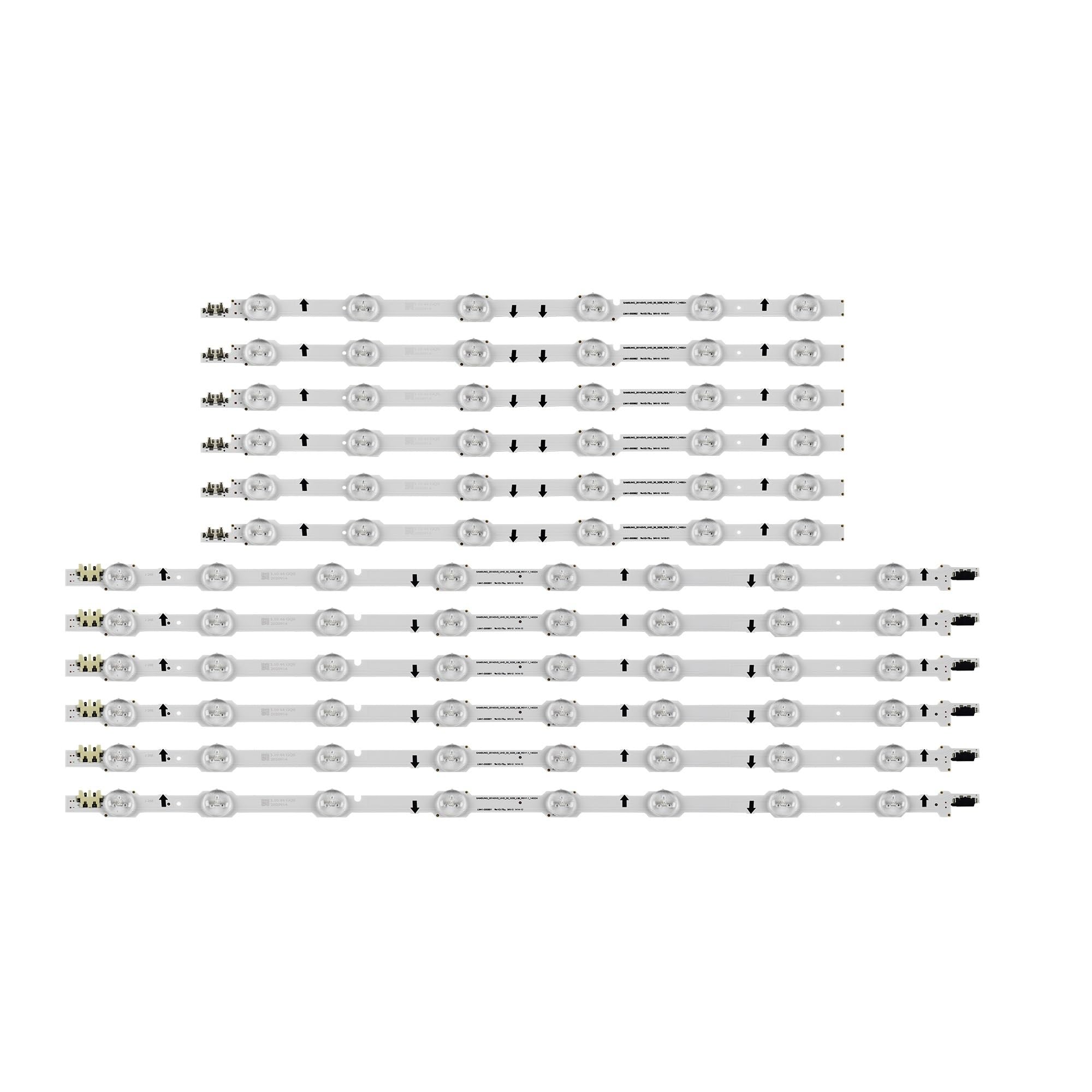
Image 1: AGJPXFR 12 PCS LED Backlight Strip set. This image shows the complete set of LED strips, including both 'R' and 'L' sections, ready for installation.
4. Operating Instructions
Once the LED backlight strips are correctly installed and the TV is fully reassembled, the operation of the backlights is integrated with the TV's normal power functions. Simply power on your television as usual. The new LED backlights will illuminate, restoring your TV's display.
5. Maintenance
LED backlight strips are generally maintenance-free once installed. To ensure their longevity and optimal performance:
- Avoid Moisture: Keep the TV in a dry environment to prevent damage to internal electronic components, including the LED strips.
- Cleanliness: Periodically clean the exterior of your TV with a soft, dry cloth. Avoid spraying liquids directly onto the screen or vents.
- Ventilation: Ensure the TV's ventilation openings are not blocked to prevent overheating, which can degrade LED performance over time.
6. Troubleshooting
If you encounter issues after installing the new LED backlight strips, consider the following troubleshooting steps:
- No Backlight / Dark Screen:
- Check Connections: Ensure all LED strip power connectors are securely attached to the power supply board.
- Verify Compatibility: Double-check that the installed strips are indeed compatible with your specific TV model.
- Power Supply Issue: A faulty power supply board in the TV could also prevent the backlights from illuminating.
- Flickering or Uneven Brightness:
- Loose Connections: Re-check all power connections to the LED strips.
- Damaged Strip: Inspect the strips for any visible damage or bent LEDs.
- Driver Board Issue: The LED driver board (often integrated into the power supply board) might be faulty.
- Partial Backlight:
- Individual Strip Failure: One or more strips might not be receiving power or could be faulty. Inspect each strip.
- Connection Issue: A specific connection to a section of strips might be loose.
If these steps do not resolve the issue, it is advisable to consult a professional TV repair technician.
7. Specifications
| Feature | Detail |
|---|---|
| Product Type | LED Backlight Strip Set |
| Compatibility | Samsung UE50HU6900S, UN50HU6900F, UN50HU6950F, UE50HU6900, UE50HU7000, UA50HU7000, CY-GH050HGNV3H |
| Strip Length | 1025mm (R+L) |
| LED Beads per Strip | 14 |
| LED Lamp Voltage | 3V |
| Package Contents | 1 set = 12 pcs Strip (6R+6L) |
| Package Dimensions | 0.39 x 0.39 x 0.39 inches |
| Item Weight | 1.76 ounces |
| Item Model Number | wangmengwei |
| ASIN | B0D9W5CF8Y |
| Manufacturer | AGJPXFR |
8. Warranty and Support
Specific warranty terms for this AGJPXFR product are typically provided by the seller at the time of purchase. Please refer to your purchase documentation or contact the seller directly for detailed warranty information, including coverage period and claims process.
For technical support or further assistance with installation and troubleshooting, please contact the seller or manufacturer through the platform where the product was purchased. Provide your order details and a clear description of the issue to facilitate a quicker resolution.