1. Introduction
The ZHIYUN CINEPEER CQ5 is a 3-axis gimbal stabilizer designed for smartphones, including iPhones. It provides stable video recording and vlogging capabilities, featuring an integrated AI tracker, built-in fill light, voice control, and gesture control for enhanced user experience. This manual provides instructions for setting up, operating, and maintaining your CQ5 stabilizer.
2. Package Contents
Upon opening the package, verify that all items are present:
- ZHIYUN CINEPEER CQ5 Stabilizer
- Charging Cable (USB-C)
- User Manual (this document)
- Note: Additional accessories may be included depending on the specific package (e.g., CQ5 COMBO).
3. Product Features
The CQ5 stabilizer integrates several features to enhance your mobile videography:
- 3-Axis Stabilization: Provides smooth, shake-free footage.
- AI Tracker: Automatically tracks subjects for dynamic shots.
- Built-in Fill Light: Offers adjustable illumination for various lighting conditions.
- Voice Control: Allows hands-free operation for recording.
- Gesture Control: Enables specific actions through hand gestures.
- Telescopic Extension Pole: Extends the reach for wider perspectives.
- Portable and Foldable Design: Compact for easy transport and storage.
- Long Battery Runtime: Up to 11 hours of operation with fast charging.
4. Setup Guide
4.1 Charging the Stabilizer
Before first use, fully charge the CQ5 stabilizer. Connect the provided USB-C cable to the charging port on the stabilizer and to a USB power adapter (not included). The charging indicator lights will show the charging status. A full charge typically takes approximately 2 hours, providing up to 11 hours of runtime.

Image: The stabilizer's handle showing the charging port and battery indicator lights. The image illustrates the fast charging capability and long runtime of up to 11 hours.
4.2 Installing the Smartphone
Unfold the stabilizer and extend the phone clamp. Carefully place your smartphone into the clamp, ensuring it is securely held and centered. For optimal balance, position the phone as close to the center of the clamp as possible.
4.3 App Installation and Bluetooth Connection
Download and install the "ZY Cami" application from your smartphone's app store. Enable Bluetooth on your smartphone and open the ZY Cami app. Follow the in-app instructions to connect your CQ5 stabilizer via Bluetooth. This connection is necessary for features like gesture control and full functionality.
5. Operating Instructions
5.1 Power On/Off and Mode Selection
Press and hold the power button to turn the stabilizer on or off. Use the mode button to cycle through different stabilization modes (e.g., Pan Follow, Lock, POV). Refer to the indicator lights for the current mode.
5.2 Voice Control
The CQ5 supports voice commands for hands-free operation. Ensure Bluetooth is connected to the ZY Cami app. In a quiet environment, the voice recognition distance is up to 3 meters. Common commands include "Hey Cami" to activate and "Start Recording" to begin video capture.
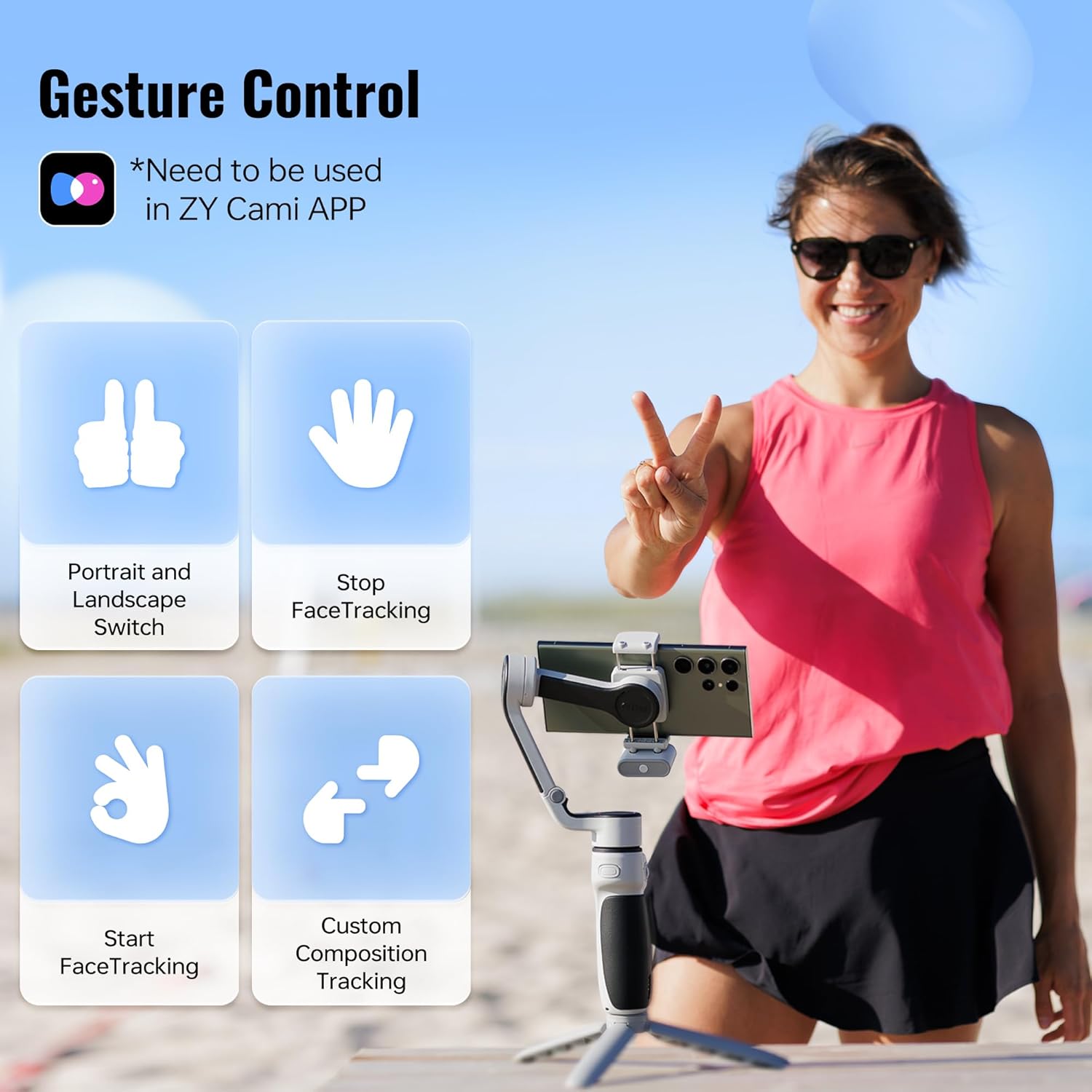
Image: A user demonstrating voice control with the CQ5 stabilizer. The image shows "Hey Cami" and "Start Recording" commands, with a note about the 3m voice recognition distance and the need for Bluetooth and the ZY Cami app in a quiet environment.
5.3 Gesture Control
Utilize gesture control through the ZY Cami app for various functions. Gestures can initiate actions such as switching between portrait and landscape modes, starting/stopping face tracking, and custom composition tracking.

Image: A visual guide to gesture controls for the CQ5 stabilizer. It displays gestures for Portrait and Landscape Switch, Stop FaceTracking, Start FaceTracking, and Custom Composition Tracking, noting that these require the ZY Cami app.
5.4 AI Tracking
The integrated AI module (included in Combo packages) enables magnetic AI face and object tracking. This feature allows the gimbal to automatically follow a designated subject without requiring an app connection.
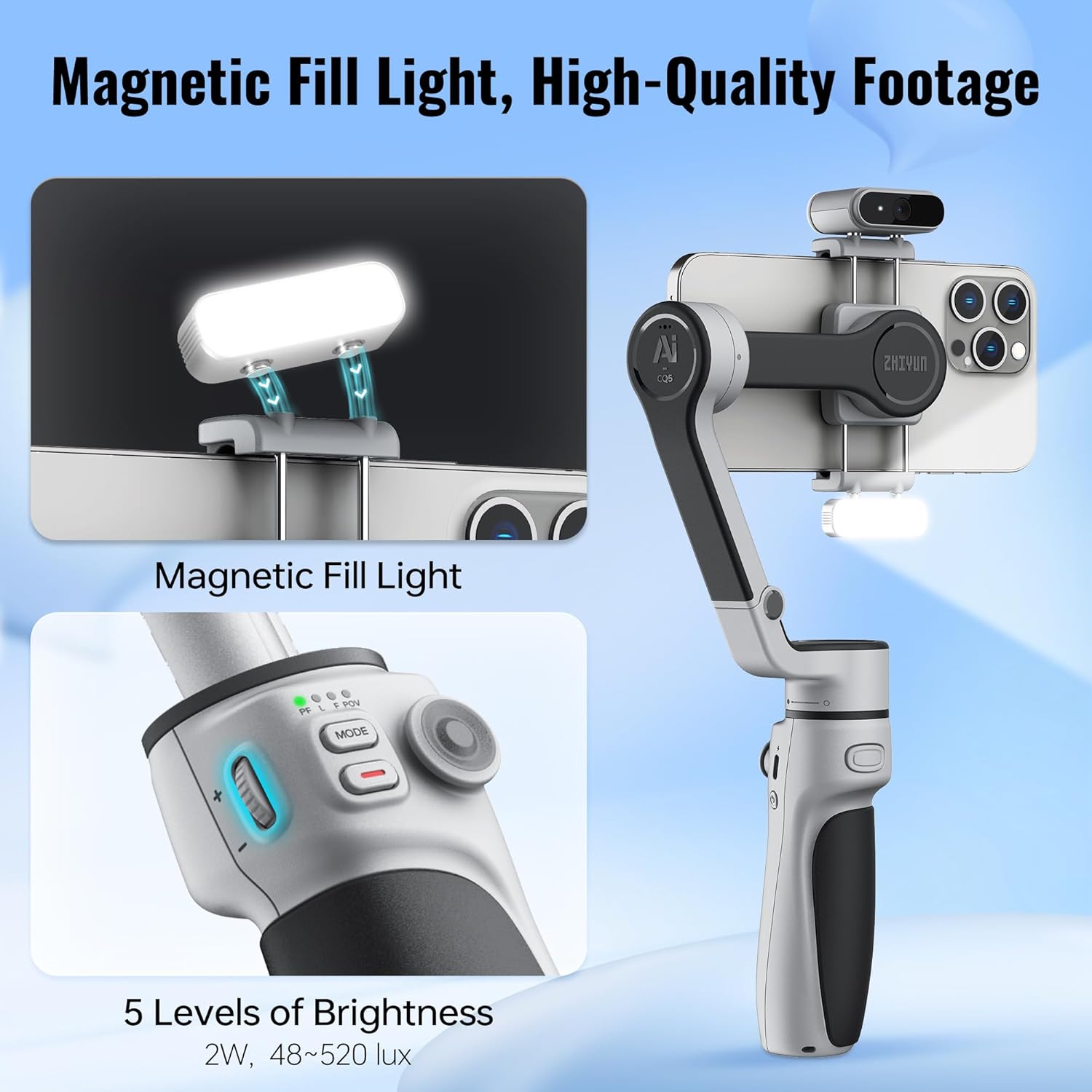
Image: Close-up view of the magnetic AI tracking module attached to the CQ5 stabilizer. It highlights AI Face Tracking and AI Object Tracking capabilities, mentioning that the AI module is only in Combo packages and no app is required for its operation.
5.5 Built-in Fill Light
The CQ5 features a magnetic fill light with 5 levels of brightness adjustment, ranging from 48 to 520 lux. Attach the fill light magnetically to the stabilizer and use the dedicated button to cycle through brightness settings.
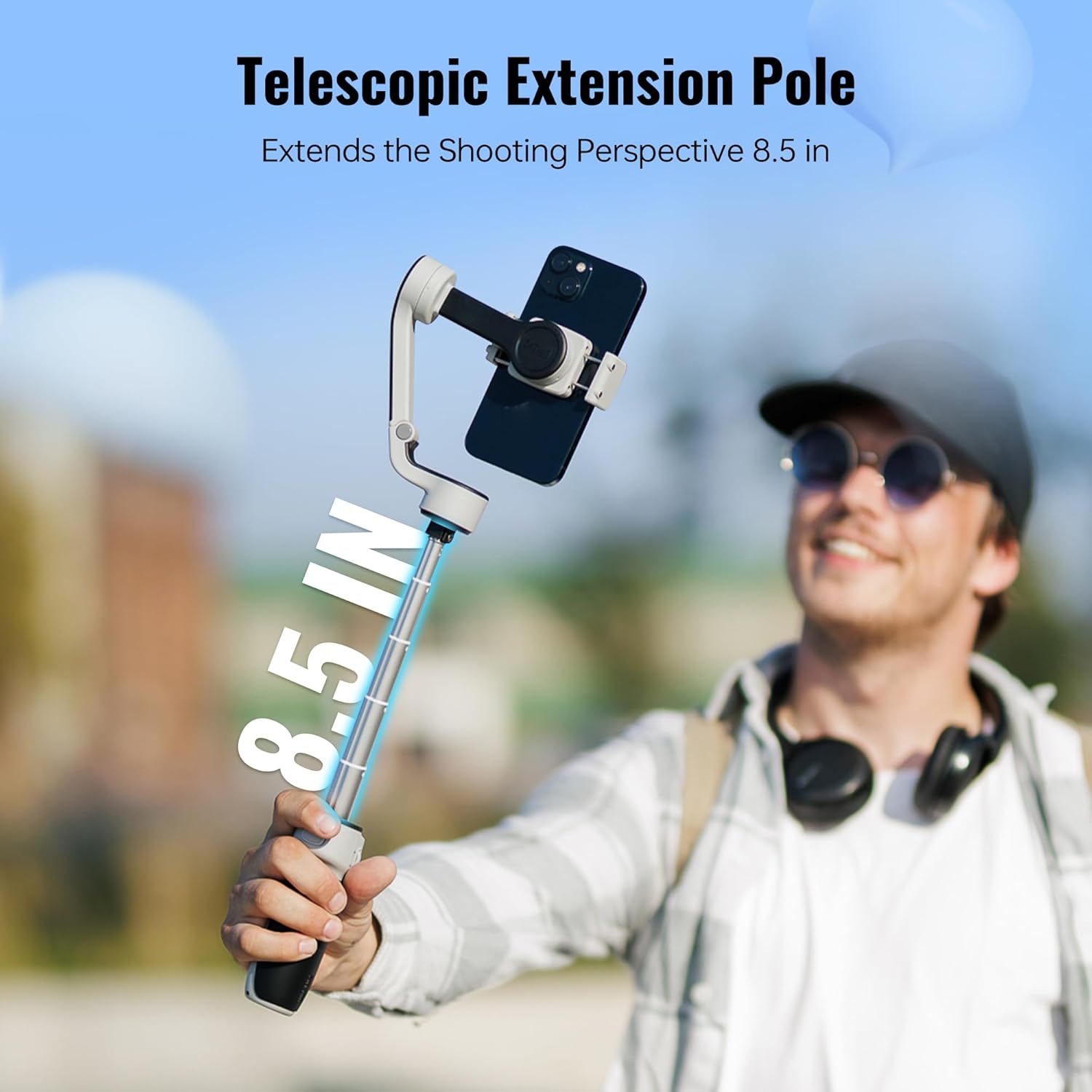
Image: The magnetic fill light attached to the CQ5 stabilizer, showing its illumination. The image also details the control panel with brightness levels and the range of 48-520 lux.
5.6 Telescopic Extension Pole
Extend the integrated telescopic pole to increase your shooting perspective by up to 8.5 inches. This is useful for wider shots or self-portraits.

Image: A person holding the CQ5 stabilizer with its telescopic extension pole fully extended, demonstrating an increased shooting perspective of 8.5 inches.
5.7 Portable and Foldable Design
The CQ5 stabilizer is designed to be compact and foldable, making it easy to carry. Its folded dimensions are approximately 7.4 x 4.8 x 2.3 inches, and it weighs 398g (0.88 lbs).
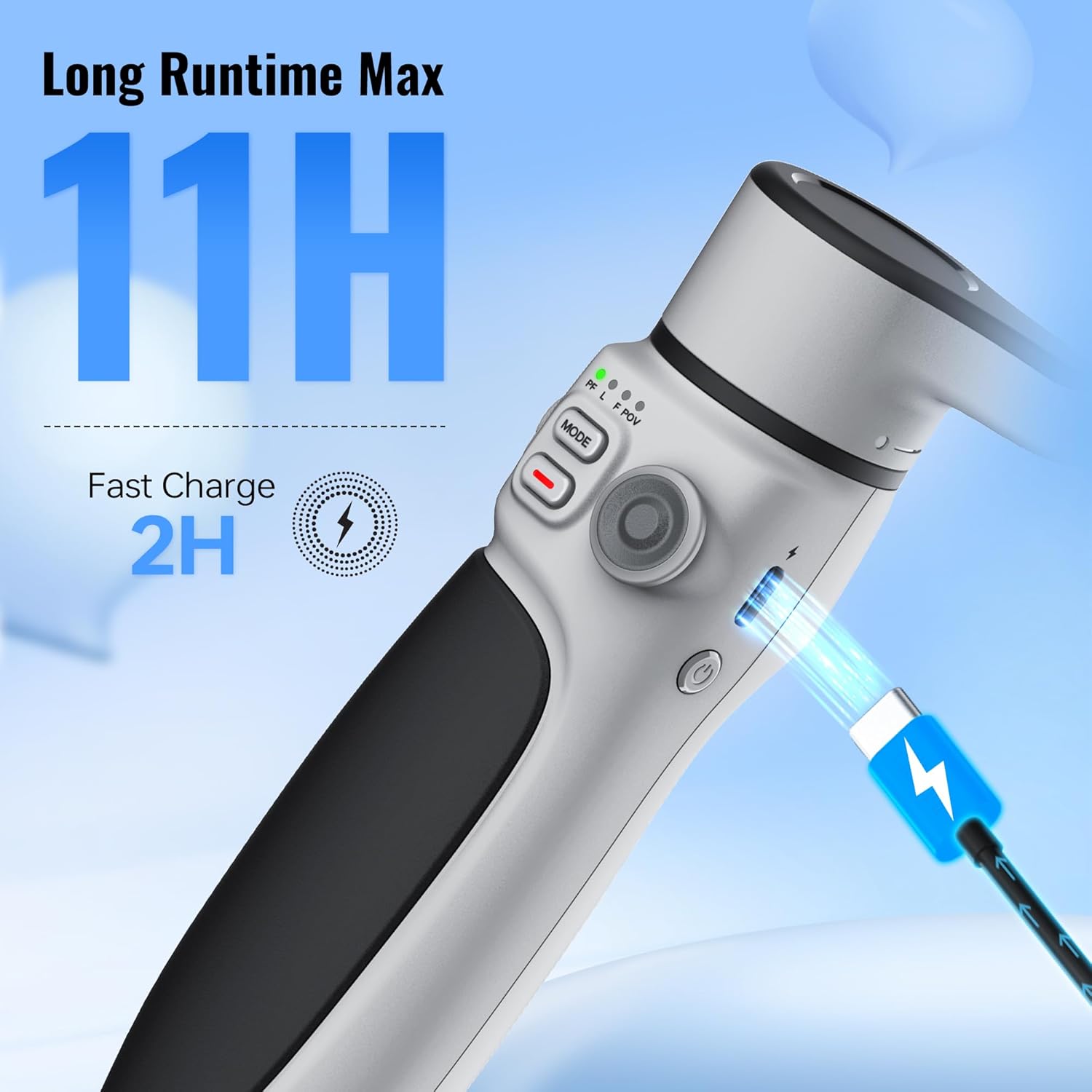
Image: The CQ5 stabilizer in its folded, compact state, being placed into a bag. The image highlights its portability and folded dimensions of 7.4 x 4.8 x 2.3 inches and weight of 398g.
6. Maintenance
- Cleaning: Use a soft, dry cloth to clean the stabilizer. Avoid using liquid cleaners or solvents.
- Storage: Store the stabilizer in a cool, dry place, away from direct sunlight and extreme temperatures. Ensure it is powered off before storage.
- Battery Care: For long-term storage, charge the battery to approximately 50-60% every three months to maintain battery health.
7. Troubleshooting
| Issue | Possible Cause / Solution |
|---|---|
| Stabilizer does not power on. | Battery may be depleted. Charge the stabilizer fully. Ensure the power button is pressed and held for a few seconds. |
| Footage is unstable or shaky. | Smartphone may not be properly balanced. Re-center the phone in the clamp. Ensure the stabilizer is calibrated if an option is available in the app. |
| ZY Cami app cannot connect to the stabilizer. | Ensure Bluetooth is enabled on your phone and the stabilizer is powered on. Restart both the app and the stabilizer. Try re-pairing through the app. |
| AI Tracking is not working. | Verify that your CQ5 model includes the AI module (typically in Combo packages). Ensure the AI module is properly attached and unobstructed. |
8. Specifications
| Feature | Detail |
|---|---|
| Model | CQ5 |
| Brand | ZHIYUN |
| Compatible Devices | Cellphone |
| Folded Size (L x W x H) | 188mm x 124.3mm x 59.3mm (7.4 x 4.8 x 2.3 inches) |
| Item Weight | 0.65 Kilograms (1.43 pounds) |
| Extension Pole Length | Up to 8.5 inches |
| Battery Runtime | Max 11 hours |
| Charging Time | Approx. 2 hours (Fast Charge) |
| Fill Light Brightness | 5 levels, 48-520 lux |
| Voice Recognition Distance | Up to 3 meters |
9. Warranty and Support
For warranty information and technical support, please refer to the official ZHIYUN website or contact your local distributor. Keep your purchase receipt as proof of purchase for warranty claims.


