
Coolfire 1685DD
Coolfire Vibrating Alarm Clock Wristband Model 1685DD User Manual
Introduction
This manual provides comprehensive instructions for the Coolfire Vibrating Alarm Clock Wristband, Model 1685DD. This device is designed to provide a silent and effective alarm through vibrations on the wrist, ideal for individuals who need to wake up without disturbing others, such as partners, roommates, or family members. It is particularly beneficial for heavy sleepers, students, shift workers, and those with hearing impairments.
Please read this manual thoroughly before using your device to ensure proper operation and to maximize its lifespan.
Product Overview
Components
The Coolfire Vibrating Alarm Clock consists of a compact digital watch unit and a soft, washable sweatband. The watch unit features a digital display and three control buttons: LIGHT/STW, SET, and TIME/ALARM.

The Coolfire Vibrating Alarm Clock unit, integrated into its comfortable blue sweatband, showing the digital display and control buttons.
Key Features
- Vibrating Alarm: Provides silent, strong vibrations to wake the user without disturbing others.
- Multiple Alarms: Supports up to 6 distinct alarm settings.
- Digital Stopwatch: Includes a 24-hour precision 1/100 seconds digital stopwatch function.
- Comfortable Design: Integrated into a soft, washable sweatband for ease of wear and support.
- Clear Display: Features large digits for easy readability.
- USB Rechargeable: Powered by a built-in lithium rechargeable battery, offering extended use on a single charge.

An illustration highlighting key features of the alarm clock, including its multiple vibration alarms, stopwatch function, clear display, portability, and USB charging capability.
Setup
Charging the Device
Before initial use, fully charge your Coolfire Vibrating Alarm Clock. The device is powered by a lithium rechargeable battery.
- Locate the charging port on the back of the watch unit.
- Connect the provided USB cable to the charging port.
- Plug the other end of the USB cable into any standard USB adapter (not included) or a powered USB port.
- Allow approximately 4 hours for a full charge. A fully charged device typically operates for 4-6 weeks, depending on usage.

Visual guide for charging the device. Connect the provided USB cable to a USB adapter and plug it into the charging socket located on the back of the watch unit. A full charge takes approximately 4 hours.
Wearing the Wristband
The watch unit is designed to be worn comfortably on your wrist using the provided sweatband.
- Slide the sweatband onto your wrist.
- Adjust the position of the watch unit for optimal comfort and vibration sensation.
- The sweatband is adjustable to fit wrist circumferences from 6.7 inches (170mm) to 8.5 inches (215mm).

This image demonstrates the adjustable wearing size of the sweatband, accommodating wrist circumferences from 6.7 inches (170mm) to 8.5 inches (215mm).
Operating Instructions
The Coolfire Vibrating Alarm Clock features three primary control buttons: LIGHT/STW, SET, and TIME/ALARM. Specific button press sequences may vary slightly; experimentation or a quick start guide (if provided separately) is recommended for precise operation.
Button Functions
- LIGHT/STW: Activates the backlight for the display; also functions as the Stopwatch control (Start/Stop/Reset).
- SET: Enters and confirms settings modes for time and alarms.
- TIME/ALARM: Toggles between time display and alarm display modes; used to adjust values during setting.
Setting the Time
- Press the SET button to enter time setting mode. The hour digits will likely flash.
- Use the TIME/ALARM button to adjust the hour.
- Press SET again to move to the minute digits.
- Use the TIME/ALARM button to adjust the minutes.
- Press SET one more time to confirm and exit time setting mode.
Setting Alarms
The device supports up to 6 vibration alarms.
- Press the TIME/ALARM button repeatedly until you see an alarm number (e.g., AL1, AL2) displayed.
- Press the SET button to enter alarm setting mode for the selected alarm. The hour digits will likely flash.
- Use the TIME/ALARM button to adjust the alarm hour.
- Press SET again to move to the alarm minute digits.
- Use the TIME/ALARM button to adjust the alarm minutes.
- Press SET to confirm the alarm time. You may then be prompted to enable/disable the alarm or set its vibration intensity (if applicable).
- Repeat for other alarms as needed.
Using the Stopwatch
- Press the LIGHT/STW button to switch to stopwatch mode.
- Press LIGHT/STW again to start the stopwatch.
- Press LIGHT/STW to pause/resume the stopwatch.
- To reset, press and hold LIGHT/STW while the stopwatch is paused.
Maintenance
Cleaning the Sweatband
The watch unit is not water resistant. To clean the sweatband, the watch unit must be detached.
- Carefully turn the watch unit over to access its back.
- Locate the locking ring on the back of the watch unit.
- Release the locking ring (this may involve twisting or gently prying, as shown in the diagram).
- Gently push the watch unit out from the sweatband.
- Wash the sweatband by hand with mild soap and water, then air dry completely.
- Once the sweatband is dry, reinsert the watch unit and secure the locking ring.
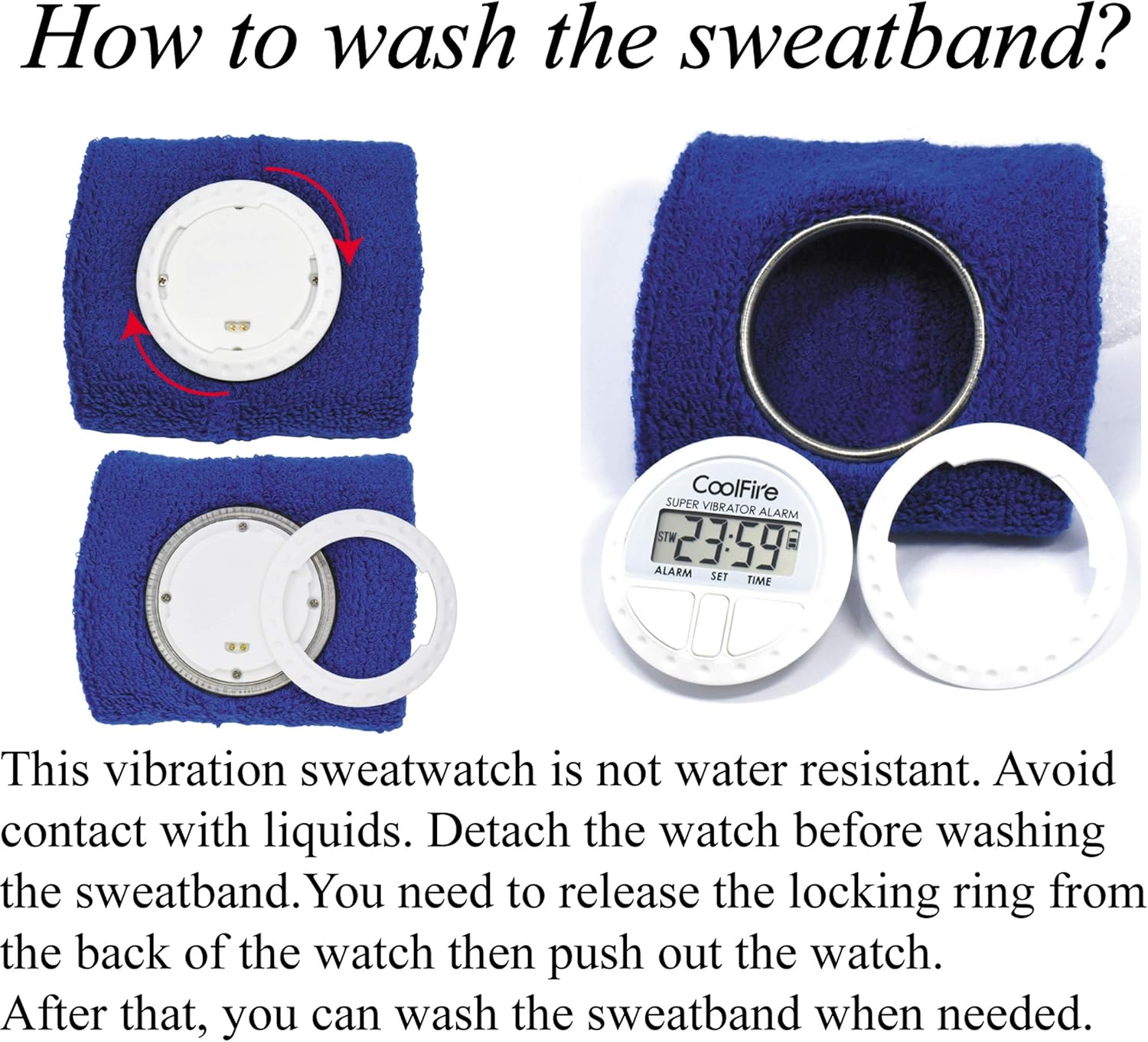
This diagram illustrates the process of detaching the watch unit from the sweatband for washing. Release the locking ring from the back of the watch, then push out the watch unit. The sweatband can then be washed separately. The watch unit is not water resistant.
Troubleshooting
Common Issues and Solutions
- Device not turning on or display is blank:
- Ensure the device is fully charged. Connect it to a USB power source for at least 4 hours.
- If the issue persists after charging, try pressing and holding the SET button for a few seconds to attempt a reset.
- Alarm not vibrating:
- Verify that the alarm is set correctly and enabled. Check the alarm icon on the display.
- Ensure the device has sufficient battery charge.
- Charging issues (device not charging):
- Check that the USB cable is securely connected to both the watch unit and the power adapter/port.
- Try using a different USB cable or a different USB power adapter/port to rule out a faulty accessory.
- Difficulty setting time or alarms:
- Refer to the 'Operating Instructions' section and carefully follow the button press sequences.
- Practice the setting process a few times to become familiar with the controls.
Specifications
Technical Specifications
| Feature | Detail |
|---|---|
| Brand | Coolfire |
| Model Number | 1685DD |
| Display Type | Digital |
| Power Source | Battery Powered (1 Lithium Polymer battery, included) |
| Battery Life | 4-6 weeks (after 4-hour charge) |
| Charging Time | Approximately 4 hours |
| Material | Plastic (watch unit), Fabric (sweatband) |
| Mounting Type | Wristband |
| Item Weight | 1.6 ounces |
| Wristband Size | Adjustable from 6.7" (170mm) to 8.5" (215mm) |
| Connectivity | USB (for charging) |
| Alarms | Up to 6 vibration alarms |
| Special Feature | Stopwatch (1/100 second precision) |
Warranty and Support
Warranty Information
Specific warranty details for the Coolfire Vibrating Alarm Clock Wristband are typically provided with your purchase documentation or on the product packaging. Please refer to these resources for information regarding warranty coverage and duration.
Customer Support
If you encounter any issues not covered in this manual or require further assistance, please contact Coolfire customer service. Contact information can usually be found on the product packaging or the official Coolfire website.
Ask a question about this manual
Ask about setup, troubleshooting, compatibility, parts, safety, or missing instructions. Manuals+ will review the question and use this page’s manual context to help answer it.