
1. Introduction
Thank you for choosing the WAIKIL Hair Clipper Model 8688. This professional grooming kit is designed for versatile use, combining the functions of a hair and beard trimmer. Please read this manual carefully before use to ensure proper operation, maintenance, and safety.
Package Contents
- Hair Clipper (main unit)
- Full-Size Trimmer Head
- Design Trimmer Head
- Micro Shaver Head
- Body Trimmer Head
- Ear/Nose Hair Trimmer Head
- Precision Trimmer Head
- Limit Combs (5 pieces)
- USB Charging Cable
- Cleaning Brush
- Comb
- Storage Box
- User Manual
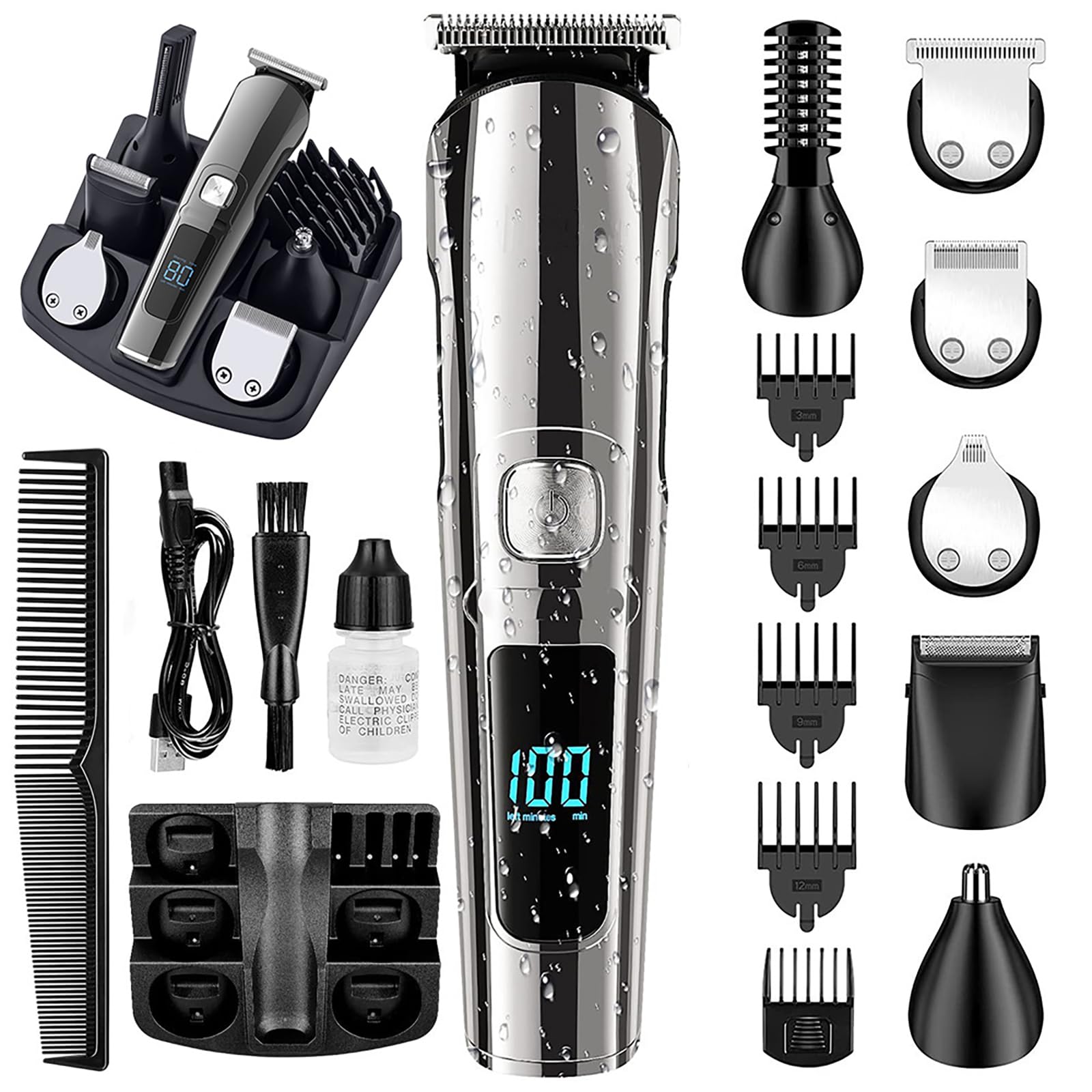
Image 1.1: The WAIKIL Hair Clipper Model 8688, showcasing the main unit and various included accessories such as different trimmer heads, guide combs, and charging cable.
2. Safety Instructions
To reduce the risk of electric shock, injury, or fire, please observe the following safety precautions:
- Do not immerse the main unit in water. The knife head is washable, but the main body should be protected from water.
- Keep the appliance away from children.
- Use only the provided USB charging cable.
- Do not use the appliance if it is damaged or malfunctioning.
- Avoid disassembling the appliance. For repairs, contact qualified service personnel.
- Ensure your hands are dry when handling the charger or appliance.
- Do not use the appliance near flammable materials.
3. Setup
3.1 Charging the Appliance
- Connect the USB charging cable to the charging port on the clipper.
- Plug the other end of the USB cable into a compatible USB power adapter (not included) or a computer USB port.
- The charge indicator light will illuminate to show that the appliance is charging.
- Allow the clipper to charge fully before first use. A full charge typically takes approximately 2 hours.
3.2 Attaching and Detaching Trimmer Heads
- To attach a trimmer head: Align the desired head with the main unit and press firmly until it clicks into place.
- To detach a trimmer head: Gently push the head upwards or press the release button (if present) and pull it away from the main unit.
3.3 Attaching Guide Combs
The 5 included guide combs allow for various cutting lengths.
- Select the desired guide comb.
- Align the comb with the trimmer head and slide it on until it securely locks into position.
- To remove, gently slide the comb off the trimmer head.
4. Operating Instructions
4.1 General Usage
- Ensure the clipper is fully charged before use for optimal performance.
- Press the power button to turn the appliance on or off.
- The clipper can be used for both dry and wet trimming. For wet use, apply foam or gel as desired.
4.2 Using Specific Trimmer Heads
- Full-Size Trimmer Head: Ideal for general hair cutting and beard trimming. Use with guide combs for desired length.
- Design Trimmer Head: For creating precise lines, edges, and detailed styling.
- Micro Shaver Head: For a close, smooth finish on small areas.
- Body Trimmer Head: Designed for trimming body hair.
- Ear/Nose Hair Trimmer Head: For safely and comfortably removing unwanted ear and nose hair.
- Precision Trimmer Head: For fine detailing and shaping.
Always move the clipper against the direction of hair growth for best results. Start with a longer guide comb if you are unsure of the desired length.
5. Maintenance
5.1 Cleaning the Trimmer Heads
The knife heads are washable for easy cleaning.
- Turn off the appliance and detach the trimmer head.
- Rinse the detached head under running water.
- Use the provided cleaning brush to remove any trapped hairs from the blades.
- Allow the trimmer head to air dry completely before reattaching or storing.
5.2 Blade Care
The WAIKIL clipper features high-carbon precision-ground blades designed for long-lasting sharpness. Regular cleaning helps maintain their performance. Periodically, a small drop of clipper oil (not included) can be applied to the blades to ensure smooth operation and extend their lifespan.
6. Troubleshooting
- Appliance does not turn on: Ensure the battery is charged. Connect to the USB charging cable and allow it to charge.
- Poor trimming performance: Clean the trimmer head and blades thoroughly. Ensure the correct trimmer head and guide comb are properly attached. The battery might be low; recharge the appliance.
- Blades feel dull: Clean the blades. If performance does not improve, consider applying a small amount of clipper oil.
- Charging indicator not working: Check the USB cable and power source connection. Try a different USB port or adapter.
If problems persist, please contact customer support.
7. Specifications
- Model Number: 8688
- Power Source: Corded Electric (via USB charging)
- Batteries: 1 Lithium Polymer battery (included)
- Material Type: Plastic
- Recommended Uses: Beard, Body, Face, Head, Neck
- Hair Type: All
- Special Features: Charge Indicator Light, Detachable Head, Ergonomic Design, Fast Charge, Multigroomer
- Manufacturer: WAIKIL
8. Warranty and Support
For warranty information or technical support, please refer to the contact details provided with your purchase or visit the official WAIKIL website. Keep your purchase receipt as proof of purchase.
