
1. Introduction
Thank you for choosing the Ashfly LCD Digital Coin Microscope 500x. This device is designed for detailed observation of various objects, including coins, circuit boards, insects, and more. Featuring a 7-inch HD display, 50X to 500X magnification, and adjustable LED lighting, it provides clear digital imaging for both standalone use and PC connectivity. This manual will guide you through the setup, operation, and maintenance of your microscope.

Image 1.1: Ashfly LCD Digital Coin Microscope 500x with 7-inch display and remote control.
2. What's in the Box
Please check the package contents upon receipt to ensure all items are present:
- Digital Microscope (1 unit)
- USB-C Data Cable (1 unit)
- Instruction Manual (1 unit)
3. Product Overview
The Ashfly Digital Microscope features a high-resolution display and powerful magnification capabilities. Key components include:
- 7-inch HD Display: Provides a clear and detailed view of magnified objects.
- Microscope Lens: Offers 50X to 500X magnification for observing fine details.
- Adjustable LED Lights: Eight integrated LED lights with stepless adjustment for optimal illumination.
- Sturdy Stand and Base: Ensures stability during observation.
- Control Buttons: Located on the display for easy operation.
- Remote Control: For convenient operation from a distance.
- PC Connectivity: Compatible with Windows and Mac operating systems for external display.
- Memory Card Slot: Supports up to 64GB memory card for photo and video storage (memory card not included).

Image 3.1: Key features of the Ashfly HD Digital Microscope.

Image 3.2: The 7.0-inch IPS screen provides a wide viewing angle and clear images.
4. Setup Instructions
Follow these steps to assemble your Ashfly Digital Microscope:
- Step 1: Place Bracket on Pole. Insert the microscope bracket onto the vertical support pole.
- Step 2: Place Bracket on Base. Securely attach the pole with the bracket to the microscope's base.
- Step 3: Place the Screen on the Bracket. Mount the microscope screen unit onto the bracket.
- Step 4: Tighten the Two Knobs. Secure all connections by tightening the adjustment knobs on the bracket and pole.

Image 4.1: Step-by-step assembly guide for the microscope.
5. Operating Instructions
5.1 Powering On/Off
Press and hold the power button on the microscope unit to turn it on or off. Ensure the device is charged or connected to a power source via the USB-C cable.
5.2 Adjusting Magnification
Magnification is adjusted by changing the distance between the microscope lens and the object. Physically move the microscope head up or down along the stand to achieve the desired magnification level, ranging from 50X to 500X. The actual magnification displayed depends on the screen size and the distance between the camera and the object.
5.3 Adjusting LED Lights
The microscope is equipped with 8 adjustable LED lights. Use the knob located on the right side of the screen to control the brightness. Adjust the illumination to achieve clear video and images, especially in dim environments.

Image 5.1: Adjustable LED ring lights with stepless control.
5.4 Taking Photos and Recording Videos
The microscope supports both still image capture and video recording. Insert a compatible memory card (up to 64GB, not included) into the designated slot to save your observations. Use the appropriate buttons on the device or remote control to initiate photo capture or video recording.

Image 5.2: HD photo and real-time video recording capabilities.
5.5 PC View Mode
Connect the digital microscope to a computer to view images on a larger screen. The device is compatible with Windows Vista/XP/7/8/10/11 and Mac OS 11.0 or above. Use the provided USB-C data cable to establish the connection. Once connected, the microscope functions as an external camera, allowing real-time observation and data transfer.
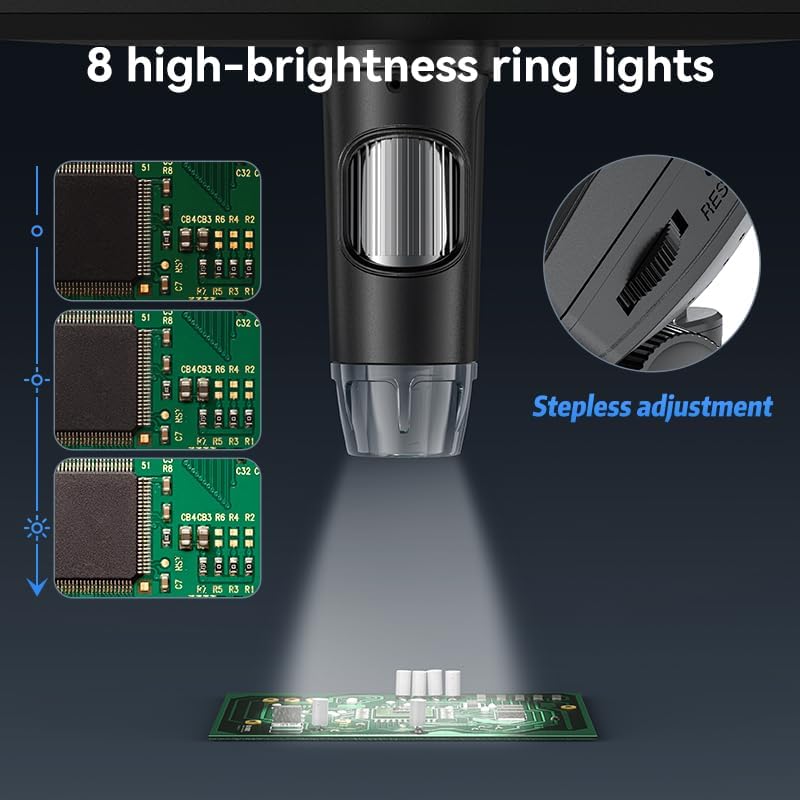
Image 5.3: Microscope connected to a computer for PC viewing.
6. Maintenance
To ensure the longevity and optimal performance of your Ashfly Digital Microscope, follow these maintenance guidelines:
- Cleaning the Lens: Use a soft, lint-free cloth specifically designed for optical lenses to gently clean the microscope lens. Avoid abrasive materials or harsh chemicals.
- Cleaning the Screen: Wipe the 7-inch display with a soft, dry microfiber cloth. For stubborn smudges, slightly dampen the cloth with water, then wipe dry.
- General Cleaning: Keep the microscope body and stand free from dust and debris. Use a soft, dry cloth for general cleaning.
- Storage: When not in use, store the microscope in a clean, dry place away from direct sunlight and extreme temperatures.
- Battery Care: The device contains a Lithium Ion battery. For best battery life, avoid fully discharging the battery frequently and store it with a partial charge if not used for extended periods.
7. Troubleshooting
If you encounter issues with your Ashfly Digital Microscope, refer to the following common troubleshooting tips:
- No Power: Ensure the device is fully charged or connected to a power source. Check the USB-C cable connection.
- Unclear Image: Adjust the distance between the lens and the object to focus. Clean the lens if smudges are present. Adjust the LED light brightness for better illumination.
- PC Connection Issues: Verify the USB-C cable is securely connected to both the microscope and the computer. Ensure your computer's operating system (Windows Vista/XP/7/8/10/11 or Mac OS 11.0+) is compatible and drivers are correctly installed if prompted.
- Memory Card Not Detected: Ensure the memory card is inserted correctly and is not damaged. The microscope supports up to 64GB cards.
- Battery Drains Quickly: Battery life can vary based on usage and settings. Ensure the device is fully charged before use. If the issue persists, contact customer support.
8. Specifications
| Feature | Specification |
|---|---|
| Model Name | 330 |
| Display Size | 7 Inch |
| Magnification Maximum | 500 x (actual magnification depends on screen size and object distance) |
| Light Source Type | LED (8 high-brightness ring lights) |
| Compatible Devices | Laptop, Personal Computer (Windows Vista/XP/7/8/10/11, Mac OS 11.0 or above) |
| Power Source | Corded Electric / 1 Lithium Ion battery (included) |
| Material | Plastic |
| Color | Black |
| Item Weight | 1.72 pounds |
| Package Dimensions | 12.24 x 8.82 x 4.61 inches |
9. Warranty and Support
For information regarding product warranty, please refer to the documentation provided at the time of purchase or contact Ashfly customer support directly. Protection plans are available for purchase separately to extend coverage for your device.
For technical assistance or further inquiries, please visit the official Ashfly website or contact their customer service department. Contact details are typically found on the product packaging or the manufacturer's website.


