
Introduction
Thank you for choosing the Aprilboy 4K Mirror Dash Cam. This advanced device is designed to enhance your driving safety and provide comprehensive vehicle monitoring. Featuring a 12-inch Full HD touch screen, it captures crystal-clear footage with its front 4K 170° wide-angle lens and rear 2.5K 150° wide-angle lens. Integrated with Advanced Driver Assistance Systems (ADAS) and Blind Spot Detection (BSD), it offers real-time warnings to prevent potential collisions. The external GPS tracking accurately records your driving route and speed, while the 24-hour parking monitor ensures your vehicle's security even when parked. This manual will guide you through the setup, operation, and maintenance of your new dash cam.
What's in the Box
Your Aprilboy 4K Mirror Dash Cam package includes the following components:
- Dual Mirror Dash Cam
- Car Charger
- GPS Module
- Rear Camera
- 33ft Rear Camera Cable
- 64G SD Card
- User Manual
- Car Reader
- Straps (x2)
- 3M Adhesive Pad
- Mount Tool
- Wiring Loops (x5)

Figure 1: All components included in the Aprilboy 4K Mirror Dash Cam package.
Setup
Component Overview
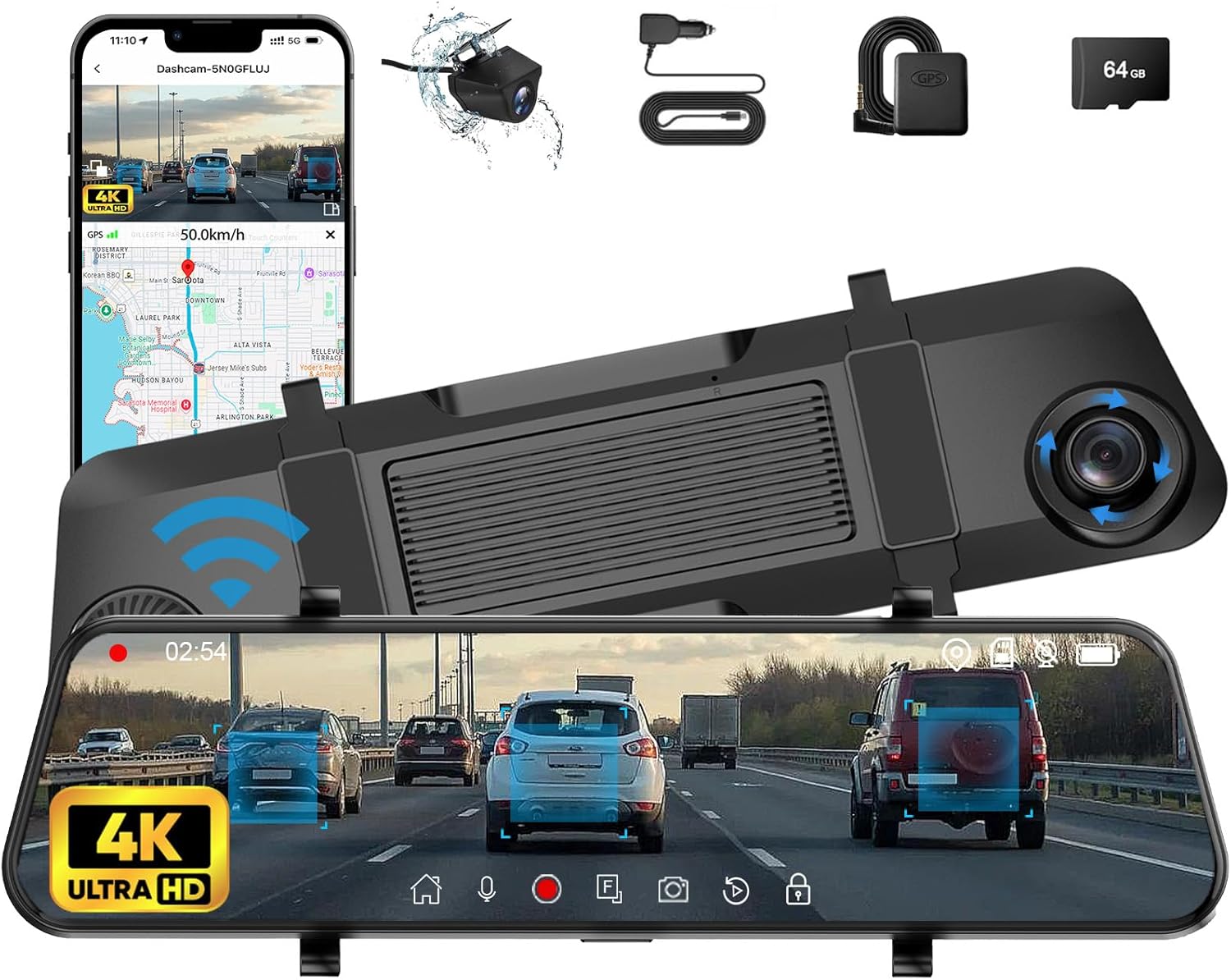
The Aprilboy 4K Mirror Dash Cam features a 12-inch full HD touch screen, front 4K camera, and rear 2.5K camera.

High-resolution cameras capture clear details in various lighting conditions.

The intuitive touch screen interface allows for easy navigation and control.

Integrated ADAS technology provides driver warnings for enhanced safety.

Blind Spot Detection (BSD) alerts the driver to potential hazards.

Superior night vision ensures flawless video footage even at night or on rainy days.

The rear camera display can be adjusted for vertical or mirror flip to suit different vehicle types.

External GPS module records driving routes, locations, and speed for accurate tracking.
Installation Steps
Follow these steps to install your Aprilboy 4K Mirror Dash Cam:
- Mount the Dash Cam: Securely attach the mirror dash cam over your existing rearview mirror using the provided rubber straps. Ensure it is centered and stable.
- Connect Power: Plug the Type-C end of the car charger into the dash cam and the cigarette lighter adapter into your vehicle's 12V power outlet.
- Install GPS Module: Connect the GPS module to the dash cam's GPS port. Position the module on your dashboard or windshield where it has a clear view of the sky for optimal signal reception.
- Install Rear Camera: Mount the rear camera at the back of your vehicle, typically above the license plate or inside the rear window. Route the 33ft rear camera cable from the rear camera to the dash cam, connecting it to the AV-IN port. Use the provided pry tool and wiring loops to neatly tuck away the cables along the vehicle's trim.
- Insert SD Card: Insert the provided 64GB Micro SD card into the designated SD card slot on the dash cam. Ensure it clicks into place.
Video 1: Watch this official Aprilboy video for a visual guide on unboxing and basic setup of the mirror dash cam, including connecting the front and rear cameras.
Operating Instructions
Touch Screen Interface
The 12-inch Full HD touch screen provides an intuitive interface for controlling your dash cam. Simply tap or swipe to navigate through menus and settings. You can easily switch between front camera view, rear camera view, or a split-screen display. The main screen also provides quick access to recording, smart driving features, playback, and system settings.
Video 2: This official Aprilboy video demonstrates the touch screen interface and various features of the 4K Smart Rear View Mirror dash cam.
Key Features
- ADAS Collision Avoidance Technology: Advanced Driver Assistance System (ADAS) utilizes sensors and cameras to monitor your vehicle's surroundings in real-time. It provides warnings for forward collision, lane departure, and vehicle ahead start, significantly improving driving safety.
- Blind Spot Detection System (BSD): The BSD system actively monitors dangerous blind spot areas. It issues warnings when changing lanes or reversing if a vehicle is detected, helping to prevent potential side collisions.
- External GPS Tracking: The Global Positioning System (GPS) accurately records your driving process, including vehicle positioning, anti-theft tracking, and detailed driving route monitoring.
- 24H Parking Monitor: This feature protects your property by automatically recording approximately 20 seconds of locking video in the event of a collision during parking, triggered by the G-sensor. Note: This feature requires an additional ACC hardwire kit (not included in package, search ASIN: B0D47TVN42).
- Loop Recording: When the SD card is full, loop recording automatically overwrites the oldest files, ensuring continuous recording without manual intervention. Locked videos (triggered by G-sensor events) will not be overwritten. You can select loop recording intervals of 1, 2, or 3 minutes.
- Wide Angle Lens: The front 4K 170° and rear 2.5K 150° wide-angle lenses cover multiple lanes, reducing blind spots and enhancing your perception of the surrounding environment. The rear camera angle can be rotated by setting the vertical/mirror surface.
Maintenance
SD Card Management
To ensure optimal performance and prevent data corruption, it is recommended to format the Micro SD card regularly (e.g., once a month). This can typically be done through the dash cam's system settings menu. The loop recording feature manages storage automatically, but periodic formatting helps maintain card health.
Cleaning the Device
Gently wipe the dash cam screen and camera lenses with a soft, lint-free cloth. Avoid using abrasive cleaners or solvents that could damage the surfaces.
Temperature Considerations
The Aprilboy Mirror Dash Cam is designed for stable operation within a temperature range of -4°F to 158°F (-20°C to 70°C). Extreme temperatures outside this range may affect performance or cause damage.
Troubleshooting
If you encounter any issues with your Aprilboy 4K Mirror Dash Cam, please refer to the following common solutions:
- Device Not Powering On: Ensure the car charger is securely plugged into both the dash cam and the vehicle's power outlet. Check the vehicle's 12V power outlet for functionality.
- Rear Camera Not Working or Poor Quality: Verify that the rear camera cable is properly connected to the AV-IN port on the dash cam. Check for any kinks or damage to the cable. If the issue persists, please contact Aprilboy customer service for assistance. We will send you a replacement rear camera for free if there is a quality problem.
- Recording Issues: Ensure a valid Micro SD card is inserted and properly formatted. Check if the card is full (though loop recording should prevent this). If the issue continues, try using a different compatible SD card.
- GPS Signal Problems: Ensure the GPS module has a clear line of sight to the sky and is not obstructed by metal objects or tinted windows.
- Screen Freezing/Unresponsive: Try restarting the device by unplugging and re-plugging the power cable. If the issue persists, perform a factory reset via the system settings (note: this will erase custom settings).
Specifications
| Feature | Specification |
|---|---|
| Product Dimensions | 12 x 3 x 0.5 inches |
| Item Weight | 2.64 pounds |
| Item Model Number | P30 |
| Connectivity Technologies | Type-C, Built-In WiFi |
| Special Features | Built-In WiFi, G-Sensor, BSD, ADAS, SONY REAR CAMERA |
| Video Capture Resolution | 4K (Front) |
| Orientation | Front and Rear |
| Mounting Type | Rearview Mirror Mount |
| Operating Temperature | -4°F to 158°F |
Warranty and Support
Aprilboy is committed to providing high-quality products and excellent customer service. Your mirror dash cam has undergone strict temperature testing to ensure stable operation.
- 24 Hours: Quick reply within 24 hours for any inquiries.
- 60 Days: No-worry return policy within 60 days of purchase.
- 12 Months: Replacement available within 12 months for product defects.
- Lifetime: Lifetime after-sales consultation and technical support.
If you experience any issues, such as the rear camera not working or any other quality concerns, please contact Aprilboy Direct customer service immediately. We are dedicated to resolving your problems promptly and will send you a replacement rear camera for free if needed.
For further assistance, please visit the Aprilboy Store on Amazon or refer to the official User Manual (PDF) available at https://manuals.plus/m/342ae79ff94882341269cd3b465ad5369ffeb0e6e2b9d9ad312d0676debf5861.


