
Introduction
The 7artisans 50mm T2.1 Hope Series Cine Lens is designed for S35 frame mirrorless cameras, offering professional cinematic performance. This manual provides essential information for the proper use and care of your lens.
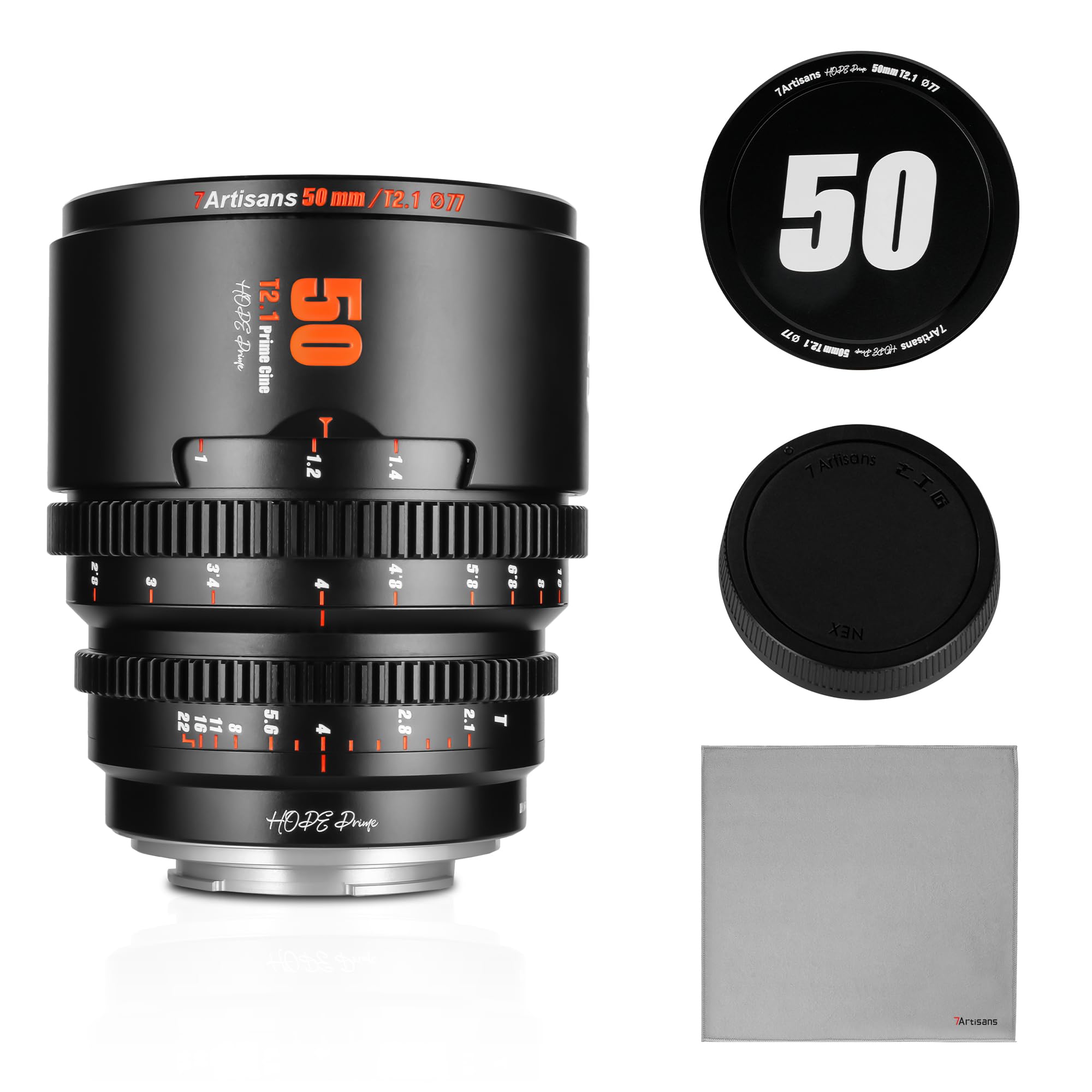
Figure 1: 7artisans 50mm T2.1 Hope Series Cine Lens.
Key Features:
- Pure and Vivid Movie Texture: Delivers clear and delicate frames, preserving movie texture and color for efficient post-production.
- Excellent Picture Quality: Features a newly designed optical and mechanical structure with high-quality lenses and coatings for rich detail and natural transitions.
- T2.1 Large Aperture: Provides ample light intake for low-light conditions and creates a sharp, milky out-of-focus effect for layered visuals.
- Minimal Breathing Effect: Engineered to suppress the breathing effect, ensuring minimal deformation of out-of-focus objects during focus pulls.
- 260° Focusing Stroke: Offers precise focus control, crucial for accurate film shooting.
Product Overview
Familiarize yourself with the components of your 7artisans 50mm T2.1 Hope Series Cine Lens.

Figure 2: Lens components including lens hood mounting position, focus ring, aperture ring, and mount, with dimensions (83mm diameter, 104mm length).
- Lens Hood Mounting Position: Area for attaching a compatible lens hood (sold separately) to reduce flare and protect the front element.
- Focus Ring: Used for manual focusing. The 260° rotation allows for precise adjustments.
- Aperture Ring: Controls the T-stop (aperture) of the lens. This lens features a de-clicked aperture ring for smooth transitions during video recording.
- Mount: The lens mount connects the lens to your camera body. This specific model is designed for Sony E-Mount cameras.
Setup
Mounting the Lens:
- Ensure your camera is turned off before attaching or detaching the lens.
- Align the mounting index on the lens with the corresponding index on your camera body.
- Rotate the lens clockwise (for Sony E-Mount) until it clicks securely into place. Do not force the lens.
- Remove the front and rear lens caps.

Figure 3: The 7artisans 50mm T2.1 lens properly mounted on a camera body.
Operating the Lens
Manual Focus:
The 7artisans 50mm T2.1 is a manual focus lens. Rotate the focus ring to achieve sharp focus on your subject. Utilize your camera's focus peaking or magnification features for precise focusing.
Aperture Adjustment:
Adjust the T-stop (aperture) by rotating the aperture ring. The de-clicked design allows for smooth, stepless aperture changes during video recording, preventing audible clicks in your audio.

Figure 4: Close-up view of the lens, highlighting the focus and aperture rings.
Breathing Effect Suppression:
This lens is designed to minimize focus breathing, a phenomenon where the field of view changes slightly when adjusting focus. This ensures a more consistent and professional look for your cinematic footage.
Video 1: Demonstrates the focus breathing, image quality, distortion, and flare resistance tests for the 7artisans T2.1 Cine Lens series, including the 50mm model.
Compatibility with Focus Pro:
The Hope series lenses are compatible with Focus Pro systems, allowing for direct selection of the corresponding model to achieve autofocus capabilities, simplifying your creative workflow.

Figure 5: The 7artisans T2.1 Cine Lens series, compatible with Focus Pro systems.
Maintenance
Proper maintenance ensures the longevity and optimal performance of your lens.
- Cleaning the Lens: Use a soft, lint-free microfiber cloth specifically designed for optical surfaces. For stubborn smudges, use a small amount of lens cleaning solution applied to the cloth, not directly to the lens.
- Dust Removal: Use a blower brush to remove dust particles from the lens surface. Avoid wiping dry, as this can scratch the coating.
- Storage: Store the lens in a cool, dry place away from direct sunlight and extreme temperatures. Always attach both front and rear lens caps when not in use.
- Avoid Moisture: Keep the lens away from water and high humidity. If it gets wet, dry it immediately with a soft cloth.
Troubleshooting
If you encounter issues with your lens, refer to the following common solutions:
| Problem | Possible Cause | Solution |
|---|---|---|
| Cannot mount lens | Incorrect alignment or debris on mount. | Ensure camera is off. Align index marks correctly. Check for and remove any debris from the lens and camera mounts. |
| Image is blurry/out of focus | Incorrect manual focus adjustment. | Rotate the focus ring slowly and deliberately. Use your camera's focus peaking or magnification assist features. |
| Dust or spots on image | Dust on lens elements or camera sensor. | Clean the lens elements using a blower brush and microfiber cloth. If spots persist, clean your camera's sensor (refer to camera manual or professional service). |
| Excessive lens flare | Strong light source directly hitting the front element. | Use a compatible lens hood. Adjust shooting angle to avoid direct light. |
Specifications
Detailed technical specifications for the 7artisans 50mm T2.1 Hope Series Cine Lens.
| Feature | Specification |
|---|---|
| Brand | 7artisans |
| Model Name | 50mm T2.1 Hope Series |
| Focal Length | 50 Millimeters |
| Maximum Aperture | T2.1 (f/2.1) |
| Minimum Aperture | T22 |
| Lens Mount | Sony E |
| Focus Type | Manual Focus |
| Lens Design | Prime |
| Optical Structure | 9 elements in 7 groups |
| Diaphragm Blades | 10 |
| Minimum Focusing Distance | 0.6 Meters |
| Filter Size | Φ77mm |
| Weight | 705g |
| Frame Type | S35 |
| Water Resistance Level | Not Water Resistant |
Warranty and Support
For warranty information, technical support, or service inquiries, please refer to the official 7artisans website or contact your authorized dealer. Keep your purchase receipt as proof of purchase for warranty claims.