
1. Introduction
Thank you for choosing the MEDION SM60 (MD10689) Sewing Machine. This manual provides essential information for the safe and efficient operation, maintenance, and troubleshooting of your new sewing machine. Please read these instructions carefully before use and keep them for future reference.
The MEDION SM60 is a versatile free-arm sewing machine designed for various sewing projects, featuring an automatic needle threader, LED sewing light, and 60 different stitch patterns.
2. Safety Instructions
- Always unplug the machine from the power outlet when not in use, when changing needles, or when performing maintenance.
- Keep fingers away from the needle, presser foot, and handwheel during operation.
- Do not operate the machine if the power cord is damaged or if the machine is not functioning correctly.
- Use only the accessories recommended by the manufacturer.
- This appliance is not intended for use by persons (including children) with reduced physical, sensory or mental capabilities, or lack of experience and knowledge, unless they have been given supervision or instruction concerning use of the appliance by a person responsible for their safety.
- Ensure the machine is placed on a stable, flat surface during use.
3. Product Overview
The MEDION SM60 sewing machine is designed for ease of use and durability. Familiarize yourself with its main components:
- Handwheel: Manually controls needle movement.
- Stitch Selector Dial: Used to choose from 60 available stitch patterns.
- Stitch Length/Width Dials: Adjusts the length and width of stitches.
- Thread Tension Dial: Controls the tension of the upper thread.
- Presser Foot Lifter: Raises and lowers the presser foot.
- Needle Plate: The flat surface under the needle where fabric rests.
- Free Arm: Allows for sewing cylindrical items like sleeves and pant legs.
- LED Sewing Light: Illuminates the sewing area.
- Automatic Needle Threader: Assists in threading the needle.
- Thread Cutter: Conveniently cuts threads after sewing.
- Accessory Compartment: Integrated storage for sewing tools.

Image: Overview of key features of the MEDION SM60 sewing machine, including 12 stitch patterns (a selection of the 60 available), precise rotary dial, snap-on presser foot, free-arm sewing, and thread cutter.
4. Setup
4.1 Unpacking and Placement
- Carefully remove the sewing machine and all accessories from the packaging.
- Place the machine on a stable, level surface with adequate lighting.
- Ensure there is enough space around the machine for comfortable operation.
4.2 Power Connection
- Connect the foot pedal to the machine's power input jack.
- Plug the power cord into a suitable electrical outlet.
- Turn on the power switch, usually located on the side of the machine. The LED sewing light should illuminate.
4.3 Winding the Bobbin
- Place a spool of thread on the spool pin.
- Guide the thread through the upper thread guide and around the bobbin winding tension disc.
- Place an empty bobbin onto the bobbin winder spindle.
- Wrap the thread around the bobbin a few times, then push the bobbin winder spindle to the right.
- Gently press the foot pedal to start winding. Stop when the bobbin is full.
- Cut the thread and push the bobbin winder spindle back to the left.
4.4 Threading the Upper Thread
- Raise the presser foot lifter.
- Place a spool of thread on the spool pin.
- Follow the numbered threading path indicated on the machine, guiding the thread through all guides and tension discs.
- Bring the thread down to the needle.
- Use the automatic needle threader or manually thread the needle from front to back.
4.5 Inserting the Bobbin
- Open the bobbin cover plate.
- Insert the wound bobbin into the bobbin case, ensuring the thread unwinds in the correct direction (usually counter-clockwise).
- Guide the bobbin thread through the tension spring slot.
- Close the bobbin cover plate.
- Hold the upper thread and turn the handwheel towards you to bring the bobbin thread up through the needle plate hole.
- Pull both threads under the presser foot and towards the back of the machine.
4.6 Attaching the Presser Foot
- Raise the presser foot lifter.
- Press the release button on the back of the presser foot holder to detach the current foot.
- Align the desired presser foot (e.g., zipper foot, buttonhole foot) with the holder pin and lower the presser foot lifter until it snaps into place.
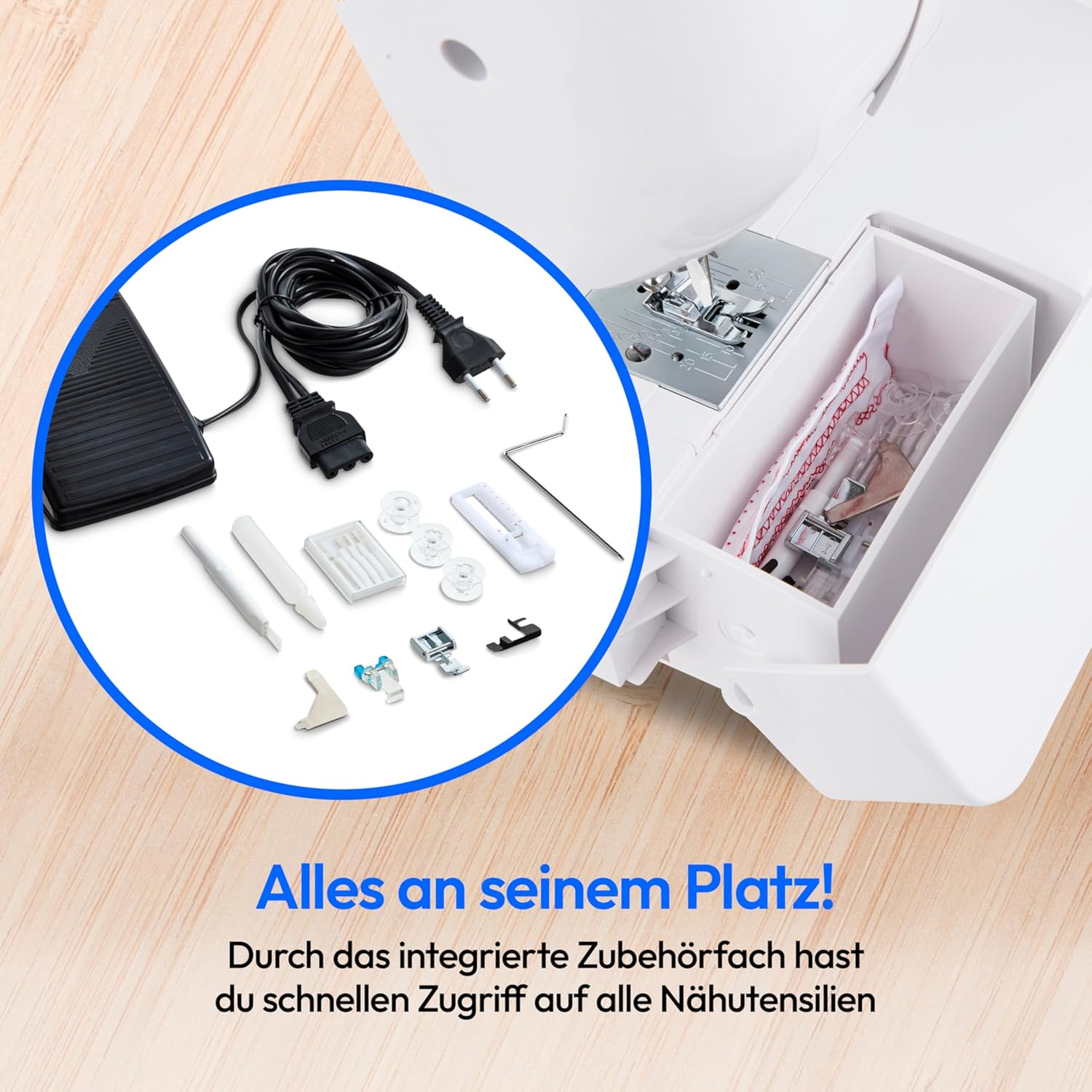
Image: The integrated accessory compartment of the MEDION SM60 sewing machine, providing quick access to all sewing utensils.
5. Operating Instructions
5.1 Selecting Stitch Patterns
- Turn the stitch selector dial to choose one of the 60 available stitch patterns.
- Refer to the stitch chart on the machine for visual guidance.

Image: The MEDION SM60 sewing machine displaying a selection of its various stitch patterns, including buttonhole options.
5.2 Adjusting Stitch Length and Width
- Use the stitch length dial to adjust the length of your stitches. Longer stitches are suitable for basting, shorter for fine work.
- Use the stitch width dial to adjust the width of zigzag or decorative stitches.
5.3 Using the Automatic Needle Threader
- Ensure the needle is in its highest position.
- Lower the needle threader lever.
- Guide the thread through the hook of the threader.
- Release the lever, and the thread will be pulled through the needle eye.
5.4 Reverse Sewing
To reinforce stitches at the beginning and end of a seam, press and hold the reverse stitch button. The machine will sew backward. Release the button to resume forward sewing.
5.5 Using the Free Arm
Remove the accessory compartment to reveal the free arm. This feature is ideal for sewing small, tubular items such as cuffs, sleeves, and pant hems.

Image: Close-up of the MEDION SM60 sewing machine's free arm in use, demonstrating its capability for sewing round, closed garments.
5.6 Buttonhole Sewing
The MEDION SM60 supports buttonhole sewing. Attach the buttonhole presser foot and follow the specific instructions in the detailed manual for your chosen buttonhole type. The machine offers various buttonhole patterns.
5.7 Thread Cutter
After completing a seam, use the integrated thread cutter located on the side of the machine to quickly trim both upper and bobbin threads.

Image: The MEDION SM60 Sewing Machine with fabric, demonstrating its ability to create perfect hems and professional seams.
6. Maintenance
6.1 Cleaning
- Always unplug the machine before cleaning.
- Remove the needle, presser foot, and needle plate.
- Use the provided lint brush to remove lint and dust from the bobbin area and feed dogs.
- Wipe the exterior of the machine with a soft, dry cloth. Do not use liquid cleaners.
6.2 Oiling
Regular oiling of specific moving parts is crucial for smooth operation. Refer to the detailed manual for exact oiling points. Use only high-quality sewing machine oil. An empty oil pot is included with the accessories.
6.3 Changing Needles
- Ensure the machine is unplugged and the needle is in its highest position.
- Loosen the needle clamp screw and remove the old needle.
- Insert a new needle with the flat side facing the back of the machine, pushing it up as far as it will go.
- Tighten the needle clamp screw securely.
7. Troubleshooting
This section addresses common issues you might encounter. For more complex problems, consult a qualified technician.
| Problem | Possible Cause | Solution |
|---|---|---|
| Skipped Stitches | Incorrect needle, bent needle, improper threading, wrong needle size for fabric. | Change needle, re-thread machine, use correct needle type/size. |
| Thread Breakage | Incorrect thread tension, poor quality thread, improperly wound bobbin, burr on needle plate. | Adjust tension, use quality thread, re-wind bobbin, check for burrs. |
| Machine Jamming | Thread tangled in bobbin case, fabric pulled too hard, lint buildup. | Clear bobbin area, do not force fabric, clean machine. |
| Uneven Stitches | Incorrect thread tension, worn needle, inconsistent fabric feeding. | Adjust tension, replace needle, ensure smooth fabric feeding. |
8. Specifications
| Feature | Detail |
|---|---|
| Model Number | SM60 (MD10689) |
| Dimensions (L x W x H) | 42 cm x 17 cm x 30 cm |
| Weight | 5.8 Kilograms |
| Power Source | Electric Cable (60W motor) |
| Material | Metal |
| Color | White |
| Stitch Patterns | 60 (including buttonholes) |
| Special Features | Free Arm, Automatic Needle Threader, LED Sewing Light, Thread Cutter |

Image: Dimensions of the MEDION SM60 sewing machine: 42 cm width, 30 cm height, 17 cm depth.
9. Warranty and Support
Your MEDION SM60 sewing machine comes with a standard manufacturer's warranty. Please refer to the warranty card included in your packaging for specific terms and conditions. For technical support, spare parts, or service inquiries, please visit the official MEDION website or contact their customer service department. Keep your proof of purchase for warranty claims.
For more information, you may visit the MEDION Brand Store.


