
1. Safety Information
Please read all safety instructions carefully before assembly and operation. Failure to follow these instructions may result in injury or damage to the product.
- Ensure all components are securely fastened before use.
- Do not exceed the maximum weight capacity of the desk.
- Keep hands and objects clear of moving parts during height adjustment.
- Ensure the power cord is properly connected and not damaged.
- Keep children and pets away from the desk during operation.
- If any unusual noise or movement occurs, immediately stop operation and unplug the desk.
Warning: When adjusting the height, ensure no obstacles are present above or below the desk to prevent damage or injury.
2. Product Overview
The TRIUMPHKEY Height Adjustable Desk is designed to provide a versatile and ergonomic workspace, allowing seamless transitions between sitting and standing positions. It features a robust one-piece tabletop and an electric height adjustment system with memory functions.

Figure 2.1: The TRIUMPHKEY Height Adjustable Desk, showcasing its spacious design and modern aesthetic.

Figure 2.2: The desk integrated into a home office environment, demonstrating its adaptability.
Key Features:
- One-Piece Tabletop: Provides superior stability and durability compared to multi-piece designs.
- Electric Height Adjustment: Smooth and quiet motor operation for effortless height changes.
- Memory Presets: Four programmable height settings for quick adjustments to preferred positions.
- Ergonomic Design: Promotes a healthier work routine by allowing users to alternate between sitting and standing.
- Integrated Cable Management: Features wire overload holes to keep your workspace tidy.
- Accessory Hook: Convenient hook for headphones or bags.
3. Setup and Assembly
The TRIUMPHKEY Height Adjustable Desk is designed for straightforward assembly. The package includes all necessary tools and parts. For detailed, step-by-step instructions, please refer to the physical installation manual provided inside the product packaging.
Important Note: The 140 cm desk is shipped in two separate packages. Please ensure you have received both packages before beginning assembly.
Assembly Overview:
- Unpack all components and verify against the parts list in the manual.
- Assemble the desk frame, including the legs, crossbar, and side plates.
- Attach the smart controller and drive rod.
- Secure the one-piece tabletop to the assembled frame.
- Install the cable hole cover and desk connection hook.

Figure 3.1: Exploded view of desk components, illustrating the main parts for assembly.
4. Operating Instructions
The desk features an intuitive control panel for height adjustment and memory functions.

Figure 4.1: The all-in-one keypad with LED display and height memory buttons.
4.1 Adjusting Desk Height
- To raise the desk: Press and hold the ^ (Up) button. The desk will move upwards. Release the button to stop at your desired height.
- To lower the desk: Press and hold the v (Down) button. The desk will move downwards. Release the button to stop at your desired height.
The current height will be displayed on the LED screen.
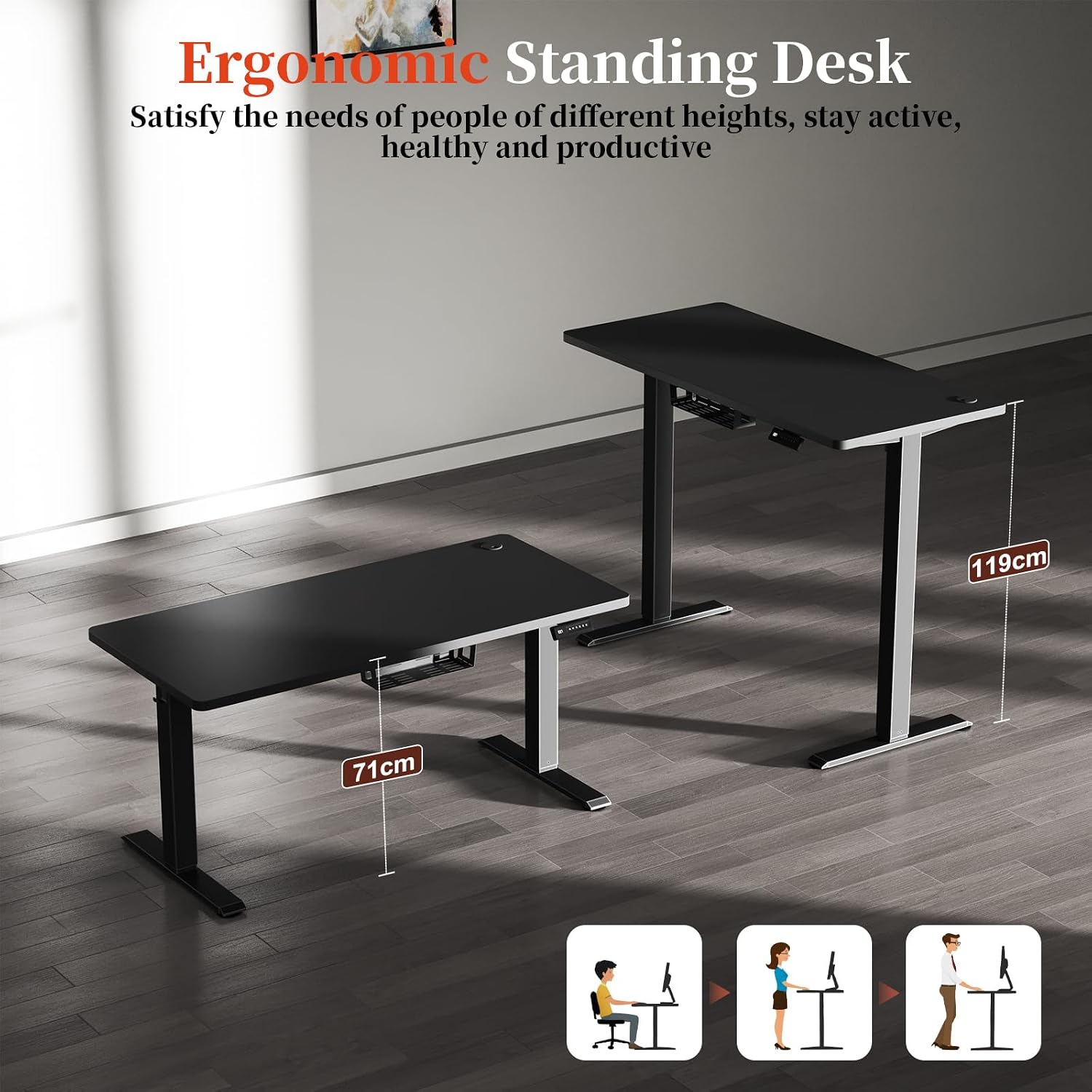
Figure 4.2: The ergonomic standing desk demonstrating its height adjustment range.
4.2 Setting Memory Presets
The desk allows you to save up to four preferred height settings for quick recall.
- Adjust the desk to your desired height using the Up (^) or Down (v) buttons.
- Press the M button (or similar memory set button, if present). The LED display may flash or show 'S' to indicate it's ready to save.
- Within a few seconds, press one of the numbered memory buttons (1, 2, 3, or 4) to save the current height to that position. The display will confirm the setting.
4.3 Recalling Memory Presets
To move the desk to a saved height:
- Simply press the corresponding numbered memory button (1, 2, 3, or 4). The desk will automatically move to the saved height.
5. Maintenance
Regular maintenance ensures the longevity and optimal performance of your TRIUMPHKEY desk.
- Cleaning: Wipe the tabletop and frame with a soft, damp cloth. Avoid abrasive cleaners or harsh chemicals that could damage the finish.
- Cable Management: Periodically check that all cables are neatly organized and not pinched or tangled.
- Connections: Ensure all screws and bolts remain tight. Re-tighten if necessary.
- Motor Care: The motor is designed for maintenance-free operation. Do not attempt to lubricate or disassemble the motor unit.
6. Troubleshooting
If you encounter any issues with your desk, please refer to the following common problems and solutions:
| Problem | Possible Cause | Solution |
|---|---|---|
| Desk does not move. | Power cord disconnected, motor overload, or control panel issue. | Check power connection. Unplug for 10 minutes, then plug back in. Reduce weight on desk. |
| Desk moves unevenly. | Uneven weight distribution or loose connections. | Distribute weight evenly. Check and tighten all assembly screws. |
| Error code E07 displayed. | Motor overload or obstruction. | Remove any obstructions. Reduce weight on the desk. Unplug the desk for 10 minutes, then plug it back in to reset. |
| Unusual noise during operation. | Loose components or motor issue. | Check all connections and tighten any loose screws. If noise persists, contact customer support. |
If the problem persists after attempting these solutions, please contact TRIUMPHKEY customer support for further assistance.
7. Specifications
| Feature | Specification |
|---|---|
| Brand | TRIUMPHKEY |
| Model Number | DT-HAD24-0448-14BK |
| Color | Black |
| Product Dimensions (L x W x H) | 140 x 60 x 119 cm (55.1 x 23.6 x 46.8 inches) |
| Adjustable Height Range | 71 cm - 119 cm (27.9 inches - 46.8 inches) |
| Material | Wood (Tabletop) |
| Features | Height Adjustable, Electric |
| Item Weight | 15 Kilograms (33 lbs) |
| Motor Noise Level | < 55 dB |
| Adjustment Speed | 10 mm/s |

Figure 7.1: Detailed product dimensions of the desk.

Figure 7.2: Illustration of the solid wood single-piece tabletop.

Figure 7.3: Various tabletop colors and finishes available.
8. Warranty and Support
Specific warranty information for the TRIUMPHKEY Height Adjustable Desk is not provided in this manual. For details regarding warranty coverage, claims, or technical support, please refer to the documentation included with your purchase or contact the seller directly.
You may also visit the official TRIUMPHKEY website for the most up-to-date support information.
