
1. Introduction
The YIMU KB41 HD720P Rear Seat Baby Car Camera system provides a clear and reliable way to monitor your baby in the back seat while driving. This system features a 4.3-inch monitor, a 360° rotatable camera with night vision, and a wide 150-degree viewing angle. Designed for easy installation without drilling, it offers peace of mind by allowing you to keep an eye on your child without distractions.
2. What's in the Box
Verify that all components are present before proceeding with installation:
- Baby Car Monitor (4.3-inch)
- Car Headrest Camera
- Suction Cup Mount for Monitor
- Headrest Straps for Camera
- Video Cable
- Cigarette Lighter Power Adapter (12V)
- User Manual
3. Setup and Installation
3.1 Monitor Installation
The monitor can be securely mounted on your car's dashboard or windshield using the provided suction cup mount. Ensure the surface is clean and dry before attaching the mount for optimal adhesion.

3.2 Camera Installation
The camera is designed for quick installation on the car seat headrest using the adjustable straps. This allows for flexible positioning to achieve the best view of your child.
- Pull the headrest restraint up slightly.
- Fasten the horizontal strap around the headrest.
- Fasten the vertical strap around the headrest, securing the camera.
- Rotate the adjustable camera to the desired viewing angle.


3.3 Power Connection
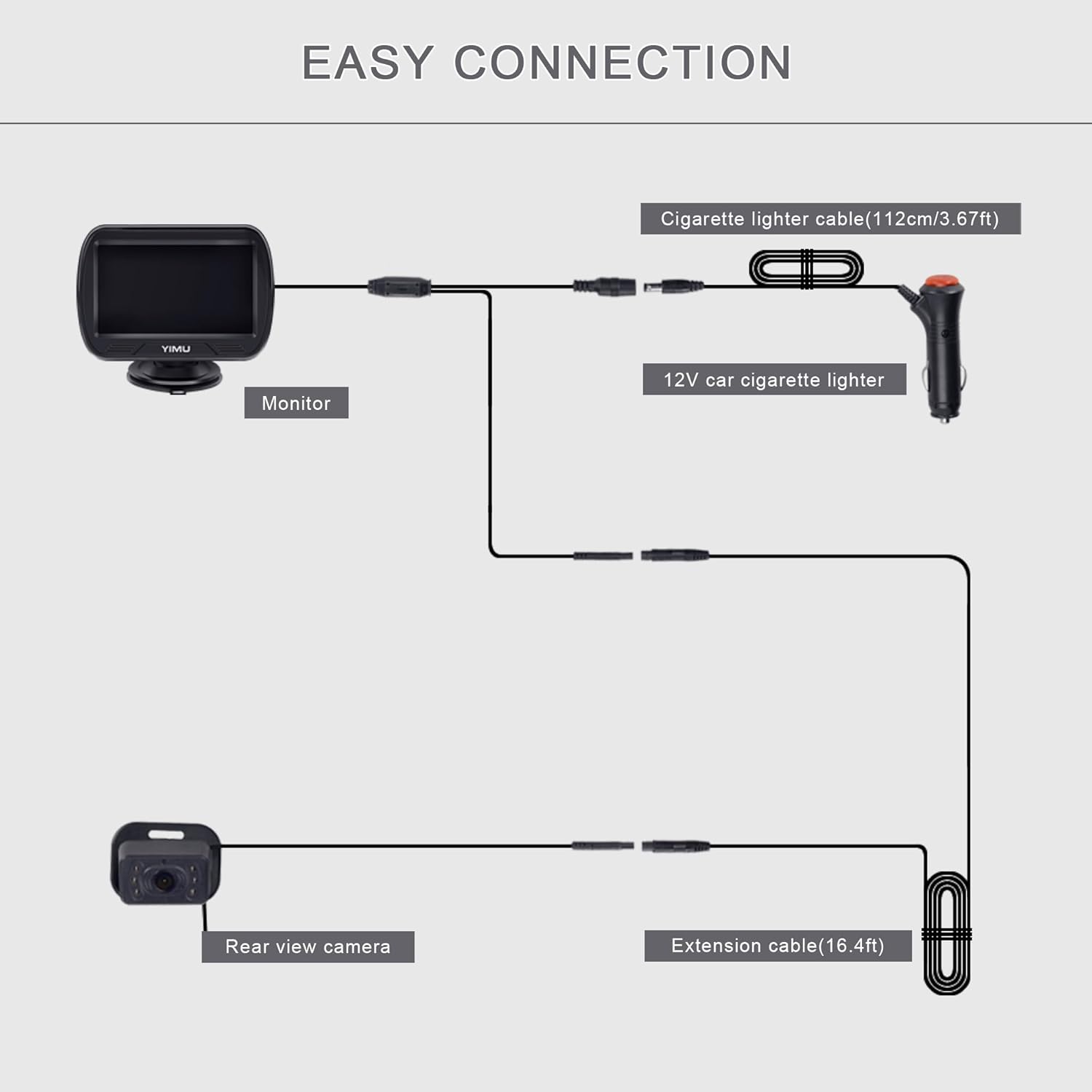
Connect the camera to the monitor using the video cable, then power the system via the cigarette lighter socket. It is recommended to use the included 12V lighter adapter.
- Connect the camera cable to the extension cable.
- Connect the extension cable to the monitor.
- Plug the cigarette lighter adapter into your car's 12V cigarette lighter socket.
- Turn on the power switch on the cigarette lighter adapter.

3.4 Installation Videos
For a visual guide, please refer to the official installation videos below:
4. Operating Instructions
4.1 Basic Operation
Once powered on, the monitor will automatically display the camera feed. Use the buttons on the monitor to access settings and adjustments.
- Power Button: Turns the monitor on or off.
- Menu Button: Accesses settings such as brightness, contrast, hue, saturation, language, and reset options.
- Up/Down Buttons: Navigate menu options or adjust values.
4.2 Night Vision
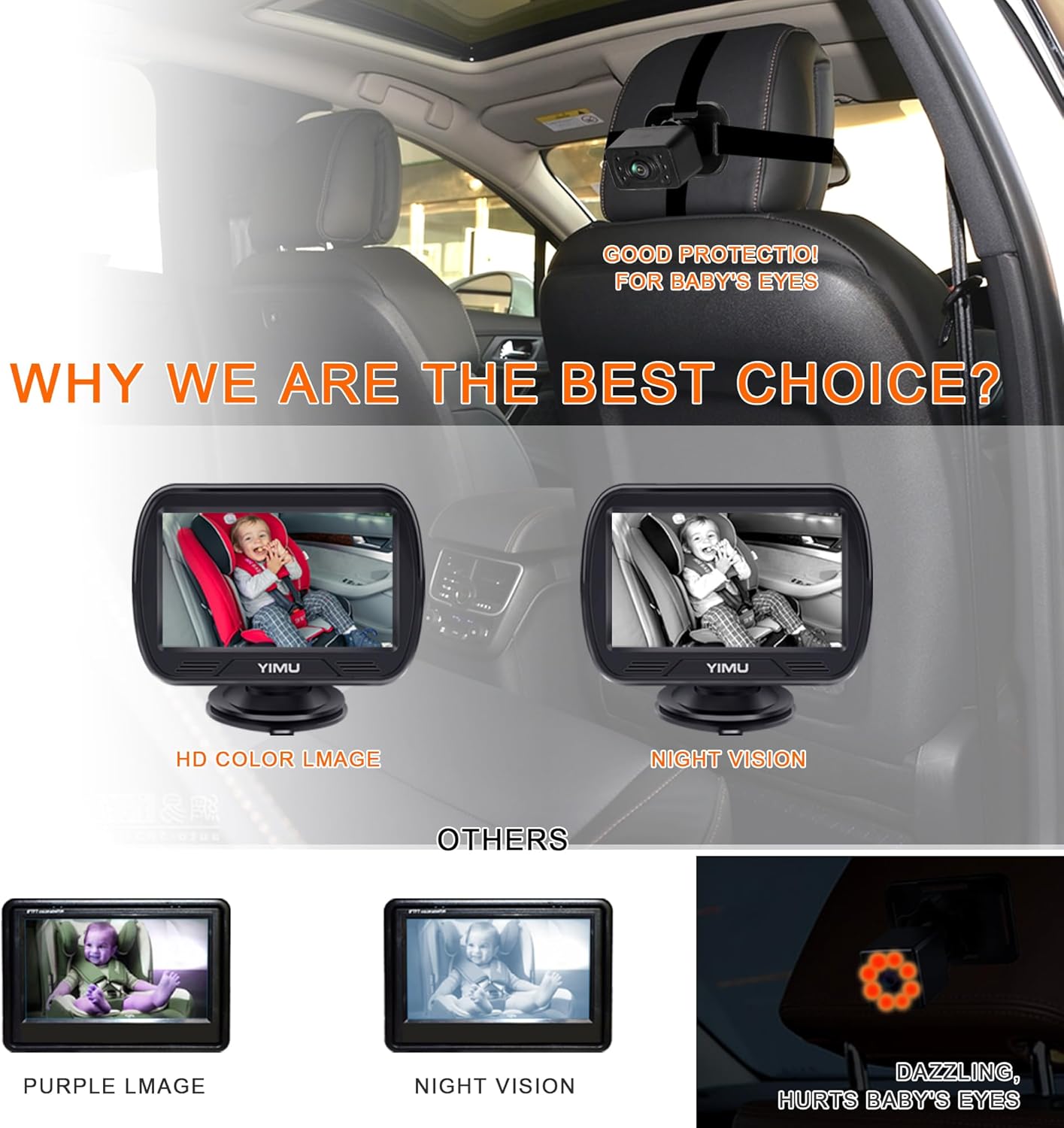
The camera features 940nm infrared (IR) lights, which are invisible to the human eye, ensuring your baby is not disturbed. The system automatically switches to night vision mode in low-light conditions, providing a clear black and white image.
4.3 360° Rotatable Camera and Wide View Angle
The camera can be rotated 360 degrees to accommodate various car seat positions and types. Its 150-degree wide-angle lens eliminates blind spots, allowing you to view one, two, or even three children clearly in the back seat.


5. Maintenance
To ensure the longevity and optimal performance of your YIMU KB41 Baby Car Camera system, follow these maintenance guidelines:
- Cleaning: Use a soft, dry cloth to clean the monitor screen and camera lens. Avoid abrasive cleaners or solvents that could damage the surfaces.
- Cable Management: Ensure all cables are neatly tucked away and not pinched or exposed to excessive wear. This prevents damage and maintains a tidy car interior.
- Storage: If storing the system for an extended period, disconnect it from power and store it in a cool, dry place away from direct sunlight and extreme temperatures.
- Regular Checks: Periodically check the camera and monitor mounts to ensure they are secure and stable.
6. Troubleshooting
If you encounter issues with your YIMU KB41 Baby Car Camera system, refer to the following common problems and solutions:
- No Image on Monitor:
- Ensure the cigarette lighter adapter is securely plugged in and the power switch is ON.
- Check that all cables (camera to extension, extension to monitor) are firmly connected.
- Verify that your car's 12V power outlet is functioning.
- Flickering or Unclear Image:
- Check cable connections for looseness.
- Ensure the camera lens is clean and free from obstructions.
- Adjust the monitor's brightness, contrast, and other settings via the menu.
- Camera Not Staying in Position:
- Re-tighten the headrest straps.
- Ensure the camera's rotational joint is tightened after adjustment.
- Night Vision Not Activating:
- The system automatically switches to night vision in low light. Ensure the environment is sufficiently dark for it to activate.
- Check for any obstructions blocking the camera's IR sensors.
If these steps do not resolve the issue, please contact YIMU customer support for further assistance.
7. Specifications
| Feature | Detail |
|---|---|
| Product Dimensions | 7.48 x 4.33 x 2.56 inches |
| Item Weight | 1.19 pounds |
| Item Model Number | KB41 4.3inch |
| Special Features | 360 Degree, Adjustable, Dimmable, HD Resolution, Night Vision |
| Display Technology | LCD |
| Other Display Features | Wireless |
| Color | Black |
| Manufacturer | Yimu |
| Screen Size | 4.3 Inches |
| Compatible Devices | Wired Monitor |
| Installation Type | Surface Mount |
| Voltage | 12 Volts (Do not use more than 24V) |
| Optical Sensor Technology | CCD or CMOS |
| Lens Type | Wide Angle |
| Real Angle of View | 150 Degrees |
| Connector Type | 4PIN |
8. Warranty and Support
The YIMU KB41 HD720P Rear Seat Baby Car Camera comes with a 2-Year Warranty. This warranty covers manufacturing defects and ensures the quality and performance of your product.
If you have any questions, require technical assistance, or encounter any issues with your device, please do not hesitate to contact YIMU customer support. Our team is dedicated to providing prompt and helpful solutions.
For support, please visit our official website or refer to the contact information provided in your product packaging.