
Solis Turbo Heat Electric Plate Warmer 32 cm
Solis Turbo Heat Electric Plate Warmer 32 cm User Manual
Model: Turbo Heat Electric Plate Warmer 32 cm | Brand: Solis
1. Introduction
Thank you for choosing the Solis Turbo Heat Electric Plate Warmer. This device is designed to gently warm up to 10 plates, ensuring your food stays at an optimal serving temperature. Please read this manual carefully before first use to ensure safe and efficient operation. Keep this manual for future reference.
2. Safety Instructions
- Always ensure the plate warmer is placed on a stable, heat-resistant surface.
- Do not immerse the plate warmer or its power cord in water or other liquids.
- Keep the appliance out of reach of children and pets.
- Do not use the plate warmer if the power cord or plug is damaged. Contact qualified service personnel for repairs.
- Unplug the appliance from the power outlet when not in use and before cleaning.
- Do not cover the plate warmer with additional materials during operation, as this may lead to overheating.
- This appliance is intended for household use only. Do not use it outdoors or for commercial purposes.
- Avoid placing sharp objects on the plate warmer to prevent damage to the fabric.
3. Package Contents
Upon unpacking, please verify that all components are present and undamaged:
- Solis Turbo Heat Electric Plate Warmer (32 cm)
- Integrated Power Cord with Plug
- User Manual (this document)

Figure 3.1: The Solis Turbo Heat Electric Plate Warmer, shown folded with plates inserted, and its power cord.
4. Setup
- Unpack: Carefully remove the plate warmer from its packaging.
- Inspect: Check the appliance for any signs of damage. Do not use if damaged.
- Placement: Place the plate warmer on a clean, dry, and stable surface, away from water sources.
- Prepare Plates: Ensure plates are clean and dry before placing them into the warmer. The warmer can accommodate up to 10 plates.

Figure 4.1: Plates stacked within the soft, insulated layers of the plate warmer.
5. Operating Instructions
Follow these steps to operate your Solis Turbo Heat Electric Plate Warmer:
- Load Plates: Carefully place your plates, up to 10, between the layers of the plate warmer. The flexible design accommodates various plate sizes.
- Connect Power: Plug the power cord into a suitable electrical outlet.
- Activate Turbo Heat (Optional): For rapid heating, press the "Turbo Heat" button. This function heats plates to optimal temperature in approximately 20 minutes, then switches to normal heating mode.
- Set Timer: Use the timer button to select the desired heating duration. Options typically include 2, 4, or 6 hours. The warmer will automatically switch off after the selected time.
- Monitor: Allow the plates to warm. The soft, double-insulated fabric ensures even heat distribution and protects plates from scratches.
- Serve: Once warmed, carefully remove the plates and serve your food.
- Power Off: Unplug the plate warmer from the outlet after use.

Figure 5.1: The control panel with Turbo Heat and timer options.

Figure 5.2: Demonstrating the placement of plates into the warmer.
6. Maintenance and Cleaning
Proper maintenance ensures the longevity and hygiene of your plate warmer.
- Before Cleaning: Always unplug the plate warmer from the power outlet and allow it to cool completely.
- Cleaning Method: The plate warmer can be cleaned in a washing machine at 30°C or by hand. Ensure the power cord and plug are not damaged during washing.
- Drying: Allow the plate warmer to air dry completely before storing or next use. Do not tumble dry.
- Storage: Store the clean, dry plate warmer in a cool, dry place. Its compact design allows for space-saving storage.

Figure 6.1: The plate warmer's compact design for storage and protection.
7. Troubleshooting
If you encounter issues with your plate warmer, refer to the following table:
| Problem | Possible Cause | Solution |
|---|---|---|
| Warmer does not heat. | Not plugged in; power outlet fault; damaged cord. | Ensure plug is securely inserted. Test outlet with another device. Inspect cord for damage; if damaged, do not use and contact support. |
| Plates are not warm enough. | Insufficient heating time; too many plates; Turbo Heat not activated. | Increase heating time. Reduce number of plates. Activate Turbo Heat for faster warming. |
| Warmer switches off unexpectedly. | Timer expired; overheating protection activated. | Check timer setting. Ensure warmer is not covered and has adequate ventilation. Allow to cool before restarting. |
8. Specifications
| Feature | Detail |
|---|---|
| Brand | Solis |
| Model | Turbo Heat Electric Plate Warmer 32 cm |
| Material | Fabric |
| Color | Red/Grey |
| Product Dimensions | 33L x 32W centimetres |
| Item Weight | 845 Grams |
| Capacity | Up to 10 plates |
| Heating Function | Turbo Heat (fast heating in approx. 20 minutes) |
| Timer | Adjustable (e.g., 2-6 hours) |
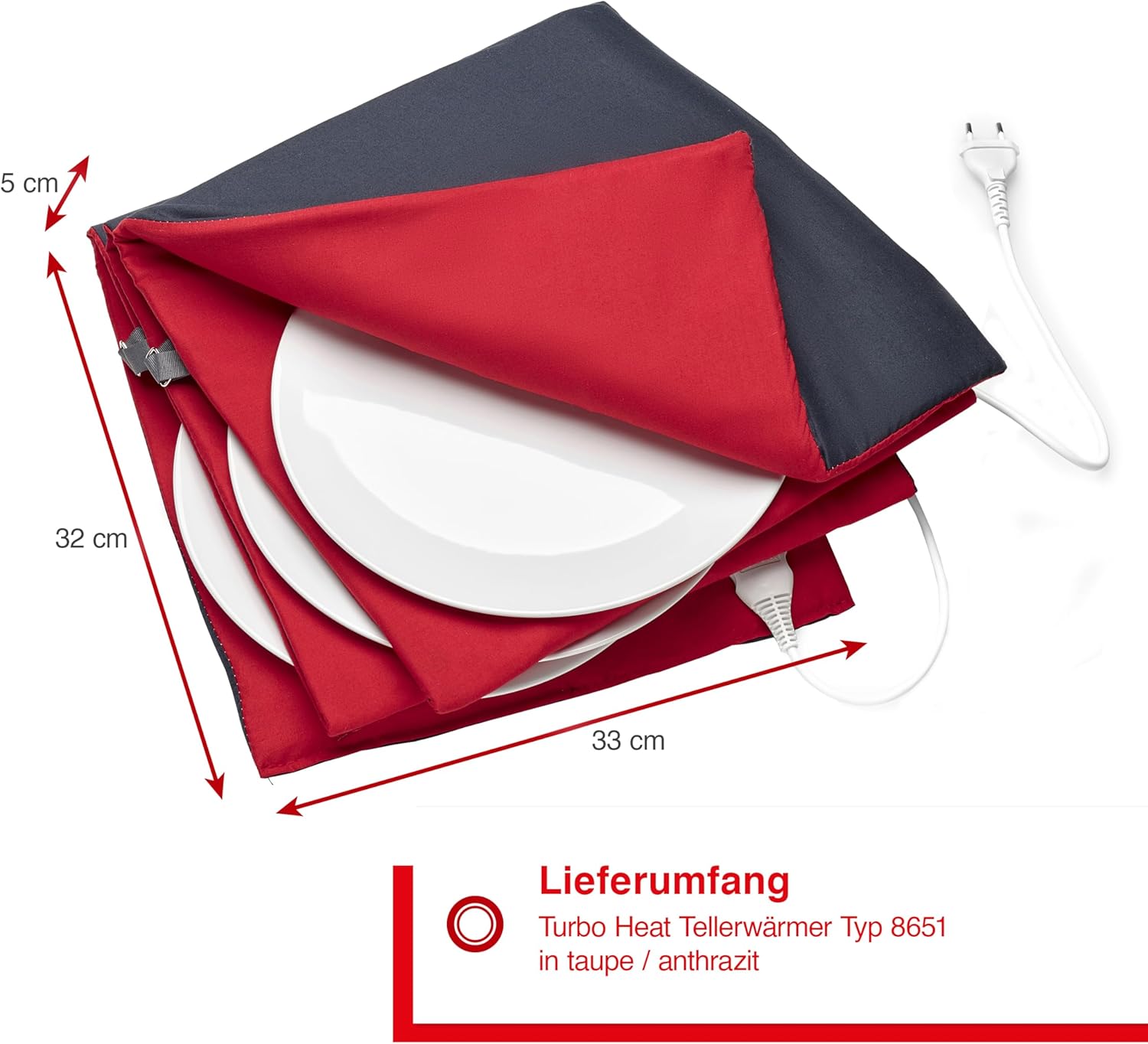
Figure 8.1: Product dimensions of the plate warmer.
9. Warranty and Support
Solis products are manufactured with quality and reliability in mind. For warranty information, technical support, or service inquiries, please refer to the warranty card included with your purchase or visit the official Solis website. Please have your model number and purchase date available when contacting support.
Note: Specific warranty terms may vary by region.
Related documentsTurbo Heat Electric Plate Warmer 32 cm

Ask a question about this manual
Ask about setup, troubleshooting, compatibility, parts, safety, or missing instructions. Manuals+ will review the question and use this page’s manual context to help answer it.