
1. Introduction
This manual provides instructions for the safe and effective use of your Fanttik X9 Pro Portable Tire Inflator. Please read this manual thoroughly before operating the device and retain it for future reference.
2. Safety Information
Observe the following safety precautions to prevent injury or damage to the device:
- Do not leave the inflator unattended during operation.
- Keep out of reach of children.
- Avoid prolonged exposure to direct sunlight or high temperatures.
- Do not operate the inflator near flammable liquids or gases.
- Ensure the correct pressure setting for the item being inflated to prevent over-inflation.
- If the device becomes excessively hot, allow it to cool down before continued use.
- Do not attempt to disassemble or modify the inflator.
3. Package Contents
Verify that all items are present in the package:
- Fanttik X9 Pro Tire Inflator
- Storage Case
- Extended Air Tube
- Needle Valve Adapter
- Presta Valve Adapter
- Car Charger
- USB-A to USB-C Charging Cable
- User Manual
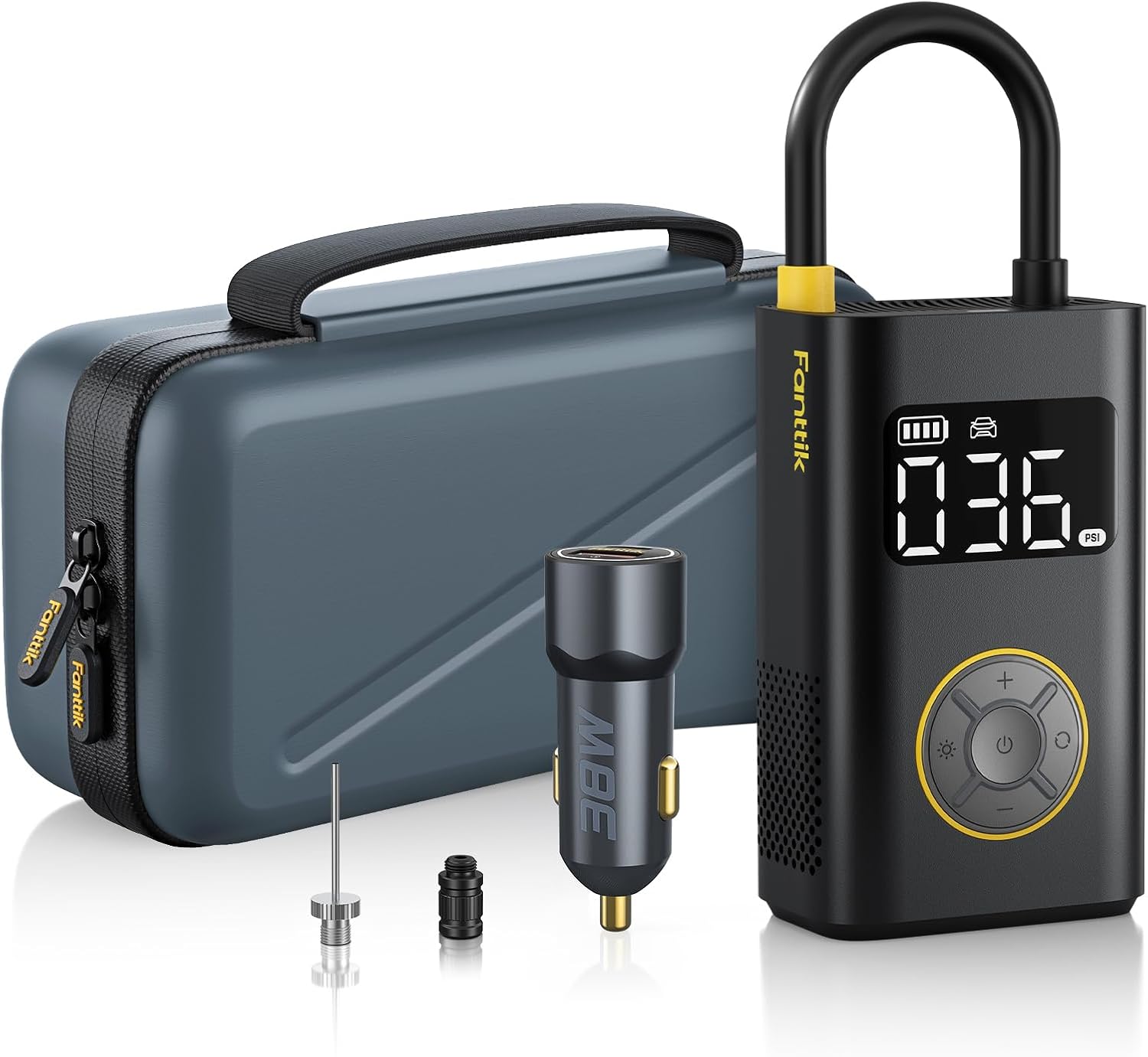
Image: Fanttik X9 Pro inflator, storage case, car charger, and various adapters.
4. Product Overview
The Fanttik X9 Pro features a compact design with integrated hose storage and a digital display for pressure readings.
4.1 Key Components
- Digital Display: Shows current pressure, target pressure, battery level, and selected mode.
- Control Buttons: Power, Mode selection, Increase/Decrease pressure.
- Air Hose: Integrated for convenience, with a smart on/off mechanism.
- LED Light: Provides illumination for use in low-light conditions, includes SOS mode.
- Accessory Storage: Compartment for needle and Presta valve adapters.

Image: The Fanttik X9 Pro's integrated LED light for nighttime use.

Image: The X9 Pro's accessory storage design, located at the bottom of the unit.
5. Setup
5.1 Charging the Device
Before first use, fully charge the inflator. Connect the USB-C charging cable to the device and a suitable power source (e.g., car charger, USB wall adapter). The battery indicator on the display will show charging status.
5.2 Powering On/Off
To power on the device, pull out the yellow end of the air hose from its storage slot. To power off, push the air hose back into the slot. The device will also automatically shut down after 3 minutes of inactivity to conserve battery.

Image: Illustration of the smart on/off mechanism by extending or retracting the air hose.
6. Operating Instructions
Follow these steps to inflate an item:
- Pull out the air hose: This will power on the device.
- Connect to valve: Remove the valve cap from the tire or item. Screw the air hose connector onto the valve stem. For Presta valves or balls, use the appropriate adapter.
- Select Mode and Set Pressure: Press the 'Mode' button to cycle through preset modes (Car, Motorcycle, Bike, Ball) or select Manual mode. Use the '+' and '-' buttons to adjust the target pressure.
- Start Inflation: Press the power button to begin inflation. The device will display the current pressure.
- Automatic Shut-off: The inflator will automatically stop once the preset pressure is reached.
- Disconnect: Unscrew the air hose from the valve stem and replace the valve cap.
- Power Off: Push the air hose back into its slot to turn off the device.

Image: Step-by-step guide for connecting the inflator and setting the desired pressure.
6.1 Preset Modes
The X9 Pro offers several preset inflation modes for common items:
- Car: Default range 26-50 PSI.
- Motorcycle: Default range 26-43 PSI.
- Bike: Default range 30-145 PSI.
- Ball: Default range 4-16 PSI.
- Manual Mode: Allows setting pressure from 3-150 PSI.
You can switch between pressure units (PSI, BAR, KPA) by long-pressing the 'Mode' button.

Image: The X9 Pro's display showing various preset modes and pressure unit selection.
6.2 Fast Inflation
The Fanttik X9 Pro is designed for efficient inflation. For example, it can inflate a compact car tire from 30 PSI to 35 PSI in approximately 1 minute.

Image: The inflator connected to a car tire, demonstrating its rapid inflation capability.
7. Maintenance
- Cleaning: Wipe the device with a soft, dry cloth. Do not use harsh chemicals or abrasive cleaners.
- Storage: Store the inflator in its provided case in a cool, dry place away from direct sunlight. Ensure the air hose is fully retracted to power off the device before storage.
- Battery Care: For optimal battery life, charge the device regularly, even if not in frequent use. Avoid fully discharging the battery for extended periods.
8. Troubleshooting
| Problem | Possible Cause | Solution |
|---|---|---|
| Inflator does not turn on | Air hose not fully extended; Low battery; Device malfunction. | Ensure air hose is fully pulled out. Charge the device. Contact customer support if issue persists. |
| Slow inflation or no inflation | Hose not securely connected; Leak in hose/valve; Incorrect mode/pressure setting. | Check hose connection. Inspect hose and valve for damage. Verify mode and target pressure. |
| Device gets hot and shuts off | Overheating protection activated. | Allow the device to cool down for at least 15-20 minutes before resuming use. |
| Inaccurate pressure reading | Sensor calibration issue; External factors. | Ensure the connection is tight. Compare with a known accurate gauge. If consistently inaccurate, contact support. |
9. Specifications
| Feature | Detail |
|---|---|
| Brand | Fanttik |
| Model | X9 Pro |
| Maximum Pressure | 150 PSI |
| Power Source | Battery Powered (7.4V, 2.5Ah Lithium Ion) |
| Continuous Work Time | Up to 23 minutes (without shut-off) |
| Material | Plastic |
| Item Weight | 2.07 pounds |
| Special Features | Cordless, Digital Display, Portable, Auto-stop, LED Light |
| UPC | 671891926658 |

Image: The X9 Pro utilizes Accuinflate Technology with precision compensation and high-precision sensors for accurate inflation.
10. Warranty and Support
For warranty information and customer support, please refer to the official Fanttik website or contact their customer service directly. Keep your purchase receipt as proof of purchase.
Fanttik Official Website: www.fanttik.com


