
Dawnice DW-N5501006
Dawnice 6KW Hybrid Solar System Complete Kit
User Manual
Model: DW-N5501006
1. Introduction
This manual provides essential information for the safe and efficient installation, operation, and maintenance of your Dawnice 6KW Hybrid Solar System Complete Kit. This comprehensive system is designed for both off-grid and on-grid applications, offering energy independence and significant electricity bill savings. It includes high-efficiency bifacial solar panels, a powerful hybrid inverter, and a robust lithium battery for energy storage.
Please read this manual thoroughly before proceeding with installation or operation to ensure proper system functionality and safety.
2. Components and Packing List
The Dawnice 6KW Hybrid Solar System Complete Kit includes the following main components:
- 10 x 550W Bifacial Solar Panels (total 5500W nominal, up to 6875W with bifacial gain)
- 1 x 6000W Hybrid Split Phase Inverter (120V/240V output)
- 1 x 51.2V 314Ah Wall Mounted Lithium Battery (16kWh capacity)
- Solar panel cables (black and red)
- Solar connectors (MC4 type)

Figure 2.1: Overview of the 6KW Hybrid Solar System Kit components.

Figure 2.2: Detailed packing list of the system components.
3. Specifications
| Feature | Specification |
|---|---|
| Brand | Dawnice |
| Model Number | DW-N5501006 |
| Material | Aluminum, Monocrystalline Silicon, Tempered Glass |
| Product Dimensions | 50"L x 25"W x 50"H (Overall System) |
| Efficiency | High Efficiency (Bifacial gain up to 25%) |
| Connector Type | MC4 |
| Maximum Voltage | 48 Volts (Battery System) |
| Maximum Power | 10000 Watts (Inverter Output) |
| Item Weight | 700 pounds (Total System) |
| Battery Capacity | 16kWh (51.2V 314Ah LiFePO4) |
| Inverter Output | 120V/240V Split Phase |
| Inverter Max. DC PV Input | 500VDC |
4. Setup and Installation
Installation of a solar power system requires technical knowledge and adherence to local electrical codes. It is highly recommended that installation be performed by a qualified and certified professional. Always prioritize safety by disconnecting all power sources before working on the system.
4.1. System Overview and Connection Diagram
The system consists of solar panels for power generation, a hybrid inverter to convert DC power to AC and manage power flow, and a lithium battery for energy storage. The inverter can connect to both the utility grid and a generator for flexible power management.

Figure 4.1: Off-Grid System Connection Diagram.
4.2. Solar Panel Installation
Install the 550W bifacial solar panels in a location with maximum sun exposure, ensuring proper tilt and orientation for your geographical location. Securely mount the panels using appropriate racking systems. Connect the panels in series or parallel configurations as per the inverter's voltage and current requirements, using the provided MC4 connectors and solar cables.

Figure 4.2: 550W Bifacial Solar Panel features.
4.3. Hybrid Inverter Installation
Mount the 6000W hybrid inverter in a cool, dry, and well-ventilated area, away from direct sunlight and flammable materials. Ensure sufficient clearance around the inverter for proper airflow. Connect the solar panel array to the inverter's PV input terminals. Connect the battery to the inverter's battery terminals. Connect the inverter's AC output to your home's electrical panel (or designated loads for off-grid setup). The inverter supports 120V/240V split phase output and can be connected to a generator.
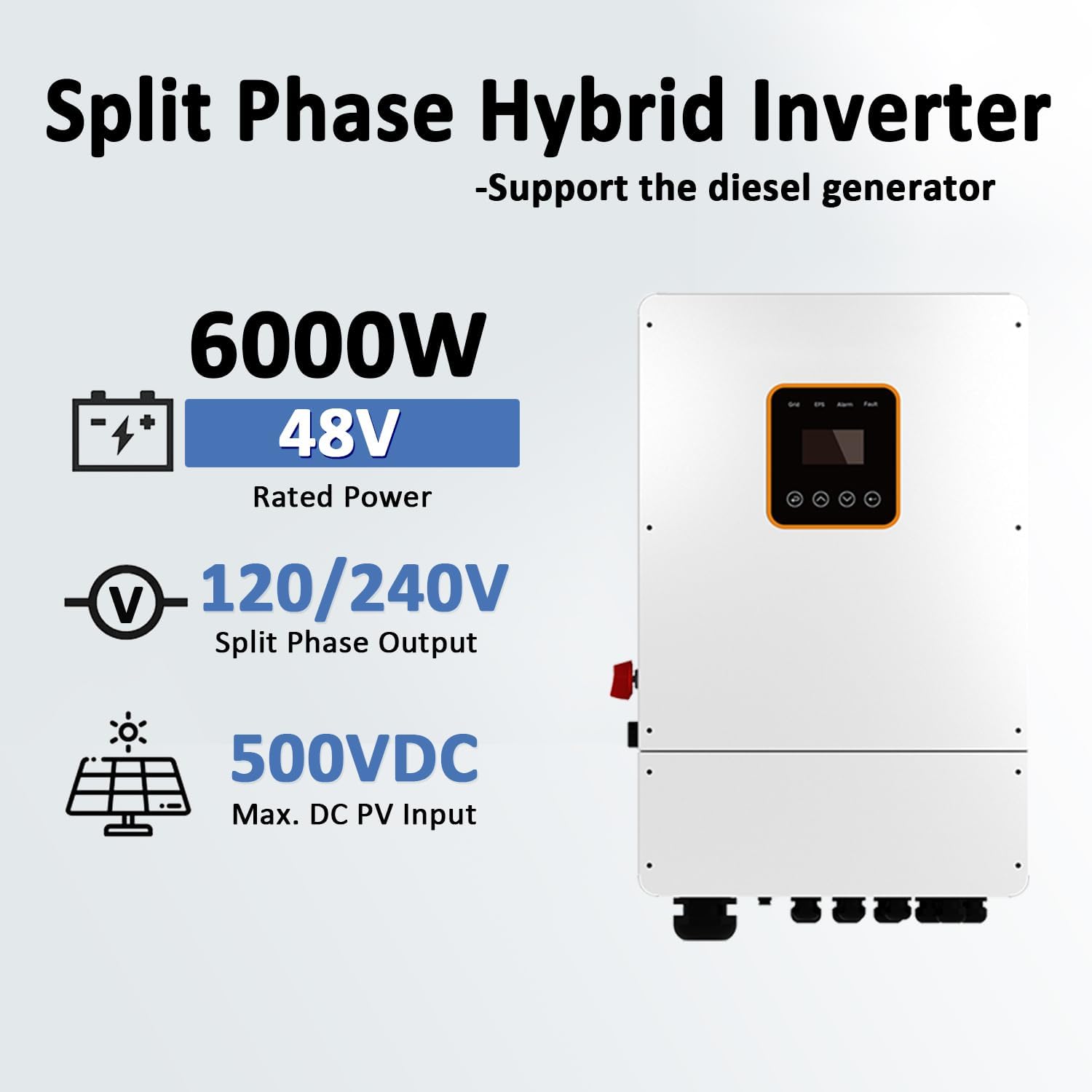
Figure 4.3: 6000W Hybrid Split Phase Inverter.
4.4. Lithium Battery Installation
The 51.2V 314Ah (16kWh) lithium battery is designed for wall-mounted installation. Ensure the mounting surface is strong enough to support the battery's weight. Connect the battery to the inverter using the appropriate battery cables, observing correct polarity. The battery features a touch screen for monitoring and can be connected via Bluetooth/WiFi.

Figure 4.4: Wall Mounted Lithium LiFePO4 Battery.
5. Operating Instructions
Once the system is fully installed and all connections are verified, you can begin operation. The hybrid inverter intelligently manages power flow between solar panels, battery, utility grid, and connected loads.
5.1. Initial Power-Up
- Ensure all circuit breakers are in the OFF position.
- Turn on the battery breaker.
- Turn on the solar array DC disconnect switch.
- Turn on the AC output breaker from the inverter to your loads/panel.
- Observe the inverter's display for system status and operational parameters.
5.2. Power Management
The system is designed for flexible electricity use. During daylight hours, solar panels generate electricity, which can directly power your loads, charge the battery, or, if configured for on-grid, feed excess power back to the utility grid. At night or during low sunlight, the inverter will draw power from the battery or the utility grid to supply your loads.
The ideal daily output power is approximately 22kWh, depending on sunlight availability. This system can meet most household power needs, providing energy independence and reducing reliance on the grid.
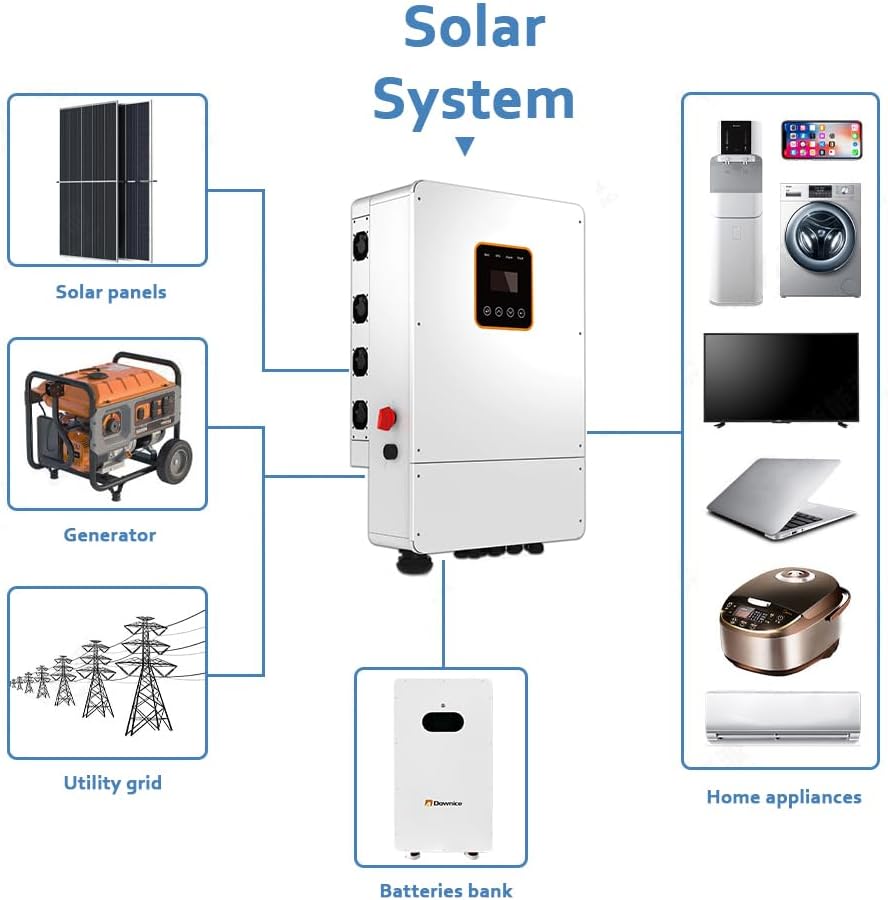
Figure 5.1: Solar System power flow diagram.
5.3. Grid-Tie and Off-Grid Modes
The 6kW hybrid inverter supports both off-grid and on-grid (grid-tie with UL certification) operations. In grid-tie mode, you can sell excess electricity back to the grid. In off-grid mode, the system provides complete energy independence, storing solar energy in the battery for use when the sun is not shining.
6. Maintenance
Regular maintenance ensures the longevity and optimal performance of your solar system. Perform these checks periodically:
- Solar Panels: Clean the surface of the solar panels regularly to remove dust, dirt, and debris that can reduce efficiency. Use a soft brush and water. Inspect for any physical damage or cracks.
- Inverter: Keep the inverter's ventilation openings clear of obstructions. Ensure the area around the inverter is clean and free of excessive dust. Check for any unusual noises or error codes on the display.
- Battery: Monitor the battery's state of charge and health via the touch screen or connected monitoring system. Ensure battery terminals are clean and free of corrosion.
- Cables and Connections: Periodically inspect all cables and connections for signs of wear, fraying, or loose connections. Ensure all MC4 connectors are securely fastened.
- Mounting Hardware: Check the integrity of all mounting hardware for solar panels and the battery to ensure they are secure and free from corrosion.
7. Troubleshooting
This section provides solutions to common issues you might encounter with your solar system. For complex problems, contact qualified technical support.
| Problem | Possible Cause | Solution |
|---|---|---|
| No power output from inverter | Inverter is off, DC/AC breakers are open, low battery voltage, PV input issue. | Check inverter status, ensure all breakers are closed. Verify battery charge. Inspect PV connections and sunlight. |
| Low power generation from panels | Dirty panels, shading, incorrect panel orientation, faulty panel. | Clean panels. Check for shading. Verify panel angle and direction. Inspect individual panels. |
| Battery not charging | Insufficient solar input, battery connection issue, inverter charging settings. | Ensure adequate sunlight. Check battery cables and connections. Verify inverter charging parameters. |
| Inverter displaying error code | Internal fault, over/under voltage, over temperature. | Refer to the inverter's specific manual for error code definitions and solutions. Contact support if persistent. |
8. Warranty and Support
Dawnice products are manufactured to high-quality standards. For information regarding product warranty, please refer to the warranty documentation included with your purchase or visit the official Dawnice website.
Optional protection plans are available for extended coverage:
- 3-Year Protection Plan
- 4-Year Protection Plan
For technical assistance, troubleshooting beyond this manual, or customer service inquiries, please contact Dawnice customer support. You can also visit the Dawnice Store on Amazon for more information and support resources.
Related Documents - DW-N5501006
 |
Lutron DW-6095 3 Phase Power Analyzer with Harmonic Measurement - Technical Specification Detailed technical specifications and features of the Lutron DW-6095 3 Phase Power Analyzer, including harmonic measurement capabilities, SD card data logging, and comprehensive electrical analysis functions for various power systems. |
 |
Lutron DW-6093 3-Phase Power Analyzer Operation Manual User manual for the Lutron DW-6093 3-Phase Power Analyzer. Learn about its features, specifications, measurement procedures, data logging, and maintenance for precise electrical analysis. |
 |
CASIO DW-9700 Module 2080 User Manual Comprehensive user manual for the CASIO DW-9700 digital watch, covering features like timekeeping, water resistance, alarms, stopwatch, timer, moon phase, tide graph, sunrise/sunset, and auto EL backlight. Includes setup instructions and maintenance information. |
 |
MYPIN DW Series Single Phase Power Meter Instruction Manual - Technical Guide Comprehensive instruction manual for the MYPIN DW Series single-phase power meter. Covers specifications, operation, wiring diagrams, parameter settings, and applications for accurate electrical measurement. |
 |
Lutron DW-6095 3-Phase Power Analyzer Operation Manual User manual for the Lutron DW-6095 3-Phase Power Analyzer, detailing its features for precision electrical measurement, real-time data recording, harmonic analysis, and transient capture. |
 |
Lepro Solar Wall Lamp 640003-DW User Manual User manual for the Lepro Solar Wall Lamp, model 640003-DW. Includes specifications, installation instructions, and operational notes for this energy-efficient lighting solution. |