
1. Introduction
This manual provides essential information for the safe and efficient installation, operation, and maintenance of your villastar YC-005N2F2024 Pool Heat Pump. Please read all instructions carefully before using the product. Proper installation and adherence to safety guidelines are crucial for optimal performance and longevity of your heat pump.

Image 1: Villastar pool heat pumps are designed to extend your swimming season.
2. Safety Information
Always observe basic safety precautions to reduce the risk of fire, electric shock, and injury. This appliance is not intended for use by persons (including children) with reduced physical, sensory or mental capabilities, or lack of experience and knowledge, unless they have been given supervision or instruction concerning use of the appliance by a person responsible for their safety.
- Electrical Safety: Ensure the heat pump is connected to a properly grounded outlet. Do not use extension cords. All electrical connections should comply with local codes and regulations.
- Water Proximity: Do not operate the heat pump while in the pool. Maintain a safe distance from the pool edge.
- Ventilation: Ensure adequate airflow around the unit. Do not block the air intake or exhaust.
- Children: Keep children away from the heat pump during operation.
- Maintenance: Disconnect power before performing any maintenance or cleaning.
3. Product Features
The villastar YC-005N2F2024 Pool Heat Pump offers advanced features for efficient and comfortable pool heating:
- 100% Titanium Spiral Heat Exchanger: Provides excellent durability against various water qualities and improves heating efficiency by 30%.
- Exceptional Heating Capability: Delivers up to 16,000 BTU, efficiently heating pools up to 5,000 gallons.
- Quiet Operation: Features a brushless DC motor and premium fan components, operating at a low noise level of just 50 dB.
- Advanced Energy-Saving Technology: Achieves a COP (Coefficient of Performance) of 4.45, reducing energy consumption and electricity costs.
- Dual Heating and Cooling Modes: Allows adjustment of pool water to optimal temperatures, suitable for air temperatures from 23°F to 109.4°F. Heating range: 59°F to 104°F; Cooling range: 46°F to 82°F.

Image 2: Overview of the villastar YC-005N2F2024 Pool Heat Pump highlighting its 16000 BTU heating power, COP 4.45 efficiency, 50dB quiet operation, and multiple safety features.
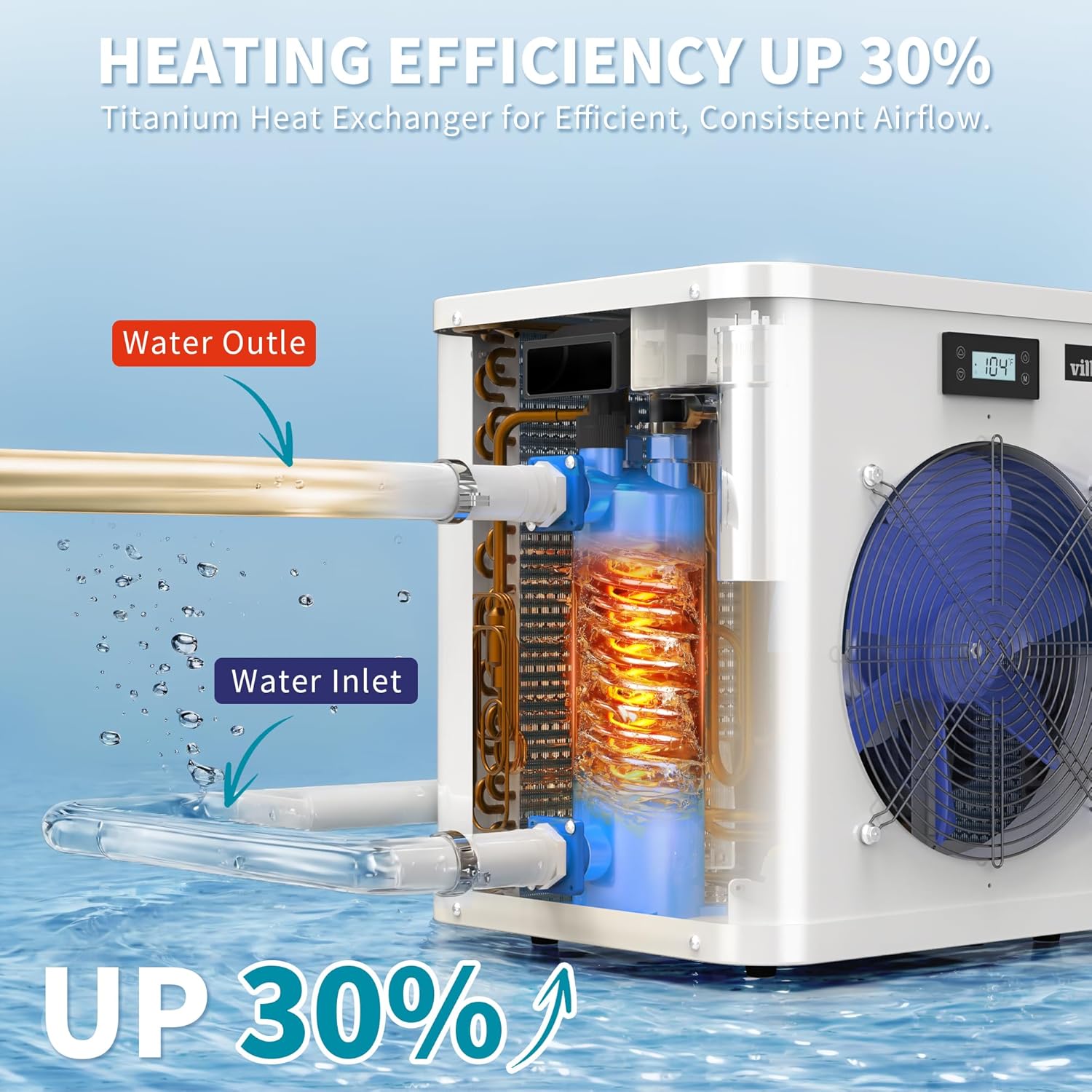
Image 3: The internal titanium heat exchanger design, showing water inlet and outlet, which contributes to 30% improved heating efficiency.

Image 4: The heat pump's high energy efficiency with a COP of 4.45, designed to save on energy costs.

Image 5: The heat pump operates at a quiet 50 dB, ensuring a peaceful poolside environment.
4. Setup & Installation
Follow these steps for efficient and rapid installation. For a visual guide, please refer to the installation video below.
4.1 Unpacking and Placement
- Carefully remove the heat pump from its packaging.
- Place the unit on a stable, level surface near your pool. Ensure there is adequate clearance around the unit for proper airflow (at least 12 inches on all sides).
4.2 Connecting to Water Pump and Pool
The heat pump requires connection to an external water pump with a hair strainer and a flow rate greater than 12 GPM (Gallons Per Minute) or 1500-2500 GPH (Gallons Per Hour).
- Connect the water inlet of the heat pump to the outlet of your pool's water pump using appropriate hoses and clamps.
- Connect the water outlet of the heat pump back to your pool.
- Secure all connections with hose clamps to prevent leaks.
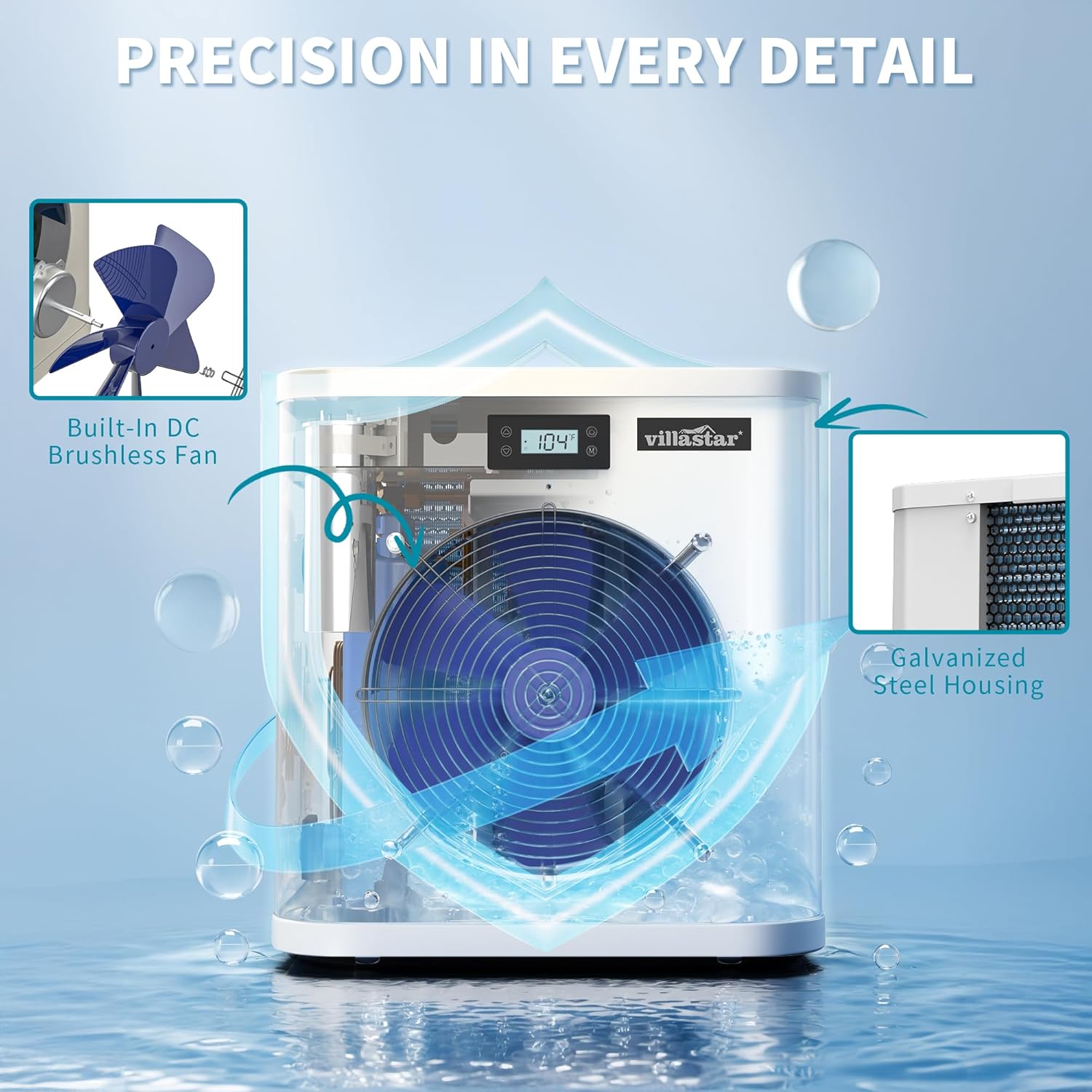
Image 6: Detail of the water inlet and outlet ports on the heat pump, ready for hose connections.
4.3 Installation Video Guide
Video 1: An official villastar video demonstrating the easy installation process for the YC-005 pool heat pump, including connecting to the water pump and pool.
5. Operating Instructions
The heat pump features a user-friendly control panel for easy operation.
5.1 Control Panel Overview

Image 7: The control panel with buttons for 'Up', 'Down', 'On/Off', and 'Mode Selection' for precise temperature control.
- ON/OFF Button: Press to power the unit on or off.
- MODE Selection (M) Button: Press to cycle between heating and cooling modes.
- UP (▲) / DOWN (▼) Buttons: Use to adjust the desired temperature setting.
5.2 Setting Desired Temperature
- Ensure the heat pump is powered on and the water pump is running.
- Press the 'M' button to select either heating or cooling mode.
- Use the '▲' or '▼' buttons to set your desired pool water temperature. The display will show the current and target temperatures.
- The unit will automatically work to reach and maintain the set temperature.
6. Maintenance
Regular maintenance ensures optimal performance and extends the lifespan of your heat pump.
- Clean Fan and Coils: Periodically inspect and clean the fan blades and evaporator coils to remove debris, leaves, or dirt that may obstruct airflow. Use a soft brush or vacuum.
- Check Water Connections: Regularly inspect all hose connections for leaks and ensure clamps are secure.
- Winterization: If you live in an area with freezing temperatures, properly winterize your heat pump by draining all water from the unit and storing it in a protected area. Consult a professional if unsure.
- General Cleaning: Wipe down the exterior of the unit with a damp cloth as needed. Do not use harsh chemicals.
7. Troubleshooting
If you encounter issues, refer to this section before contacting support.
| Problem | Possible Cause | Solution |
|---|---|---|
| Unit not turning on | No power, tripped breaker, faulty wiring. | Check power supply, reset breaker, ensure proper electrical connections. |
| Not heating/cooling effectively | Low water flow, dirty coils, incorrect temperature setting, ambient temperature outside operating range. | Ensure water pump is running and flow rate is sufficient. Clean coils. Verify temperature settings. Check ambient air temperature. |
| Unusual noise | Loose components, fan obstruction. | Inspect for loose parts and tighten. Clear any obstructions from the fan. |
| Water leaks | Loose hose connections, damaged O-rings. | Tighten hose clamps. Inspect and replace O-rings if damaged. |
If the problem persists after attempting these solutions, please contact customer support.
8. Specifications
| Feature | Detail |
|---|---|
| Model Number | YC-005N2F2024 |
| Heating Capacity (80°F Air, 80°F Water, 63% RH) | 16000 BTU/hr |
| Power Input (80°F Air, 80°F Water, 63% RH) | 3720 Btu/h |
| COP (80°F Air, 80°F Water, 63% RH) | 4.30 |
| Heating Capacity (50°F Air, 80°F Water, 63% RH) | 8400 Btu/h |
| Power Input (50°F Air, 80°F Water, 63% RH) | 2800 Btu/h |
| COP (50°F Air, 80°F Water, 63% RH) | 3.0 |
| Power Supply | 110-120V/60Hz |
| Max Power Input | 4623 Btu/h |
| Max Current | 7.1 A |
| Setting Temperature Range (Heating) | 59°F - 104°F |
| Setting Temperature Range (Cooling) | 46°F - 82°F |
| Noise Level | 50 dB(A) |
| Recommended Water Flow | 1500-2500 GPH |
| Product Dimensions | 17.32 x 18.9 x 19.27 inches |
| Net Weight | 59 lbs (67.9 pounds shipping weight) |
Note: Specifications are subject to change without notice.

Image 8: Detailed specifications for the villastar YC-005 Pool Heat Pump.
9. Pool Size Selection Guide
To ensure optimal heating performance, select the appropriate heat pump model based on your pool size and average local temperatures. The YC-005 model is suitable for pools up to 5,000 gallons.

Image 9: Selection guide indicating suitable pool sizes for the YC-005 model based on average temperature zones.
10. Warranty & Support
Your villastar Pool Heat Pump is covered by a manufacturer's warranty. For specific warranty details, please refer to the warranty card included with your product or visit the official villastar website. For technical support, troubleshooting assistance, or to inquire about replacement parts, please contact villastar customer service through the contact information provided in your product packaging or on the official website.

