
1. Introduction
This manual provides detailed instructions for the operation and maintenance of your Jesebang Wireless Earbuds, Model IS07. Please read this manual thoroughly before using the product to ensure proper function and longevity. These earbuds feature Bluetooth 5.3 connectivity, HiFi stereo sound, and an IP7 waterproof rating, designed for use with Android and iOS devices.
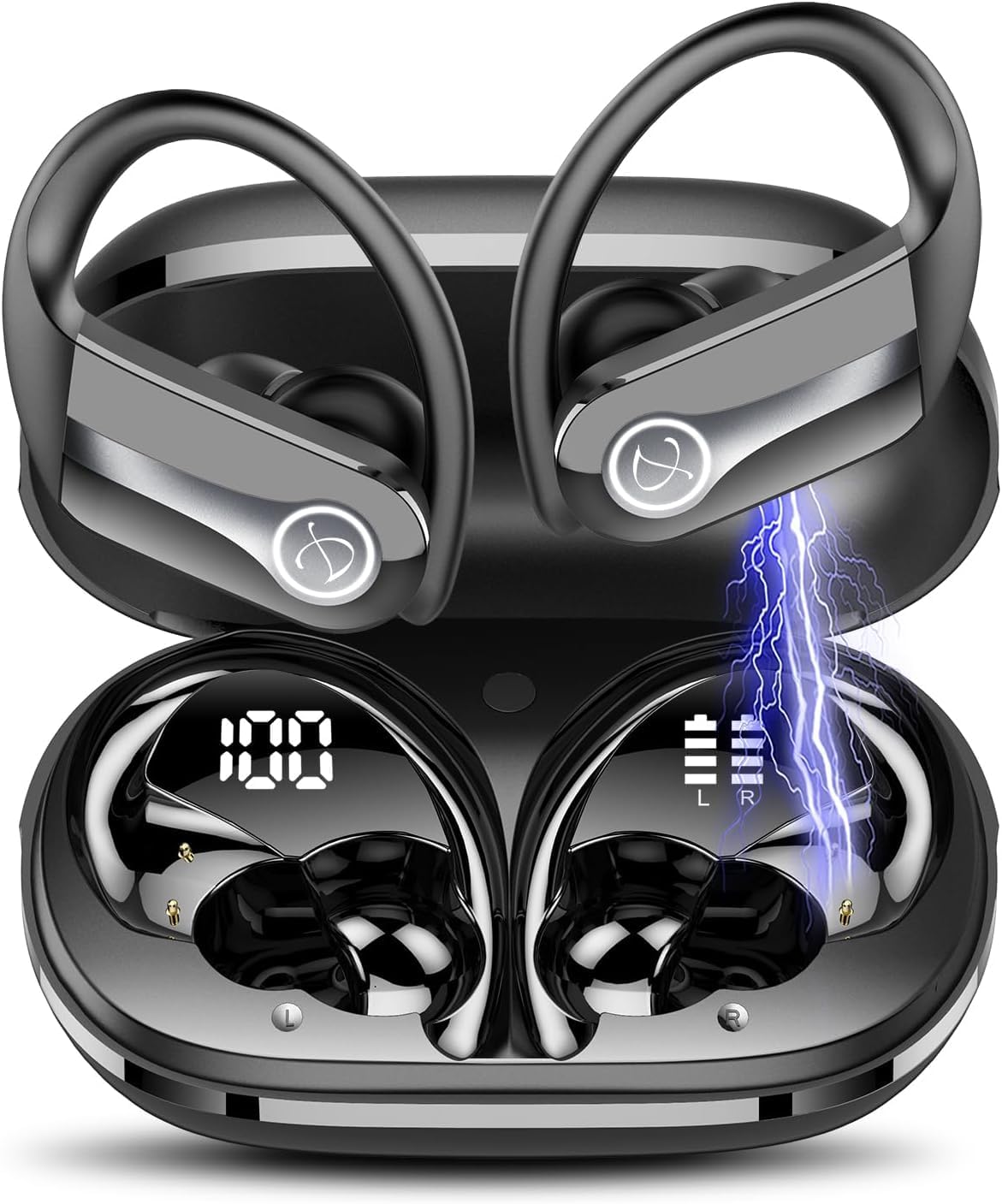
Image 1.1: Jesebang Wireless Earbuds IS07 in their charging case, displaying battery levels. The earbuds are black with silver accents and feature ear hooks for secure fit. The charging case shows a digital display for its battery percentage (100%) and individual earbud battery indicators (L and R).
2. Setup
2.1 Initial Charging
Before first use, fully charge the earbuds and the charging case. The product includes a charging cable. Connect the charging cable to the charging port on the case and a compatible USB power source. The digital display on the charging case will indicate the charging status and battery percentage.
- Ensure the earbuds are properly seated in the charging case.
- A full charge typically takes approximately 1-2 hours.
- The charging case display will show "100" when fully charged.
2.2 Pairing with a Device
The earbuds will automatically enter pairing mode when removed from the charging case.
- Open the charging case and remove both earbuds.
- On your smartphone or device, navigate to the Bluetooth settings.
- Search for available devices and select "IS07" from the list.
- Once connected, a voice prompt will confirm successful pairing.
- If pairing fails, place the earbuds back into the case, close the lid, wait a few seconds, and repeat the process.
3. Operating Instructions
3.1 Power On/Off
- Power On: Remove earbuds from the charging case. They will power on automatically.
- Power Off: Place earbuds back into the charging case and close the lid. They will power off automatically and begin charging.
3.2 Touch Controls
The Jesebang IS07 earbuds feature touch-sensitive controls for various functions:
| Action | Function |
|---|---|
| Single Tap (L/R) | Play/Pause music, Answer/End call |
| Double Tap (L) | Previous Track |
| Double Tap (R) | Next Track |
| Triple Tap (L/R) | Activate Voice Assistant |
| Long Press (2s) (L/R) | Reject Call |
| Long Press (3s) (L/R) | Volume Up (R) / Volume Down (L) |
Note: Functions may vary slightly depending on your connected device and operating system.
4. Maintenance
4.1 Cleaning
Regular cleaning helps maintain sound quality and product longevity.
- Use a soft, dry, lint-free cloth to wipe the earbuds and charging case.
- For stubborn dirt, slightly dampen the cloth with water. Do not use harsh chemicals or abrasive materials.
- Clean the charging contacts on both the earbuds and the case periodically with a dry cotton swab to ensure proper charging.
4.2 Storage
When not in use, store the earbuds in their charging case to protect them and keep them charged. Store in a cool, dry place away from direct sunlight and extreme temperatures.
4.3 Water Resistance (IP7)
The earbuds are rated IP7 waterproof, meaning they can withstand immersion in water up to 1 meter for 30 minutes. This makes them suitable for workouts and light rain. However, they are not designed for swimming or prolonged submersion. Ensure earbuds are dry before placing them back in the charging case to prevent damage to the charging contacts.
5. Troubleshooting
If you encounter issues with your Jesebang Wireless Earbuds, refer to the following common solutions:
| Problem | Possible Cause | Solution |
|---|---|---|
| Earbuds not pairing | Out of range, low battery, pairing mode not active | Ensure earbuds are charged. Place them back in the case, close, then reopen to re-enter pairing mode. Check Bluetooth on your device. |
| Only one earbud working | Earbuds not connected to each other, low battery on one earbud | Place both earbuds back in the case, close the lid, then remove them together. Ensure both are charged. |
| No sound | Volume too low, not connected, incorrect audio output selected | Increase volume on your device and earbuds. Verify Bluetooth connection. Check audio output settings on your device. |
| Charging issues | Dirty charging contacts, faulty cable/adapter | Clean charging contacts. Try a different charging cable or power adapter. Ensure earbuds are correctly seated in the case. |
If the problem persists, please contact customer support (refer to Section 7).
6. Specifications
| Feature | Detail |
|---|---|
| Model Name | IS07 |
| Connectivity Technology | Wireless (Bluetooth 5.3) |
| Ear Placement | In Ear |
| Form Factor | In Ear |
| Color | Black |
| Waterproof Rating | IP7 |
| Playtime | Up to 40 hours (with charging case) |
| Included Components | Charging Cable |
| Item Weight | 3.52 ounces |
| Batteries | 3 Lithium Polymer batteries (included) |
7. Warranty and Support
7.1 Warranty Information
Jesebang products typically come with a standard manufacturer's warranty. Please refer to the product packaging or the official Jesebang website for specific warranty terms and conditions. Keep your purchase receipt as proof of purchase for warranty claims.
7.2 Customer Support
For technical assistance, troubleshooting beyond this manual, or warranty inquiries, please contact Jesebang customer support. You can usually find contact information on the official Jesebang website or through the retailer where you purchased the product.
Online Support: Visit the official Jesebang website for FAQs and support resources. Jesebang Store on Amazon