
1. Product Overview
The Huuger L Shaped Office Desk is designed to optimize your workspace with its versatile L-shape, integrated power solutions, and ample storage. This desk features a durable construction suitable for various uses, from home offices to gaming setups.
Key Features:
- Integrated Power Outlets: Equipped with 4 AC outlets, 1 USB port, and 1 Type-C port for convenient device charging and power access.
- 3 Fabric Drawers: Provides spacious storage for office supplies, gaming accessories, or personal items, helping to keep your workspace organized.
- Reversible L-Shape Design: The desk can be configured with the L-section on either the left or right side to fit your specific room layout.
- Durable Construction: Crafted from sturdy particle board and a robust metal frame with X-shaped back supports for enhanced stability.
- Adjustable Feet: Ensures stability on uneven floors.

Image 1.1: The Huuger L Shaped Office Desk in a typical office environment, showcasing its design and functionality.
2. Package Contents
Before beginning assembly, please verify that all components listed below are present and undamaged. If any parts are missing or damaged, please contact customer support.
- Desk Panels (L-shaped desktop, side shelves)
- Metal Frame Components (legs, support bars, X-shaped braces)
- 3 Fabric Drawers with Handles
- Power Outlet Unit (with 4 AC, 1 USB, 1 Type-C ports)
- Adjustable Leveling Feet
- Assembly Hardware (screws, bolts, nuts)
- Assembly Tools (Allen wrench, screwdriver)
- Instruction Manual
3. Safety Information
Please read and follow these safety guidelines to ensure safe use and longevity of your desk:
- Do not overload the desk or shelves beyond their weight capacity.
- Ensure all screws and fasteners are tightened securely during assembly and periodically check for looseness.
- Keep liquids away from the power outlets and electronic devices.
- Do not attempt to modify the power outlet unit.
- Place the desk on a level surface. Use the adjustable feet to compensate for minor unevenness.
- Keep small children and pets away during assembly to prevent injury or choking hazards from small parts.
4. Setup and Assembly
Assembly of the Huuger L Shaped Office Desk is designed to be straightforward. All necessary tools and numbered components are included. It is recommended that one person performs the assembly.
Assembly Steps:
- Unpack all components and lay them out on a clean, soft surface to prevent scratches.
- Identify all parts using the provided instruction manual and component list.
- Follow the step-by-step diagrams in the manual to connect the metal frame components. Pay close attention to the orientation of parts, especially for the reversible sections.
- Attach the desktop panels and shelves to the assembled frame.
- Install the power outlet unit into the designated slot on the desktop.
- Insert the fabric drawers into their respective slots.
- Attach the adjustable leveling feet to the bottom of the desk legs and adjust as needed to ensure stability.
- Ensure all connections are secure before placing items on the desk.
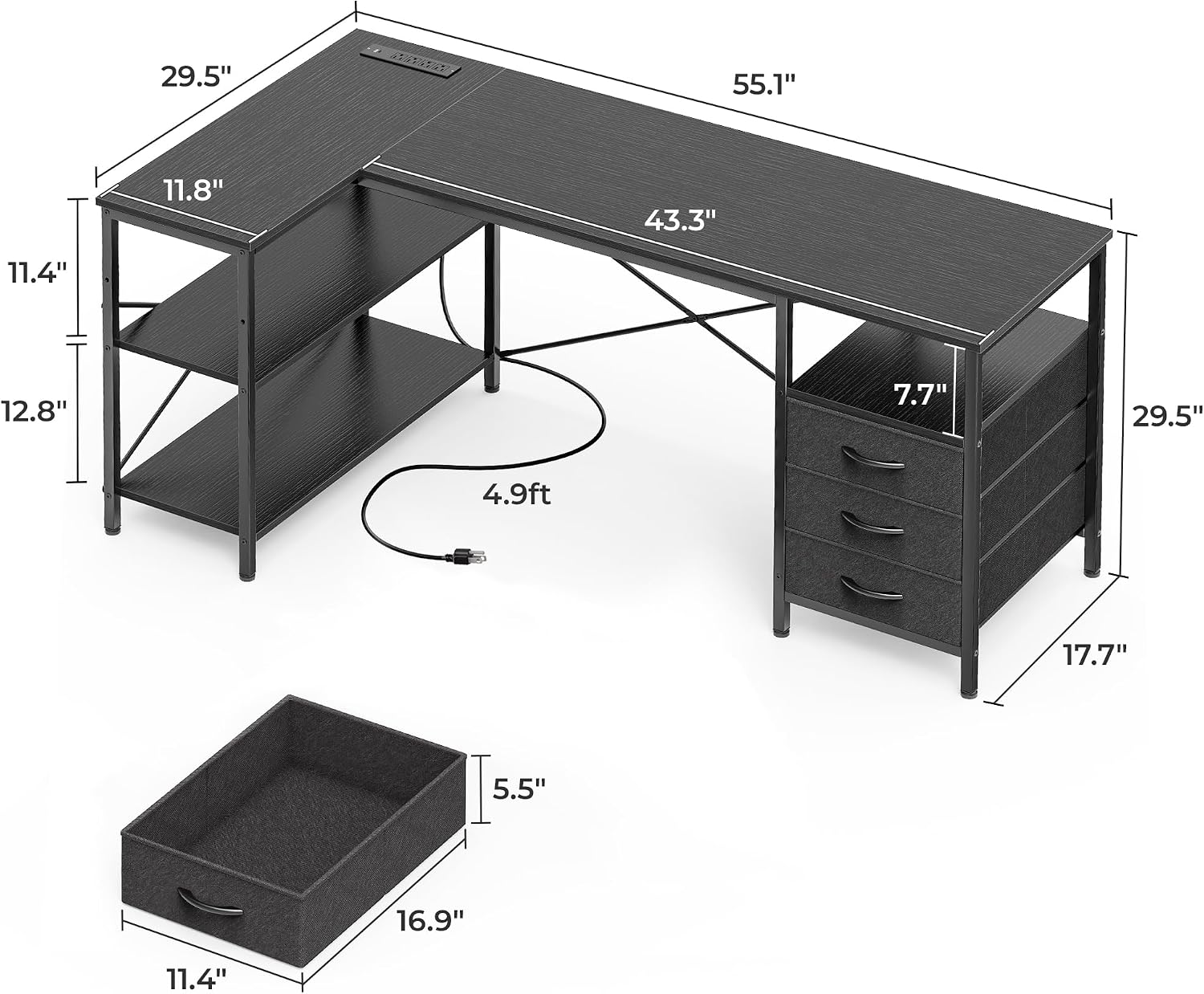
Image 4.1: Detailed dimensions of the desk, including the main desktop, L-extension, and drawer unit.

Image 4.2: The reversible design allows the L-section and shelves to be installed on either side to suit your space.

Image 4.3: X-shaped back supports and adjustable leveling feet contribute to the desk's overall stability.
5. Operating Instructions
5.1. Using the Integrated Power Outlets
The desk includes a built-in power strip with 4 AC outlets, 1 USB port, and 1 Type-C port. This allows for convenient charging and powering of your electronic devices directly on your desktop.
- Plug the desk's main power cord into a standard wall outlet.
- Connect your devices to the available AC outlets, USB port, or Type-C port.
- Ensure that the total power draw of connected devices does not exceed the unit's maximum capacity (125V/12A).

Image 5.1: The integrated power strip provides easy access to charging and power for multiple devices.
5.2. Utilizing Storage Drawers and Shelves
The desk features three spacious fabric drawers and open shelves to help maintain an organized workspace.
- Use the fabric drawers for storing documents, stationery, or personal items. Avoid placing excessively heavy or sharp objects in the drawers to prevent damage.
- The open shelves are ideal for books, decorative items, or a computer tower. The shelves are reversible and can be adjusted to two different heights (18.9 inches or 12.8 inches clearance) to accommodate various items.

Image 5.2: The three fabric drawers offer convenient and accessible storage.

Image 5.3: The adjustable shelves provide flexible storage for various items, including a CPU tower or books.
6. Maintenance
To keep your Huuger L Shaped Office Desk in optimal condition, follow these simple maintenance guidelines:
- Cleaning: Wipe the desk surfaces with a damp cloth. Avoid using harsh chemicals or abrasive cleaners, which can damage the finish.
- Dusting: Regularly dust all surfaces to prevent buildup.
- Hardware Check: Periodically check all screws and fasteners to ensure they remain tight. Re-tighten if necessary.
- Drawer Care: The fabric drawers can be spot cleaned with a mild detergent if needed. Ensure they are completely dry before reinserting.
7. Troubleshooting
If you encounter any issues with your Huuger L Shaped Office Desk, please refer to the following common troubleshooting tips:
- Desk Wobbles: Ensure all assembly hardware is securely tightened. Adjust the leveling feet on the bottom of the desk legs to stabilize it on uneven floors.
- Power Outlets Not Working: Verify that the desk's main power cord is securely plugged into a functional wall outlet. Check if the total power draw exceeds the unit's capacity. If issues persist, contact customer support.
- Drawers Not Sliding Smoothly: Ensure the fabric drawers are correctly inserted and not overloaded. Check for any obstructions.
- Missing Parts: If any parts were missing upon delivery, please refer to the "Package Contents" section and contact customer support with the specific part number or description.
For issues not covered here, please contact Huuger customer support.
8. Specifications
| Feature | Detail |
|---|---|
| Brand | Huuger |
| Model | B0D9Q4GC6D |
| Shape | L-Shaped (Rectangular) |
| Product Dimensions (D x W x H) | 17.7"D x 55.1"W x 29.5"H |
| Color | Black |
| Material Type | Engineered Wood, Metal |
| Number of Drawers | 3 (Fabric) |
| Number of Shelves | 2 (Adjustable Height) |
| Power Outlets | 4 AC Outlets (125V/12A) |
| USB Ports | 1 USB-A Port (5V-2A), 1 USB-C Port (5V-2A) |
| Assembly Required | Yes (Tools included) |
| Recommended Uses | Office, Working, Gaming |
| Product Care | Wipe with Damp Cloth |
9. Warranty and Support
9.1. Warranty Information
The Huuger L Shaped Office Desk comes with a Limited Warranty. Please retain your proof of purchase for any warranty claims. Specific terms and conditions of the warranty are available upon request from Huuger customer service.
9.2. Customer Support
For any questions, assistance with assembly, troubleshooting, or warranty inquiries, please contact Huuger customer support. You can typically find contact information on the Huuger Store page on Amazon or through the retailer where the product was purchased.
Seller: Huuger Store
We are committed to providing excellent customer service and support for your Huuger product.
