
WONNIE W-612D
WONNIE W-612D 7.5-inch Portable DVD Player User Manual
Model: W-612D
Introduction
This manual provides essential instructions for the proper setup, operation, and maintenance of your WONNIE W-612D 7.5-inch Portable DVD Player. Please read this guide thoroughly before using the device to ensure optimal performance and longevity.
Product Overview
The WONNIE W-612D is a compact and versatile portable DVD player designed for personal entertainment. It features a 7.5-inch LCD screen and supports various disc formats.
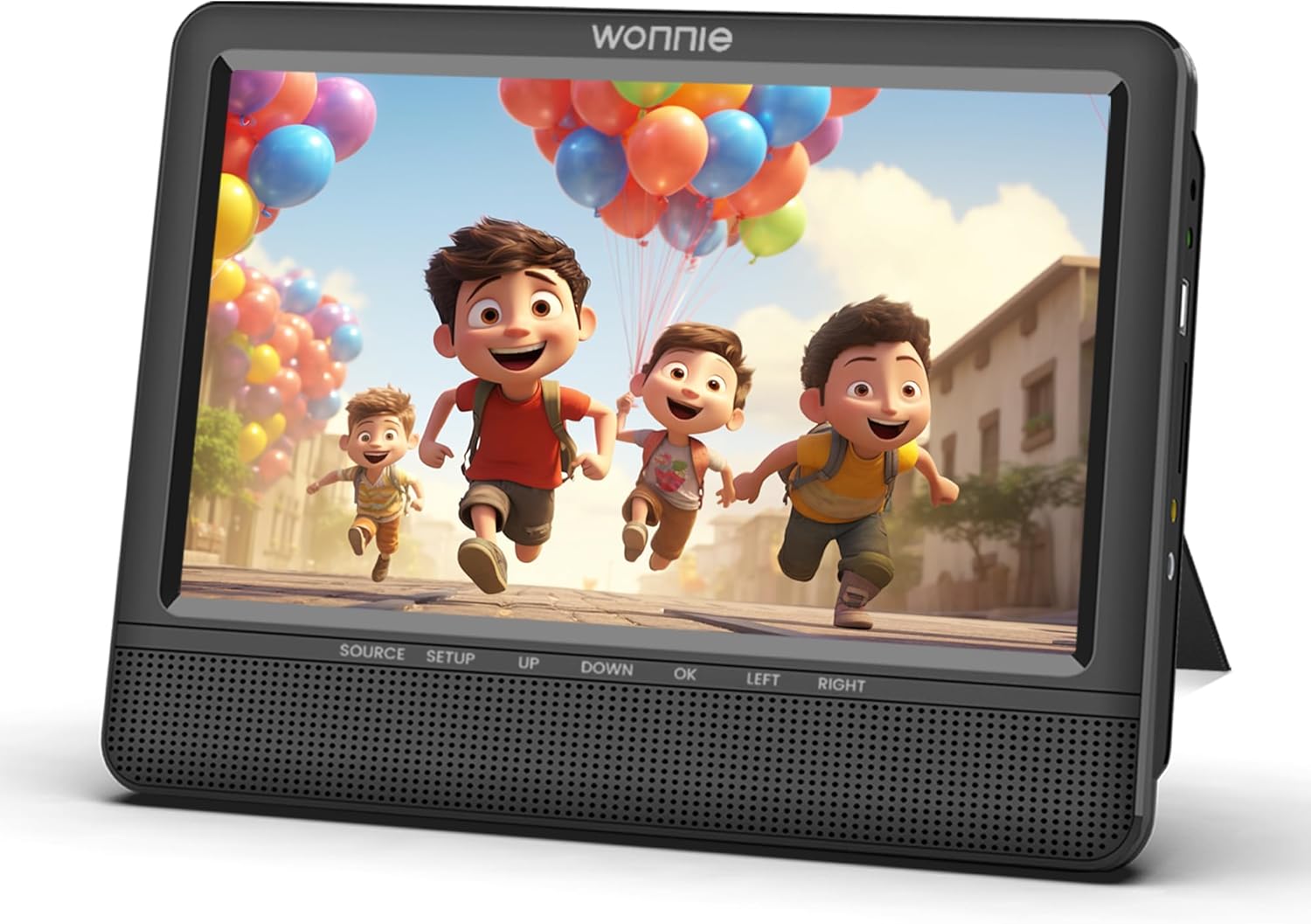
Image: Front view of the WONNIE W-612D portable DVD player. The screen displays a colorful cartoon scene. Below the screen are control buttons labeled SOURCE, SETUP, UP, DOWN, OK, LEFT, and RIGHT, along with speaker grilles.
Key Components:
- 7.5-inch LCD Screen: For video playback.
- Control Buttons: For navigation and function selection (SOURCE, SETUP, UP, DOWN, OK, LEFT, RIGHT).
- Disc Tray: For inserting DVDs and CDs.
- Speaker Grilles: Integrated speakers for audio output.
- Power Input: For connecting the power adapter.
- Headphone Jack: For private listening.
Setup
- Unpacking: Carefully remove the DVD player from its packaging.
- Power Connection: Connect the power adapter (not included with this specific model) to the player's power input and then to a power outlet.
- Power On: Press the power button to turn on the device.
Operating Instructions
Playing a Disc:
- Open the disc tray.
- Place a compatible DVD or CD onto the spindle with the label side facing up.
- Gently close the disc tray.
- The player will automatically begin reading the disc. If not, select the "Disc" source using the SOURCE button.
- Use the navigation buttons (UP, DOWN, LEFT, RIGHT) and the OK button to navigate menus and make selections.
System Settings:
Press the SETUP button to access the system menu. Here you can adjust settings such as:
- Language: Select preferred language for menus and subtitles.
- Display: Adjust brightness, contrast, and aspect ratio.
- Audio: Configure audio output settings.
- Parental Control: Set rating limits for disc playback.
Media Compatibility
The WONNIE W-612D supports the following media types:
- DVD, DVD±R, DVD±RW
- CD, CD±R, CD±RW
- VCD, SVCD
Note: This player does NOT support MP4 or Blu-ray discs.
Maintenance
- Cleaning the Screen: Use a soft, lint-free cloth to gently wipe the screen. Do not use abrasive cleaners or solvents.
- Cleaning the Player: Wipe the exterior of the player with a soft, dry cloth.
- Disc Care: Handle discs by their edges. Store them in their cases to prevent scratches and dust accumulation.
- Storage: When not in use, store the player in a cool, dry place away from direct sunlight and extreme temperatures.
Troubleshooting
| Problem | Possible Solution |
|---|---|
| Player does not power on. | Ensure the power adapter is securely connected to both the player and a working power outlet. Check if the power outlet is functional. |
| Disc does not play. | Check if the disc is inserted correctly (label side up). Ensure the disc is clean and free of scratches. Verify that the disc format is supported (not MP4 or Blu-ray). |
| No sound. | Adjust the volume level. Check if headphones are connected. Ensure audio settings in the SETUP menu are correct. |
| Picture is distorted or unclear. | Clean the disc. Adjust display settings (brightness, contrast) in the SETUP menu. Ensure the disc is not damaged. |
Specifications
| Feature | Detail |
|---|---|
| Brand | WONNIE |
| Model Number | W-612D |
| Screen Size | 7.5 Inches |
| Display Type | LCD |
| Color | Black |
| Media Type Supported | DVD, DVD±R, DVD±RW, CD, CD±R, CD±RW, VCD, SVCD |
| Unsupported Media Types | MP4, Blu-ray discs |
| Item Weight | 9.6 ounces |
| Package Dimensions | 9 x 8.3 x 3 inches |
What's in the Box
- One WONNIE W-612D Portable DVD Player
Note: No additional accessories (such as power adapter, remote control, car charger, etc.) are included with this specific product offering.
Warranty and Support
For warranty information and customer support, please refer to the official WONNIE website or contact your retailer. Keep your purchase receipt for warranty claims.
For further assistance, you may visit the WONNIE Store on Amazon.
Related documentsW-612D


Ask a question about this manual
Ask about setup, troubleshooting, compatibility, parts, safety, or missing instructions. Manuals+ will review the question and use this page’s manual context to help answer it.