
Safety Information
WARNING: Plastic bags can be dangerous! To avoid danger of suffocation, keep this bag away from babies and children. Do not use this bag in cribs, beds, carriages or playpens. This bag is not a toy.
Remove the protective film on the filter before use.
Product Overview
The KNKA APH3000 Air Purifier is a high-performance air cleaning system designed to improve indoor air quality in large spaces. Its sleek and compact design allows it to blend seamlessly into any home or office environment.

The KNKA APH3000 Air Purifier, a compact white unit with a black top panel, is designed to purify air in large rooms. It features a digital display and air vents on the front and sides. A dog is pictured next to the unit, highlighting its suitability for pet owners.
- Effortlessly Purifies Spaces up to 2325 Sq. Ft: Designed for bedrooms, living rooms, offices, and large open areas. Its powerful fan and circulation system quickly remove airborne pollutants, ensuring fresh air for your family in any environment.
- Advanced Triple Filtration: The washable pre-filter extends the H13 HEPA filter's lifespan, reducing costs while capturing larger particles like hair and dust. The HEPA filtration system with an activated carbon layer removes 99.9% of particles as small as 0.3 microns, including dust, pollen, pet dander, and smoke, making it ideal for households with pets or allergy sufferers.
- Real-Time Air Quality Monitoring: A built-in sensor continuously tracks air quality, with real-time updates displayed via an LED indicator. In Auto Mode, the room air purifier adjusts fan speed automatically for optimal performance and energy efficiency.
- Ultra-Quiet Sleep Mode: Operating at just 24dB—quieter than a whisper—it ensures restful sleep and uninterrupted air purification, a flexible light button to adjust the purifier's lights as needed, making it perfect for bedrooms or nurseries.
- Turbo Mode and Essential Features: Speeds up purification by over one-third, effectively eliminating odors and pollutants. Additional features include a child lock, an aroma sponge for added ambiance, and a user-friendly design. Air purifiers for home pets combine style, efficiency, and convenience.
- Customizable Modes: Choose from three adjustable fan speeds or let Auto Mode adjust automatically based on air quality. The timer function (1-12 hours) ensures convenience when sleeping or away.
- Hassle-Free Maintenance: A filter replacement indicator notifies you when it’s time to change filters. Replace every 3–6 months for optimal performance. Use official KNKA filters (search for B0DDKMTRXK or B0D9PVNF1K on Amazon).

The KNKA APH3000 Air Purifier is shown in a spacious living room, emphasizing its ability to purify large areas up to 2325 sq. ft. The image highlights its integration into a family environment, suggesting clean air for all occupants and pets.

An internal view of the KNKA APH3000 Air Purifier illustrates its unique air circulation system. It features an extra-large fan, high CADR (Clean Air Delivery Rate), whisper-quiet operation, and a high power mode, all contributing to ultimate purification.
Setup
Initial Setup
Follow these steps to set up your KNKA APH3000 Air Purifier:
- Unboxing: Carefully remove the air purifier and all accessories from the packaging.
- Filter Installation:
- Open the front panel of the air purifier.
- Remove the protective plastic film from the pre-installed filter.
- Ensure the filter is correctly oriented (pre-filter facing outwards) and reinsert it.
- Close the front panel securely.
- Power Connection: Connect the AC power adapter to the air purifier and plug it into a suitable power outlet.
This video provides a step-by-step guide on how to unbox and set up the KNKA APH3000 Air Purifier, including removing packaging, installing filters, and connecting power.
The main product image of the KNKA APH3000 Air Purifier, a white rectangular unit with a black top panel and front air intake.

The KNKA APH3000 Air Purifier is shown plugged into a wall outlet, ready for operation. The power cord is visible, emphasizing the ease of connection.
Operating Instructions
Control Panel Overview
The control panel on the top of the unit features several touch-sensitive buttons and a digital display for easy operation.

A close-up of the KNKA APH3000 Air Purifier's intelligent touch control panel, showing various buttons and a digital display. The Turbo mode button is highlighted, indicating quick purification.
Power On/Off
Press the power button to turn the unit on or off.
Air Quality Monitoring
The built-in sensor continuously tracks air quality, with real-time updates displayed via an LED indicator on the control panel.
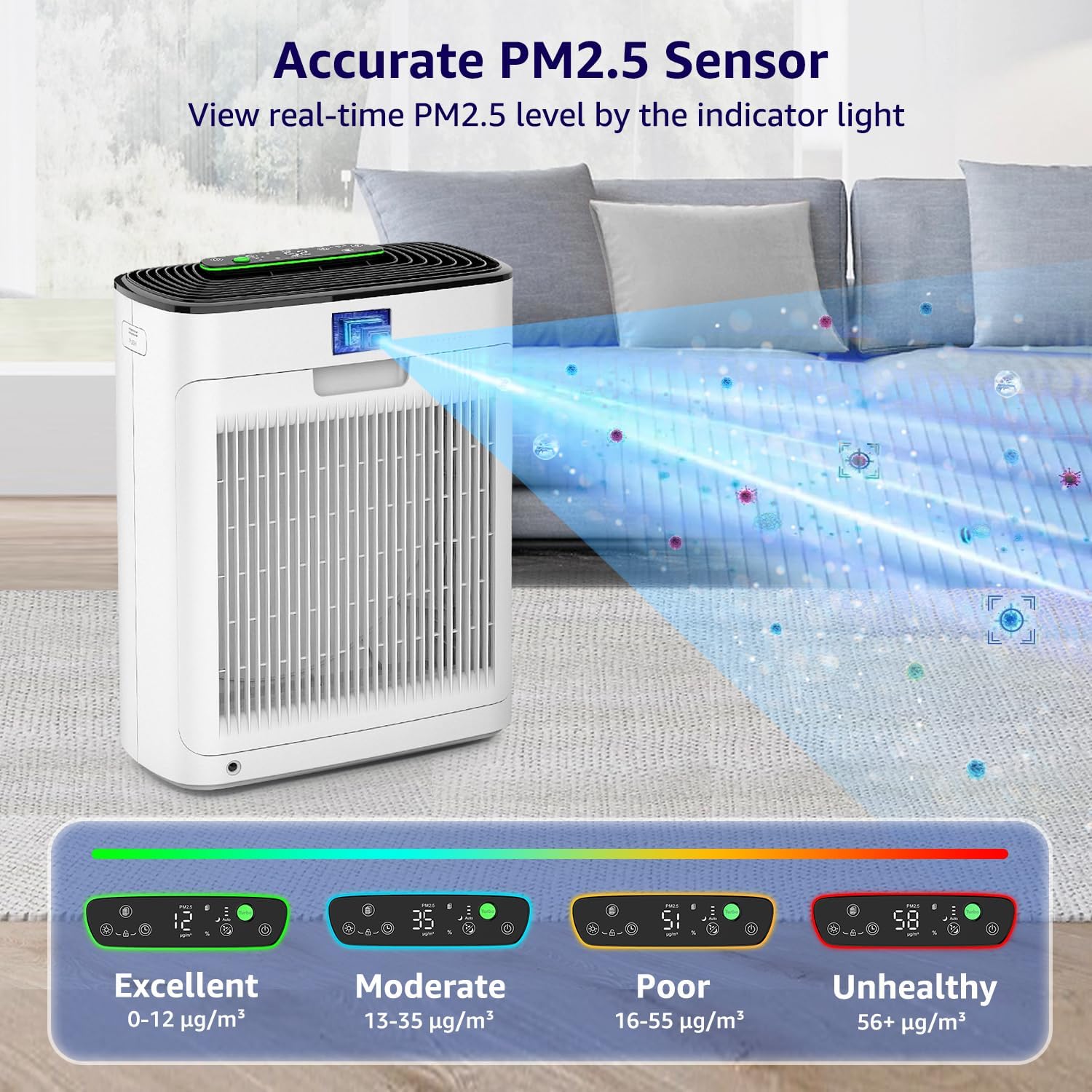
The KNKA APH3000 Air Purifier's real-time air quality monitoring feature is shown, with an LED indicator displaying PM2.5 levels. The display changes color to indicate Excellent, Moderate, Poor, or Unhealthy air quality.
Fan Speed Adjustment
Cycle through different fan speeds (Intelligent, Sleep, Speed 1, Speed 2, Speed 3) using the fan speed button.
Auto Mode
In Auto Mode, the air purifier adjusts fan speed automatically based on the detected air quality for optimal performance and energy efficiency.
Sleep Mode
Operating at just 24dB, Sleep Mode ensures restful sleep and uninterrupted air purification. The display lights can be dimmed or turned off.

The KNKA APH3000 Air Purifier is depicted in a bedroom at night, emphasizing its ultra-quiet Sleep Mode operation at 24dB. The image suggests it provides uninterrupted air purification for better sleep.
Turbo Mode
Speeds up purification by over one-third, effectively eliminating odors and pollutants quickly.
Timer Function
The timer function (1-12 hours) ensures convenience when sleeping or away.
Child Lock
Activate the child lock to prevent accidental changes to settings.

The child lock feature of the KNKA APH3000 Air Purifier is illustrated with a baby and a cat near the unit, indicating that settings can be locked to prevent accidental changes by children or pets.
Aroma Sponge
Add essential oils to the aroma sponge for added ambiance.
Maintenance
Filter Replacement Indicator
A filter replacement indicator notifies you when it’s time to change filters. The indicator will turn red when the filter life is less than 5%.

The filter replacement indicator on the KNKA APH3000 Air Purifier is shown, highlighting that it turns red when filter life is below 5%, signaling the need for replacement.
Filter Replacement
Replace filters every 3–6 months for optimal performance. Use official KNKA filters (search for B0DDKMTRXK or B0D9PVNF1K on Amazon).

The washable pre-filter of the KNKA APH3000 Air Purifier is shown being cleaned under running water, illustrating its reusability and ease of maintenance to extend the life of the overall filtration system.

An image comparing the washable pre-filter with the unwashable main filter of the KNKA APH3000 Air Purifier, emphasizing the longer lifespan and lower costs due to the reusable pre-filter.
Troubleshooting
Common Issues
- Unit not turning on: Ensure the power adapter is securely plugged into both the unit and a working electrical outlet.
- Poor air purification: Check if the protective plastic film has been removed from the filter. Ensure the filter is clean and not clogged. Replace the filter if the indicator light is red.
- Unusual noise: Verify that the filter is correctly installed and the front panel is securely closed.
Product Specifications
| Feature | Detail |
|---|---|
| Color | White |
| Brand | KNKA |
| Product Dimensions | 6.22"D x 11.73"W x 14.92"H |
| Floor Area | 2325 Square Feet |
| Specification Met | Energy Star Certified, FCC Certified, ETL Certified, CARB Certified, EPA Certified |
| Noise Level | 24 dB |
| Particle Retention Size | 0.3 Micron |
| Controller Type | Touch |
| Wattage | 48 watts |
| UPC | 717331965976 |
| Manufacture Year | 2024 |
| Manufacturer | KNKA |
| Item Weight | 7.9 pounds |
| ASIN | B0D9PTN74F |
| Country of Origin | China |
| Item model number | APH3000 |
| Assembly required | No |
| Batteries required | No |
| Included Components | 1 x 3-Stage Original Filter (Pre-Installed), 1 x User Manual, 1 x Air Purifier |
Warranty and Customer Support
For warranty information or technical support, please refer to the contact details provided in your product's user manual or visit the official KNKA website.
