
1. Introduction
Thank you for choosing the XQDKoon Smart Self-Cleaning Cat Litter Box. This innovative device is designed to provide a clean and comfortable environment for your cat while simplifying litter maintenance for you. Please read this manual thoroughly before operating the device to ensure proper use and optimal performance.
2. Safety Information
- Age and Weight Restrictions: This litter box is suitable for cats weighing between 1 kg and 8 kg. It is not suitable for animals under 6 months of age.
- Placement: Always place the litter box on a flat, stable surface. Ensure all four feet of the product are in contact with the ground to prevent tipping and ensure proper sensor function.
- Power Supply: Use only the provided power adapter. This product is a plug-in model.
- Cleaning: Do not rinse or immerse the base of the unit in water. Only the drum and waste bin are washable (excluding electrical parts).
- Child Safety: Keep children away from the device during operation. The app includes a "KidsLock" function for added safety.
- Litter Type: Use cat litter with a length of less than 11 mm. Suitable types include tofu litter, mixed litter, bentonite litter, and mineral litter.
- Emergency Stop: The device features multiple sensors (weight sensors, infrared sensor) to stop operation if a cat enters during a cleaning cycle.
3. Product Components
The XQDKoon Smart Self-Cleaning Cat Litter Box consists of several key components designed for efficient and safe operation.
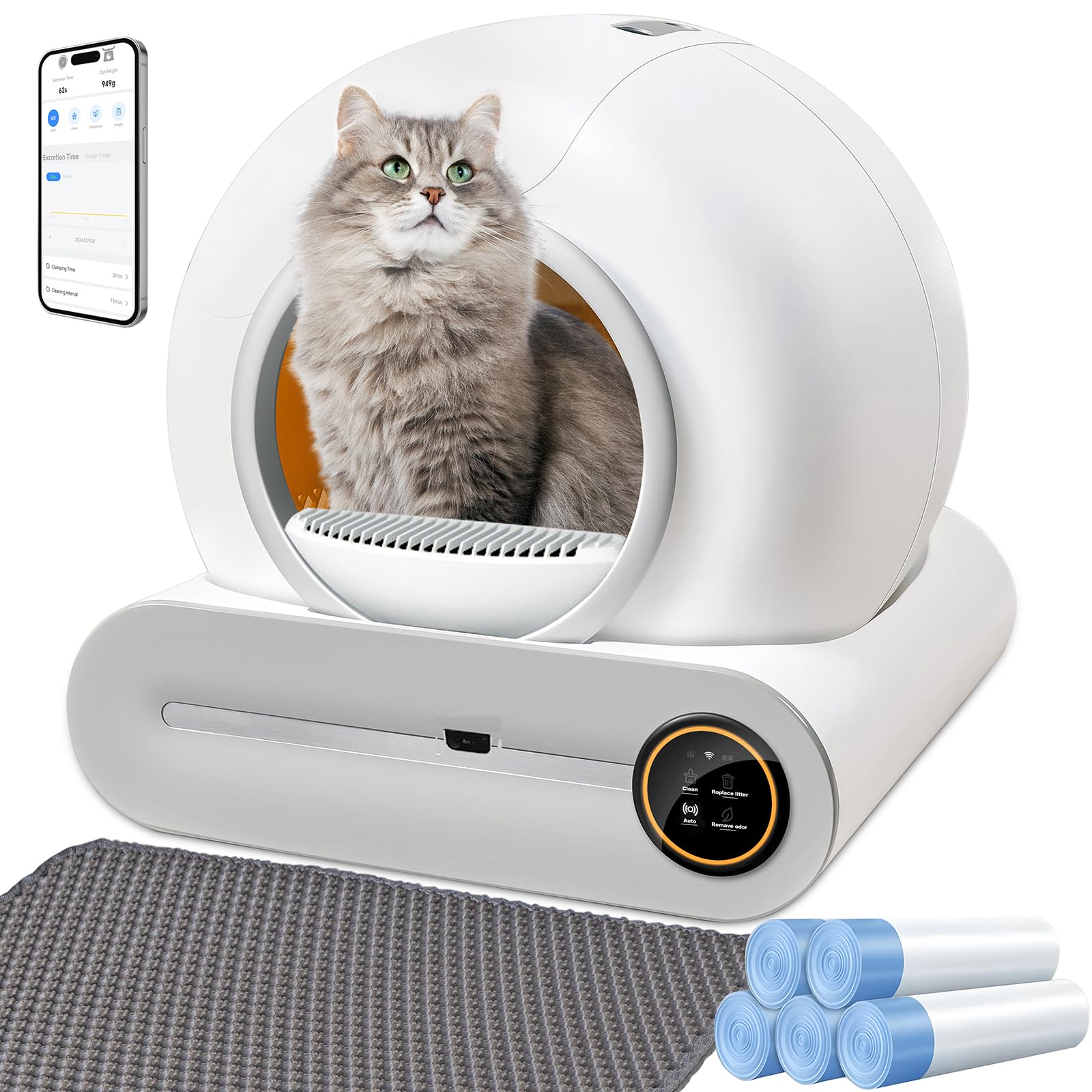
Figure 3.1: Main unit and accessories.

Figure 3.2: Internal components and safety features.
3.1 Package Contents
- XQDKoon Smart Self-Cleaning Cat Litter Box Unit
- 2 Rolls of Garbage Bags
- Power Adapter
- User Manual
4. Setup Guide
4.1 Initial Placement
Place the litter box on a flat, stable surface. Ensure the power cable (1.5 meters long) can reach an outlet without strain.
4.2 Installing the Garbage Bag
- Open the top cover of the litter box.
- Place a garbage bag on top of the cat litter box, ensuring it covers the waste collection area.
- Secure the garbage bag using the provided clips or fasteners.
- Close the top cover.

Figure 4.1: Garbage bag installation steps.
4.3 Adding Cat Litter
Pour the appropriate type and amount of cat litter into the drum. Ensure the litter level does not exceed the maximum fill line. The litter box has a 65-liter capacity for litter.

Figure 4.2: Suitable cat litter types and filter sizes.
4.4 Power Connection
Plug the power adapter into the designated port on the litter box and then into a wall outlet.
4.5 App Connection (2.4GHz WiFi Only)
To utilize smart features, download the companion app. The app supports multiple languages including English, Spanish, Italian, French, and German. Ensure your device is connected to a 2.4GHz WiFi network.
- Scan the QR code in the manual or search for the app in your app store.
- Open the app and follow the on-screen instructions to add a new device.
- On the litter box, press and hold the WiFi button for 3 seconds to enter pairing mode.
- Confirm the connection in the app.
Video 4.1: Step-by-step guide for initial setup, including garbage bag installation, litter pouring, power connection, and app pairing.
5. Operating Instructions
5.1 Automatic Cleaning
The litter box automatically detects when your cat has used it and initiates a cleaning cycle after a set delay. This delay can be adjusted via the app to allow sufficient time for clumping, especially for soft stools (e.g., set to more than 5 minutes).
5.2 Manual Cleaning
You can manually initiate a cleaning cycle by pressing the "Clean" button on the control panel or through the app.
5.3 Odor Elimination
The device uses an ionic deodorizer and antibacterial treatment after each cleaning cycle to maintain fresh air. This feature helps prevent unpleasant odors and ensures a comfortable environment.

Figure 5.1: Ionic deodorization and antibacterial system.
5.4 Litter Replacement
The one-click litter replacement function allows you to easily empty old litter. Press the designated button on the control panel or use the app to activate this feature.
5.5 Smart App Control
The app provides comprehensive control and monitoring features:
- Usage Monitoring: Track your cat's usage frequency.
- Cleaning Control: Initiate cleaning or air purification remotely.
- Health Insights: Observe your cat's health habits, even when away.
- Settings: Adjust cleaning intervals (e.g., for multiple cats, set to >30 minutes to prevent repeated cleaning) and litter stacking time.
- KidsLock: Activate child safety lock.

Figure 5.2: App interface for smart control and monitoring.
6. Maintenance
6.1 Regular Cleaning
It is recommended to clean the drum and the waste bin (excluding electrical parts) every 20 days. These parts can be easily removed for washing.

Figure 6.1: Removing the drum for cleaning.
6.2 Changing Cat Litter
For a single cat, it is recommended to completely change the cat litter every 15 days. You may also refill the litter irregularly based on usage and cleanliness.
6.3 Waste Bin Management
The waste bin has a 9-liter storage capacity, allowing for worry-free use for up to 15 days before needing to be emptied, depending on cat usage.

Figure 6.2: Waste bin capacity and duration.
7. Troubleshooting
- Cat Refuses to Use Litter Box: Most cats adapt within a month. Place your cat's favorite toys inside the litter box to encourage use.
- Repeated Cleaning with Multiple Cats: Adjust the "cleaning interval" in the app to more than 30 minutes to prevent inefficient repeated cleaning.
- Soft Stool Contamination: Set the "waiting time for cleaning" in the app to more than 5 minutes. This allows sufficient time for stools to clump, reducing contamination of the waste bin.
- Urine Leaks: The litter box is equipped with a small barrier at the entrance to prevent urine from seeping into the machine's base. Ensure this barrier is properly installed and maintained.
- Where to Buy Garbage Bags: Specific garbage bags for this product will be published soon. Please check the manufacturer's website or contact support for availability.
8. Specifications
| Feature | Detail |
|---|---|
| Model Number | Smart cat litter box A-B-C |
| Brand | XQDKoon |
| Dimensions (L x W x H) | 48 x 51.6 x 50.5 cm |
| Weight | 9.1 Kilograms |
| Material | Plastic |
| Litter Capacity | 65 Liters |
| Waste Bin Capacity | 9 Liters |
| Suitable Cat Weight | 1 - 8 kg (Not for cats under 6 months) |
| Power Cable Length | 1.5 meters |
| Connectivity | 2.4GHz WiFi (App Control) |
| Special Features | Ionic Deodorizer, Antibacterial Treatment, Automatic/Manual Cleaning, One-Click Litter Change, Urine Leak Prevention Barrier, Multiple Safety Sensors (Weight, Infrared, Anti-Pinch) |
| UPC | 762736370504 |
9. Warranty and Support
9.1 Warranty Information
XQDKoon guarantees a lifetime supply of damaged parts for this product. Please retain your proof of purchase for warranty claims.
9.2 Customer Support
For any questions, technical assistance, or warranty claims, please contact XQDKoon customer support through their official website or the contact information provided with your purchase.
