
1. Product Overview
The DJCLUB K10 19x25W Bee Eye Moving Head Light is a versatile stage lighting fixture designed for professional and event use. It features 19 powerful 25W 4-in-1 RGBW LEDs, offering a wide range of color mixing, beam, wash, zoom, and CTO effects. This manual provides essential information for the safe and effective operation of your device.
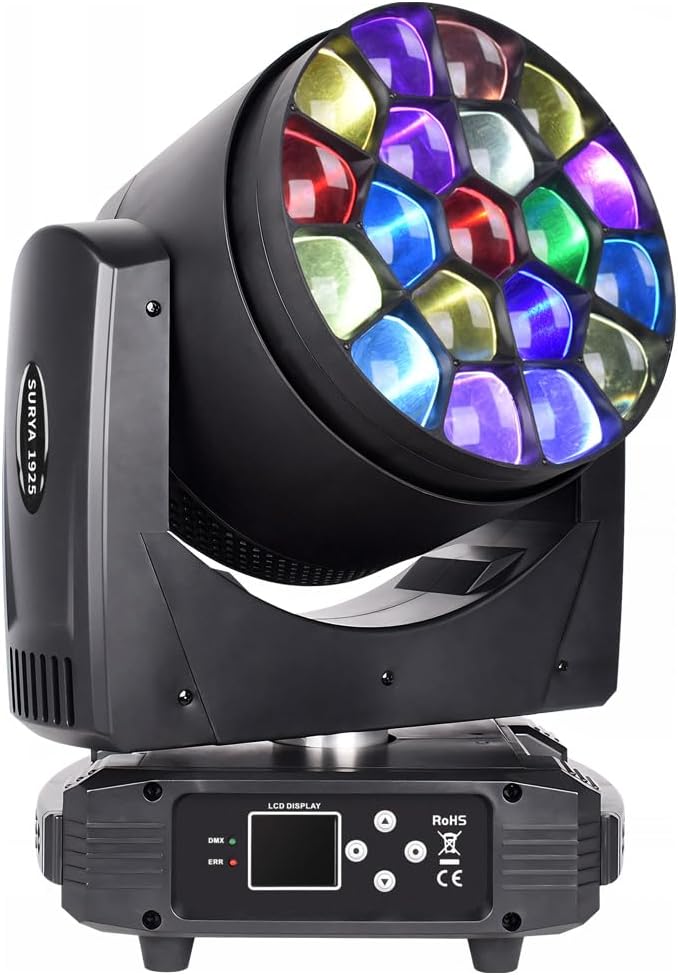
Figure 1: Front view of the DJCLUB K10 Moving Head Light, showcasing its multi-lens array.
2. Safety Instructions
- Always connect the device to a grounded power outlet.
- Ensure proper ventilation to prevent overheating.
- Do not look directly into the light source when the device is operating.
- Keep the device away from moisture and extreme temperatures.
- Only qualified personnel should perform maintenance or repairs.
3. Package Contents
Verify that all items are present in the package:
- 1 x K10 19X25W Bee Eye Moving Head Light
- 1 x DMX Cable
- 1 x Power Cable
- 1 x Omega Bracket (for mounting)
- 1 x User Manual (this document)
4. Setup
4.1 Physical Installation
- Unpacking: Carefully remove the light fixture and all accessories from the packaging.
- Placement: Position the light on a stable, flat surface or securely mount it using the provided Omega bracket. Ensure adequate space for movement and ventilation.
- Power Connection: Connect the power cable to the light fixture and then to a suitable grounded power outlet (AC 240V).
4.2 DMX Connection
For DMX control, connect the DMX cable from your DMX controller to the DMX input of the light fixture. For multiple fixtures, daisy-chain them by connecting the DMX output of the first fixture to the DMX input of the next, and so on.

Figure 2: Rear panel with DMX input/output and power connections.
5. Operating Instructions
The K10 Moving Head Light offers various control modes and effects.
5.1 Control Panel and Display
The light features a graphic LCD backlit display and control buttons for menu navigation and setting adjustments.
5.2 Control Modes
- DMX Control Channel Mode: Supports 24/26/38/81/95/100/102 channels for comprehensive control via an external DMX controller.
- AUTO Mode: Pre-programmed sequences for automatic operation.
- Manual Mode: Allows direct adjustment of parameters via the control panel.
- Sound Activated Mode: Responds to audio input, synchronizing light effects with music.
- Master-Slave Mode: Link multiple fixtures where one acts as the master, controlling the others.
5.3 Functional Effects
- Beam/Wash/Zoom: Adjustable beam angle from 6° to 50° for versatile lighting coverage.
- RGBW + Mix Color: Full color mixing capabilities with 19pcs 25W 4-in-1 LEDs.
- CTO (Color Temperature Adjustment): Linear control from 2500K to 8000K.
- Strobe: Variable speed pulsation up to 24 flashes/second.
- Horse Racing Effect: Dynamic sequential lighting patterns.
- Built-in Programs: Includes swirl and kaleidoscope effects.
- Pan/Tilt Movement: PAN range of 540° and TILT range of 210° with 16-bit resolution for precise movement.

Figure 3: Examples of individual color outputs (Red, Green, Blue, White) from the K10 light.
5.4 Video Demonstration
Watch this video for a demonstration of the DJCLUB K10 19x25W Bee Eye Moving Head Light's features and effects.
Video 1: Official product video demonstrating various lighting effects and movements of the DJCLUB K10 Bee Eye Moving Head Light.
6. Maintenance
Regular maintenance ensures optimal performance and extends the lifespan of your light fixture.
- Cleaning: Use a soft, lint-free cloth to clean the exterior and lenses. Do not use harsh chemicals or abrasive materials.
- Ventilation: Ensure ventilation openings are clear of dust and debris. Periodically clean with compressed air if necessary.
- Cable Inspection: Regularly check power and DMX cables for any signs of damage. Replace damaged cables immediately.
- Firmware Updates: Firmware can be updated via DMX input. Refer to the DJCLUB website for the latest firmware and instructions.
7. Troubleshooting
If you encounter issues, refer to the following common problems and solutions:
| Problem | Possible Cause | Solution |
|---|---|---|
| Light does not power on | No power, faulty cable, power switch off | Check power connection, replace cable, ensure switch is on. |
| No DMX control | Incorrect DMX address, faulty DMX cable, DMX controller issue | Verify DMX address, check DMX cable, test with another controller. |
| Light movement is erratic | Mechanical obstruction, DMX signal interference | Clear obstructions, check DMX signal integrity. |
| Overheating | Blocked ventilation, prolonged use in high ambient temperature | Ensure clear ventilation, operate in suitable environment. |
For further assistance, please contact DJCLUB customer support.
8. Specifications

Figure 4: Product dimensions of the DJCLUB K10 Moving Head Light.
| Feature | Detail |
|---|---|
| Model Number | DJ-1925 |
| Light Source | 19x 25W 4-in-1 RGBW LEDs |
| Light Output | 5,500 lm |
| LED Life Expectancy | Min. 50,000 hours |
| Zoom Range | 6° - 50° |
| Color Temperature Control | Linear from 2500K to 8000K (CTO mode) |
| Strobe Rate | 24 flashes/sec |
| Control Signal | USITT DMX 512 |
| DMX Channels | 24/26/38/81/95/100/102 Ch |
| Display | Graphic LCD backlit |
| Pan Range | 540° (16-bit resolution) |
| Tilt Range | 210° (16-bit resolution) |
| Material | Aluminum, Iron, Plastic |
| Color | Black |
| Power Source | Corded Electric |
| Voltage | 240 Volts (AC) |
| Maximum Compatible Light Source Wattage | 475 Watts |
| Product Dimensions | 11.5"L x 8.85"W x 16.95"H (29.2cm L x 22.5cm W x 43.1cm H) |
| Item Weight | 25.4 Pounds (11.5 kg) |
| Certifications | CE, RoHS |
9. Warranty and Support
The DJCLUB K10 19x25W Bee Eye Moving Head Light comes with a 30-day money-back guarantee and a 90-day warranty from the date of purchase.
For any issues, technical support, or warranty claims, please contact DJCLUB customer service via the after-sales email provided at the time of purchase or through the official DJCLUB website. Our support team is available to assist you with troubleshooting and product inquiries.