
Introduction
This manual provides comprehensive instructions for the Koiiko Wireless Gaming Controller Model Z03. It covers setup, operation, maintenance, and troubleshooting to ensure optimal performance and an enhanced gaming experience across various platforms.
The Koiiko Z03 controller is designed for multi-platform compatibility, supporting iOS (iPhone 15/14), Android, PC, Nintendo Switch, PS3, and PS4. It features advanced functionalities such as Hall linear triggers, a 6-axis gyro sensor, programmable buttons, and turbo functions.
Package Contents
Please verify that all items are present in your package:
- 1 x Koiiko Wireless Gaming Controller (Model Z03)
- 1 x Cell Phone Holder
- 1 x Detachable Cross Key Cap
- 1 x USB-C Charging Cable
- 1 x User Manual

Image: Contents of the Koiiko Wireless Gaming Controller Z03 package, showing the black controller, a white phone holder, a USB-C cable, and the user manual.
Product Overview and Features
The Koiiko Z03 controller integrates several features for a versatile gaming experience:
- Hall Linear Triggers & Rockers: Utilizes electromagnetic induction for precise input, offering accuracy up to 0.1mm and smooth responsiveness.
- Switchable Trigger Types: Allows selection between micro triggers for rapid firing in shooting games and Hall triggers for nuanced control in racing games.
- 6-Axis Gyro Sensor: Provides motion control capabilities for supported games on PC, PS3, PS4, and Switch.
- Programmable Buttons (M1/M2): Two back buttons can be programmed for custom button combinations or macros.
- Turbo Function: Enables rapid, automatic button presses for enhanced gameplay.
- Adjustable Joystick Linear Algorithm: Three adaptation modes (Racing, Normal, FPS) to fine-tune joystick sensitivity and dead zones.
- Dual Vibration: Provides haptic feedback for immersive gameplay (supported on PC/PS3/PS4/Switch only).
- Phone Holder: Integrated holder supports smartphones with widths between 2.08-3.77 inches (53-96mm).
- Cloud Gaming Support: Compatible with various cloud gaming services including Play Space, Nvidia GeForce Now, Xbox Game Pass, Amazon Luna, Google Stadia, Rainway, and Moonlight.

Image: Front and rear views of the Koiiko Wireless Gaming Controller Z03, highlighting its ergonomic design and button layout.

Image: A visual representation of the controller's switchable trigger types, showing micro triggers for shooting games and Hall triggers for racing games.

Image: The Koiiko Z03 controller with its integrated phone holder, demonstrating a smartphone securely mounted and displaying a mobile game.

Image: A detailed view of the back of the Koiiko Z03 controller, pointing out the M1 and M2 programmable buttons.

Image: Illustration of the two-stage trigger lock structure, differentiating between outward shift (micro trigger for fast firing) and inward shift (Hall trigger for precise control).
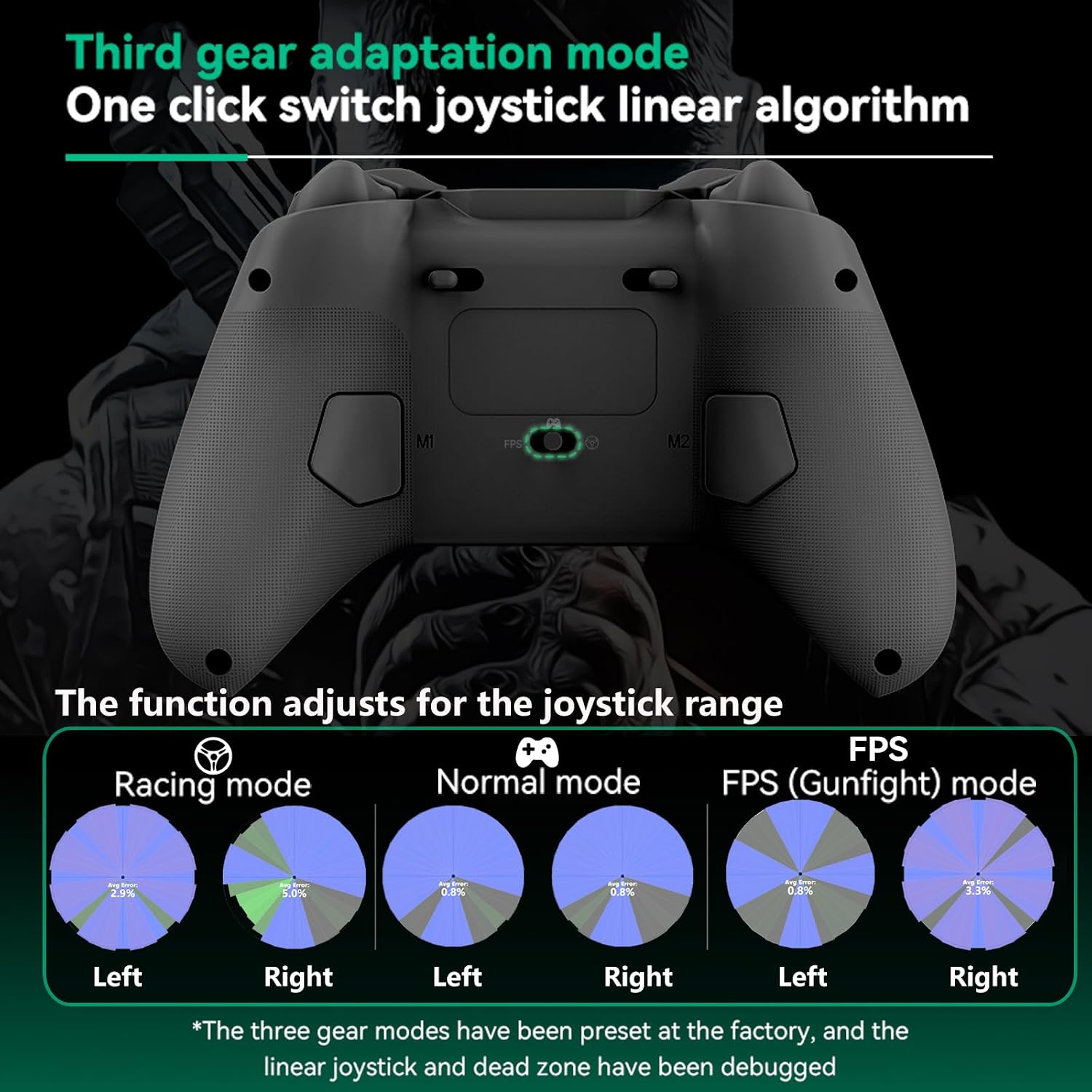
Image: A visual guide to the three-gear adaptation mode for the joystick, showing different linear algorithm settings for Racing, Normal, and FPS (Gunfight) modes.

Image: A collage showcasing various features of the Koiiko Z03 controller, such as Auto & Manual Turbo, ABXY Function Adaptive, 6-Axis Gyro Motion Control, Dual Vibration, Hall-Rocker, Axis Calibration Function, 1000Hz Wired Rolling Rate, and included accessories.
Setup and Connection Guide
Follow these steps to connect your Koiiko Wireless Gaming Controller to various devices.
1. iOS / PC Connection
- Ensure the controller is off.
- Hold down the 'RB' key, then press the 'HOME' key to power on the controller.
- On your iOS device or PC, turn on Bluetooth and connect to 'Xbox Wireless Controller'.
- Start playing.
After connection, you can also play cloud games via cloud gaming apps on your iOS mobile device or PC, such as Game Pass.

Image: Connection guide for iOS and PC, illustrating the Bluetooth pairing process with the controller.
2. Android Connection
- Ensure the controller is off.
- Hold down the 'RB' key, then press the 'HOME' key to power on the controller.
- On your Android device, turn on Bluetooth and connect to 'Xbox Wireless Controller'.
For different games, Android has a second controller boot mode: Hold down the 'X' key, then press the 'HOME' key to boot the controller. Turn on the Bluetooth connection 'BSP-D8' on your Android device.
After connection, you can also play cloud games via cloud gaming apps on your Android mobile device.

Image: Connection guide for Android devices, detailing the Bluetooth pairing process and alternative boot mode.
3. Nintendo Switch / Switch OLED Connection
- On your Switch console, navigate to System Settings > Controllers and Sensors > Change Grip/Order page.
- Ensure the controller is off.
- Hold down the 'RT' key, then press the 'HOME' key to power on the controller. The controller will automatically connect to the Switch.
- Start playing.

Image: Connection guide for Nintendo Switch and Switch OLED, illustrating the pairing steps.
4. PS4 / PS3 Connection
- Open the PS4 console, click 'Settings', 'Devices', 'Controllers', 'Communication Method', 'Use USB Cable', then turn off your original controller.
- Make sure the Koiiko controller is off. Connect the Koiiko controller to the PS4 console with a Type-C cable.
- Press the 'HOME' key to boot the controller. The controller will automatically connect to the console.
- Once the connection is done, you can unplug the Type-C cable to turn the controller into a wireless game controller.
Note: PS5 only supports streaming, not direct connection.

Image: Connection guide for PS4 and PS3 consoles, detailing the wired and wireless pairing process.
5. Streaming Xbox One / Series Connection
- Ensure the controller is off.
- Hold down the 'RB' key, then press the 'HOME' key to power on the controller.
- Turn on the Bluetooth connection 'Xbox Wireless Controller' on your iOS / Android mobile device or PC.
- Start playing.
After connection, you can play cloud games via cloud gaming apps on your iOS or Android mobile device or PC, such as Game Pass.

Image: Connection guide for streaming Xbox One/Series games, illustrating the Bluetooth connection via a mobile device or PC.
Operating Instructions
1. Programmable Buttons (M1/M2)
The M1 and M2 buttons on the back of the controller can be programmed to perform single button presses or complex button combinations (up to 20 buttons). Refer to the detailed programming instructions in the full user manual for specific steps.
2. Turbo Function
The controller supports both auto and manual turbo functions. This allows for rapid, repeated input of a button press without continuously holding it down. Consult the full user manual for activation and customization of turbo settings.
3. Trigger Lock Structure
The two-stage trigger lock structure allows you to switch between micro triggers and Hall triggers:
- Outward Shift (Micro Trigger): Provides a short travel distance for quick, responsive firing, ideal for shooting games.
- Inward Shift (Hall Trigger): Offers a longer, more linear travel for precise control, suitable for throttle and brake in racing games.
4. Joystick Linear Algorithm Adjustment
The controller features three preset joystick adaptation modes to optimize performance for different game genres:
- Racing Mode: Optimized for precise steering and control in racing simulations.
- Normal Mode: Standard joystick response for general gaming.
- FPS (Gunfight) Mode: Enhanced sensitivity and reduced dead zone for quick aiming in first-person shooter games.
These modes are factory preset and debugged for linear joystick and dead zone performance.
5. 6-Axis Gyro Motion Control
For supported games on PC, PS3, PS4, and Switch, the 6-axis gyro sensor enables motion-based controls, adding an immersive layer to gameplay.
6. Axis Calibration Function
If you experience any drift or inaccuracy with the joysticks or triggers, use the axis calibration function to reset and fine-tune their performance. Refer to the full user manual for calibration steps.
Maintenance
To ensure the longevity and optimal performance of your Koiiko Wireless Gaming Controller, follow these maintenance guidelines:
- Cleaning: Use a soft, dry cloth to wipe the controller. For stubborn dirt, slightly dampen the cloth with water. Avoid using harsh chemicals or abrasive cleaners.
- Storage: Store the controller in a cool, dry place away from direct sunlight, extreme temperatures, and humidity.
- Battery Care: If the controller will not be used for an extended period, ensure it is fully charged before storage. Avoid completely draining the battery frequently.
- Avoid Physical Damage: Do not drop the controller or expose it to excessive force.
Troubleshooting
If you encounter issues with your Koiiko Wireless Gaming Controller, try the following solutions:
- Controller Not Connecting:
- Ensure the controller is fully charged.
- Verify that the correct connection mode (boot sequence) is used for your device (iOS/PC, Android, Switch, PS4/PS3).
- Check your device's Bluetooth settings and ensure it is discoverable.
- Try restarting both the controller and your device.
- Input Lag or Unresponsiveness:
- Ensure there are no obstructions between the controller and your device.
- Reduce the distance between the controller and your device.
- Check for interference from other wireless devices.
- If using a wired connection (for PS4/PS3 setup), ensure the cable is securely connected.
- Buttons / Joysticks Not Working Correctly:
- Perform an axis calibration (refer to the Operating Instructions or full manual).
- Ensure no debris is lodged around the buttons or joysticks.
- Reset the controller to factory settings (refer to the full manual for instructions).
- Phone Holder Issues:
- Ensure your phone's width is within the supported range (2.08-3.77 inches / 53-96mm).
- Verify the phone holder is securely attached to the controller.
If these steps do not resolve the issue, please contact customer support.
Specifications
| Model | Z03 |
| Connectivity | Wireless (Bluetooth), Wired (USB-C) |
| Compatibility | iOS (iPhone 15/14), Android, PC, Nintendo Switch, PS3, PS4 (streaming for PS5, Xbox One/Series) |
| Special Features | Hall Linear Triggers & Rockers, 6-Axis Gyro, Programmable Buttons (M1/M2), Turbo Function, Dual Vibration, Adjustable Joystick Linear Algorithm, Phone Holder |
| Item Weight | 9.6 ounces (approx. 272 grams) |
| Package Dimensions | 7.3 x 5.5 x 2.7 inches (approx. 18.5 x 14 x 6.9 cm) |
| Batteries | 1 AA battery required (included) |
| Manufacturer | ShenZhen ShanWan Technology Co., Ltd. |
Warranty and Support
The Koiiko Wireless Gaming Controller comes with customer support. If you encounter any problems during use, please contact our customer service team. We are committed to resolving your issues within 24 hours.
For further assistance or warranty information, please refer to the contact details provided with your purchase or visit the official Koiiko website.
