
1. Introduction
Thank you for choosing the Mcdodo 100W USB Charging Station, Model CH-1800. This device is designed to provide efficient and safe charging for multiple electronic devices simultaneously. Please read this manual thoroughly before use to ensure optimal performance and safety.
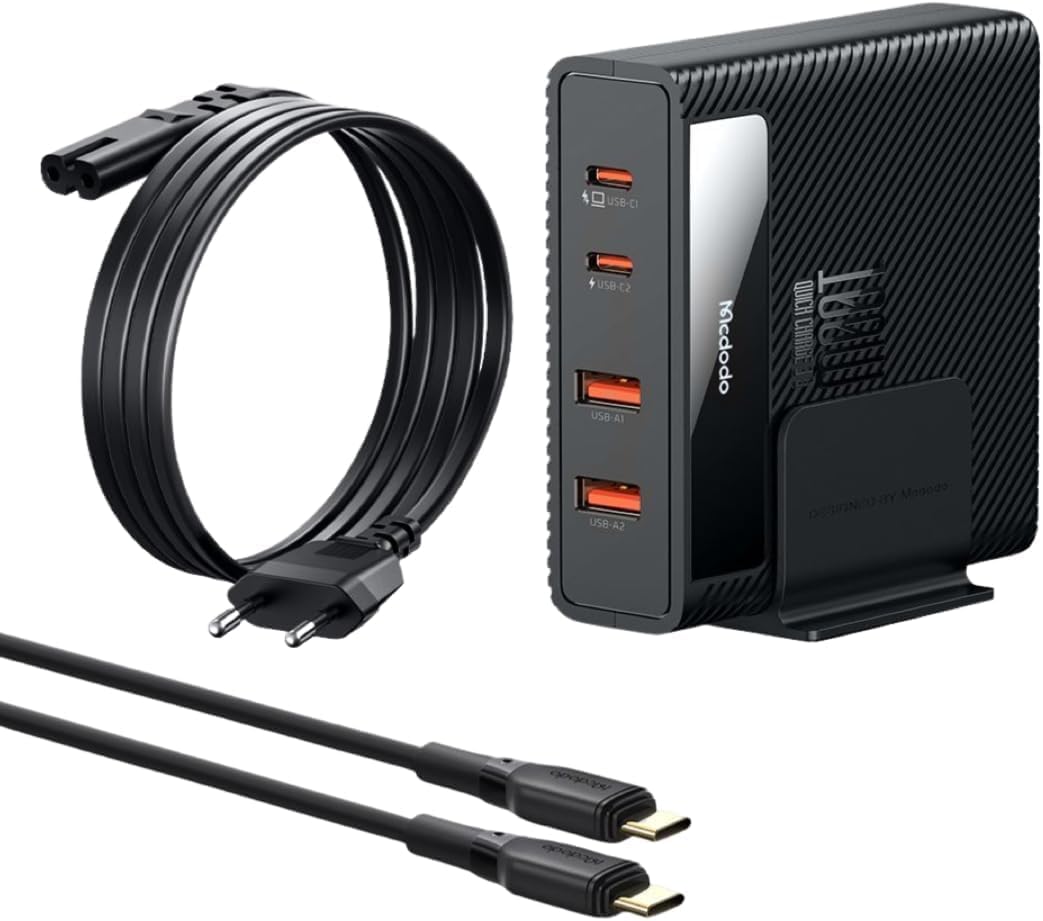
Figure 1: Mcdodo 100W USB Charging Station and accessories.
2. Package Contents
- 1 x Mcdodo 100W Multiport USB Charging Station
- 1 x 1.5m AC Cable
- 1 x 1.2M Type-C to Type-C Cable
- 1 x Welcome Guide (this manual)
3. Key Features
- 4-Port 100W USB Charging: Equipped with 2 USB-C ports (up to 100W each) and 2 USB-A ports (up to 22.5W each) for simultaneous charging of up to 4 devices.
- PowiGaN Technology: Utilizes advanced GaN technology for increased power output in a compact size, balancing volume, efficiency, and temperature control.
- Superior Safety Mechanisms: Features upgraded temperature control, high-efficiency heat dissipation, and multiple protections including over-heating, over-charging, over-voltage, over-current, and short-circuit.
- Dual Charging Position: Includes a supportable base allowing for both horizontal and vertical placement to suit various desk setups.
- Universal Compatibility: Supports fast charging for a wide range of devices including iPhones, iPads, Android smartphones, MacBooks, and other USB-powered devices.

Figure 2: PowiGaN Technology for enhanced charging performance.
4. Setup
- Connect the AC Cable: Plug the provided 1.5m AC cable into the charging station and then into a wall outlet. The extended cable length allows for flexible placement.
- Position the Charging Station: Use the included supportable base to position the charging station either horizontally or vertically on your desk or preferred surface.

Figure 3: Flexible placement with the 1.5m AC cable.

Figure 4: Horizontal and vertical charging positions.
5. Operation
The Mcdodo 100W USB Charging Station intelligently distributes power across its ports to optimize charging speed for connected devices. Below are the typical power outputs for various charging scenarios:
- Single-Port Charging: Up to 100W for USB-C ports, up to 22.5W for USB-A ports.
- Two-Port Charging: For example, 65W + 30W for two USB-C devices, or 65W + 18W for USB-C and USB-A.
- Three-Port Charging: Power is distributed accordingly, e.g., 45W + 30W + 18W.
- Four-Port Charging: Power is distributed across all four ports, e.g., 45W + 30W + 5V/4.5A + 5V/4.5A.
The station supports various fast charging protocols including PD (Power Delivery), QC (Quick Charge), FCP, SCP, and Apple 2.4A.

Figure 5: Power distribution across multiple ports.

Figure 6: Charging multiple devices at once.
Video 1: Overview of the Mcdodo 100W USB Charging Station's features and multi-device charging capability.
6. Specifications
| Feature | Detail |
|---|---|
| Model Number | CH-1800 |
| Total USB Ports | 4 (2x USB Type-C, 2x USB Type-A) |
| Max Output Power | 100W |
| USB-C Output | Up to 100W per port (dynamic distribution) |
| USB-A Output | Up to 22.5W per port (dynamic distribution) |
| Input Voltage | 240 Volts (AC) |
| Material | Metal |
| Item Weight | 1.15 pounds |
| Package Dimensions | 6.85 x 5.94 x 2.52 inches |
| Special Feature | Fast Charging, GaN Technology |
| Color | Black |
7. Safety Information
The Mcdodo 100W USB Charging Station is designed with multiple safety features to protect your devices and the charger itself:
- Over-Temperature Protection: Advanced temperature control and high-efficiency heat dissipation prevent overheating during full load operation.
- Over-Charging Protection: Prevents devices from being overcharged, extending battery life.
- Over-Voltage Protection: Safeguards against excessive voltage input.
- Over-Current Protection: Protects against current surges.
- Short-Circuit Protection: Automatically cuts off power in case of a short circuit.
- Anti-Interference Protection: Ensures stable charging performance.
- Electrostatic Protection: Guards against electrostatic discharge.
Important Safety Precautions:
- Do not expose the charger to water or moisture.
- Do not disassemble or modify the charger.
- Keep out of reach of children.
- Ensure proper ventilation when in use.

Figure 7: Integrated safety protection mechanisms.
8. Troubleshooting
- Device not charging: Ensure the AC cable is securely plugged into both the charger and the wall outlet. Verify that the charging cable connected to your device is functional and properly inserted.
- Slow charging: Check if your device supports fast charging protocols (PD, QC). Ensure you are using a compatible fast-charging cable. The charging speed may also be affected by the number of devices connected and their power requirements.
- Charger feels warm: It is normal for the charger to become warm during operation, especially when charging multiple devices at high power. If it becomes excessively hot, disconnect all devices and the AC power, and allow it to cool down.
9. Care and Maintenance
- Clean the charging station with a soft, dry cloth. Do not use liquid cleaners or aerosols.
- Store the charger in a cool, dry place when not in use.
- Avoid dropping or subjecting the charger to strong impacts.
10. Warranty and Support
This Mcdodo product comes with a 12-month warranty from the date of purchase. This warranty covers manufacturing defects. Please retain your proof of purchase for warranty claims.
The warranty does not cover damage caused by:
- Accidental damage, misuse, or abuse.
- Unauthorized repairs or modifications.
- Normal wear and tear.
- Exposure to extreme temperatures or liquids.
For customer service and support, please refer to the contact information provided in your welcome guide or visit the official Mcdodo website.