
1. Setup
1.1 Package Contents
Verify all items are present in your package:
- 10 x RT68 Walkie Talkies
- 1 x 10-Way Charger
- 10 x Batteries (1200mAh Lithium Ion)
- 10 x Belt Clips
- 10 x Hand Straps
- 1 x AC Adapter
- 1 x DC Adapter
- User Manuals (for RT68 and Charger)

1.2 Battery Installation
To install the battery:
- Align the battery with the back of the radio.
- Slide the battery into place until it clicks securely.
To remove the battery:
- Locate the battery release button at the bottom of the radio.
- Press and hold the button, then slide the battery downwards to detach it.

1.3 Charging the Radios
The Retevis RT68 radios come with a 10-way multi-unit charger for efficient and simultaneous charging of up to 10 walkie talkies or batteries.
- Connect the AC adapter to the 10-way charger and a power outlet.
- Place the RT68 walkie talkies (with batteries installed) or individual batteries into the charging slots.
- Observe the 5 LED indicators on the charger to monitor the charging status. Red indicates charging, green indicates fully charged.
- The charger also features Type-C and USB output ports for charging other devices, and replaceable charging slots.

Video 1: Retevis RT68 Walkie Talkie with 10-Way Charger Set. This video demonstrates the setup and use of the 10-way charger with the Retevis RT68 walkie talkies, showing how to insert the radios and batteries for charging.
2. Operation
2.1 Power On/Off and Volume Control
To power on the radio, rotate the left knob clockwise. Continue rotating to increase the volume. Rotate counter-clockwise to decrease volume and power off.
2.2 Channel Selection
The RT68 features 16 channels. To select a channel, rotate the right knob to your desired channel number. The radio will announce the selected channel.
2.3 Transmitting and Receiving
To transmit, press and hold the Push-to-Talk (PTT) button located on the side of the radio. Speak clearly into the microphone. Release the PTT button to receive.
2.4 Key Features
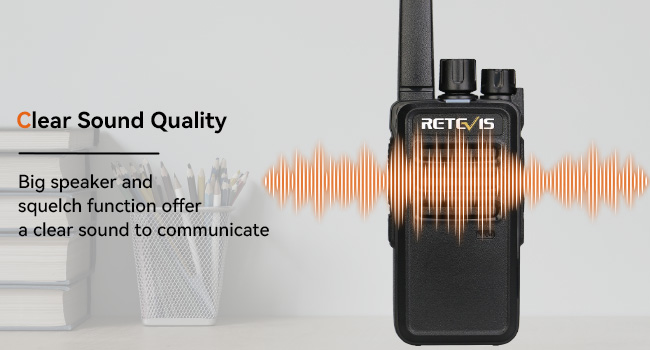
- Clear Sound Quality: Equipped with a built-in big speaker and 9-level squelch function to reduce noise, ensuring clear communication even in noisy environments.
- License-Free Operation: The RT68 operates on FRS frequencies, allowing for immediate use without complex settings or licensing requirements.
- Long Range Communication: Offers a talking range of up to 2 miles, suitable for various industrial and outdoor applications.
- CTCSS/DCS: Features 260 CTCSS/DCS codes for enhanced privacy and reduced interference.
- Battery Save Function: Optimizes battery usage for extended operation.

Video 2: Retevis RT68 Walkie Talkie High Audio Test. This video demonstrates the audio performance of the Retevis RT68, showcasing its clear sound quality during operation.
Video 3: Retevis RT68 Range Test. This video illustrates the effective communication range of the Retevis RT68 walkie talkie in various environments.
3. Maintenance
3.1 Battery Care
The 1200mAh Lithium Ion battery provides an average life of 30 hours. For optimal battery longevity, ensure regular charging using the provided 10-way multi-unit charger. The charger is equipped with overheating, overvoltage, and overcurrent protection measures.
3.2 Durability and Cleaning
The RT68 radios are constructed from solid ABS material, designed to withstand a 1-meter fall without damage. They are also water-resistant with an IP54 rating. To clean, wipe the radio with a soft, damp cloth. Avoid using harsh chemicals or abrasive materials.

4. Troubleshooting
If you encounter issues with your Retevis RT68 2-Way Radio, please refer to the following common solutions:
| Problem | Possible Cause | Solution |
|---|---|---|
| Radio does not power on | Low or depleted battery; incorrect battery installation | Charge the battery fully; ensure battery is correctly installed and secured. |
| Cannot transmit or receive | Incorrect channel selection; out of range; low battery | Verify both radios are on the same channel; move closer to the other radio; charge the battery. |
| Poor audio quality or static | Weak signal; interference; squelch level too low | Move to an area with fewer obstructions; adjust squelch level (9-level function); ensure antenna is clear. |
| Charger indicators not working | Power supply issue; radio/battery not properly seated | Check power connection to the charger; re-seat the radio or battery firmly in the slot. |
5. Specifications
Below are the detailed specifications for the Retevis RT68 2-Way Radio:
| Feature | Detail |
|---|---|
| Brand | Retevis |
| Model Number | RT68 |
| Color | Black |
| Number of Channels | 16 |
| Frequency Range | FRS |
| Talking Range Maximum | 2 Miles |
| Voltage | 3.7 Volts |
| Water Resistance Level | IP54 (Water Resistant) |
| Product Dimensions (D x W x H) | 1.37"D x 1.96"W x 4.56"H |
| Battery Type | Lithium Ion (1200mAh) |
| Battery Average Life | 30 Hours |
| Audible Noise | 35 Decibels |
| Temperature Range | -20 to 50 Degrees Celsius |
| Special Features | 500 mW speaker, Safer & Faster Charging, Weight/Performance/Durability Balanced |

6. Warranty & Support
6.1 Warranty Information
Retevis provides a 3-year warranty for the radio body and a 1-year warranty for accessories. Additionally, a 30-day no-reason return policy is offered.
6.2 Post-Warranty Service
Beyond the warranty period, Retevis continues to offer maintenance services. Buyers are responsible for any corresponding costs.
6.3 Customer Support
For any inquiries or support needs, please contact Retevis customer service on Amazon. Responses are typically provided within 12 hours.


