
1. Introduction
Welcome to the world of intelligent lawn care with the NOVABOT N2000 Robotic Lawn Mower. This manual provides essential information for the safe and efficient operation, setup, and maintenance of your new robotic mower. Please read this manual thoroughly before using the product to ensure optimal performance and longevity.
The NOVABOT N2000 is designed to provide hassle-free lawn maintenance, featuring advanced RTK GPS, TOF sensors, and 360° vision cameras for centimeter-level precision. Its wireless perimeter technology and intuitive app control simplify lawn management, offering intelligent obstacle avoidance and customizable multi-zone management.
2. Product Overview
2.1 Key Features
- Revolutionary Precision and Autonomous Intelligence: Combines RTK-GPS with advanced vision enhancement, utilizing 360° front cameras for precise, centimeter-level lawn care.
- No Perimeter Wires & Effortless Perimeter Mapping: Eliminates the need for physical boundary wires. Virtual boundaries are created easily via the app, with the mower precisely identifying and mapping the lawn area.
- Easy App Control & Multi-Zone Management: Schedule, control remotely, monitor real-time status, and receive progress updates via a user-friendly application. Offers precise control over mowing times, directions, heights, and speeds for customized preferences across multiple zones.
- Intelligent Obstacle Avoidance: Utilizes a high-definition camera and TOF sensor for precise obstacle avoidance and smart navigation, ensuring safe and efficient mowing around fences, walls, pets, trees, and vehicles.
- Excellent Performance: Powerful drive system adapts to all terrain types. Features a cutting height range of 2 to 8.9 cm (0.8 to 3.5 inches) and a cutting width of 21.8 cm (8.6 inches). Automatically returns to the charging station when the battery is low and resumes mowing from where it left off once charged. Operates quietly below 67 dB.
- Durable and Safe: IPX5 waterproof body and IPX4 charging pile for strong weather resistance, easy cleaning, and maintenance. TÜV certified for high quality, safety, and durability. Includes an alarm for abnormal movement and an automatic lock, unlockable via PIN code. Features a "Guard Dog" mode for patrolling your yard.
2.2 Product Components
The NOVABOT N2000 Robotic Lawn Mower comes with the main unit, a charging station, and a power adapter. Ensure all components are present upon unboxing.

Figure 2.1: The NOVABOT N2000 Robotic Lawn Mower, showcasing its sleek design and integrated sensors.
3. Setup
3.1 Charging Station Placement
Place the charging station on a flat, level surface in an area with good GPS signal reception, preferably near an outdoor power outlet. Ensure there is clear space around the station for the mower to dock easily.
3.2 Initial Charging
Connect the charging station to power. Place the NOVABOT N2000 onto the charging station. The mower will begin charging automatically. Allow the mower to fully charge before proceeding with mapping.
3.3 App Installation and Connection
- Download the official NOVABOT app from your device's app store.
- Follow the in-app instructions to create an account and pair your NOVABOT N2000. Ensure your device's Bluetooth is enabled during the pairing process.
3.4 Virtual Boundary Mapping
The NOVABOT N2000 uses RTK GPS, TOF sensors, and vision for precise navigation without physical wires. Use the app to define your lawn's virtual boundaries:
- In the app, select the mapping function.
- Guide the mower (or allow it to autonomously map) along the perimeter of your lawn. The mower will precisely identify and record the boundaries.
- Define any "no-go" zones (e.g., flower beds, ponds) within the app to prevent the mower from entering these areas.
- You can also define multiple mowing zones for customized management.

Figure 3.1: The NOVABOT N2000 utilizing RTK, TOF, and Vision for precise navigation without perimeter wires.
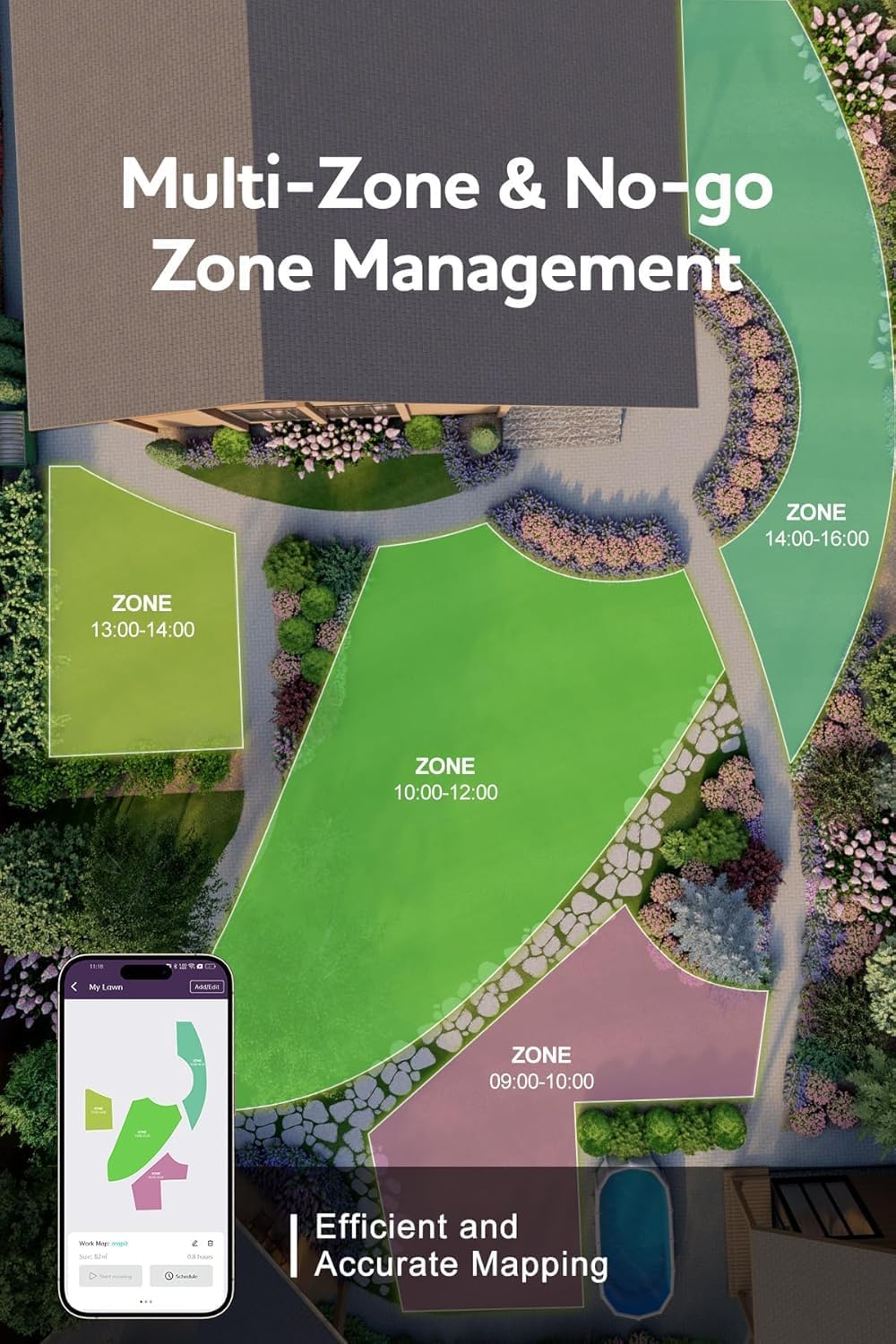
Figure 3.2: App interface showing multi-zone and no-go zone management for efficient and accurate mapping.
4. Operating the Mower
4.1 Starting a Mowing Session
Once mapping is complete, you can initiate a mowing session via the app. You can choose to mow the entire defined area or specific zones.
- Open the NOVABOT app.
- Select the desired mowing zone(s) or the entire lawn.
- Tap "Start Mowing" to begin.
4.2 Scheduling Mowing Times
The app allows you to set up a regular mowing schedule. This ensures your lawn is maintained automatically without daily intervention.
- Navigate to the "Schedule" section in the app.
- Set preferred days and times for mowing.
- Customize settings such as cutting height and mowing pattern for each scheduled session or zone.
4.3 Obstacle Avoidance
The NOVABOT N2000 is equipped with advanced sensors and cameras to detect and avoid obstacles. It will intelligently navigate around objects like garden furniture, trees, and even pets.
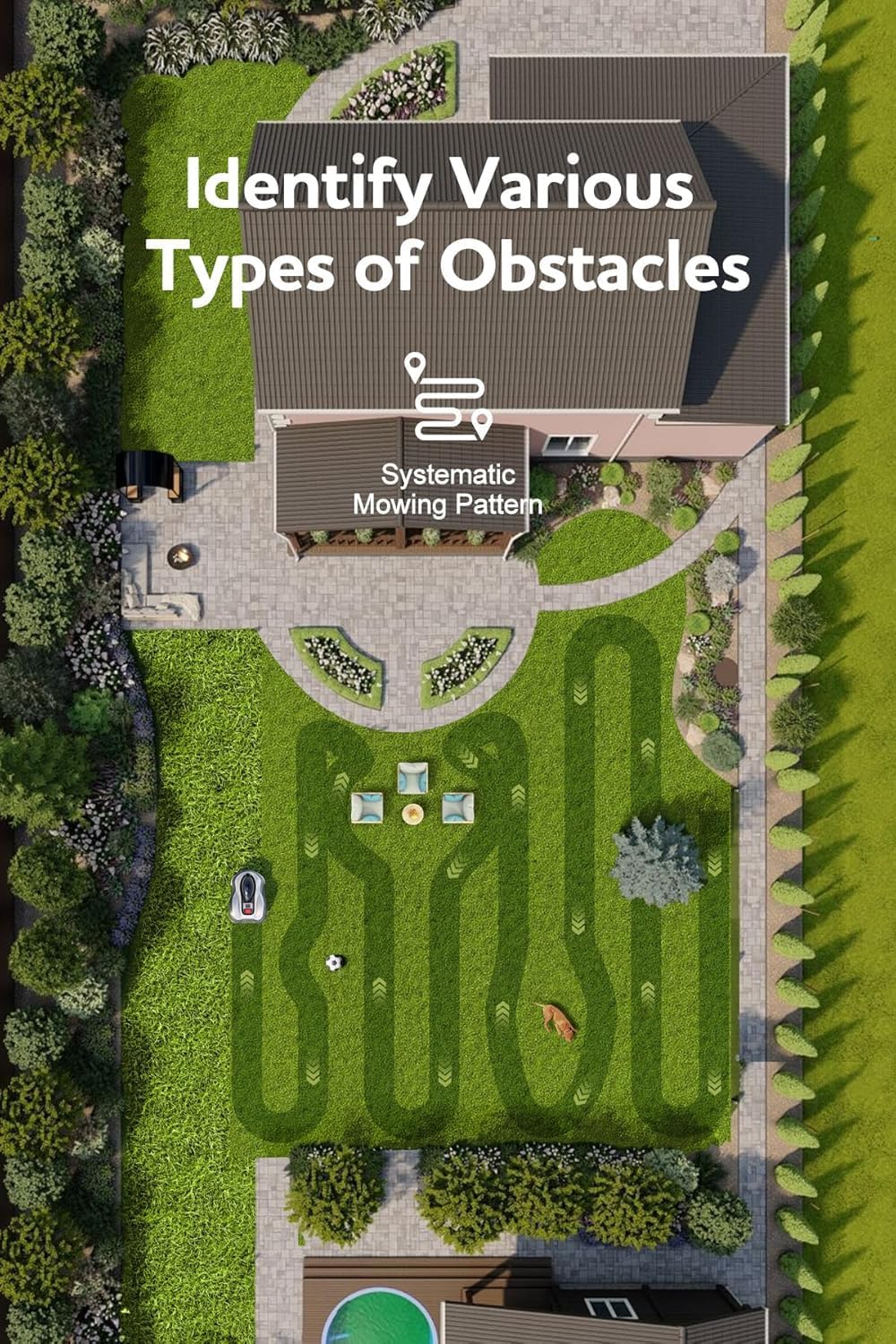
Figure 4.1: The NOVABOT N2000 demonstrating its ability to identify and navigate around various obstacles with a systematic mowing pattern.
4.4 Battery Management
The mower automatically returns to its charging station when the battery is low. Once fully charged, it will resume mowing from where it left off, ensuring complete lawn coverage.

Figure 4.2: A user controlling the NOVABOT N2000 via the easy-to-use mobile application.
5. Maintenance
5.1 Cleaning
Regular cleaning ensures optimal performance and extends the life of your mower. The NOVABOT N2000 has an IPX5 waterproof body, making it easy to clean.
- Turn off the mower and disconnect it from the charging station before cleaning.
- Use a soft brush or cloth to remove grass clippings and dirt from the chassis, wheels, and cutting deck.
- You may use a gentle stream of water to rinse the underside of the mower, but avoid directing high-pressure water directly at electronic components.
- Ensure the mower is completely dry before returning it to the charging station or resuming operation.
5.2 Blade Inspection and Replacement
Inspect the cutting blades regularly for wear and damage. Dull or damaged blades can affect cutting quality and increase energy consumption. Replace blades as needed, following the instructions provided in the full product manual (not included here).
5.3 Charging Pile Maintenance
The charging pile has an IPX4 rating. Keep the charging contacts clean and free of debris to ensure reliable charging.
6. Troubleshooting
This section addresses common issues you might encounter with your NOVABOT N2000.
| Problem | Possible Cause | Solution |
|---|---|---|
| Mower does not connect to app (Bluetooth issue) | Faulty Bluetooth module; app or mower software glitch. |
|
| Mower not mowing entire area or getting stuck | Incomplete mapping; obstacles not avoided; poor GPS signal. |
|
| Mower not charging | Charging contacts are dirty; charging station not powered. |
|
| Abnormal movement alarm / Mower locked | Mower detected unusual movement (e.g., lifted, tilted); security feature activated. |
|
For more detailed troubleshooting or issues not listed here, please refer to the comprehensive online support resources or contact NOVABOT customer service.
7. Specifications
Below are the technical specifications for the NOVABOT N2000 Robotic Lawn Mower.
| Feature | Detail |
|---|---|
| Model | N2000 (Automatic) |
| Dimensions (L x W x H) | 65.68 x 31.8 x 46.69 cm (25.86 x 12.52 x 18.38 inches) |
| Weight | 14.97 kg (33 lbs) |
| Power Source | Battery Powered (1 non-standard battery included) |
| Material | Plastic |
| Color | Grey |
| Mowing Area Capacity | Up to 1.5 acres (6000 m²) |
| Max Slope | Up to 45% |
| Cutting Height | 2 to 8.9 cm (0.8 to 3.5 inches) |
| Cutting Width | 21.8 cm (8.6 inches) |
| Noise Level | Below 67 dB |
| Waterproof Rating (Mower) | IPX5 |
| Waterproof Rating (Charging Pile) | IPX4 |
| Navigation Technology | RTK GPS, TOF Sensors, 360° Vision Cameras |
| Control Method | App Control, Automatic Operation |
| UPC | 744585277180 |

Figure 7.1: Overview of NOVABOT N2000's capabilities, including 45% slope handling, 1.5 acres mowing area, adjustable cut height, excellent anti-theft, and watchdog mode.
8. Warranty and Support
Information regarding specific warranty terms was not available at the time of this manual's creation. Please refer to the product packaging or the official NOVABOT website for the most up-to-date warranty details.
For technical support, service, or any questions regarding your NOVABOT N2000 Robotic Lawn Mower, please contact NOVABOT customer support. Contact information can typically be found on the manufacturer's website or within the product packaging.
When contacting support, please have your product model number (N2000) and any relevant purchase information ready.


