1. Introduction
This manual provides essential information for the installation, operation, and maintenance of your NULKOMMA S830 Electric Bike LCD Display Control Panel. Please read this manual thoroughly before using the product to ensure proper function and safety. The S830 display is designed for electric bicycles, providing speed, battery, and other vital ride data, and features a waterproof connector for durability.
2. Safety Information
- Always ensure the display is securely mounted to your bicycle handlebars before riding.
- Do not attempt to open or modify the display unit. This may void the warranty and cause damage.
- Keep the display clean and free from excessive dirt or moisture. Although waterproof, prolonged submersion is not recommended.
- Disconnect power before performing any maintenance or installation procedures.
- Operate your e-bike responsibly and adhere to all local traffic laws and regulations.
3. Product Overview
The NULKOMMA S830 LCD Display is a key component for your electric bike conversion kit, offering a clear interface for monitoring your ride. It includes a control panel with buttons for easy interaction and a USB port for charging external devices.
Key Features:
- Display Type: LCD
- Applicable Voltage: 36V
- Waterproof Connector: 6-pin male connector
- Functions: USB power, speed display, battery level, and other ride data.
- Interface: Integrated buttons for control.
Components:
- S830 LCD Display Unit
- Integrated Control Buttons
- Mounting Bracket
- 6-Pin Male Waterproof Connector Cable
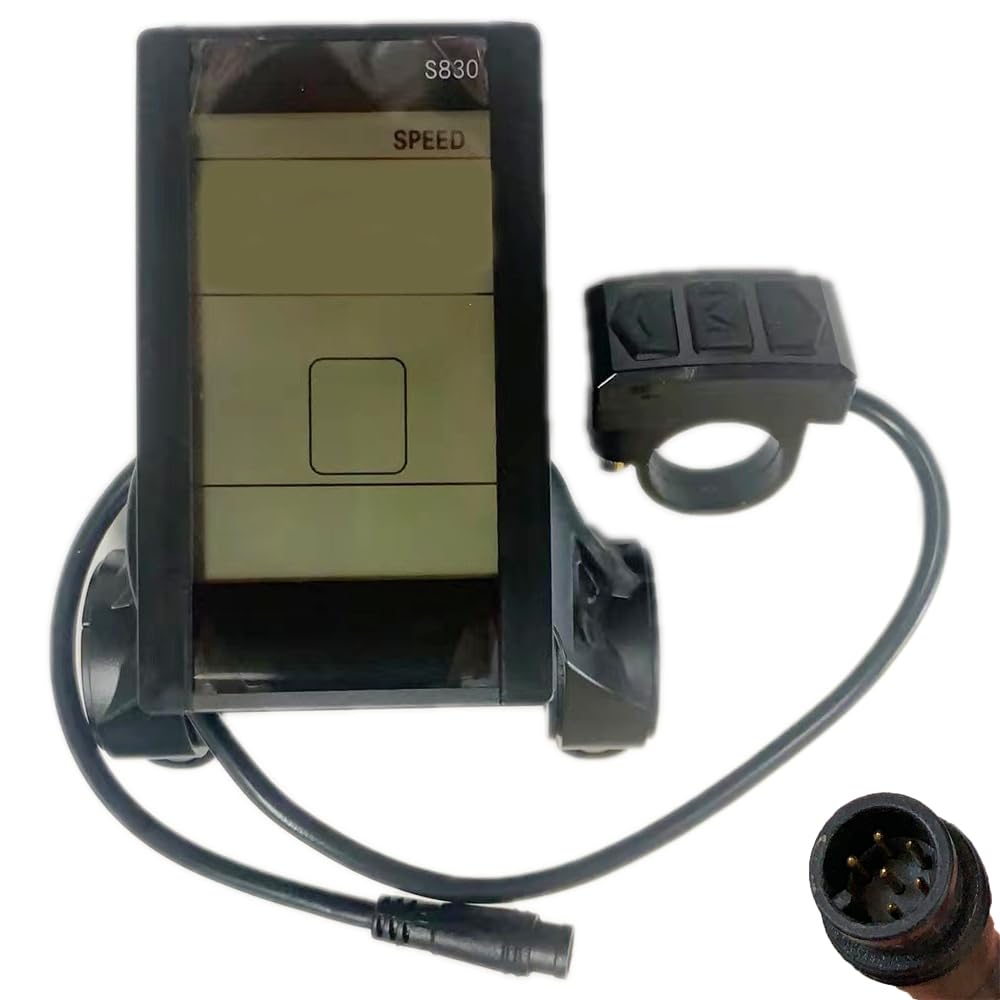
Image 3.1: NULKOMMA S830 LCD Display with approximate dimensions (9cm height, 5cm width).

Image 3.2: Front view of the S830 LCD Display showing the 6-pin male waterproof connector.

Image 3.3: Close-up of the S830 control buttons: Up arrow, 'M' (Mode), and Down arrow.

Image 3.4: View of the S830 LCD Display highlighting the integrated USB charging port.
4. Setup and Installation
Follow these steps to properly install your NULKOMMA S830 LCD Display on your electric bike.
- Mounting the Display: Attach the S830 display unit to your bicycle handlebars using the provided mounting bracket. Ensure it is positioned for optimal visibility and accessibility while riding. Tighten the screws securely, but do not overtighten.
- Connecting the Cables: Locate the 6-pin male waterproof connector on the S830 display cable. Connect this to the corresponding female connector on your e-bike's wiring harness. Ensure the connection is firm and secure to prevent water ingress and ensure reliable operation.
- Cable Management: Route all cables safely along the bicycle frame, securing them with cable ties to prevent them from interfering with moving parts or becoming snagged.
- Initial Power-Up: After installation, power on your e-bike system. The S830 display should illuminate and show initial data.

Image 4.1: The S830 LCD Display mounted on an e-bike handlebar.

Image 4.2: Rear view of the S830 display showing cable routing and the 6-pin connector.
5. Operating Instructions
The S830 display provides essential information and control for your e-bike. Specific functions may vary slightly depending on your e-bike's controller and firmware.
Basic Operation:
- Power On/Off: Typically, press and hold the 'M' (Mode) button for a few seconds to power the display on or off.
- Changing Assist Levels: Use the Up (▲) and Down (▼) arrow buttons to adjust the pedal assist level (PAS). Higher numbers usually indicate more motor assistance.
- Cycling Through Information: Short press the 'M' button to cycle through different display modes, such as Odometer (ODO), Trip Distance (TRIP), Current Speed (CUR), Average Speed, Max Speed, and Battery Voltage.
- Headlight Control: Some systems allow turning the headlight on/off by pressing and holding the Up arrow button.
- Walk Mode: Some systems activate walk mode (low-speed assistance for pushing the bike) by pressing and holding the Down arrow button.
USB Charging Port:
The integrated USB port can be used to charge small electronic devices like smartphones or GPS units. Connect your device using a compatible USB cable. Note that using the USB port will draw power from your e-bike's battery.
6. Maintenance
Proper maintenance ensures the longevity and reliability of your S830 display.
- Cleaning: Wipe the display screen and casing with a soft, damp cloth. Do not use abrasive cleaners, solvents, or excessive water.
- Inspecting Connections: Periodically check all cable connections, especially the 6-pin waterproof connector, to ensure they are secure and free from corrosion or damage.
- Storage: If storing your e-bike for an extended period, ensure the display is clean and dry. Store in a cool, dry place.
- Avoid Impact: Protect the display from physical impact, which can damage the screen or internal components.
7. Troubleshooting
If you encounter issues with your S830 display, refer to the following common troubleshooting steps:
| Problem | Possible Cause | Solution |
|---|---|---|
| Display does not power on. | Loose connection, low battery, faulty display. | Check all cable connections, especially the 6-pin connector. Ensure the e-bike battery is charged. If the problem persists, contact support. |
| Incorrect speed reading. | Speed sensor issue, incorrect wheel size setting. | Check the speed sensor and its magnet for proper alignment. Consult your e-bike controller manual for wheel size calibration. |
| Buttons are unresponsive. | Dirt/debris, internal fault. | Clean around the buttons. If still unresponsive, contact support. |
| USB charging not working. | Cable issue, device incompatibility, low e-bike battery. | Try a different USB cable and device. Ensure the e-bike battery has sufficient charge. |
If these steps do not resolve the issue, please contact NULKOMMA customer support for further assistance.
8. Specifications
| Feature | Specification |
|---|---|
| Model Name | S830 |
| Brand | NULKOMMA |
| Display Type | LCD |
| Applicable Voltage | 36V |
| Waterproof Connector | 6-pin Male |
| Sensor Type | Speed Sensor (integrated/compatible) |
| Human Interface Input | Buttons |
| Material | Plastic |
| Item Weight | 140 Grams |
| Color | Black |
| Included Components | LCD Display |
9. Warranty Information
The NULKOMMA S830 Electric Bike LCD Display Control Panel comes with a 1-year warranty from the date of purchase. This warranty covers manufacturing defects and malfunctions under normal use. It does not cover damage caused by misuse, accidents, unauthorized modifications, or improper installation.
Please retain your proof of purchase for warranty claims.
10. Support
For technical assistance, warranty claims, or any questions regarding your NULKOMMA S830 LCD Display, please contact NULKOMMA customer support through the retailer where you purchased the product or visit the official NULKOMMA brand store online.
NULKOMMA Brand Store: https://www.amazon.com/stores/NULKOMMA/page/4F62B541-AE1E-45AA-AA81-301190F2EFC4


