
1. Product Overview
The Shadowhawk S1670 is a high-power rechargeable LED torch light designed for various outdoor and emergency situations. It features an advanced XHM77.2 LED chip, multiple lighting modes, and a robust, waterproof construction.

Image: The Shadowhawk S1670 torch light, showcasing its sleek design and powerful beam.
Video: A brief overview of the Shadowhawk S1670 Torch Light's features and capabilities.
2. What's in the Box
Your Shadowhawk S1670 Torch Light package includes the following items:
- 1x Shadowhawk Flash Light with Rechargeable Battery
- 1x Charging Torch Light Holster
- 1x USB-C Cable
- 1x AAA Battery Holder and White Battery Tube
- 1x Instruction Manual

Image: All components included in the Shadowhawk S1670 Torch Light kit.
3. Setup
3.1 Battery Installation
The Shadowhawk S1670 torch light operates with a rechargeable lithium-ion battery (included) or 3 AAA batteries (using the provided holder).
- Unscrew the tail cap of the torch light.
- If using the rechargeable battery, ensure to tear off the transparent plastic film on the battery before use. Insert the rechargeable battery with the positive (+) pole facing towards the head of the torch.
- Alternatively, insert 3 AAA batteries into the AAA battery holder, ensuring correct polarity. Then insert the holder into the torch with the positive (+) end facing the head.
- Screw the tail cap back on securely.

Image: Visual guide for inserting the battery correctly into the torch light.
4. Operating Instructions
4.1 Power On/Off
- Press the power button once to turn the torch light on.
- Long press the power button for 3 seconds in any mode to switch off the torch light.
4.2 Lighting Modes
The Shadowhawk S1670 features 7 lighting modes, divided into main light and COB side light functions:
- Main Light Modes (3 modes): High, Medium, Strobe. Cycle through these modes with single presses of the power button.
- COB Side Light Modes (4 modes): High, Medium, Red Light, Red Strobe. To switch to COB mode from off or main lighting mode, press the button twice quickly. Cycle through COB modes with single presses.

Image: Visual representation of the 7 main and COB lighting modes.
4.3 Telescopic Function (Adjustable Focus)
The torch light offers an adjustable focus feature, allowing you to switch between a wide floodlight and a focused spotlight:
- To activate the floodlight, pull the head of the torch backward. This provides a broad beam, ideal for illuminating large areas up to 2160 square feet.
- To activate the spotlight, push the head of the torch forward. This concentrates the beam for long-distance illumination, reaching up to 0.5 miles.

Image: Illustration of the telescopic function to switch between floodlight and spotlight modes.
4.4 USB Charging and Power Bank Function
The Shadowhawk S1670 is equipped with a USB-C input for charging and a USB output for use as a power bank:
- Charging the Torch: Connect the provided USB-C cable to the torch's input port and a power source. The power indicator lights will show the charging progress (25%, 50%, 75%, 100%).
- Power Bank Function: Connect your device to the torch's USB output port using a compatible cable. The torch can provide emergency power to charge your mobile devices.
- Power Indicator: The built-in power indicator monitors the remaining battery level in real-time, preventing unexpected power depletion.
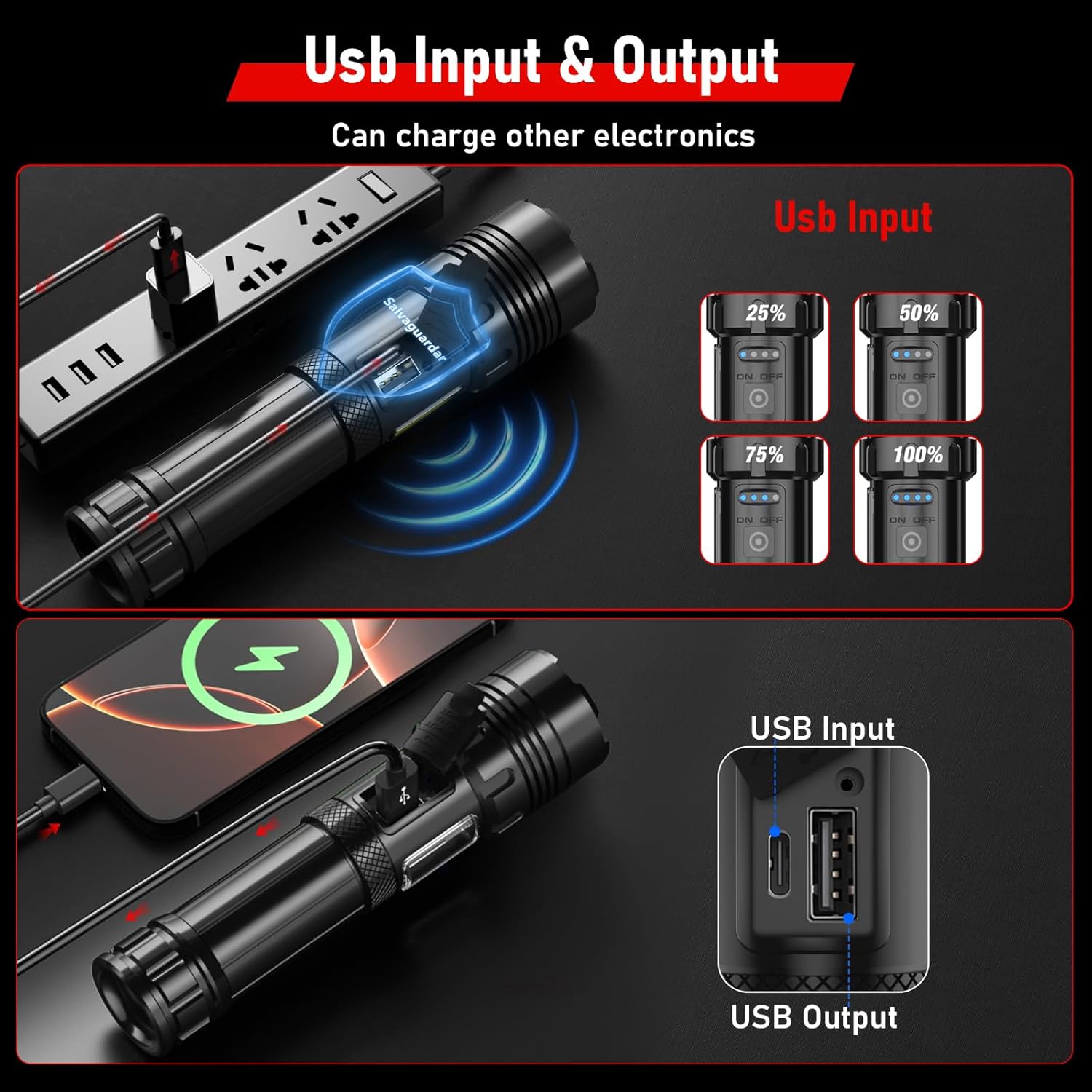
Image: Demonstrates the USB input for charging the torch and USB output for using it as a power bank.
5. Maintenance
To ensure the longevity and optimal performance of your Shadowhawk S1670 Torch Light, follow these maintenance guidelines:
- Cleaning: Wipe the torch with a soft, damp cloth. Avoid using abrasive cleaners or solvents.
- Waterproof Design: The torch has an IP67 waterproof rating, meaning it is protected against dust and can withstand immersion in water up to 1 meter for 30 minutes. Ensure the USB port cover is securely closed to maintain water resistance.
- Durability: Constructed from aircraft-grade alloy with an anodized anti-abrasive coating, the torch is designed for extreme impact resistance.
- Battery Care: Store the torch and battery in a cool, dry place when not in use. If storing for extended periods, charge the battery periodically to maintain its health.

Image: The torch light submerged in water, highlighting its IP67 waterproof capability.
6. Troubleshooting
If you encounter any issues with your Shadowhawk S1670 Torch Light, please consider the following general advice:
- Torch not turning on: Ensure the battery is correctly installed with the transparent film removed, and that it is sufficiently charged. Check if the AAA batteries (if used) are new and correctly oriented.
- Dim light output: The battery may be low. Recharge the battery fully.
- Charging issues: Ensure the USB-C cable is properly connected to both the torch and the power source. Try a different USB-C cable or power adapter.
For persistent problems or further assistance, please contact our customer support team.
7. Specifications
| Feature | Detail |
|---|---|
| Model Number | 0717GRT-S1670 |
| Light Source Type | LED (XHM77.2 chip) |
| White Brightness | 10000 Lumens |
| Light Path Distance | 0.5 Miles |
| Lighting Modes | 7 Modes (3 Main, 4 COB Side Light) |
| Power Source | Battery Powered (Lithium Ion) |
| Runtime | Up to 12 hours (on low setting) |
| Water Resistance Level | IP67 Waterproof |
| Material | Aircraft-grade Metal Alloy |
| Item Weight | 473 Grams |
| Item Dimensions (L x W x H) | 49L x 49W x 180H Millimeters |
8. Warranty and Support
The Shadowhawk S1670 Torch Light comes with a Lifetime Warranty, reflecting our commitment to quality and durability.
For any product inquiries, technical support, or warranty claims, please contact our customer support team:
- Email: support@shadowhawk.top
- Phone: +91 9818598163 (Deepali)
We are dedicated to providing the best solution and ensuring your satisfaction with Shadowhawk products.


