
1. Introduction
Thank you for choosing the Yamnweo XF12 12-Channel Professional Audio Mixer. This versatile console is designed to meet various audio needs, including home music production, live performances, and karaoke. This manual provides essential information for setting up, operating, and maintaining your mixer to ensure optimal performance and longevity.
The XF12 features USB/Bluetooth connectivity, a 99 DSP effect processor, 7-band equalizer control, and individual channel mute and grouping functions, offering precise control over your audio.
2. Safety Information
- Read all instructions carefully before operating the device.
- Keep this manual for future reference.
- Do not expose the mixer to rain or moisture to prevent fire or electric shock.
- Do not block ventilation openings. Install in accordance with the manufacturer's instructions.
- Use only attachments/accessories specified by the manufacturer.
- Unplug the mixer during lightning storms or when unused for long periods.
- Refer all servicing to qualified service personnel.
3. Package Contents
Please check that all items are present in the package:
- Yamnweo XF12 12-Channel Professional Audio Mixer
- Power Adapter
- User Manual
4. Product Overview and Features
The Yamnweo XF12 mixer is equipped with a comprehensive set of features for professional audio mixing. Below is an overview of its main components and capabilities.
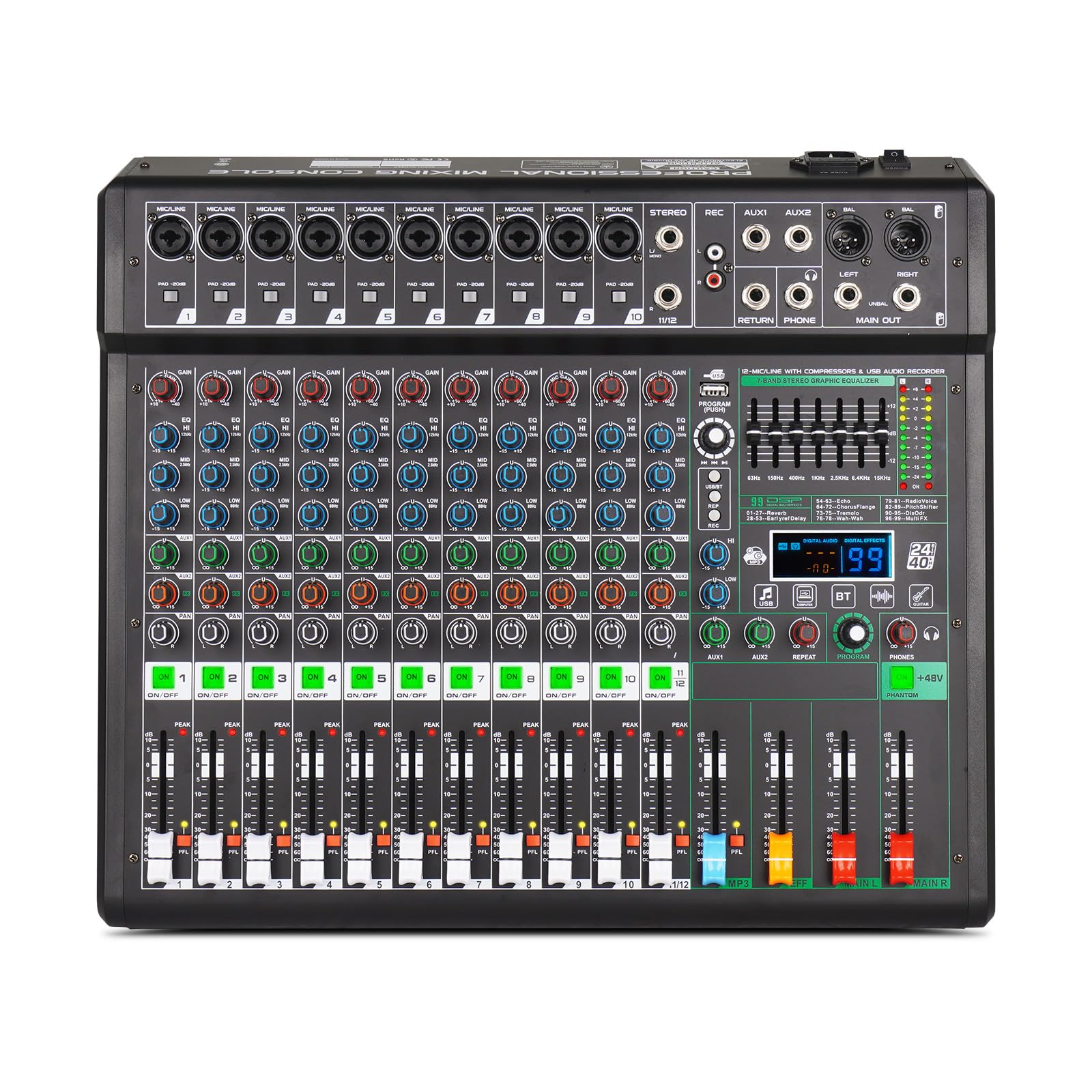
Figure 4.1: Front view of the Yamnweo XF12 12-Channel Professional Audio Mixer, showing all controls and inputs.
4.1 Key Features
- 12-Channel Input: Supports multiple microphones and instruments.
- USB/Bluetooth Functionality: Stream music wirelessly from devices or connect via USB for playback and recording.
- 99 DSP Effect Processor: Built-in digital effects for various scenarios, including Reverb, Echo, Chorus, Flange, Tremolo, Wah-Wah, RadioVoice, PitchShifter, DisOdr, and Multi FX.
- 7-Band Equalizer Control: Precise adjustment of overall sound quality.
- Mute and Group Settings: Individual mute buttons for each channel and custom grouping for flexible mixing.
- 48V Phantom Power: Essential for condenser microphones.
- HD Display: Shows working status and effect numbers.

Figure 4.2: Diagram illustrating the key features of the XF12 mixer, including microphone amplifier, U disk/OTG recording, mute switch, HD display, 48V power supply, wireless connection, and built-in reverberation effect.
4.2 Connectivity
The mixer offers broad compatibility with various audio devices.

Figure 4.3: The XF12 mixer demonstrating connectivity with multiple devices such as wireless microphones, wired microphones, power amplifiers, speakers, guitars, and computers.
5. Setup
5.1 Power Connection
- Ensure the mixer's power switch is in the OFF position.
- Connect the provided power adapter to the mixer's power input.
- Plug the power adapter into a suitable electrical outlet.
5.2 Input Connections
- Microphones: Connect XLR or 1/4-inch TRS cables from your microphones to the MIC/LINE input jacks. For condenser microphones, activate 48V Phantom Power (see Section 6.5).
- Instruments: Connect instruments (e.g., guitar, keyboard) to the LINE input jacks using 1/4-inch TRS cables.
- USB Devices: Insert a USB flash drive into the USB port for playback or recording. Connect a computer via USB for audio interface functionality.
5.3 Output Connections
- Main Output: Connect the MAIN OUT (RCA or XLR) to your power amplifier or active speakers.
- Headphones: Plug your headphones into the PHONES jack for monitoring.
6. Operating Instructions
6.1 Powering On/Off
- Turn on any connected audio sources (microphones, instruments).
- Turn on the mixer using the power switch.
- Finally, turn on your power amplifier or active speakers.
- To power off, reverse the sequence: speakers off, then mixer off, then audio sources off.
6.2 Input Channel Controls
- GAIN: Adjusts the input sensitivity for each channel. Set it so the PEAK LED flashes only occasionally.
- EQ (High, Mid, Low): Adjusts the treble, midrange, and bass frequencies for each channel.
- AUX: Controls the level of the channel signal sent to the AUX output (e.g., for monitor mixes or external effects).
- PAN: Positions the channel signal in the stereo field (left to right).
- LEVEL FADER: Controls the overall volume of the channel in the main mix.
6.3 USB/Bluetooth Functionality
The XF12 supports three playback modes for USB and Bluetooth audio.

Figure 6.1: The three playback modes available for USB/Bluetooth audio: Single Cycle, Loop Play, and Random Play.
- USB Playback: Insert a USB flash drive. Use the control buttons (Play/Pause, Next/Previous, Mode) to navigate and play audio files.
- Bluetooth Pairing: Activate Bluetooth on your smartphone or tablet. Select 'XF12' from the available devices to pair. Once connected, you can stream audio wirelessly.
- Recording to USB: The mixer allows direct recording to a USB memory stick. Refer to the display for recording status.
6.4 DSP Effects Processor
The mixer includes 99 digital signal processing (DSP) effects to enhance your sound.
- Use the 'PROGRAM' knob to select an effect number (1-99) displayed on the HD screen.
- Press the 'PROGRAM' knob to confirm the selection.
- Adjust the 'EFFECT SEND' control on each channel to send the desired amount of signal to the effects processor.
- Adjust the 'EFFECT RETURN' control in the master section to control the overall level of the applied effect.
6.5 48V Phantom Power
To use condenser microphones, activate the 48V phantom power.
- Ensure all channel faders are down before activating phantom power to prevent loud pops.
- Press the '48V PHANTOM' button. An indicator light will illuminate.
- Only use phantom power with microphones that require it. Dynamic microphones typically do not need it.
6.6 Mute and Group Settings
Each input channel features an independent mute switch for quick audio control.

Figure 6.2: Each input channel is equipped with an independent mute switch and an LED light display, allowing visibility of the working status even in low light conditions.
- Mute Button: Press the 'ON/OFF' button below each channel fader to mute or unmute that specific channel. An LED indicator shows the mute status.
- Grouping: The mixer allows for custom grouping of channels. Refer to the specific grouping controls on your unit to assign channels to groups. Grouped channels can be adjusted and muted collectively.
7. Maintenance
7.1 Cleaning
- Always disconnect the power before cleaning.
- Use a soft, dry cloth to wipe the exterior of the mixer.
- Do not use liquid cleaners, aerosols, or solvents, as they may damage the finish or internal components.
- Use a soft brush or compressed air to remove dust from faders and knobs.
7.2 Storage
- Store the mixer in a cool, dry place away from direct sunlight and extreme temperatures.
- If storing for an extended period, cover the unit to protect it from dust.
8. Troubleshooting
If you encounter issues with your Yamnweo XF12 mixer, refer to the following common problems and solutions:
| Problem | Possible Cause | Solution |
|---|---|---|
| No sound output | Power not connected; Master volume down; Channel fader down; Mute engaged; Cables faulty. | Check power connection; Increase master volume; Raise channel fader; Disengage mute; Check and replace cables. |
| Distorted sound | Input gain too high; Output level too high; Faulty cable/microphone. | Reduce input GAIN; Lower master or channel volume; Test with different cables/microphones. |
| Bluetooth not connecting | Mixer not in pairing mode; Device too far; Interference. | Ensure mixer is in Bluetooth mode; Bring device closer; Reduce interference from other wireless devices. |
| Phantom power not working | 48V button not pressed; Faulty microphone or cable. | Press the 48V PHANTOM button; Test with a known working condenser microphone and XLR cable. |
If the problem persists after trying these solutions, please contact Yamnweo customer support.
9. Specifications
| Feature | Specification |
|---|---|
| Brand | Yamnweo |
| Model Number | XF12 |
| Number of Channels | 12 |
| Product Dimensions (D x W x H) | 40D x 46.1W x 7H Centimeters |
| Connectivity Technology | Bluetooth, USB |
| Power Source | Corded Electric |
| Output Connector Type | RCA |
| Audio Input | Auxiliary, XLR, USB |
| Voltage | 110 Volts |
| UPC | 770701086008 |
| ASIN | B0D9LXGV6N |
10. Warranty and Support
For warranty information or technical support, please contact Yamnweo customer service through the retailer where the product was purchased or visit the official Yamnweo website. Please have your model number (XF12) and purchase details ready when contacting support.