
Popglory S136
Popglory Smartwatch GPS User Manual
Model: S136
1. Introduction
Thank you for choosing the Popglory Smartwatch GPS. This manual provides essential information for setting up, operating, and maintaining your new smartwatch. Please read this manual thoroughly before using the device to ensure proper function and safety. The Popglory Smartwatch is designed to be a comprehensive health and fitness companion, offering features such as smartphone connectivity, health tracking, and multiple sports modes.

Image: The Popglory Smartwatch GPS S136, featuring a black strap and a watch face with a detailed gear design and digital time display.
2. Safety Information
- Do not expose the device to extreme temperatures or direct sunlight for prolonged periods.
- Keep the device away from strong magnetic fields.
- Do not attempt to disassemble or repair the device yourself. Refer to qualified service personnel.
- This product is IP68 water-resistant, suitable for daily use like hand washing or rain. It is not suitable for sauna, hot water, showering, diving, or swimming.
- Consult a medical professional before starting any new exercise regimen or if you have pre-existing health conditions. The health monitoring data is for reference only and should not be used for medical diagnosis.
- Keep out of reach of children.
3. Package Contents
Please check the package contents upon unboxing:
- Popglory Smartwatch GPS (S136)
- Charging Cable
- User Manual
4. Setup Guide
4.1 Charging the Smartwatch
Before first use, fully charge your smartwatch. Connect the magnetic charging cable to the charging points on the back of the watch and plug the USB end into a standard USB power adapter (5V/1A recommended).
- Charging Time: Approximately 2 hours for a full charge.
- Battery Life: Up to 7 days of average usage, 15 days standby time.

Image: Visual representation of the Popglory Smartwatch's battery life, showing 2 hours charging time, 7 days average usage, 15 days standby time, and a 280 mAh battery capacity.
4.2 Downloading the Companion App
To unlock the full functionality of your smartwatch, download the companion app (e.g., "Da Fit" or similar, as indicated in the product packaging or quick start guide) from your smartphone's app store (Google Play Store for Android or Apple App Store for iOS). You can usually find a QR code in the quick start guide to directly download the app.
4.3 Pairing with Your Smartphone
- Ensure Bluetooth is enabled on your smartphone.
- Open the companion app on your smartphone.
- Follow the in-app instructions to search for and connect to your Popglory Smartwatch (S136).
- Confirm the pairing request on both your smartphone and the smartwatch.
Once paired, the watch will synchronize time and data with your phone, and you can customize settings through the app.
5. Operating Instructions
5.1 Basic Navigation
- Touch Screen: Swipe left/right, up/down to navigate through menus and features. Tap to select.
- Side Buttons: The smartwatch features two functional buttons. The top-right button often acts as a power/back button and may also function as a rotary dial for scrolling through menus. The bottom-right button typically provides quick access to sports modes or other frequently used functions.
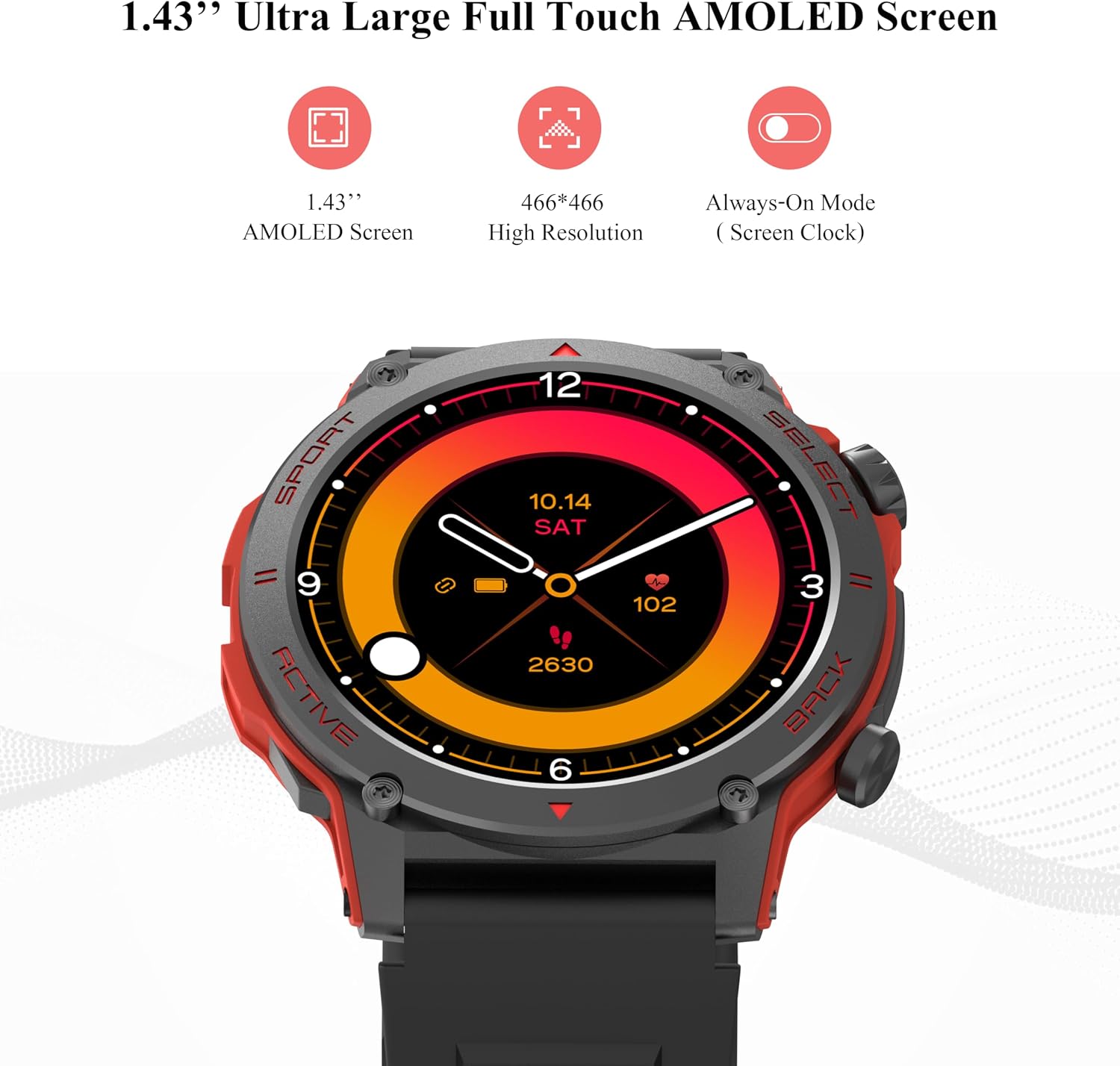
Image: The Popglory Smartwatch display highlighting its 1.43-inch AMOLED screen, 466x466 high resolution, and Always-On Mode (Screen Clock) capability.
5.2 Call Function and Message Notifications
Once paired with your smartphone, the smartwatch allows you to manage calls and receive notifications directly on your wrist.
- Answering/Rejecting Calls: When an incoming call is received, you can answer or reject it directly from the watch screen.
- Making Calls: Use the watch's dial pad or contact list (synced from your phone) to make calls.
- Message Notifications: Receive alerts for SMS, emails, and social media updates (e.g., LinkedIn, Line, Instagram, Facebook, Twitter, Pinterest, WhatsApp, Skype).

Image: Screenshots demonstrating the call function and message notification features on the Popglory Smartwatch, showing incoming call interface, dial pad, and message previews from various apps.
5.3 Health Monitoring
The smartwatch provides comprehensive health tracking features. Access these functions via the watch menu or the companion app.
- Heart Rate Monitor: Tracks your heart rate 24/7.
- Blood Pressure Monitor: Measures your blood pressure.
- Blood Oxygen (SpO2) Monitor: Detects blood oxygen saturation levels.
- Sleep Analysis: Monitors your sleep patterns, including awake, REM, light, and deep sleep stages.
- Stress Monitor: Helps track and manage your daily stress levels.
- Step Counter: Automatically counts your daily steps.

Image: Displays the Heart Rate Monitor, Blood Pressure Monitor, and Blood Oxygen Monitor interfaces on the smartwatch.

Image: Shows the sleep tracking graph (Awake, REM, Light, Deep) and the stress monitor interface on the smartwatch.
Note: Health data provided by the smartwatch is for reference purposes only and should not be used as a substitute for professional medical advice or diagnosis.
5.4 Sports Modes
The Popglory Smartwatch supports over 110 built-in sports modes to accurately track your activity data. Select the appropriate mode before starting your workout.
- Examples include outdoor running, gym workouts, yoga, basketball, and more.
- The watch records data such as duration, steps, calories burned, average heart rate, and distance.

Image: A collage showing various sports icons representing over 110 sports modes, along with detailed exercise record summaries for activities like running, basketball, and yoga.
5.5 Customizing Watch Faces
Personalize your smartwatch with over 100 watch faces available through the companion app. You can also create your own custom watch faces.

Image: Illustration of how to customize watch faces using the companion app, showing various pre-designed faces and options to create a custom one with personal photos.
5.6 Other Smart Features
- Voice Assistant
- Physiological Cycle Reminder
- Find Phone Function
- Stopwatch
- Weather Forecast
- Remote Camera Control
- Music Playback Control
6. Maintenance
- Cleaning: Wipe the watch and strap regularly with a soft, dry cloth. For stubborn dirt, use a slightly damp cloth and then dry thoroughly. Avoid using harsh chemicals or abrasive cleaners.
- Water Resistance (IP68): The watch is resistant to splashes, rain, and brief immersion in shallow water. Do not use it for swimming, diving, hot showers, or in saunas, as steam and hot water can damage the seals.
- Storage: Store the watch in a cool, dry place when not in use.
7. Troubleshooting
| Problem | Possible Solution |
|---|---|
| Watch does not turn on. | Ensure the watch is fully charged. Connect it to the charger for at least 10 minutes. |
| Cannot pair with smartphone. |
|
| Inaccurate health data. |
|
| Notifications not received. |
|
| Short battery life. |
|
8. Specifications
| Brand | Popglory |
| Model Number | S136 |
| Screen Size | 1.43 Inches |
| Display Type | AMOLED (466x466 resolution) |
| Connectivity | Bluetooth |
| Battery Capacity | 280 mAh Lithium-ion |
| Charging Time | Approx. 2 hours |
| Average Usage Time | Up to 7 days |
| Standby Time | Up to 15 days |
| Water Resistance Rating | IP68 |
| Memory Storage Capacity | 128 MB |
| Weight | 100 Grams |
| Color | Black - A |
9. Warranty and Support
Popglory products are designed and manufactured to the highest quality standards. For warranty information and customer support, please refer to the warranty card included in your product packaging or visit the official Popglory website. If you encounter any issues not covered in this manual, please contact customer service for assistance.
Please retain your proof of purchase for warranty claims.
Related documentsS136


Ask a question about this manual
Ask about setup, troubleshooting, compatibility, parts, safety, or missing instructions. Manuals+ will review the question and use this page’s manual context to help answer it.